Elastic Compute Service
Elastic Compute Service


Document

- Documentation
 Elastic Compute ServiceElastic Compute ServiceFAQImage FAQ
 Copy page
 Download PDF
FAQ
Image FAQ
Copy pageDownload PDFImage FAQ
General FAQ
Am I charged for using images on ECS instances?
You are charged for the following types of images only in specific regions. The actual prices on the purchase page prevail. You are not charged for using other images.
- Windows Server and Red Hat Enterprise Linux public images
- Custom images activated by using licenses officially provided by Volcano Engine
Can I install or update the operating system myself?
You can update the operating system by replacing it or using custom images.
Does the operating system have a graphical interface?
The Volcano Engine platform provides Windows operating systems in desktop management mode, while Linux images are in command-line mode. You can install a graphical interface as needed. For specific operations, refer to Installing graphical interface on Linux.
How do I change the image of an ECS instance?
warning
Replacing the image of an instance results in the loss of all data on the system volume of the original instance. Make sure that data on the system volume is backed up.
Why do I fail to mount the data volume after I change CentOS 8.3 to CentOS 6.9?
For an instance running the CentOS 8.3 operating system, if you format the data volume to the ext4 file system by using the mkfs.ext4 command and change the operating system to CentOS 6.9, you may fail to mount the data volume. This issue occurs because the low-version kernel of CentOS 6.9 doesn't support the high-version kernel features of CentOS 8.3. If you encounter such an issue, submit a ticket.
What are the memory limits for different versions of Windows operating systems?
For memory limits of Windows Server versions, refer to Memory limits for Windows and Windows Server versions. Select an appropriate instance type based on the memory limits of the Windows operating system.
Why cannot I use the preset password of a Windows image to log in to the instance?
You can use the preset password of a Windows image to log in to the instance only when the Windows image meets the following requirements:
- The Windows image is a custom image or shared image.
- The image has already been preconfigured with information, such as the login account and password.
- To log in to an instance created by using a Windows public image provided by VolcanoEngine before November 10, 2022, change the operating system or modify the Cloudbase-init configuration file of the image. You need to modify the Cloudbase-init configuration for the custom image or shared image created by using this instance. For more information, refer to Installing Cloudbase-init on virtual machine.
- For custom or shared images created by using non-VolcanoEngine Windows public images, you need to modify the Cloudbase-init configuration file of the images. For more information, refer to Installing Cloudbase-init on virtual machine.
- Custom or shared images created from non-platform Windows public images require modifications to the Cloudbase-init configuration files. .
How do I fix Linux kernel vulnerabilities?
The Volcano Engine platform provides periodic updates for Linux images to fix kernel vulnerabilities. For more information, refer to Image release notes.
warning
If you want to fix the vulnerabilities yourself, refer to the official website of the corresponding image for instructions. There are risks in fixing vulnerabilities yourself. Back up your data in advance.
How do I install upgrade patches?
The Volcano Engine platform provides periodic updates for Linux images to install upgrade patches. For more information, refer to Image release notes.
warning
If you want to install upgrade patches yourself, refer to the official website of the corresponding image for instructions. There are risks in installing upgrade patches yourself. Back up your data in advance.
How do I configure the NTP/Chrony clock synchronization service for an instance?
How do I safely upgrade the Python version in a Linux image?
Because many Linux system tools (such as yum, apt, cloud-init, systemd, and netplan) depend on the default Python version of the operating system, we recommend that you manually compile and install the new Python version when upgrading Python. Do not uninstall the old Python version or replace the /usr/bin/python and /usr/bin/python3 symlinks. Otherwise, the system may behave abnormally or fail to start. After the upgrade, refer to Using specified Python version to use the new version.
Why does the system encounter issues after I execute the yum update or yum remove command in a CentOS image?
- yum update command
- Cause:
- The yum update command is used to update the software packages installed on the system to the latest available version. Executing this command without restrictions may cause the instance to encounter issues such as dependency conflicts, system incompatibility, or performance degradation. For example, it may result in modification of the default software repository or uninstallation of the Virtio1.1 driver.
- Recommended solution:
- Use the yum update package_name command to explicitly specify the software package name. This way, only the software that you specify is updated.
- Use the yum update --security command to install only security-related updates. This helps reduce the risk posed by feature changes.
- Use the yum update --exclude command to exclude packages that you do not want to update, such as the kernel or critical libraries.
- yum remove command
- Cause:
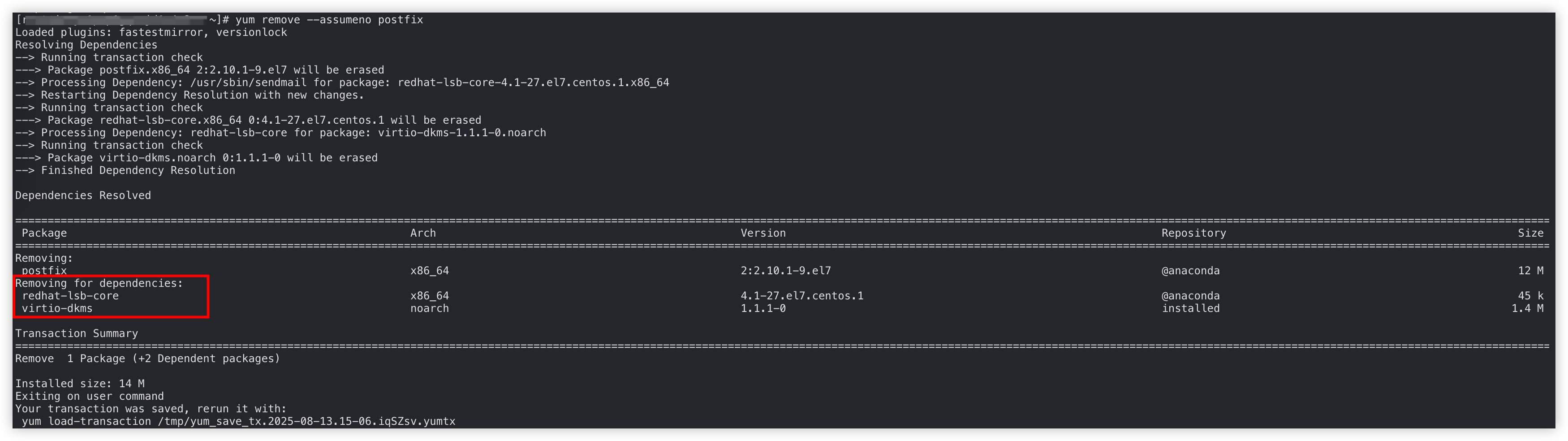
- The yum remove command is used to remove the specified software packages and their exclusive dependencies. For example, when you remove postfix, the virtio-dkms module is uninstalled. This is because postfix depends on the module. As a result, the instance fails to start as expected due to the missing Virtio driver.
- Recommended solution:
- Use the yum remove --assumeno package_name command to simulate the removal of the target software package and check which dependent packages will also be removed. If Virtio driver-related modules are removed, we recommend that you manually install the Virtio driver-related modules after the target software is removed.
-
Why am I unable to install the Cloud Security Center client on a VolcanoEngine instance whose network interface is associated with a High-Availability Virtual IP Address (HAVIP)?
Cause:
When "Host Type" is set to "VolcanoEngine", the platform-generated command for installing the Cloud Security Center client installs the client by connecting to the Metadata server through the private network. After an HAVIP is associated with a network interface of the instance, the private IP address of the network interface is overwritten by the HAVIP. As a result, the Metadata server cannot determine the Cloud Security Center client to install based on the private IP address of the network interface.
Solution:
You can disassociate the HAVIP from the network interface. After the original configuration is restored, execute the installation command again. Learn more.
To access the Metadata server while using an HAVIP, mount a new secondary network interface to the instance and configure routing rules to access the Metadata server through the secondary network interface.
- Execute the following command to query the IP address, name, MAC address, and gateway address of the secondary network interface.
tip
In the example provided in this section, a secondary network interface named eth1 whose gateway address is 192.168.0.254 is mounted.
- Linux instances
-
- Windows instances
-
- Execute the following command to configure routing rules for the secondary network interface.
- Linux instances:
-
tip
- 100.96.0.96: The IP address of the Metadata server, which is a fixed value.
- 255.255.255.255: The subnet mask for the routing destination CIDR block in the route.
- 192.168.0.254: The next hop address of the route, that is, the gateway address.
- eth1: The name of the secondary network interface.
- Windows instances
-
tip
- 100.96.0.96: The IP address of the Metadata server, which is a fixed value.
- 255.255.255.255: The subnet mask for the routing destination CIDR block in the route.
- 192.168.0.254: The next hop address of the route, that is, the gateway address.
- 10: The interface number of the network interface mounted to the instance. You can query the interface number by executing the route print command. For example, if the MAC address of the current network interface is 00 16 3e 63 40 20, its interface number is 10.
-

Will a custom image created for an instance be affected after the instance expires or is released? Will the instances created by using the custom image be affected?
No impact. The custom image is independent of and not coupled with the instance for which the custom image is created. After the instance expires or is automatically released or manually released, the custom image is not affected and the instances created by using the custom image are not affected.
Can I use a whole image (including the image of the data volume) to change the operating system of an instance?
Yes. You can use the system volume image in a whole image (including data volume images) to change the operating system of an instance.
What do I do if I want to use the image created for an existing instance to deploy another ECS instance?
You can create a custom image for an existing ECS instance and use the custom image to create a new ECS instance. For more information, see Creating custom images for instances and Purchasing instances based on custom images.
What do I do if instances created based on custom images in General-purpose (g3i, g3a), Compute-optimized (c3i, c3a), or Memory-optimized (r3i, r3a) types cannot start as expected?
Instances in third-generation types can work as expected only when the images support the Virtio 1.1 protocol. You can install the Virtio 1.1 driver on the custom images or use images that support the Virtio 1.1 protocol.
How do I switch the Windows Server operating system version of an instance?
You can change the operating system of an instance to switch the version of the operating system to the specified version. For more information, see Changing operating systems.
How do I view and add user information in a Linux operating system?
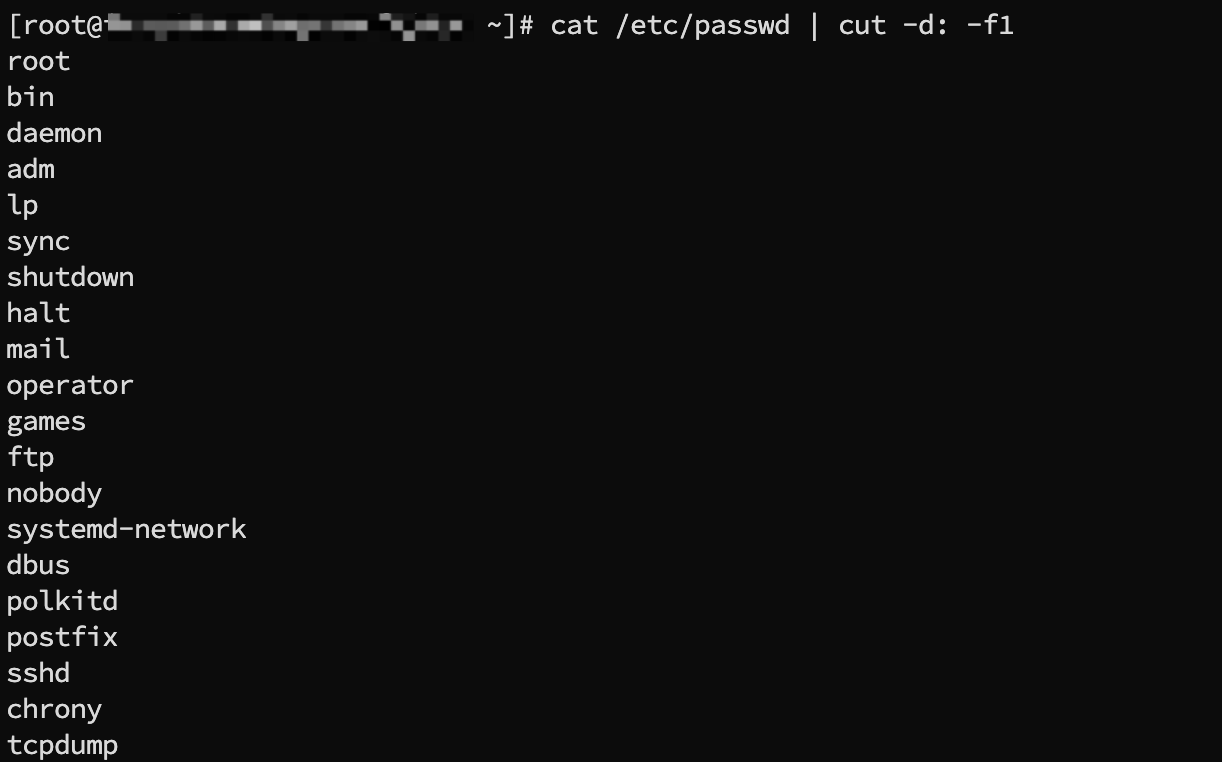
You can execute the following commands in the instance to manage user information.
Sample output:

Sample output:
- Execute the following command to specify the username for the new user.
- Specify the login password for the new user.
- Execute the following command to specify the password.
- Enter the password as instructed and press Enter to confirm.
-

- Execute the following command to check whether the home directory of the new user is successfully created.
- Sample output:
-

How do I import images from servers of other cloud vendors or local servers?
If you wish to use images from other cloud vendors or local servers on the VolcanoEngine platform, you can import images to the VolcanoEngine platform through the following methods:
Method | Description |
Importing custom images | You can create an image file on your own local server, virtual machine, other cloud platform's cloud host, or other types of server to meet the import requirements of VolcanoEngine, and then import it into VolcanoEngine to use as a cloud image. Learn more. |
Server Migration Center (SMC) | You can migrate your local servers, virtual machines, cloud hosts from other platforms, or other types of servers to VolcanoEngine platform instances or generate cloud images without shutting down using SMC. Learn more. |
Why am I required to install the Virtio 1.1 driver?
Virtio is a standard interface that provides efficient device I/O between virtual machines and the host in the virtualization environment. According to the requirements of the VolcanoEngine proprietary Data Processing Unit (DPU) architecture, the operating system kernel must support the Virtio1.1 protocol. When you use ECS instances based on the architecture (such as General-purpose g3i, Compute-optimized c3i, and Memory-optimized r3i), make sure that the operating system kernel supports this protocol. Otherwise, you need to install the Virtio1.1 driver.
Why do I have to install the blk-none tool?
When you run your business that involves a large number of I/O merge operations and deep I/O request queues on ECS instances in General-purpose (g3a/g3i), Compute-optimized (c3a/c3i), or Memory-optimized (r3a/r3i) types, if the kernel version of your operating system is old, I/O hang issues may occasionally occur.
The blk-none tool provided by VolcanoEngine sets the disk scheduling algorithm of the disk mounted on your instance to none or noop to prevent such issues. Learn more.
Questions about public images
Will related public images be taken down after the EOL of CentOS 8?
Currently, VolcanoEngine will not discontinue CentOS 8 images. Existing ECS instances created by using CentOS 8 images will not be affected. However, the images will not be updated.
What impact will the EOL of CentOS 8 have on my ECS instances?
Existing ECS instances created by using CentOS 8 images will not be affected. However, since the community no longer provides support and security updates, your business carries certain security risks. We recommend that you migrate your business as soon as possible. For more information and handling strategies, refer to Description on the stopped maintenance of CentOS Linux.
Does the official platform support Windows Server 2008 and Windows Server 2008 R2 operating systems?
Microsoft stopped providing support for Windows Server 2008 and Windows Server 2008 R2 operating systems on January 14, 2020. Therefore, VolcanoEngine platform no longer provides technical support for ECS instances using the aforementioned operating systems.
If you are using ECS instances with the aforementioned operating systems, please update to Windows Server 2012 or later as soon as possible.
What are instance type families supported by Red Hat images?
If you want to use a Red Hat image to create an ECS instance, make sure that the types of the instance are certified by Red Hat Enterprise Linux. For the certified instance types and their supported RHEL image versions, refer to Cloud instance types.
What official Red Hat subscriptions are included in the Red Hat Enterprise Linux image provided by VolcanoEngine?
The Red Hat images provided by VolcanoEngine include official Red Hat Enterprise Linux (RHEL) product subscriptions from Red Hat.
- The following table describes the related product software repositories.
-
- When you purchase a Red Hat Enterprise Linux image, you can obtain updates from the update source provided by VolcanoEngine. The difference between this method and the traditional method is that you will not receive a separate Red Hat account to fetch updates from the Red Hat update source. Therefore, when you execute the subscription-manager status command inside the instance to view the subscription status, the system will display an unsubscribed status as shown in the output shown in the following figure.
-

- The Red Hat images provided by VolcanoEngine only offer RHEL product software packages. If you want to install software packages for products other than RHEL (such as Red Hat Satellite and Red Hat Ceph Storage), you need to purchase the Red Hat subscription service and register the host to subscribe to the relevant products.
How can I obtain technical support when encountering problems with the official Red Hat operating system?
You can submit a ticket to seek technical support from VolcanoEngine. If there are problems with the RHEL operating system that VolcanoEngine cannot solve, we will submit the issue to the official Red Hat team, and Red Hat will provide the final technical support.
When using the official Red Hat operating system, can you register with your own Red Hat account?
Yes. If your Red Hat account has purchased additional subscriptions, you can follow the process below to register with your own account.
- Log in to the target instance.
- Execute the following command to complete registration and authorization.
-
- Follow the instructions to enter your Red Hat account and password, then press Enter to submit the registration request.
-

warning
If the email you use is associated with multiple Red Hat accounts, registration may fail due to the failure to point to a specific account.
- After successful registration, execute the following command to associate with the subscribed repository.
-
Are public images preconfigured with the FTP upload feature?
No. You need to configure the feature yourself. For more information, refer to Setting up FTP site (Linux) and Setting up FTP site (Windows).
What are OpenSUSE versions provided by public images?
How do I enable kdump in a public image?
kdump is automatically enabled in some veLinux images. You can manually enable kdump in other images. Learn more.
What are the public images that support General-purpose g3a, Compute-optimized c3a, and Memory-optimized r3a instance types?
General-purpose g3a, Compute-optimized c3a, and Memory-optimized r3a provided by VolcanoEngine are instance types based on the third-generation AMD EPYCTM Genoa processor. Some new features of the processor may not be supported on older operating systems. Refer to Instructions on compatibility between AMD instance types and operating systems to select the image based on your business requirements.
How do I resolve the black screen issue that occurs during VNC-based login after I create an instance or change the instance operating system by using a Windows Server 2022, Windows Server 2019, or Windows Server 2016 public image?
Follow the instructions provided in Restarting instances to restart the faulty instance. If the issue persists after you restart the instance, submit a ticket.
What is the /proxima directory found under the /opt directory in Linux public images?
The directory is the default installation directory of the Security Center client. For more information, see Learning about the client.
Why can't I modify the system configuration such as the SSH port when using the Red Hat Enterprise Linux public image provided by VolcanoEngine?
The SELinux feature is enabled by default in Red Hat Enterprise Linux public images provided by VolcanoEngine. The feature restricts the permissions for user applications and system servers to access files and network resources. You can disable SELinux or specify permissive mode for SELinux before you modify system settings, such as SSH port. Learn more.
FAQ about custom images
Will the custom image be deleted after the instance is released?
The custom image will not be deleted upon the release of the instance.
Can I use a custom image to change the operating system?
Can I upgrade the CPU and memory resources of an ECS instance that is created based on a custom image?
Can I use a custom image across regions?
No. You cannot use a custom image across regions. You need to copy the custom image to the target region before you can use the custom image in the target region. For more information, see Copying custom images.
What are the scenarios in which copying images is required?
The following items describe the scenarios in which you want to use custom images across regions:
- Deploy the application on ECS instances across multiple regions.
- Migrate an ECS instance to another region.
In the preceding scenarios, you can copy custom images. For more information, see Copying custom images.
What types of images can be replicated?
You can copy only custom images. You cannot copy public images and images shared by other accounts.
What are the regions that support the image replication feature?
All VolcanoEngine regions support the image replication feature. For more information, see Regions and availability zones.
How long does it take to replicate an image?
The time required for image replication depends on network transfer speed and the number of queued tasks. When you replicate an image, the image file is transferred from the availability zone in one region to the other availability zone in the target region over the network. Wait patiently during the replication process.
What are the restrictions on the source image and target image during replication?
During the replication process, the source image cannot be deleted, and the target image cannot undergo any actions.
How do I replicate image resources in my account to another region in a different account?
First, replicate the custom image to the target region, and then share this image with the other VolcanoEngine account. The Shared Image will appear in the Shared Image list of the other account. For more information, see Copying custom images and Sharing images.
Why is the project to which the snapshot consistency group of the target image is associated not updated after I copy a whole image?
- Issue description
- When I replicate a whole image across regions and configure a project for the target image, the target image belongs to the configured project after the replication is complete. However, the project associated with the snapshot consistency group of the target image remains the same as that of the source snapshot consistency group. For example:
- The source whole image (Image_A) and the associated snapshot consistency group (SnapGroup_A) both belong to the same project Project_a. During cross-region image replication, set the project of the target image to Project_b. After replication is complete, the target whole image (Image_B) belongs to Project_b, and the associated snapshot consistency group (SnapGroup_B) belongs to Project_a.
- Solutions
- You can use the project resource management feature to change the project of the snapshot consistency group associated with the target image to the configured project of the target image.
How do I use a custom image across accounts?
You can use the feature of sharing images to share the existing custom images with other VolcanoEngine accounts. This way, custom images can be used across accounts. For more information, see Sharing or unsharing custom images.
Can I use custom images created for subscription instances to create pay-as-you-go ECS instances?
Yes. You can use a custom image of an instance to create a new instance regardless of the billing method of the two instances.
Where can I view the image creation progress? How long does it take to create an image?
You can view the image creation progress from the ECS console on the image list page. The image creation time depends on the size of the instance disk.
Where can I view the image import progress? How long does it take to import an image?
You can view the image import progress on the ECS console's image list page. The time it takes to import an image depends on the image file size.
Why cannot I log in to an ECS instance created by using a Windows custom image?
A Windows custom image only supports instances with at least two vCPUs. If your instance meets this requirement but you still cannot log in to the instance, submit a ticket.
Can I change the operating system for instances created by using custom images? Can I use the original custom images after I change the operating system?
You can change the operating system for instances created by using custom images. After you change the operating system, you can still use the original custom images.
Why cannot I log in to an ECS instance after I change the operating system of the instance by using a custom image created for the instance?
This issue occurs because the ECS instance ID is not changed after the operating system of the instance is changed. When you change the operating system by using a custom image created for the instance, the operating system does not undergo secondary initialization or inject Cloud-init. In this case, the new password or key does not take effect and you cannot use the new password or key to log in to the instance.
Therefore, do not use a VolcanoEngine-based ECS instance to create a custom image and reinstall the original cloud server's operating system.
After changing the operating system of an instance equipped with a local disk, will the data on the data volume be retained?
Yes. Changing the operating system will only clear the data on the system volume. The data on the instance-mounted data volume and local disk (For example, NVMe SSD, SATA HDD) will be retained.
Can I export custom images to a local device for testing?
You can export custom images to a local device. For information about how to export custom images, see Exporting custom images.
Can the exported custom images start as expected on other platforms?
The exported custom images only contain system volume files and may fail to start as expected on other platforms.
What do I do if an error is reported when I import a custom image?
The imported custom images must meet VolcanoEngine platform requirements. For more information, see Requirements on imported images.
What do I do if file system damages or system initialization failures occur when I use an Ubuntu 22.04 custom image created for an instance to create a new instance?
Before you create a Ubuntu 22.04 custom image based on an instance, stop or shut down the instance. Before you create a Ubuntu 22.04 custom image based on an instance, stop or shut down the instance.
What do I do if automatic scaling-up fails for the system volume of an instance created by using a custom image?
Automatic scaling-up may fail for the system volume of an instance created by using a custom image due to reasons such as the absence of Cloud-init, service running failure, or unsupported file system. At this time, you can manually scale up by following the guidance in Overview of volume scaling up.
Why can't new hostnames, passwords, and other information be injected when creating instances or changing operating systems using Linux images created from instances?
Before creating a Linux custom image from an instance, be sure to clear the Cloud-Init configuration. Otherwise, when you use the image to create instances or change the operating system, VolcanoEngine cannot inject new hostnames, passwords, and other information.
Can I delete a custom image after I use the image to create ECS instances or share the image? What is the impact of the deletion operation?
If you have not shared the image, you can directly delete the image, and the instances created using the image work as expected. If you have shared the image, you need to first cancel all sharing relationships for the image before you can delete the image. For more information, see Unsharing images.
Can I use a custom image created for an ECS instance of Account A to change the operating system of an instance of Account B?
Yes. You need to share the image with Account B, and then Account B can use the shared image to change the operating system. For more information, see Sharing images and Changing operating systems.
Can I recover the data of an instance that is released upon expiration if an image is manually created for the instance?
Yes. You can recover instance data by using any of the following methods:
- Create a new instance by using the previously created image. For more information, see Creating instances by using custom images.
- Use the previously created image to change the system volume for the current instance. For more information, see Replacing the operating system.
How many accounts can each Shared Image be shared with at most?
Each custom image can be shared with up to 50 VolcanoEngine platform accounts.
How many shared images can I obtain at most?
The VolcanoEngine platform account currently does not limit the number of shared images that can be obtained.
Can I share images shared by an account with other accounts?
No. You can only share custom images that you uploaded or created yourself.
Can I still use an image to create instances if I share the image with other accounts?
Yes. After you share an image with other accounts, you can still use the image to create ECS instances, and you can create custom images based on these ECS instances.
Can I delete a custom image after I share the image with another account?
You cannot delete a shared custom image. You need to cancel all sharing relationships for the image before you delete the image. For more information, see Unsharing images.
What are the risks when I share a custom image with another account?
Data leakage and software leakage risks exist. Before you share an image, make sure that the image does not contain security-related sensitive and important data and software.
How can I view the accounts that use my shared image?
You can view information of the accounts with which your image is shared on the "Shared object" tab of the details page of the shared custom image.
What are the risks when I create instances by using a shared image?
The image owner can view the sharing relationships of the image, including your account ID, and can also delete the image.
When you use an image shared by another account, the VolcanoEngine platform cannot ensure the security and integrity of the image. Make sure that you use images shared by trusted accounts.
Are there limits on the regions in which I can create instances based on a shared image?
Yes. The region of the shared image and source image must be the same. You can use the shared image to create or reinstall ECS instances only in the region.
Can I delete an image shared by another account?
No. Only the owner of the shared image can delete the shared image.
Can the image created for ECS instance A in the Beijing region be shared with ECS instance B in the Shanghai region?
If the two instances belong to the same account, you can replicate the image from the Beijing region to the Shanghai region. For more information, see Copying custom images.
If the two instances belong to different accounts, you can replicate the image from the Beijing region to the Shanghai region and then share the image with the account of ECS instance B. The image is displayed in the shared image list of the account of ECS instance B. For more information, see Copying custom images and Sharing or unsharing images.
What is the impact if I remove Account A from the list of accounts with which a custom image (Image M) is shared?
Account A cannot query Image M in the ECS console or by using OpenAPI, and can no longer use Image M to create ECS images or change system volumes.
FAQ about veLinux images
What are the differences between different versions of veLinux images?
The VolcanoEngine platform provides you with multiple versions of veLinux, for example: veLinux 1.0, veLinux 1.0 CentOS-compatible version, etc. The kernel, supported CPUs, supported instance types, and other features differ among versions. For details, view Image release notes.
How to use veLinux?
The VolcanoEngine platform offers veLinux as a Public Image. You can simply select the version of the veLinux image under Public Image when you create an ECS instance or change the operating system. For more information, see Purchasing instances and Changing operating systems.
Are there any related costs for running veLinux on ECS?
No. The VolcanoEngine platform provides veLinux images for free; you only need to pay for other fees during the ECS instance runtime.
Which ECS instance types does veLinux support?
veLinux supports most VolcanoEngine platform instance types, including Elastic Bare Metal servers. Details can be viewed in Image release notes.
What are third-party applications that can run on veLinux?
- All third-party applications that can run on Debian 10 can run on veLinux 1.0.
- All third-party applications that can run on CentOS 7 can run on CentOS-compatible veLinux, which is configured with the LTS 5.4 veLinux kernel.
What do I do if the system performance is affected when I specify always for the Transparent Hugepage (THP) switch?
You can modify the THP configuration based on your business requirements by referring to the THP configuration guide.
Does veLinux support Graphical User Interface (GUI)?
No.
Does veLinux support 32-bit applications and libraries?
No.
Can I view the source code of veLinux components?
veLinux complies with open-source protocols. You can go to the GitHub site to download the source code tree of the veLinux kernel. For more information, see bytedance/kernel.
What are the advantages of veLinux compared to other operating systems?
- Service: The VolcanoEngine platform provides an enterprise-level Linux operating system for servers, offering long-term service with updates at least once every four months, 24/7 dedicated customer service, and official support available through tickets and other channels.
- Security: The VolcanoEngine platform provides rapid kernel issue resolution, data security, and General-purpose vulnerability fixes for security assurance.
- Stability: veLinux is stably running on more than one million ECS instances deployed for ByteDance internal applications for a long period of time. The downtime rate of veLinux is 50% lower than that of open-source Linux.
- Performance: VolcanoEngine platform deeply integrates and optimizes the infrastructure, continuously enhancing the runtime performance of the system. Commonly used E2E application performance surpasses community Linux by more than 20%.
- Ecology: veLinux is compatible with the CentOS 7 and Debian 10 ecosystem. Most software that can run on CentOS 7 and Debian 10 can run on veLinux without or with minimal modification.
- Feature: The veLinux kernel is customized based on the LTS 5.4 version from the kernel community, with effective bug fixes and feature enhancements applied to modules including memory management, networking, I/O, and file systems.
How does veLinux ensure data security?
veLinux ensures data security by using the following methods:
- In collaboration with the VolcanoEngine security team, veLinux uses standard vulnerability scanning and security testing tools to perform security scans.
- veLinux assesses CVEs and patches in a timely manner and issues user security alerts and patch updates accordingly.
- veLinux regularly updates the system to fix high-risk and critical CVEs, and updates and releases public images.
How do I install Docker and related dependencies on veLinux?
veLinux images are compatible with the CentOS 7, Debian 10, and Debian 12 ecosystem. Most software that can run on CentOS 7, Debian 10, and Debian 12 can run on veLinux without or with minimal modification. For more information, see veLinux overview.
Last updated: 2026.06.18 17:48:25
All rights reserved © Beijing Volcano Engine Technology Co., Ltd2024
