Elastic Compute Service
Elastic Compute Service


Document

- Documentation
 Elastic Compute ServiceElastic Compute ServiceBest PracticesImagesConfiguring CPU affinity for IRQ of network interface in Linux operating system
 Copy page
 Download PDF
Images
Configuring CPU affinity for IRQ of network interface in Linux operating system
Copy pageDownload PDFConfiguring CPU affinity for IRQ of network interface in Linux operating system
This topic describes how to use the irqbalance-ng feature provided by the platform to automatically configure CPU affinity for the interrupt requests (IRQs) of physical network interfaces, thereby improving network performance.
Applicable scenario
In high network traffic scenarios, a large number of network interface IRQs may concentrate on a single CPU, causing delays in packet transmission and reception. irqbalance-ng operates in a periodic scanning mode, automatically checking and configuring the CPU affinity (via /proc/irq/{irq_id}/smp_affinity) of physical network interfaces. This prevents uneven CPU load when network interface IRQs are processed, thereby improving network performance.
In scenarios where multiple Network Namespaces are configured, irqbalance-ng can automatically identify network interface information for each namespace and configure CPU affinity for the network interface IRQs.
Usage notes
The tool can only be installed and used in the images described in the following table.
Concepts
Procedure
Install irqbalance-ng
You can log in to the target Linux instance and install the irqbalance-ng tool for the corresponding operating system.
- Execute the following command to configure the extra-tools software repository for the image.
- echo 'deb http://mirrors.ivolces.com/extra-tools/velinux/ orion main' >> /etc/apt/sources.list.d/extra-tools.listwget -O - http://mirrors.ivolces.com/extra-tools/velinux/GPG-KEY-system | apt-key add -echo 'deb http://mirrors.ivolces.com/extra-tools/velinux/ lyra main' >> /etc/apt/sources.list.d/extra-tools.listwget -O - http://mirrors.ivolces.com/extra-tools/velinux/GPG-KEY-system | apt-key add -
- Execute the following command to update the software repository information.
- apt-get update
- Execute the following command to install irqbalance-ng.
- apt-get install irqbalance-ng
- Execute the following command to configure the extra-tools software repository for the image.
- echo -e '[extra-tools]\nname= extra-tools\nbaseurl=http://mirrors.ivolces.com/extra-tools/centos/7/rpms/\nenabled=1\ngpgcheck=0' >> /etc/yum.repos.d/extra-tools.repoecho -e '[extra-tools]\nname= extra-tools\nbaseurl=http://mirrors.ivolces.com/extra-tools/centos/8/rpms/\nenabled=1\ngpgcheck=0' >> /etc/yum.repos.d/extra-tools.repoecho -e '[extra-tools]\nname= extra-tools\nbaseurl=http://mirrors.ivolces.com/extra-tools/centos/9/rpms/\nenabled=1\ngpgcheck=0' >> /etc/yum.repos.d/extra-tools.repo
- Execute the following command to update the cache.
- yum makecache
- Execute the following command to install irqbalance-ng.
- yum -y remove irqbalanceyum -y install irqbalance-ng
- Execute the following command to configure the extra-tools software repository for the image.
- echo 'deb http://mirrors.ivolces.com/extra-tools/debian/ buster main' >> /etc/apt/sources.list.d/extra-tools.listwget -O - http://mirrors.ivolces.com/extra-tools/debian/GPG-KEY-system | apt-key add -echo 'deb http://mirrors.ivolces.com/extra-tools/debian/ bookworm main' >> /etc/apt/sources.list.d/extra-tools.listwget -O - http://mirrors.ivolces.com/extra-tools/debian/GPG-KEY-system | apt-key add -
- Execute the following command to update the software repository information.
- apt-get update
- Execute the following command to install irqbalance-ng.
- apt-get install irqbalance-ng
- Execute the following command to configure the extra-tools software repository for the image.
- echo 'deb http://mirrors.ivolces.com/extra-tools/ubuntu/ bionic main' >> /etc/apt/sources.list.d/extra-tools.listwget -O - http://mirrors.ivolces.com/extra-tools/ubuntu/GPG-KEY-system | apt-key add -echo 'deb http://mirrors.ivolces.com/extra-tools/ubuntu/ focal main' >> /etc/apt/sources.list.d/extra-tools.listwget -O - http://mirrors.ivolces.com/extra-tools/ubuntu/GPG-KEY-system | apt-key add -echo 'deb http://mirrors.ivolces.com/extra-tools/ubuntu/ jammy main' >> /etc/apt/sources.list.d/extra-tools.listwget -O - http://mirrors.ivolces.com/extra-tools/ubuntu/GPG-KEY-system | apt-key add -echo 'deb http://mirrors.ivolces.com/extra-tools/ubuntu/ noble main' >> /etc/apt/sources.list.d/extra-tools.listwget -O - http://mirrors.ivolces.com/extra-tools/ubuntu/GPG-KEY-system | apt-key add -
- Execute the following command to update the software repository information.
- apt-get update
- Execute the following command to install irqbalance-ng.
- apt-get install irqbalance-ng
Install the corresponding irqbalance-ng tool according to the operating system version.
- Execute the following command to download the irqbalance-ng installation package.
- wget http://mirrors.ivolces.com/extra-tools/centos/7/rpms/irqbalance-ng-1.0.27-3.ve.noarch.rpm
- Execute the following command to install irqbalance-ng.
- rpm -e irqbalance-ng irqbalance || truerpm -ivh irqbalance-ng-1.0.27-3.ve.noarch.rpm
- Execute the following command to download the installation package for the irqbalance-ng tool.
- wget http://mirrors.ivolces.com/extra-tools/centos/8/rpms/irqbalance-ng-1.0.27-3.ve.noarch.rpm
- Execute the following command to install irqbalance-ng.
- rpm -e $(rpm -qa | grep -E '^irqbalance(-ng)?') || truerpm -ivh irqbalance-ng-1.0.27-3.ve.noarch.rpm
- Execute the following command to download the installation package for the irqbalance-ng tool.
- wget http://mirrors.ivolces.com/extra-tools/centos/9/rpms/irqbalance-ng-1.0.27-3.ve2.noarch.rpm
- Execute the following command to install irqbalance-ng.
- rpm -e $(rpm -qa | grep -E '^irqbalance(-ng)?') || truerpm -ivh irqbalance-ng-1.0.27-3.ve2.noarch.rpm
Manage irqbalance-ng
View the running status
- Execute the following command to check whether irqbalance-ng is running as expected.
- systemctl status irqbalance-ng.service
-

Configure rules for running the tool
You can modify the configuration file of irqbalance-ng to adjust settings such as the interval at which irqbalance-ng checks or adjusts CPU affinity for network interface IRQs, and the list of CPUs that handle network interface IRQs.
- Execute the following command to edit the configuration file.
- vim /etc/default/irqbalance-ng
- Press the i key to enter edit mode, and modify the irqbalance-ng configuration based on your needs.
-
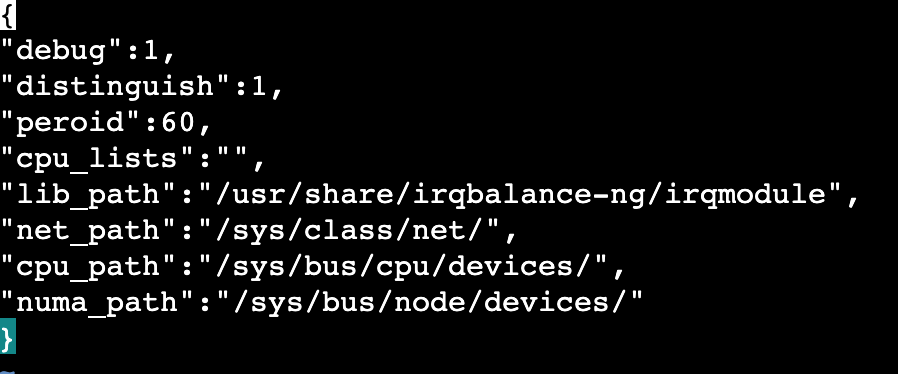
- Parameter description
- ParameterDescriptionSample valuedebugThe level of logs printed by the irqbalance-ng service. Valid values:
- 0: Logs of the error level are printed.
- 1: Logs of the info and error levels are printed. This is the default value.
- 2: Logs of the debug, info, and error levels are printed.
tipThe storage path for irqbalance-ng logs is /var/log/irqbalance-ng.log.1distinguishThe default setting. Do not modify the setting.1peroidThe interval (in seconds) at which irqbalance-ng checks or adjusts CPU affinity for network interface IRQs. The default value is 60.60cpu_listsThe CPUs specified to handle network interface IRQs. The default value is "", which specifies all CPUs. You can pass in multiple CPU IDs, and use commas (,) to separate them. You can use - to pass in a range of consecutive CPU IDs.tipYou can execute the lscpu, numactl --hardware, or lshw command to view the CPU IDs. In the following figure, the lscpu command is used as an example. 0-7 indicates that the IDs of the CPUs are 0, 1, 2, 3, 4, 5, 6, and 7.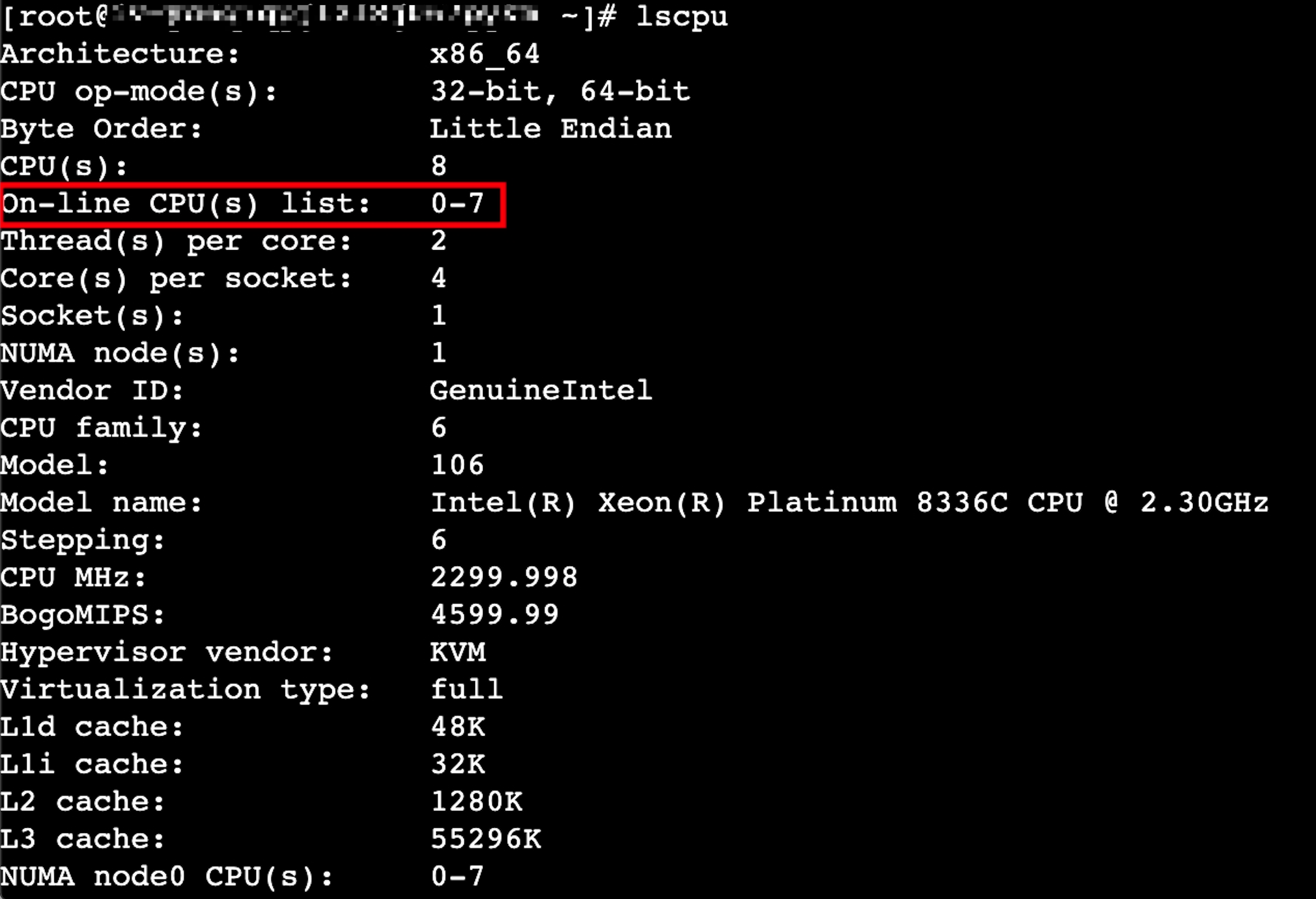 "1,4,5,10-15,20"lib_pathThe path to library files when you use the installation package to install the tool. We recommend that you do not modify the path.-net_pathThe path to files related to network interfaces in the image. We recommend that you do not modify the path.-cpu_pathThe path to the CPU device file in the image. We recommend that you do not modify the path.-numa_pathThe path to the NUMA file in the image. We recommend that you do not modify the path.-
- Press Esc, enter :wq, and then press Enter to save the modifications and close the file.
- After you modify the file, execute the following command to restart irqbalance-ng for the modifications to take effect.
- systemctl restart irqbalance-ng
- You can execute the following command to view the binding information between IRQs and CPUs.
This command retrieves IRQ information from /proc/interrupts and uses cat /proc/irq/$i/smp_affinity_list to configure or read the CPU affinity of IRQs. You can adjust the command based on your needs.
- for i in `cat /proc/interrupts | grep -E "input|output" | awk -F ' ' '{print $1}' | awk -F ':' '{print $1}'` ;do echo "irq_"$i ":" `cat /proc/irq/$i/smp_affinity_list` ;done
-

Stop irqbalance-ng
You can execute the following command to stop periodic CPU affinity configuration for IRQs performed by irqbalance-ng.
systemctl stop irqbalance-ng.service
You can also execute the following command to disable irqbalance-ng from starting automatically when the instance starts.
systemctl disable irqbalance-ng.service
Uninstall irqbalance-ng
- CentOS/AlmaLinux/RHEL
- yum remove irqbalance-ng
- Debian/Ubuntu
- apt-get remove --purge irqbalance-ng
Last updated: 2026.07.22 18:39:13
All rights reserved © Beijing Volcano Engine Technology Co., Ltd2024
