Elastic Compute Service
Elastic Compute Service


Document

- Documentation
 Elastic Compute ServiceElastic Compute ServiceUser GuideElastic Block StorageESSD FlexPL volumes
 Copy page
 Download PDF
Elastic Block Storage
ESSD FlexPL volumes
Copy pageDownload PDFESSD FlexPL volumes
EBS offers ESSD FlexPL volumes. This topic provides the use cases and performance details about these volumes.
Billing notes
You are charged for the capacity, additional performance, and burst performance of your ESSD FlexPL volumes. Specifically:
- Capacity cost: Billing begins when you create an ESSD FlexPL volume. For more information, see Volume billing.
- Additional performance cost: Billing begins when you provision additional performance. For more information, see Additional performance billing - ESSD FlexPL volumes.
- Burst performance cost: After enabling burst performance, you will be charged based on your usage. For more information, see Burst performance billing - ESSD FlexPL volumes.
Volume performance
ESSD FlexPL volumes offer baseline, additional and burst performance. If the baseline performance does not meet your needs, you can provision additional or burst performance. The formula for calculating volume performance is as follows:
ESSD FlexPL volume performance = Baseline performance + Additional performance + Burst performance
Total performance
Baseline performance
Baseline performance is built into the volume and is not customizable. For FlexPL ESSD volumes, baseline performance increases with capacity until it reaches the volume type's limit. Specifically:
Latency
Starting November 1, 2025, the average random write latency for newly created ESSD FlexPL volumes in certain availability zones will be within 0.2 ms by default. The average random write latency for existing ESSD FlexPL volumes and volumes changed from ESSD PL0 to ESSD FlexPL remains 0.3 to 0.5 ms. The availability zones that support 0.2 ms latency are as follows:
- China (Beijing) Availability Zone A/B/C/D/E.
- China (Shanghai) Availability Zone A/B.
- Asia Pacific (Johor) Availability Zone A/B.
Additional performance
EBS lets you provision additional performance for ESSD FlexPL volumes. You can increase the performance of a volume without increasing its capacity. There are three types of additional performance that you can provision:
- Balanced type: You can provision additional IOPS for your volume. The provisionable range is 1 to 50,000 IOPS. For every IOPS added, the throughput increases by 8 KB/s. This option is ideal for workloads with high IOPS and throughput demands.
- IOPS type: You can provision additional IOPS for your volume. The provisionable range is 1 to 50,000 IOPS. For every IOPS added, the throughput increases by 4 KB/s. This option is ideal for IOPS‑intensive workloads, such as OLTP databases.
- Throughput type: You can provision additional throughput for your volume. The provisionable range is 1 to 650 MB/s. For every 1 MB/s added, the IOPS increases by 16. This option is ideal for throughput-intensive workloads such as video offloading, transcoding, machine learning, media rendering, log storage, and large-scale offline data processing.
Specifically:
Burst performance
tip
- Burst performance is currently in closed beta. Please contact your account manager for access.
- Burst performance is essentially additional performance provided based on the available resources. It depends on the current load of the cluster in which the volume resides. Burst performance is not guaranteed and may fail if the system is overloaded.
This feature allows for dynamic performance adjustments based on workloads and does not require pre-configuration. When enabled for a volume, burst performance provides extra capacity when baseline and additional performance are insufficient. It increases IOPS or throughput within performance limits to handle short-term traffic spikes. Burst performance automatically scales down when the workload returns to normal levels. This is suitable for burst workloads or scenarios that require processing large amounts of data in a short time. The formula for calculating burst performance is as follows:
- Burst IOPS for a given volume = Actual IOPS − Baseline IOPS − Additional IOPS
- Burst throughput for a given volume (MB/s) = Actual throughput − Baseline throughput − Additional throughput
Creating an ESSD FlexPL volume
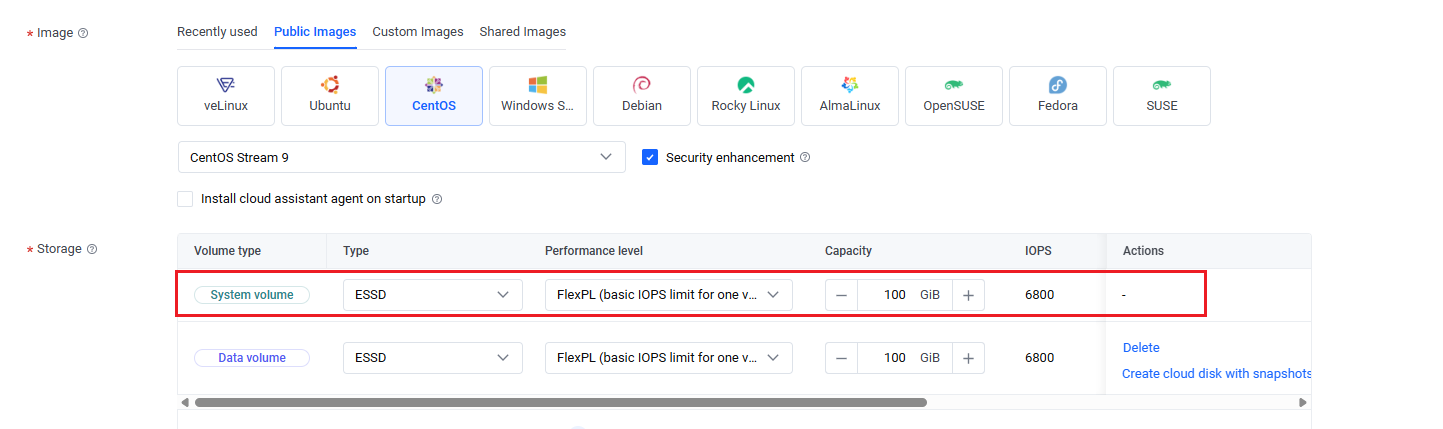
EBS lets you create an ESSD FlexPL volume as either a system or data volume. Steps:
- Creating an ESSD FlexPL system volume
- When creating an instance, set the system volume type to "ESSD" with a performance level of "FlexPL (basic IOPS limit for one volume: 50,000)". If your volume has a capacity of 500 GiB or more, you can provision additional performance by dragging the horizontal scroll bar to the far right and selecting "Extra performance". For more information, see Purchasing an instance by following the wizard.
-
- Creating an ESSD FlexPL data volume
- When creating an instance, set the data volume type to "ESSD" with a performance level of "FlexPL (basic IOPS limit for one volume: 50,000)". If your volume has a capacity of 500 GiB or more, you can provision additional performance by dragging the horizontal scroll bar to the far right and selecting "Extra performance". For more information, see Purchasing an instance by following the wizard.
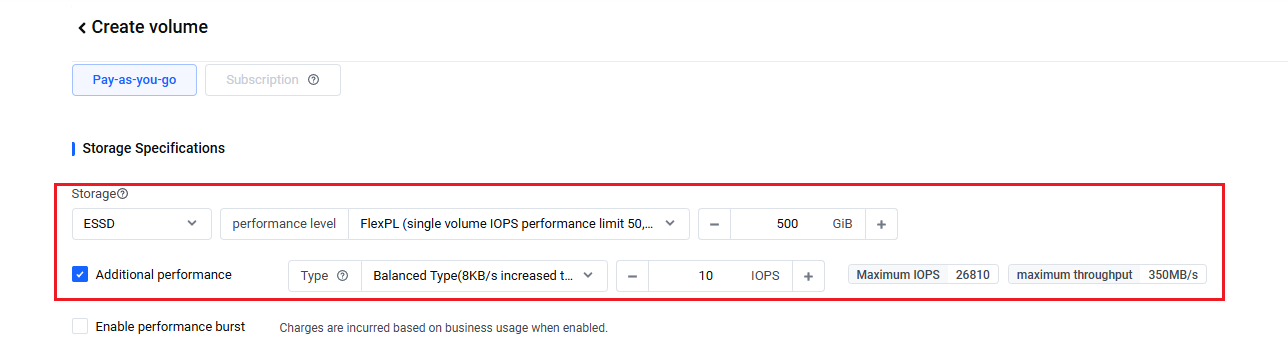
- Alternatively, set the data volume type to ESSD FlexPL when creating a volume. For more information, see Creating a volume.
Description
- Additional performance is available only if your ESSD FlexPL volume is at least 500 GiB.
- You can only select one additional performance type for each volume. If necessary, you can change the type of additional performance.
- When you delete a volume, the additional performance configuration is also deleted.
-
Related operations
- View volume details
- On the "Volumes" page, click the name of the volume that you want to check. In the "Volume information" section, you can view details such as specifications, additional performance and burst performance.
- Additional performance
- Provision additional performance for your volume
- On the "Volumes" page, click "... > Adjust extra performance" in the "Actions" column of the volume that you want to manage. In the box that appears, set the desired additional performance type and value, and click "Adjust extra performance".
- Adjust additional performance
- On the "Volumes" page, click "... > Adjust extra performance" in the "Actions" column of the volume that you want to manage. In the box that appears, modify the additional performance type and value, and click "Adjust extra performance".
tip
- When you modify additional performance, its billing changes immediately. For more information, see Additional performance billing.
- You can also use the ModifyVolumeExtraPerformance API to provision additional performance for ESSD FlexPL volumes. For more information, see ModifyVolumeExtraPerformance.
- You can only adjust the additional performance when the volume is in the Available, Attaching, Attached, Detaching, Snapshotting, or Rolling Back state.
- Cancel additional performance
- On the "Volumes" page, click "... > Adjust extra performance" in the "Actions" column of the volume that you want to manage. In the box that appears, set the additional performance value to 0, and click "Adjust extra performance".
- Burst performance
- Enable burst performance
- When creating a volume, select the "Enable performance burst" option. Under "Order details", check the box that says "I have read and agree to Elastic Compute Service Terms of Service", and click "Create volume" to submit your order.
- You can also enable burst performance for an existing volume. On the "Volumes" page, click "... > Modify attributes" in the "Actions" column of the volume. In the "Modify volume attributes" dialog, select "Enable performance burst", and click "Save".
- Disable burst performance
- On the "Volumes" page, click "... > Modify attributes" in the "Actions" column of the volume that you want to manage. In the "Modify volume attributes" dialog, deselect "Enable performance burst", and click "Save".
Last updated: 2026.06.24 15:56:11
All rights reserved © Beijing Volcano Engine Technology Co., Ltd2024
