Torch Object Storage
Torch Object Storage
Torch Object Storage


Document
What's New
Announcements
Billing
Billable items
Billing method
Getting Started
User Guide
Working with buckets
Basic configurations
Managing lifecycle
Back-to-origin rules
Event notification
Intelligent Tiering
Domain management
Fault tolerance and disaster recovery
Cross-region replication
Same-region replication
Data redundancy
Image processing
ObjectSet
Working with objects
Managing folders
Monitoring and alerting
Metric monitoring
Access control
Bucket policies
Common configuration scenarios
Authorizing IAM users of the current account
Authorizing other accounts
Managing access via tools and SDKs
Managing public read access
Data security
Access points
Multi-region access points (MRAP)
Single-region access points (SRAP)
Converged access points (CAP)
DevMind
TOS accelerator
SenseFlow
TOS Agent
Data processing
Basic concepts
Image processing
Media processing
Document preview
Task processing
Data subscription
Flow control management
Quality of Service (QoS) policies
Hierarchical namespace (HNS)
User guide
Tool reference
Best practices
TOS Vectors
User guide
API reference
Vector bucket
Vector index
SDK reference
Python-Vectors
Vector bucket
Vector index
Java-Vectors
Vector bucket
Vector index
Node.js-Vectors
Vector bucket
Vector index
Tool Guide
tosutil
Common commands
Upload, download, and copy objects
Share objects
Auxiliary commands
Common examples
TOS Browser
FSX
FSX best practices
TOS PyTorch Connector
tosfsspec
TOS Import(will be deprecated soon)
API Reference
Signature Mechanism
The header contains a signature
Bucket
Basic Bucket Operations
Bucket Lifecycle
Access Monitor
Bucket ACL
Bucket CORS
Bucket Policy
Back-to-origin Rules
Bucket Replication
Versioning
Static Website
Event Notification
Custom Domain
Server-side encryption
Transfer Acceleration
Data Processing
Image processing
Media processing
Video transcoding
Audio transcoding
video to GIF
Document preview
File decompression
Log Storage
Retention Policy
Requester pays
TLS version
Object
Basic Object Operations
Object ACL
Fetch Object
Symbolic Link
WORM object
Multipart Upload
SDK Reference
Java
Pre-signing Mechanism
Bucket Interface
Basic Bucket Interface
Manage Bucket Configuration
Object Interface
Upload Object
Download Object
Upload and Download Speed Limit
Copy Object
List Object
Data Processing
Image Processing
Video Processing
Audio Processing
Log Configuration
Hierarchical Namespace
Bucket base interface
Introduction to Typical Scenes
Python
Data processing
Pre-signature mechanism
Bucket interface
Basic bucket interface
Manage bucket configuration
Object interface
Upload object
Download object
Copy object
List objects
Introduction to typical scenes
C
Object Interface
Upload object
C++
Pre-signature Mechanism
Bucket Interface
Basic Bucket Interface
Manage Bucket Configuration
Object Interface
Upload Object
Download Object
Copy Object
List Objects
Data Processing
Go
Object Interface
Upload Object
Download Object
Copy Object
List Objects
Manage Objects
Bucket Interface
Manage Bucket Configuration
Data Processing
Log Configuration
Introduction to Typical Scenes
Pre-signature Mechanism
Node.js
Pre-signature Mechanism
Bucket Interface
Basic Bucket Interface
Manage Bucket Configuration
Object Interface
Upload object
Download object
Copy object
List objects
Data Processing
Image Processing
Introduction to Typical Scenes
Browser.js
Pre-signature Mechanism
Upload Object
Download Object
Copy Object
List Objects
Manage Objects
Data Processing
.NET
Bucket Interface
Object Interface
Upload Object
Download Object
List Objects
Introduction to Typical Scenes
PHP
Bucket Interface
Object Interface
Download Object
Data Processing
Exception Handling
Android
Bucket Interface
Object Interface
Upload Object
Download Object
Exception Handling
iOS
Bucket Interface
Object Interface
Upload Object
Download Object
Harmony
Pre-signature Mechanism
Bucket Interface
Object Interface
Upload Object
Download Object
List Objects v2
Introduction to Typical Scenarios
Rust
Pre-signing mechanism
Bucket interface
Basic bucket operations
Lifecycle rules
Bucket ACLs
Cross-origin resource sharing
Bucket inventory
Back-to-origin rules
Bucket replication
Static website hosting
Event notification
Custom domain
Server-side encryption
Object interface
Basic operation
Access control
Error Codes
01-SERVICE_ERROR
02-AUTH
03-ACCESS_CONTROL
04-QOS
05-REQUEST
06-BUCKET
07-LIFECYCLE
08-ACL
09-CORS
10-POLICY
11-MIRROR
12-REPLICATION
13-WEBSITE
14-NOTIFICATION
15-ENCRYPT
16-CUSTOMDOMAIN
17-OBJECT
18-TAG
19-MULTIPART
20-STORAGE_CLASS
21-CALLBACK
22-DATA_PROCESS
23-BATCH
24-STORAGE_LENS
25-INVENTORY
26-DIRECTORY_BUCKET
FAQ
Best Practices
AIGC-Doubao LLMs
Accessing TOS with third-party tools
Granting temporary access
Data migration
Data processing
Checking data integrity
Performance optimization
- Documentation
 Torch Object StorageBest PracticesUploading data from WeChat Mini Programs to TOS
 Copy page
 Download PDF
Best Practices
Uploading data from WeChat Mini Programs to TOS
Copy pageDownload PDFUploading data from WeChat Mini Programs to TOS
This topic describes how to upload files directly to TOS from WeChat Mini Programs.
Background information
WeChat Mini Programs, which can be used without downloading, are attracting a growing number of developers and users. One common concern for developers is how to upload files from a WeChat Mini Program to TOS. You can create a pre-signed post form and use the PostObject API to upload files from a WeChat Mini Program to TOS as an HTML form. For more information, see PostObject and Pre-signed Post Form.
Step 1: Create a CORS rule
When data is uploaded from a WeChat Mini Program, a cross-origin request is sent to TOS. TOS then verifies permissions by checking the bucket’s cross-origin resource sharing (CORS) rules. To ensure that WeChat Mini Programs can transfer data to TOS correctly, you must set up CORS rules in TOS. For more information, see CORS rules.
- Log in to the TOS console.
- In the left navigation pane, click Buckets. In the Buckets list, click the bucket you want to manage.
- In the left navigation pane, select Permissions > CORS rules.
- On the CORS rules page, click Create rule.
- On the Create CORS Rule page, configure the following parameters:
-
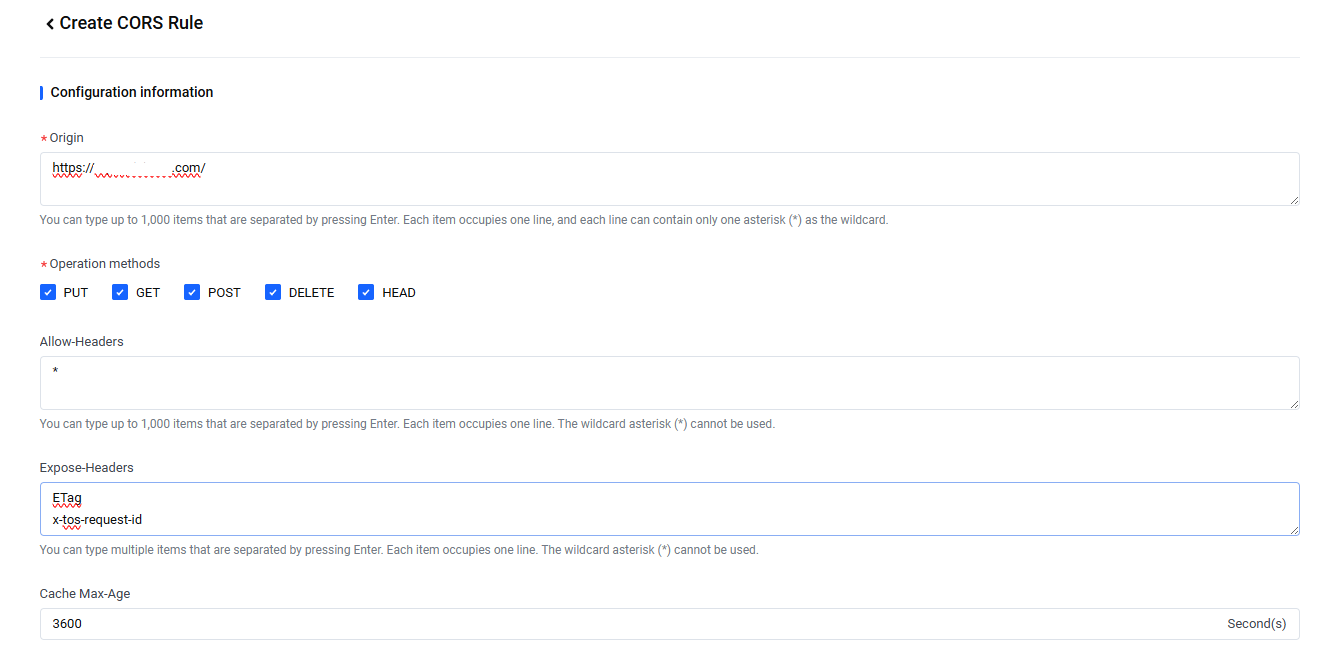
- ParameterDescriptionOriginEnter the domain name of your WeChat Mini Program.tipYou can use a wildcard (*) to allow all origins.Operation methodsSelect PUT, GET, POST, DELETE, and HEAD.Allow-HeadersEnter a wildcard (*).Expose-HeadersEnter ETag, x-tos-request-id, and x-tos-version-id. Multiple entries are permitted, with each entry separated by a carriage return.Cache Max-AgeUse the default value.
- Click Create.
Step 2: Add your domain to the allowlist
To upload files from a WeChat Mini Program, a domain name must be added to its allowlist. Configure the allowlist in your WeChat Mini Program settings to include your TOS bucket's domain. This will allow normal interaction between your Mini Program and your bucket.
tip
We recommend associating your bucket with your own domain name so that you can access the objects stored in TOS via your domain. For instructions, see Associating a custom domain.
- Obtain the bucket domain.
- Log in to the TOS console.
- In the left navigation pane, click Buckets. In the Buckets list, click the bucket you want to manage.
- In the left navigation pane, click Overview.
- On the Overview page, navigate to the Access domain area. In the Bucket domain column, find the corresponding domain name for Public Network Access.
- Configure the allowlist.
- Log in to the WeChat Mini Program management console.
- On the Mini Program page, locate the Server Domain Names section and click Start Configuration.
- In the Configure Server Domain Names dialog, enter your bucket's domain name in the uploadFile Valid Domain and downloadFile Valid Domain fields.
- Click Save and Submit.
Step 3: Upload data to TOS
This JavaScript SDK sample demonstrates how to generate a signature using the calculatePostSignature method for a TOS PostObject request. Then, it shows how to use the WeChat Mini Program's uploadFile API to upload the file. The example code is shown below.
// Ensure SDK version is 2.6.10 or later
import { TosClient } from '@volcengine/tos-sdk'
async function wxUploadToTOS() {
// Create client
const client = new TosClient({
accessKeyId: "Provide your access key", // Enter the access key ID obtained through STS
accessKeySecret: "Provide your secret key", // Enter the secret access key obtained through STS
stsToken: "Provide your session token", // Enter the session token obtained through STS
region: "Provide your region", // Specify the region where the bucket is located. For example, if your bucket is in China (Beijing), replace "Provide your region" with "cn-beijing".
});
const res = await wx.chooseMessageFile({ count: 1 });
const path = res.tempFiles[0].path;
const bucket = 'test-bucket';
const key = 'wx-miniprogram-test';
// For data security, we recommend uploading files using signature authentication. Learn more in https://www.volcengine.com/docs/6349/113484.
For more information on pre-signed post form, refer to Browser-based uploads using HTTP POST.
const formData = await client.calculatePostSignature({
bucket,
key,
expiresIn: 3600,
// To add custom fields, add these lines in your code:
//fields: {
// 'key': 'value'
// }
})
// Replace bucketHost with the corresponding bucket domain ${bucket}.tos-${region}.volces.com
const bucketHost = `${bucket}.tos-cn-beijing.volces.com`;
const url = `https://${bucketHost}/${encodeURI(key)}`
const result = await wx.uploadFile({
filePath: path,
name: 'file', // This is a fixed value.
url,
formData,
success: (res) => {
if (res.statusCode === 204) {
console.log('Successfully Uploaded');
}
},
fail: err => {
console.log(err);
}
})
console.log(result, 'result');
}
Replace the following parameters in the sample code with the appropriate values for your situation.
Parameter | Description |
accessKeyId | Specifies the access key ID obtained through Security Token Service (STS). tip You can use STS to generate temporary access credentials, including temporary keys. For instructions, see Accessing TOS with temporary credentials of Security Token Service. |
accessKeySecret | Specifies the secret access key obtained through STS. |
stsToken | Specifies the session token obtained through STS. |
region | Specifies the region of the bucket to which you want to upload the object. |
endpoint | Specifies the regional node for the bucket. tip |
const bucket | Specifies the name of the bucket. |
const key | Specifies the name of the object to be uploaded. |
const url | Specifies the URL for access in the format https://<bucket domain>/<encoded object name>. |
Last updated: 2025.11.18 14:49:32
All rights reserved © Beijing Volcano Engine Technology Co., Ltd2024
