Volcano Engine Function as a Service
Volcano Engine Function as a Service


Document

- Documentation
 Volcano Engine Function as a ServiceUser guideCloud sandboxSandbox applicationConnect sandbox applications to the E2B protocol
 Copy page
 Download PDF
Sandbox application
Connect sandbox applications to the E2B protocol
Copy pageDownload PDFConnect sandbox applications to the E2B protocol
Cloud sandbox is compatible with the E2B protocol at the interface layer and supports dynamic injection of the Envd runtime into any sandbox image. You do not need to modify your business code. You can directly use the official E2B CLI / SDK to create, connect to, and operate sandbox instances on sandbox applications. This article introduces the background information, usage scenarios, and procedure for this feature.
warning
- The E2B compatibility and Envd injection capability for any image are currently in beta. To activate, please submit a ticket.
- This feature is currently available only in the China(Beijing) 、China(Shanghai) 、China(Guangzhou) region. Please create and use sandbox applications in this region.
Background information
Cloud sandbox has the following capabilities.
Capability | Description |
E2B interface compatibility | Compatible with the E2B interface protocol, supports direct use of the official E2B CLI / SDK for actions such as create, connect, execute commands, read and write files, and code execution for sandbox instances. |
Envd runtime injection | When creating a sandbox application, inject the Envd runtime into the sandbox image via Sidecar, enabling any sandbox image to launch sandbox instances with E2B sandbox capability, without modifying the image. |
Reuse of ecosystem toolchain | Reuse the E2B official CLI, SDK, and related tools. Existing E2B applications can be migrated to the veFaaS cloud sandbox at low cost. |
Application scenarios
Cloud sandbox connected to the E2B protocol and ecosystem is suitable for the following usage scenarios.
Scenario | Description |
Smooth migration from E2B | For existing Agent / Code Interpreter applications built on E2B, simply replace the API address and API Key to migrate to the veFaaS cloud sandbox and benefit from its elasticity and cost advantages. |
Reuse the E2B ecosystem toolchain | The team is accustomed to the E2B official CLI/SDK development method and wishes to continue using the existing toolchain and coding practices without learning new proprietary interfaces. |
Agent code execution | The AI Agent needs to instantly launch sandbox instances to execute code, run commands, and read/write files. With the E2B-compatible interface, sandboxed code execution capabilities can be quickly integrated. |
Quick integration for any sandbox image | Business sandbox images without the E2B runtime can obtain runtime capability by injecting Envd, allowing sandbox instances launched from existing images to have runtime capability without modifying the image. |
Procedure
Step 1: Create a sandbox application and inject Envd
- Log in to the veFaaS console.
- In the top navigation bar, select the target region.
- In the left navigation bar, click Cloud sandbox > Sandbox app. Then, click Create sandbox app.
- Configure sandbox application parameters. This article only introduces parameters related to injecting Envd. For other parameter descriptions, see Sandbox Application.
- ParameterDescriptionFor sandbox imagesContainer imageSelect Public image. The cloud sandbox provides pre-configured, ready-to-use public images that can be used directly.Select imagesIn image address, enter enterprise-public-cn-beijing.cr.volces.com/vefaas-public/e2b:code-interpreter-v1 and select the E2B code sandbox image.Listening portEnter the port 49999 on which the E2B Code Interpreter Server starts listening.Advanced settingsSidecarClick Add Sidecar to configure Sidecar.
- Source Type: Select Platform preset.
- Select Sidecar: Select envd.
- After creation, record the Sandbox Application ID in the Basic Information section of the application details page. You will need it when creating sandbox instances later.
Step 2: Create an API Key for E2B calls
warning
The created API Key is displayed only once. After you turn off the window, it will no longer be visible. Please save it promptly.
The API Key is used for authentication in subsequent E2B CLI / SDK operations.
- In the left navigation bar, select Cloud Sandbox > API Key Management, and click Create API Key.
- Click Copy to copy the API Key.
- Click Finish to turn off the window.
Step 3: Use the E2B CLI to create a sandbox instance
- Install the official E2B CLI via npm.
-
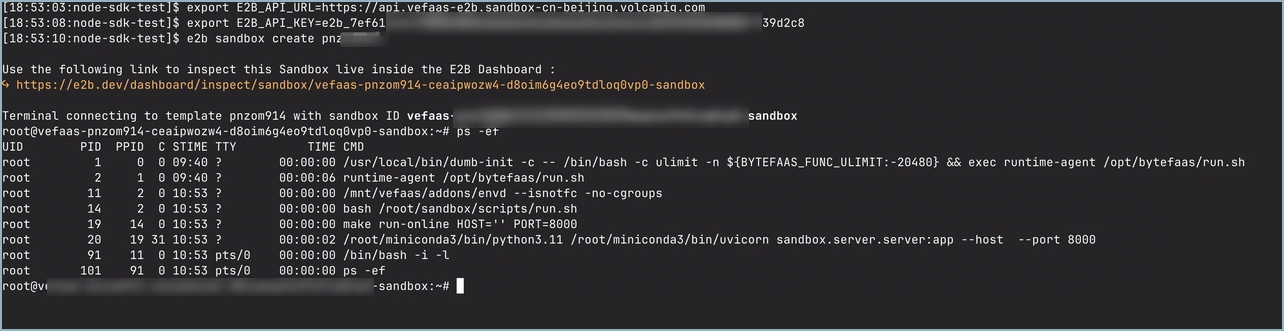
- Configure the E2B_API_URL and E2B_API_KEY environment variables. E2B_API_KEY is the API key obtained in Step 2.
-
- Use the Sandbox Application ID obtained in Step 1 to create and connect to a sandbox instance via the CLI. After executing the command, you will directly create and connect to the corresponding sandbox instance.
-
-
Step 4: Use the E2B SDK to create a sandbox instance
Install the official E2B SDK via pip.
The following example script demonstrates sandbox instance creation, command execution, file read/write, background command execution, and multi-port invocation.
E2B interface compatibility scope
Last updated: 2026.08.19 14:06:08
All rights reserved © Beijing Volcano Engine Technology Co., Ltd2024
