实时音视频
实时音视频


文档指南

请输入


- 文档首页
 实时音视频实时音视频场景方案多人音视频场景搭建(Web)
 复制全文
复制全文 下载 pdf
场景搭建(Web)
 文档反馈
文档反馈 问问助手
问问助手SDK集成
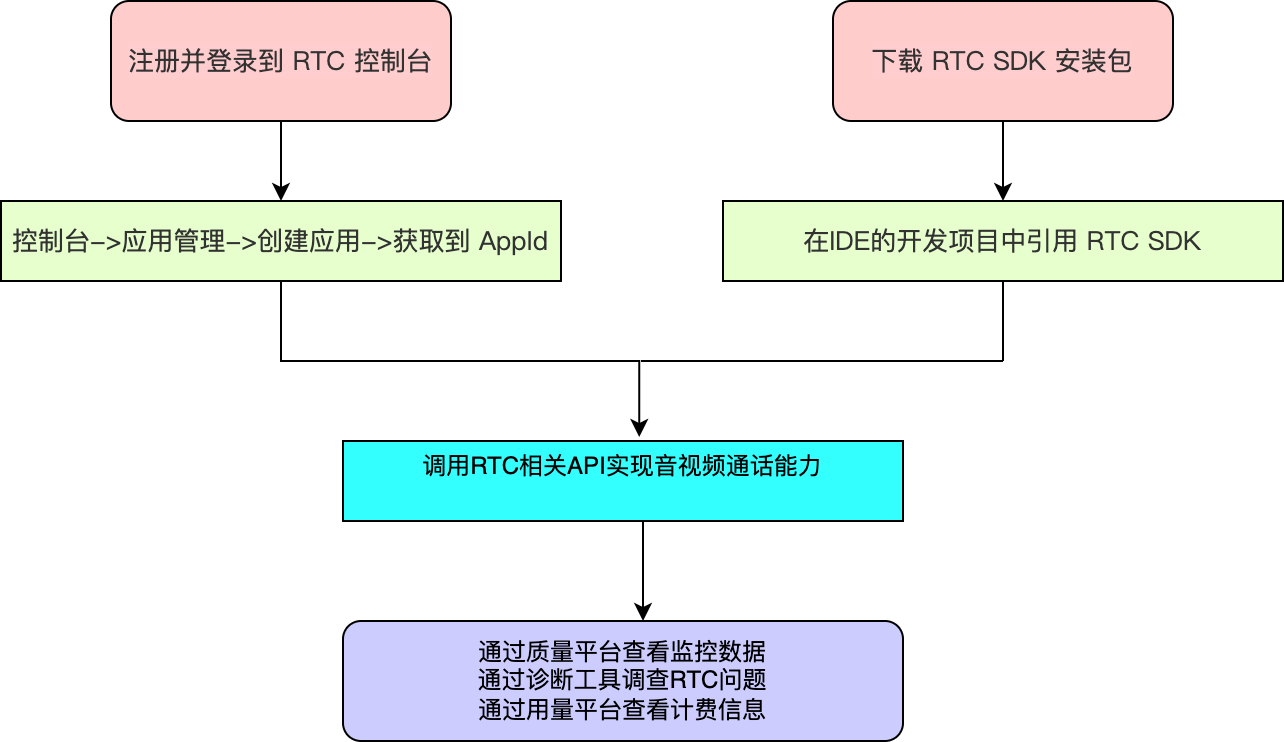
整体实现流程
整体业务流程图
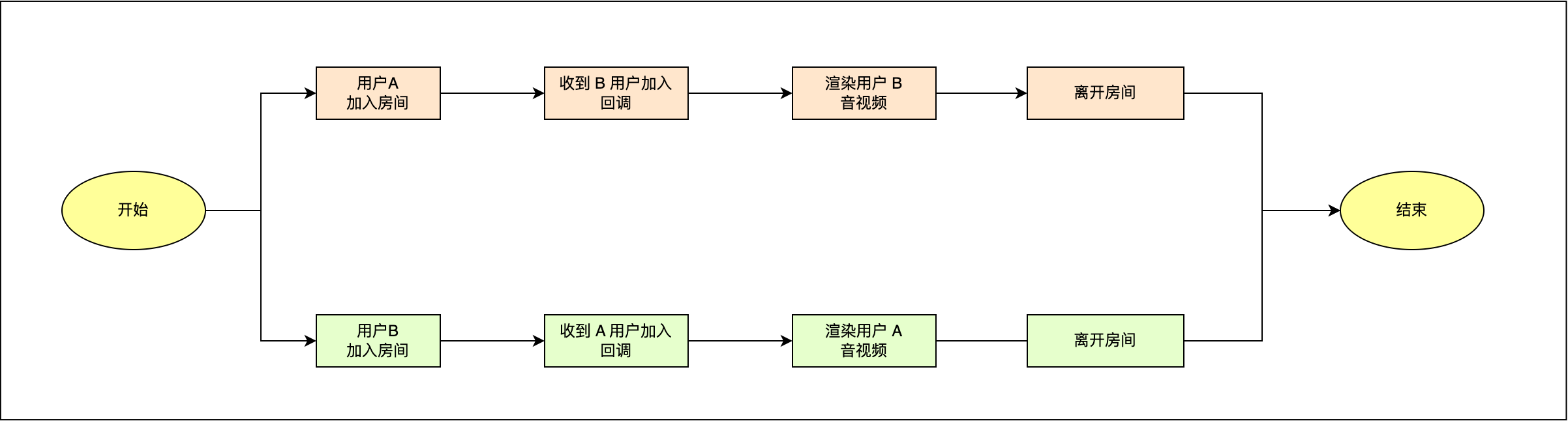
核心功能实现
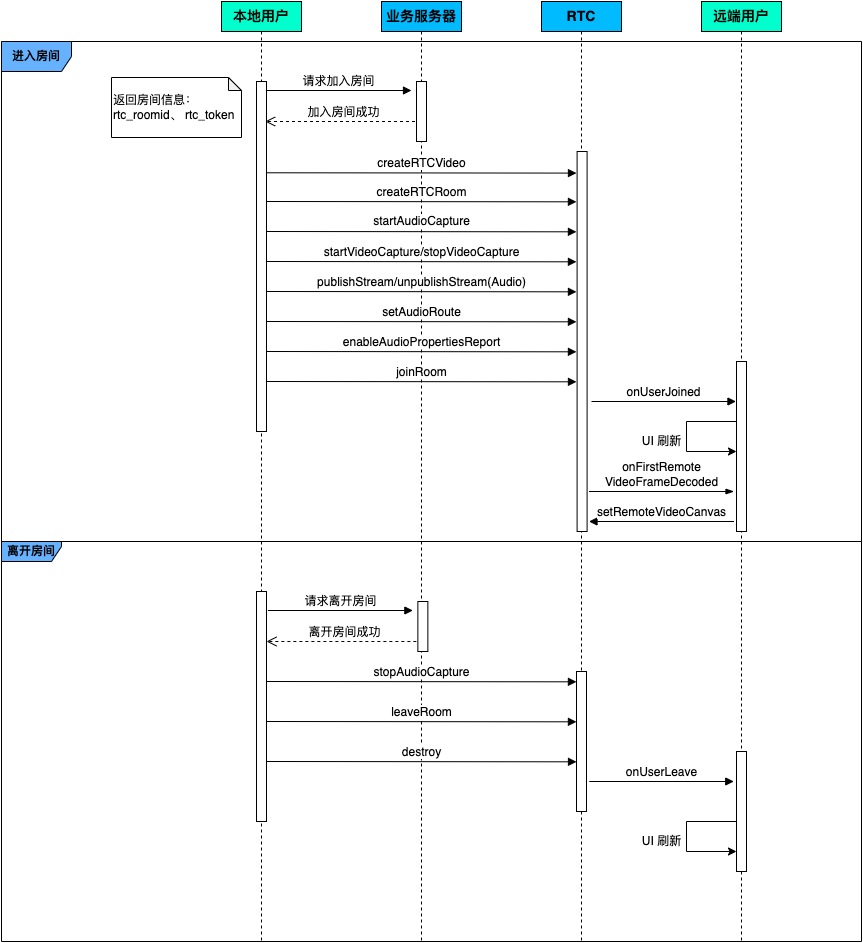
进入退出房间
时序图
示例代码
- 进入房间
const app_id = "";
const rtc_token="";
interface EngineOptions {
appId: string;
uid: string;
rtsUid: string;
roomId: string;
rtmToken: string;
serverUrl: string;
serverSignature: string;
bid: string;
}
// rtc 实例
class RtcClient {
createEngine = async (props: EngineOptions) => {
this.config = props;
this.engine = VERTC.createEngine(this.config.appId);
};
joinWithRTS = async () => {
await this.engine.login(this.config.rtmToken, this.config.rtsUid);
await this.engine.setServerParams(this.config.serverSignature, this.config.serverUrl);
};
joinRoom = (token: string | null, username: string): Promise<void> => {
// 启用音频信息提示,回调周期 2000ms
this.engine.enableAudioPropertiesReport({ interval: 2000 });
return this.engine.joinRoom(
token,
`${this.config.roomId!}`,
{
userId: this.config.uid!,
extraInfo: JSON.stringify({
user_name: username,
user_id: this.config.uid,
}),
},
{
isAutoPublish: true,
isAutoSubscribeAudio: true,
isAutoSubscribeVideo: true,
roomProfileType: RoomProfileType.meeting,
}
);
};
leaveRoom = () => {
this.engine.leaveRoom();
VERTC.destroyEngine(this.engine);
this._videoCaptureDevice = undefined;
this._audioCaptureDevice = undefined;
this._audioPlaybackDevice = undefined;
this._captureConfig = DefaultCaptureConfig;
this._encoderConfig = DefaultEncoderConfig;
};
// ...
}
// 业务层逻辑
const handleStart = async (formValues: FormProps) => {
// 创建RTC引擎对象
await RtcClient.createEngine({
appId: app_id,
});
await RtcClient.joinWithRTS();
const joinRes: any = await RtcClient.sendServerMessage('videocallJoinRoom');
await RtcClient.joinRoom(rtc_token, formValues.username);
const mediaDevices = await RtcClient.getDevices();
// 根据设备权限和是否启用,开启/关闭视频采集
if (devicePermissions.video && formValues.publishVideo) {
await RtcClient.startVideoCapture();
RtcClient.setMirrorType(MirrorType.MIRROR_TYPE_RENDER);
}
// 根据设备权限,默认采集音频
if (devicePermissions.audio) {
await RtcClient.startAudioCapture();
}
// 根据是否启用,推送音频流
if (!formValues.publishAudio) {
RtcClient.unpublishStream(MediaType.AUDIO);
}
};
- 退出房间
const handleStop = async () => {
await RtcClient.stopAudioCapture();
await RtcClient.stopVideoCapture();
await RtcClient.stopScreenCapture();
await RtcClient.leaveRoom();
};
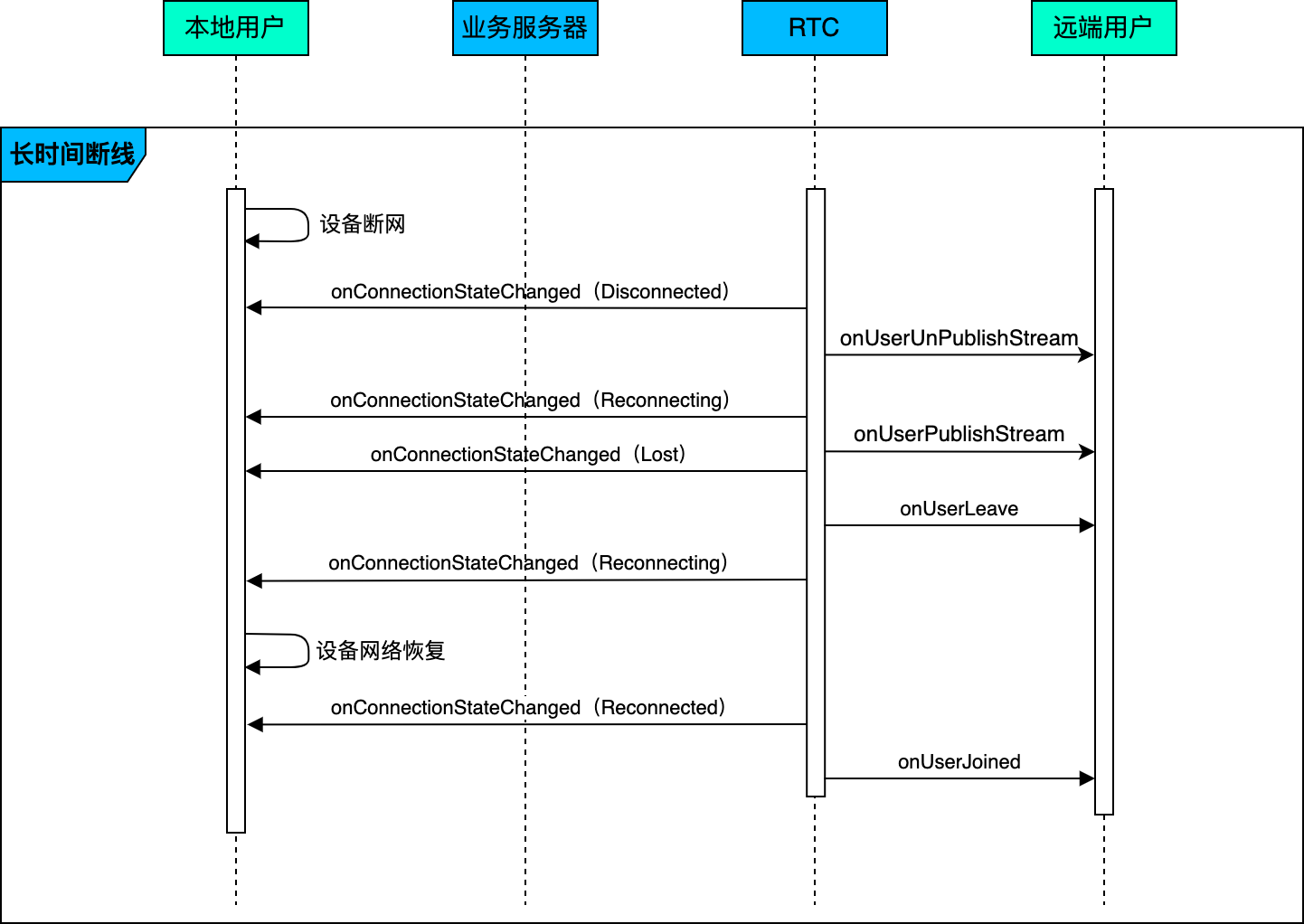
断线重连
时序图
示例代码
- 短时间断网
- 无需处理。RTC SDK 会补发断网期间丢失的消息。
- 例如:本地用户网络从 WIFI 切换到 5G,在网络切换中有远端用户加入房间。当本地用户网络切换成功后,就会收到 RTC SDK -onUserJoined 回调。
- 长时间断网,时序图和关键代码如下:
const handleConnectionStateChange = (state) =>{
if(state === ConnectionState.CONNECTION_STATE_DISCONNECTED){
message.error("网络断开链接")
}
}
const handleUserPublishStream = (e: { userId: string; mediaType: MediaType }) => {
// 更新UI
};
const handleUserUnpublishStream = (e: {
userId: string;
mediaType: MediaType;
reason: StreamRemoveReason;
}) => {
// 更新UI
};
屏幕共享
核心功能 API 与回调参考
API
功能点 | API |
创建 RTCEngine 实例 | |
设置视频发布参数 | |
开启本地音频采集 | |
开启本地视频采集 | |
设置本地视频渲染 | |
设置远端视频渲染 | |
加入 RTC 房间 | |
离开房间 | |
销毁引擎实例对象 | |
发布本地通过摄像头/麦克风采集的媒体流 | |
取消发布本地通过摄像头/麦克风采集的媒体流 | |
启用音频信息提示 | |
开启镜像 | |
设置音质档位 |
回调
功能点 | 回调 |
远端可见用户加入房间 | |
远端可见用户离开房间 | |
远端用户摄像头/麦克风采集音视频流 | |
远端用户摄像头/麦克风采集的媒体流移除 | |
本地音频回调信息 | |
远端用回调信息信息 | |
本端连接状态变化 |
最近更新时间:2026.09.22 13:34:14
这个页面对您有帮助吗?
有用
有用
无用
无用