实时音视频
实时音视频


文档指南

请输入


- 文档首页
 实时音视频AI 音视频互动方案API 参考如何调用 OpenAPI
 复制全文
复制全文 下载 pdf
如何调用 OpenAPI
 文档反馈
文档反馈 问问助手
问问助手本文主要介绍实时对话式 AI 相关 OpenAPI 的调用方法及签名鉴权方法。
准备工作
快速测试
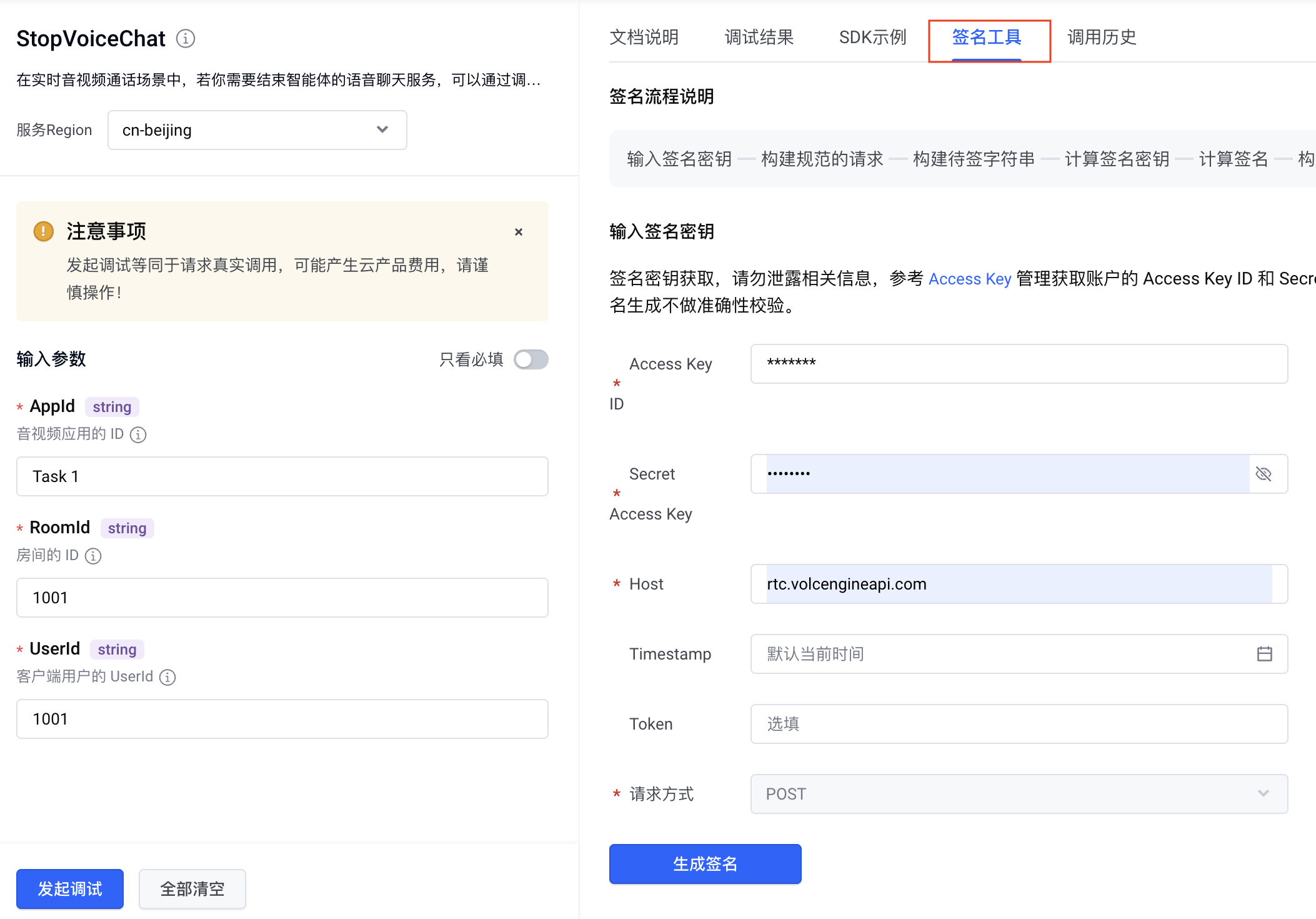
在生产环境中集成
方式一:使用官方 SDK 集成
如果您的编程语言为 Golang、Python、Java、PHP、Node.js,官方提供了已封装签名算法的示例,供直接调用。
- 修改示例文件中的配置(以 Python 为例):
- 打开下载的示例文件,找到以下配置变量,按要求修改:
- import json # 确保顶部已引入 json# --- 1. 服务固定配置 ---Service = "rtc" # 替换为 rtcVersion = "2025-06-01" # 请根据您要调用的接口文档确认版本并替换Region = "cn-north-1" Host = "rtc.volcengineapi.com" # 替换为 rtc.volcengineapi.comContentType = "application/json" # 替换为 application/json# --- 2. 填入您的密钥 ---AK = "您的Access Key ID" # 替换为您的真实 AKSK = "您的Secret Access Key" # 替换为您的真实 SK
- 构造请求。
- 定位到文件最末尾的 if __name__ == "__main__": 部分,根据您要调用的接口替换。
- if __name__ == "__main__":now = utc_now()# 1. 根据接口文档修改以下变量# =================================================================action = "StartVoiceChat" # 接口名称,请按实际接口替换method = "POST" # 请求方法,支持 "POST" 或 "GET"# 业务参数字典,请根据接口文档填写payload = {"Parameter1": "Value1","Parameter2": "Value2"}# =================================================================# 2. 发起请求(以下逻辑无需修改,签名由代码自动处理)# =================================================================response_body = Noneif method.upper() == "POST":response_body = request(method, now, {}, {}, AK, SK, action, json.dumps(payload))elif method.upper() == "GET":response_body = request(method, now, payload, {}, AK, SK, action, None)if response_body:print("\nResponse:")print(json.dumps(response_body, indent=2, ensure_ascii=False))# =================================================================
- 在终端中运行测试。
- 集成到项目:测试成功后,您可以将 request() 等核心函数复制到您的项目中,作为签名模块来调用。
方式二:自行封装接入
如果您使用的编程语言没有官网 SDK,可基于标准 HTTP 协议自行封装接入。该集成方式,您需要手动构造 HTTP 请求,并自行实现签名算法。
目前提供示例的语言有:Golang、Python、Java、PHP、Node.js。
完整请求结构
一个有效的 OpenAPI 请求必须包含:请求行 + 请求头(含签名)+ 请求体。完整结构如下:
# -------------------- Part 1: 请求行 --------------------
[Method] https://[Host]/?Action=[Action]&Version=[Version]
# -------------------- Part 2: 请求头(需携带鉴权签名) --------------------
Host: [参考下方说明]
Content-Type: [参考下方说明]
X-Date: [动态生成的当前 UTC 时间]
X-Content-Sha256: [根据 Part 3 请求体计算出的SHA256哈希值]
Authorization: [必须进行签名,用于鉴权]
# -------------------- Part 3: 请求体 --------------------
# 对于 POST 请求,这里是“接口特有参数”
{
"Parameter1": "Value1",
"Parameter2": "Value2",
...
}
请求行
- [Method]、[Action]、[Version] :可在对应接口文档获取。以 StartVoiceChat 接口为例,如下图所示:
-

- [Host]:仅支持 rtc.volcengineapi.com。
请求头(需鉴权签名)
参数 | 如何获取 / 构造 |
[Host] | 服务接入点,与请求行中的保持一致。 |
[Content-Type] | 资源的 MIME 类型。对于 POST 请求,固定为 application/json;Get 请求中,该值可为空。 |
[X-Date] | 请求时间, UTC 格式(ISO 8601),精确到秒,例如 20201230T081805Z。 |
[X-Content-Sha256] | 请求体的 SHA256 哈希值。若请求体为空,则使用一个固定的哈希值。 |
[Authorization] | 若您的编程语言是其他语言,可参考签名示例,自行构造该语言签名代码。 |
请求体
附录
完整 Python 请求示例
以下是一个调用 StopVoiceChat 接口的完整、可直接运行的 Python 示例。
请将 AK 和 SK 替换为您自己的密钥;body_payload 部分替换为实际值。
# coding:utf-8
"""
Copyright (year) Beijing Volcano Engine Technology Ltd.
Licensed under the Apache License, Version 2.0 (the "License");
you may not use this file except in compliance with the License.
You may obtain a copy of the License at
http://www.apache.org/licenses/LICENSE-2.0
Unless required by applicable law or agreed to in writing, software
distributed under the License is distributed on an "AS IS" BASIS,
WITHOUT WARRANTIES OR CONDITIONS OF ANY KIND, either express or implied.
See the License for the specific language governing permissions and
limitations under the License.
"""
import datetime
import hashlib
import hmac
import json
from urllib.parse import quote
import requests
# The following parameters vary depending on the service, but are usually consistent within a service.
# Service, Version, Region, Host, ContentType must be consistent with the API documentation.
Service = "rtc"
Version = "2025-06-01"
Region = "cn-north-1"
Host = "rtc.volcengineapi.com"
ContentType = "application/json"
# Request credentials, obtained from IAM or STS service.
# Please replace with your own real AK and SK.
AK = "AKLTM***"
SK = "WW1JMF***"
# When using temporary credentials, you need to pass the SessionToken into the Header and include it in the SignedHeader. Please add the X-Security-Token header to the header parameter yourself.
# SessionToken = ""
def norm_query(params):
query = ""
for key in sorted(params.keys()):
if type(params[key]) == list:
for k in params[key]:
query = (
query + quote(key, safe="-_. ~") + "=" + quote(k, safe="-_. ~") + "&"
)
else:
query = (query + quote(key, safe="-_. ~") + "=" + quote(params[key], safe="-_. ~") + "&")
query = query[:-1]
return query.replace("+", "%20")
# Step 1: Prepare helper functions.
# HMAC-SHA256 签名算法
def hmac_sha256(key: bytes, content: str):
return hmac.new(key, content.encode("utf-8"), hashlib.sha256).digest()
# sha256 hash algorithm
def hash_sha256(content: str):
return hashlib.sha256(content.encode("utf-8")).hexdigest()
# Step 2: Sign request function
def request(method, date, query, header, ak, sk, action, body):
# Step 3: Create credential. The Service and Region fields are fixed. ak and sk represent
# AccessKeyID and SecretAccessKey, respectively. At the same time, the signature structure needs to be initialized. Some properties required for signature calculation are also processed here.
# Initialize credential structure
credential = {
"access_key_id": ak,
"secret_access_key": sk,
"service": Service,
"region": Region,
}
# Initialize signature structure
request_param = {
"body": body,
"host": Host,
"path": "/",
"method": method,
"content_type": ContentType,
"date": date,
"query": {"Action": action, "Version": Version, **query},
}
if body is None:
request_param["body"] = ""
# Step 4: Next, start calculating the signature. Before calculating the signature, prepare the signResult variable to receive the signature calculation result and set some parameters.
# Initialize the structure of the signature result
x_date = request_param["date"].strftime("%Y%m%dT%H%M%SZ")
short_x_date = x_date[:8]
x_content_sha256 = hash_sha256(request_param["body"])
sign_result = {
"Host": request_param["host"],
"X-Content-Sha256": x_content_sha256,
"X-Date": x_date,
"Content-Type": request_param["content_type"],
}
# Step 5: Calculate the Signature.
signed_headers_str = ";".join(
["content-type", "host", "x-content-sha256", "x-date"]
)
# signed_headers_str = signed_headers_str + ";x-security-token"
canonical_request_str = "\n".join(
[request_param["method"].upper(),
request_param["path"],
norm_query(request_param["query"]),
"\n".join(
[
"content-type:" + request_param["content_type"],
"host:" + request_param["host"],
"x-content-sha256:" + x_content_sha256,
"x-date:" + x_date,
]
),
"",
signed_headers_str,
x_content_sha256,
]
)
# Print the canonical request for debugging comparison
print("CanonicalRequest:\n" + canonical_request_str)
hashed_canonical_request = hash_sha256(canonical_request_str)
# Print the hash value for debugging comparison
print("\nHashedCanonicalRequest:\n" + hashed_canonical_request)
credential_scope = "/".join([short_x_date, credential["region"], credential["service"], "request"])
string_to_sign = "\n".join(["HMAC-SHA256", x_date, credential_scope, hashed_canonical_request])
# Print the final calculated signature string for debugging comparison
print("\nStringToSign:\n" + string_to_sign)
k_date = hmac_sha256(credential["secret_access_key"].encode("utf-8"), short_x_date)
k_region = hmac_sha256(k_date, credential["region"])
k_service = hmac_sha256(k_region, credential["service"])
k_signing = hmac_sha256(k_service, "request")
signature = hmac_sha256(k_signing, string_to_sign).hex()
sign_result["Authorization"] = "HMAC-SHA256 Credential={}, SignedHeaders={}, Signature={}".format(
credential["access_key_id"] + "/" + credential_scope,
signed_headers_str,
signature,
)
header = {**header, **sign_result}
# header = {**header, **{"X-Security-Token": SessionToken}}
# Step 6: Write the Signature into the HTTP Header and send the HTTP request.
r = requests.request(method=method,
url="https://{}{}".format(request_param["host"], request_param["path"]),
headers=header,
params=request_param["query"],
data=request_param["body"],
)
return r.json()
# datetime.utcnow() is deprecated in 3.12+, use the following method for compatibility
def utc_now():
try:
from datetime import timezone
return datetime.datetime.now(timezone.utc)
except ImportError:
class UTC(datetime.tzinfo):
def utcoffset(self, dt):
return datetime.timedelta(0)
def tzname(self, dt):
return "UTC"
def dst(self, dt):
return datetime.timedelta(0)
return datetime.datetime.now(UTC())
if __name__ == "__main__":
now = utc_now()
# Please replace AppId, RoomId, TaskId with your actual situation
body_payload = {
"AppId": "67163******",
"RoomId": "10***",
"TaskId": "10***"
}
response_body = request("POST", now, {}, {}, AK, SK, "StopVoiceChat", json.dumps(body_payload))
print("\nResponse:")
print(response_body)
事件和错误码
最近更新时间:2026.09.28 10:31:34
这个页面对您有帮助吗?
有用
有用
无用
无用