实时音视频
实时音视频


文档指南

请输入


- 文档首页
 实时音视频实时音视频场景方案秀场直播连麦互动直播场景搭建(iOS)
 复制全文
复制全文 下载 pdf
场景搭建(iOS)
 文档反馈
文档反馈 问问助手
问问助手SDK集成
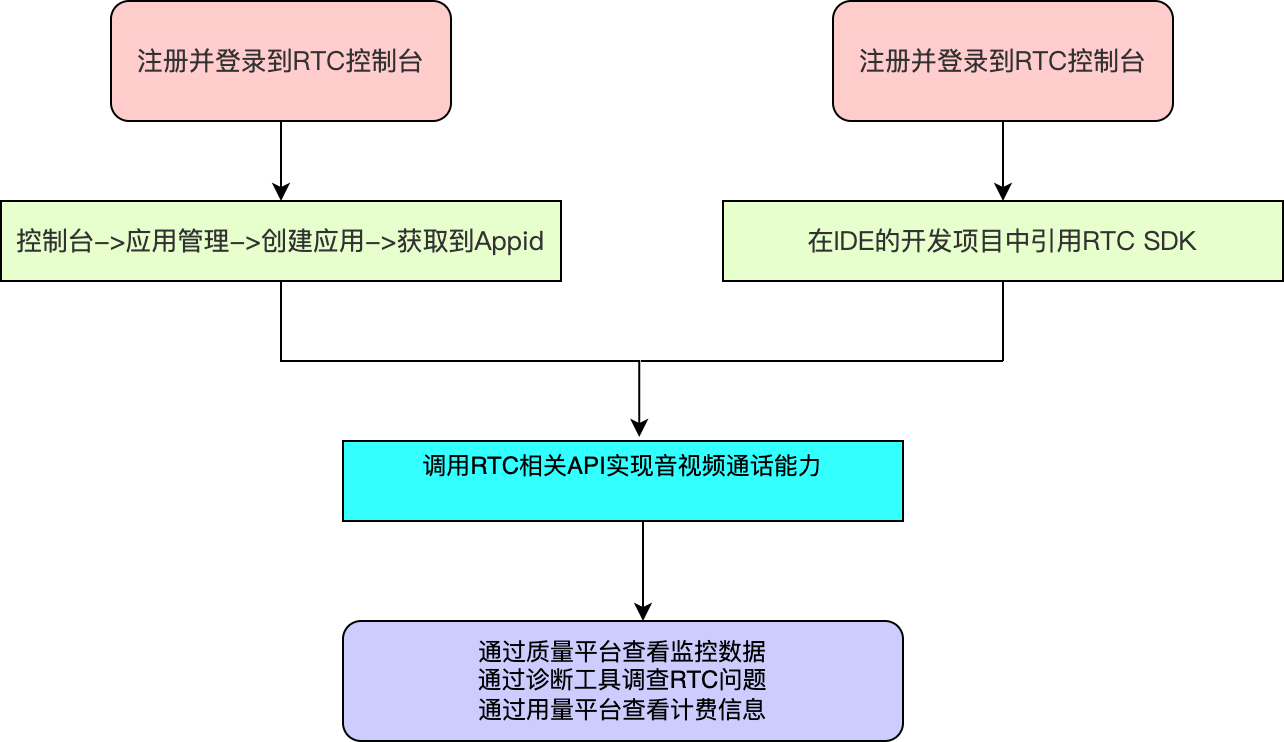
整体实现流程
整体业务流程图
- 主播与主播进行 PK
-
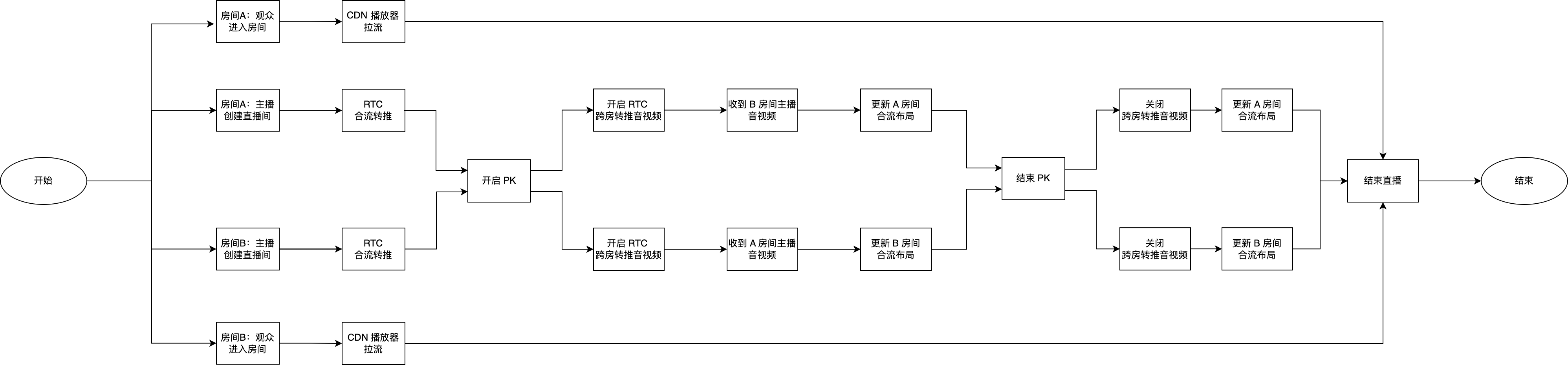
- 主播与观众进行连麦
-

核心功能实现
主播开启直播和观众进房
时序图
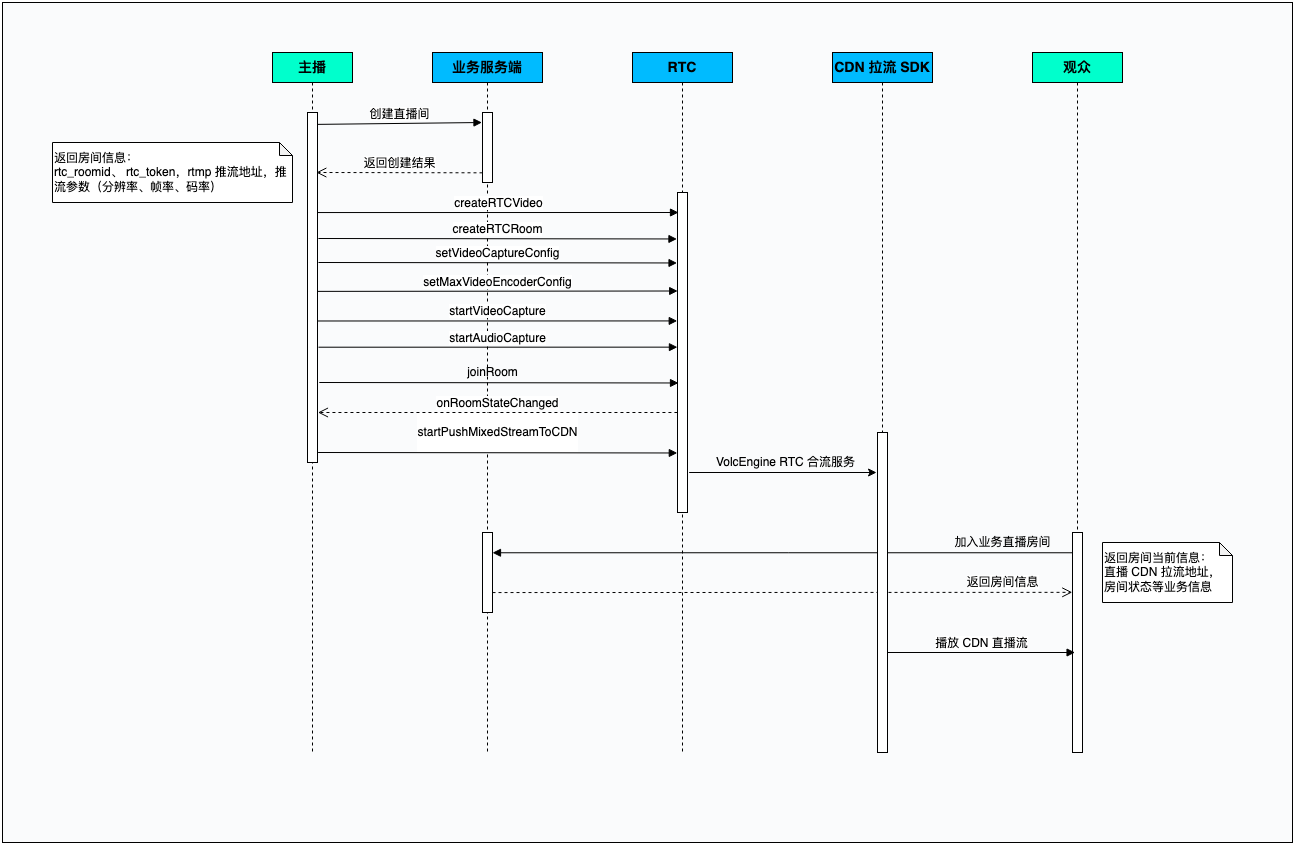
示例代码
- (void)startMixStreamRetweetWithPushUrl:(NSString *)pushUrl
rtcUid:(NSString *)rtcUid
rtcRoomId:(NSString *)rtcRoomId {
if (NOEmptyStr(pushUrl)) {
// 初始化 ByteRTCVideo 对象
// Initialize the ByteRTCVideo object
self.rtcEngineKit = [ByteRTCVideo createRTCVideo:appID
delegate:self
parameters:@{}];
// 初始化 ByteRTCRoom 对象
// Initialize the ByteRTCRoom object
self.rtcRoom = [self.rtcEngineKit createRTCRoom:rtcRoomID];
self.rtcRoom.delegate = self;
// 加入 RTC 房间
// join the RTC room
ByteRTCUserInfo *userInfo = [[ByteRTCUserInfo alloc] init];
userInfo.userId = userID;
ByteRTCRoomConfig *config = [[ByteRTCRoomConfig alloc] init];
config.profile = ByteRTCRoomProfileLiveBroadcasting;
config.isAutoPublish = YES;
config.isAutoSubscribeAudio = YES;
config.isAutoSubscribeVideo = YES;
[self.rtcRoom joinRoom:token
userInfo:userInfo
roomConfig:config];
// 设置采集分辨率
// Set the video capture config
ByteRTCVideoCaptureConfig *captureConfig = [[ByteRTCVideoCaptureConfig alloc] init];
captureConfig.videoSize = CGSizeMake(720, 1280);
captureConfig.frameRate = 15;
[self.rtcEngineKit setVideoCaptureConfig:captureConfig];
// 设置推流编码分辨率
// Set the video encoder config
ByteRTCVideoEncoderConfig *encoderConfig = [[ByteRTCVideoEncoderConfig alloc] init];
encoderConfig.videoSize = videoSize;
encoderConfig.frameRate = frameRate;
encoderConfig.maxKbps = maxKbps;
[self.rtcEngineKit setMaxVideoEncoderConfig:encoderConfig];
// 开启相机和麦克风采集
// Start video and audio capture
[self.rtcEngineKit startVideoCapture];
[self.rtcEngineKit startAudioCapture];
}
}
// 加入 RTC 房间成功
// Join RTC room succeed delegate
- (void)rtcRoom:(ByteRTCRoom *)rtcRoom onRoomStateChanged:(NSString *)roomId withUid:(NSString *)uid state:(NSInteger)state extraInfo:(NSString *)extraInfo {
if (state == 0) {
// 收到 RTC 入房成功回调之后,开始合流转推
// After receiving the successful callback of RTC entry, start to merge and retweet
[self startLiveTranscoding];
}
}
- (void)startLiveTranscoding {
// 获取合流转推视频流布局
// Get the layout of the confluence retweet video stream
NSArray *regions = [self getRegionWithUserId:rtcUid
rtcRoomId:rtcRoomId];
// 设置合流转推参数
// Confluence retweet Setting
self.mixedStreamConfig = [ByteRTCMixedStreamConfig defaultMixedStreamConfig];
self.mixedStreamConfig.layoutConfig.regions = regions;
self.mixedStreamConfig.roomID = rtcRoomId;
self.mixedStreamConfig.userID = [LocalUserComponents userModel].uid;
self.mixedStreamConfig.pushURL = pushUrl;
self.mixedStreamConfig.expectedMixingType = ByteRTCMixedStreamByServer;
self.mixedStreamConfig.audioConfig.sampleRate = 44100;
self.mixedStreamConfig.audioConfig.channels = 2;
self.mixedStreamConfig.videoConfig.fps = frameRate;
self.mixedStreamConfig.videoConfig.bitrate = maxKbps;
self.mixedStreamConfig.videoConfig.width = videoSize.width;
self.mixedStreamConfig.videoConfig.height = videoSize.height;
// 设置合流SEI
self.mixedStreamConfig.layoutConfig.userConfigExtraInfo = @"json";
// 开始合流转推
// start merge retweet
[self.rtcEngineKit startPushMixedStreamToCDN:@""
mixedConfig:self.mixedStreamConfig
observer:self];
}
- (NSArray *)getRegionWithUserId:(NSString *)userId
rtcRoomId:(NSString *)rtcRoomId {
NSInteger audienceIndex = 0;
NSMutableArray *list = [[NSMutableArray alloc] init];
ByteRTCMixedStreamLayoutRegionConfig *region = [[ByteRTCMixedStreamLayoutRegionConfig alloc] init];
region.userID = userId;
region.roomID = rtcRoomId;
region.isLocalUser = [userModel.uid isEqualToString:[LocalUserComponents userModel].uid] ? YES : NO;
region.renderMode = ByteRTCMixedStreamRenderModeHidden;
region.locationX = 0.0;
region.locationY = 0.0;
region.width = videoSize.width;//合流转推设置分辨率的宽
region.height = videoSize.height;//合流转推设置分辨率的高
region.zOrder = 1;
region.alpha = 1.0;
[list addObject:region];
return [list copy];
}
主播与观众连麦互动
时序图
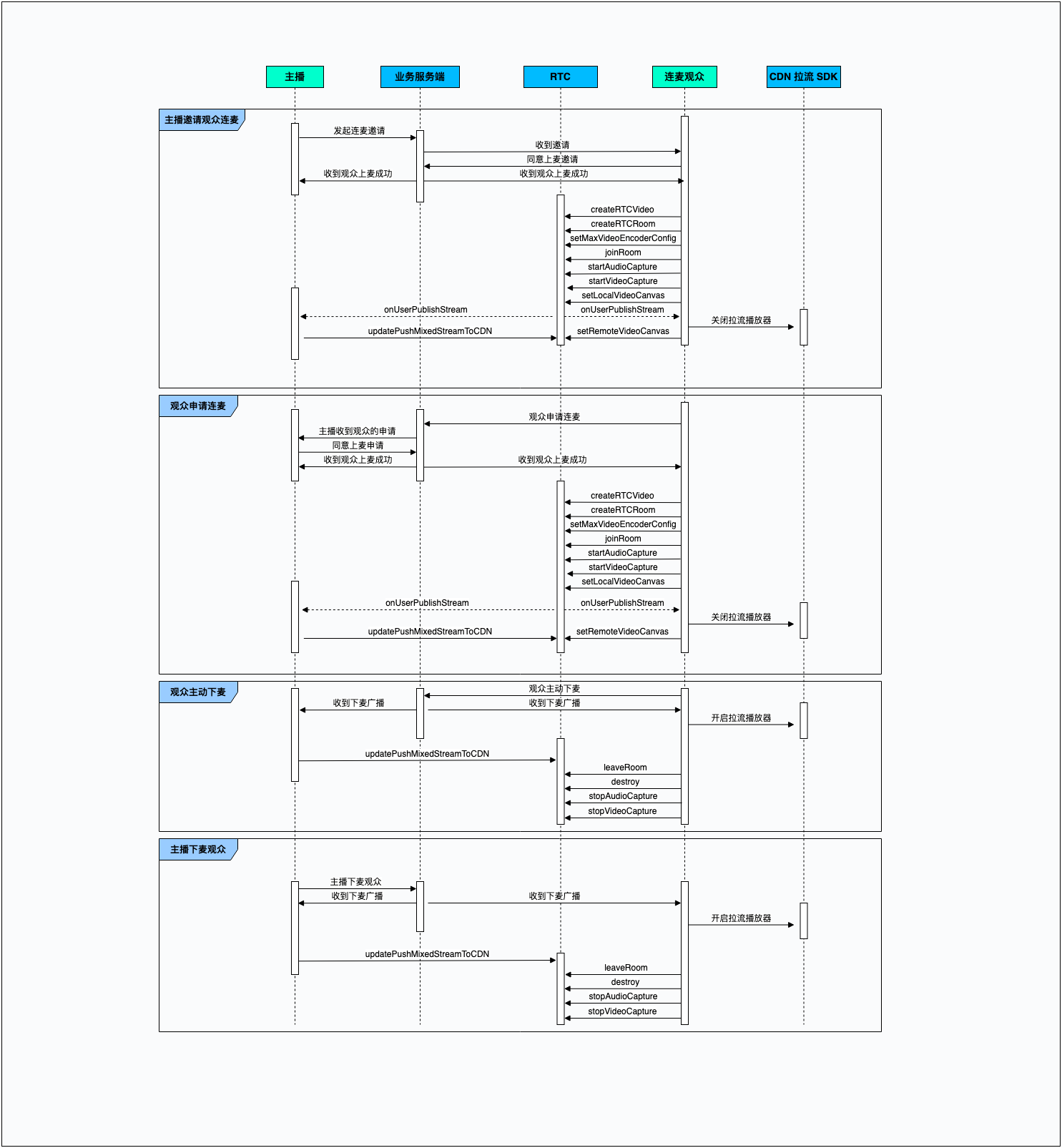
示例代码
- 观众上麦
- (void)audienceOnMic {
// 初始化 ByteRTCVideo 对象
// Initialize the ByteRTCVideo object
self.rtcEngineKit = [ByteRTCVideo createRTCVideo:appID
delegate:self
parameters:@{}];
// 初始化 ByteRTCRoom 对象
// Initialize the ByteRTCRoom object
self.rtcRoom = [self.rtcEngineKit createRTCRoom:rtcRoomID];
self.rtcRoom.delegate = self;
// 设置推流编码分辨率
// Set the video encoder config
ByteRTCVideoEncoderConfig *encoderConfig = [[ByteRTCVideoEncoderConfig alloc] init];
encoderConfig.videoSize = videoSize;
encoderConfig.frameRate = frameRate;
encoderConfig.maxKbps = maxKbps;
[self.rtcEngineKit setMaxVideoEncoderConfig:encoderConfig];
// 加入 RTC 房间
// join the RTC room
ByteRTCUserInfo *userInfo = [[ByteRTCUserInfo alloc] init];
userInfo.userId = userID;
ByteRTCRoomConfig *config = [[ByteRTCRoomConfig alloc] init];
config.profile = ByteRTCRoomProfileLiveBroadcasting;
config.isAutoPublish = YES;
config.isAutoSubscribeAudio = YES;
config.isAutoSubscribeVideo = YES;
[self.rtcRoom joinRoom:token
userInfo:userInfo
roomConfig:config];
// 开启相机和麦克风采集
// Start video and audio capture
[self.rtcEngineKit startVideoCapture];
[self.rtcEngineKit startAudioCapture];
}
- 观众下麦
- (void)audienceLeaveMic {
// 离开 RTC 房间
// Leave the RTC room
[self.rtcRoom leaveRoom];
// 释放 rtcRoom 对象
// destroy the rtcRoom object
[self.rtcRoom destroy];
self.rtcRoom = nil;
// 关闭相机和麦克风采集
// Stop video and audio capture
[self.rtcEngineKit stopVideoCapture];
[self.rtcEngineKit stopAudioCapture];
}
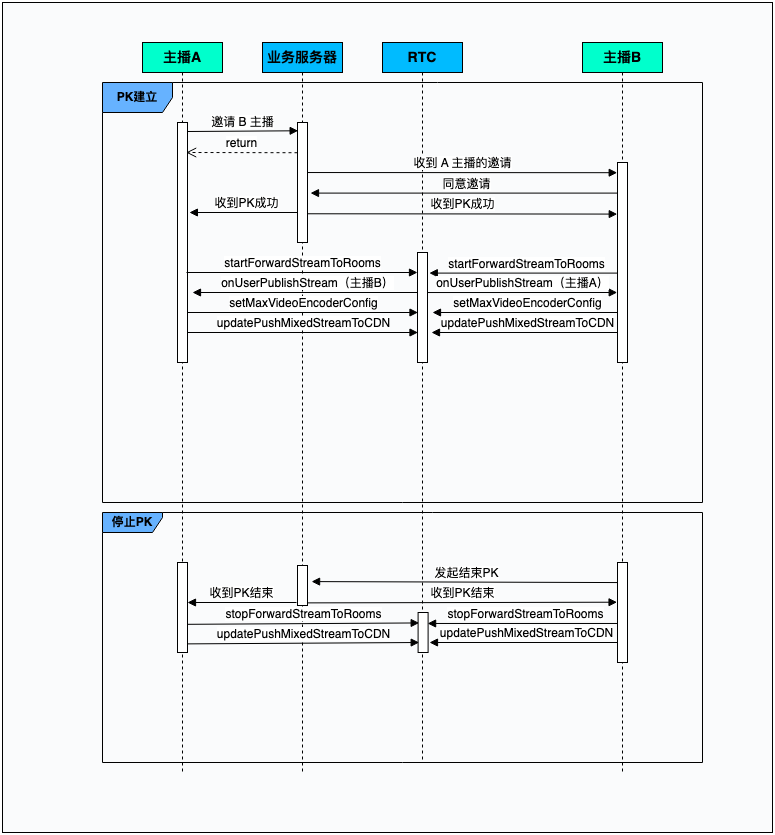
主播与主播连麦PK
时序图
示例代码
- (void)startCoHost {
// 开启跨房转推
// Enable span the room retweet stream
ForwardStreamConfiguration *configuration = [[ForwardStreamConfiguration alloc] init];
configuration.roomId = roomId;
configuration.token = token;
[self.rtcEngineKit startForwardStreamToRooms:@[configuration]];
}
- (void)rtcEngine:(ByteRTCEngineKit *)engine onUserPublishStream:(NSString *)userId type:(ByteRTCMediaStreamType)type {
// 收到 B 主播视频流回调
// Receive video stream from anchor B
if (type == ByteRTCMediaStreamTypeBoth ||
type == ByteRTCMediaStreamTypeVideo) {
// 修改 RTC 编码参数
// Encoder config
ByteRTCVideoSolution *pushRTCVideoConfig = [[ByteRTCVideoSolution alloc] init];
pushRTCVideoConfig.videoSize = videoSize;
pushRTCVideoConfig.frameRate = frameRate;
pushRTCVideoConfig.maxKbps = maxKbps;
[self.rtcEngineKit setMaxVideoEncoderConfig:@[pushRTCVideoConfig]];
// 当前主播的合流布局
// Current streamer's confluence layout
ByteRTCMixedStreamLayoutRegionConfig *localRegion = [[ByteRTCMixedStreamLayoutRegionConfig alloc] init];
// 当前登录主播的 user id
// The user id of the currently logged in host
localRegion.userID = localUserId;
localRegion.roomID = rtcRoomId;
localRegion.isLocalUser = YES;
localRegion.renderMode = ByteRTCMixedStreamRenderModeHidden;
localRegion.locationX = 0.0;
localRegion.locationY = 0.25*videoSize.height;
localRegion.width = 0.5*videoSize.width;
localRegion.height = 0.5*videoSize.height;
localRegion.zOrder = 0;
localRegion.alpha = 1.0;
// 远端主播的合流布局
// Confluence layout of remote anchors
ByteRTCMixedStreamLayoutRegionConfig *remoteRegion = [[ByteRTCMixedStreamLayoutRegionConfig alloc] init];
// 远端主播 user id
// remote host user id
remoteRegion.userID = userId;
remoteRegion.roomID = rtcRoomId;
remoteRegion.isLocalUser = NO;
remoteRegion.renderMode = ByteRTCMixedStreamRenderModeHidden;
remoteRegion.locationX = 0.5*videoSize.width;
remoteRegion.locationY = 0.25*videoSize.height;
remoteRegion.width = 0.5*videoSize.width;
remoteRegion.height = 0.5*videoSize.height;
remoteRegion.zOrder = 0;
remoteRegion.alpha = 1.0;
// 更新合流SEI
self.mixedStreamConfig.layoutConfig.userConfigExtraInfo = @"json";
// 更新合流布局
// Update Confluence Layout
self.mixedStreamConfig.layoutConfig.regions = @[localRegion, remoteRegion];
[self.rtcEngineKit updatePushMixedStreamToCDN:@""
mixedConfig:self.transcodingSetting];
}
}
核心功能 API 与回调参考
API
功能点 | API |
创建 ByteRTCVideo 实例 | createRTCVideo:delegate:parameters: |
创建 ByteRTCRoom 实例 | |
设置相机采集参数 | |
设置视频发布参数 | setMaxVideoEncoderConfig: |
设置镜像 | |
获取合流转推默认配置参数 | ByteRTCLiveTranscoding.defaultTranscoding |
加入RTC房间 | joinRoom:userInfo:roomConfig: |
离开RTC房间 | |
销毁房间对象 | |
开启合流转推 | startLiveTranscoding:transcoding:observer: |
更新合流转推参数 | updateLiveTranscoding:transcoding: |
关闭合流转推 | stopLiveTranscoding: |
开启跨房间转推 | |
关闭跨房间转推 | |
开启相机采集 | |
关闭相机采集 | |
开启麦克风采集 | |
关闭麦克风采集 | |
切换前置/后置摄像头 | |
暂停接收来自远端的媒体流 | pauseAllSubscribedStream: |
恢复接收来自远端的媒体流 | resumeAllSubscribedStream: |
回调
功能点 | 回调 |
本地用户加入 RTC 回调 | |
远端用户加入 RTC 回调 | rtcRoom:onUserJoined:elapsed: |
收到远端用户音视频流回调 | rtcRoom:onUserPublishStream:type: |
本地流数据统计以及网络质量回调 | |
远端流数据统计以及网络质量回调 |
最近更新时间:2026.09.28 10:19:27
这个页面对您有帮助吗?
有用
有用
无用
无用