实时音视频
实时音视频


文档指南

请输入


- 文档首页
 实时音视频实时音视频开发指南视频管理自定义视频采集
 复制全文
复制全文 下载 pdf
自定义视频采集
 文档反馈
文档反馈 问问助手
问问助手当你使用 RTC 实现实时音视频通信时,RTC 会使用默认的音视频模块进行视频采集和渲染。在一些场景下,你可能会发现默认模块无法满足需求,比如:
- 你的音视频应用中已实现了视频采集和渲染模块;
- 希望使用其他设备采集的视频源,如录屏信息;
- 希望对采集到的音视频数据进行一些传输前处理,如美颜等;
- 某些视频采集设备被占用。
在这些场景下,你可以参考本文,将自定义设备采集的视频源,交由 RTC 进行编码和传输。
前提条件
功能实现
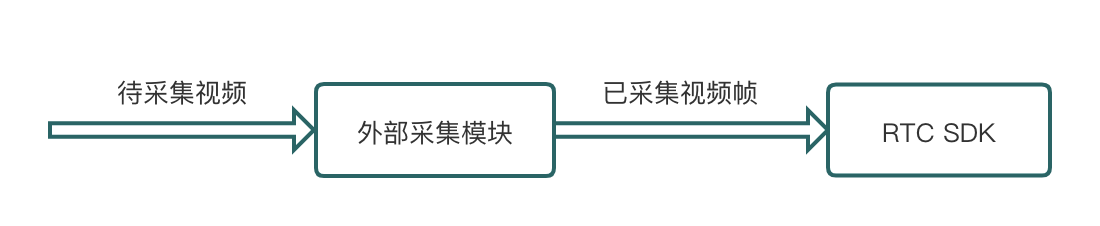
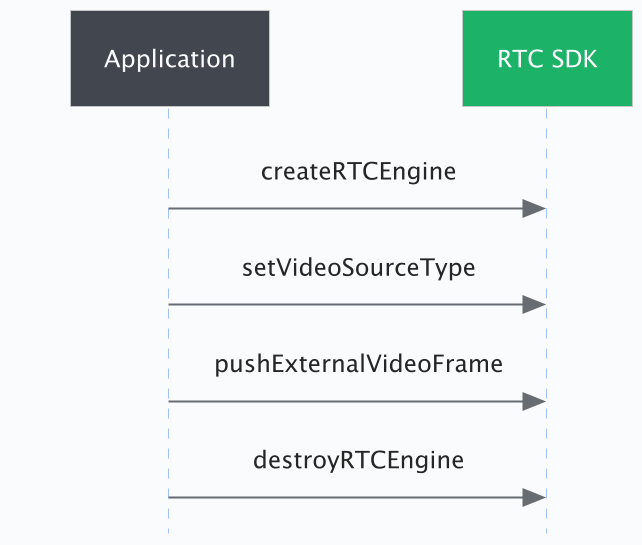
使用 setVideoSourceType 指定自定义视频源。你需要使用自采集模块驱动采集设备对视频进行采集,采集的视频帧通过 pushExternalVideoFrame 发送给 SDK。
自定义视频采集的数据流转如下图:
时序图
说明
- 以下代码基于 3.33+,此版本下,视频封装类为 VideoFrame。
- 3.32 到 3.18 版本中,视频封装类为 RtcVideoFrame,和 VideoFrame 的差别仅在于名称不同。
- 对于 3.18 以下的版本,视频封装类为 ExtVideoFrame,和 VideoFrame 的差别仅在于:ExtVideoFrame 中不包含 buffer_type。
步骤 1:指定自定义视频源
通过调用 setVideoSourceType 指定自定义视频源。
- iOS
- [self.rtcEngine setVideoSourceType:ByteRTCVideoSourceTypeExternal];
- Android
- mRTCEngine.setVideoSourceType(VIDEO_SOURCE_TYPE_EXTERNAL);
步骤 2:构建视频采集器
你可以参考以下示例项目中,Advance_Demo 中自定义采集工具类,创建你的视频采集模块。
- iOS
步骤 3:配置视频帧参数
你可以使用 pushExternalVideoFrame 中的 VideoFrame 参数,对采集到的视频数据进行编码前处理。比如,设置 VideoFrame 参数中的 rotation 为 180,即可使视频帧顺时针旋转 180 度。当然,你也可以加入自行实现的其它前处理逻辑。
你必须根据自采集视频编码数据格式,使用对应的 VideoFrame 参数。
步骤 4:推送外部视频帧
调用 pushExternalVideoFrame 将采集到的视频帧,交由 RTC 进行编码和传输。
iOS
#pragma mark - AVCaptureVideoDataOutputSampleBufferDelegate
/**
* 在接收到摄像头视频帧回调后调用 pushExternalVideoFrame 接口向 SDK 发送视频帧数据。
*/
- (void)captureOutput:(AVCaptureOutput *)output didOutputSampleBuffer:(CMSampleBufferRef)sampleBuffer fromConnection:(AVCaptureConnection *)connection {
CVPixelBufferRef buffer = CMSampleBufferGetImageBuffer(sampleBuffer);
CMTime timestamp = CMSampleBufferGetPresentationTimeStamp(sampleBuffer); // 建议增加时间戳打印,便于进行异常问题的定位和排查。
ByteRTCVideoFrameData *frame = [[ByteRTCVideoFrameData alloc] init];
frame.timestamp = timestamp;
frame.width = (int32_t)CVPixelBufferGetWidth(buffer);
frame.height = (int32_t)CVPixelBufferGetHeight(buffer);
frame.cvpixelbuffer = buffer;
frame.rotation = ByteRTCVideoRotation0;
frame.seiData = nil;
[self.rtcEngine pushExternalVideoFrame:frame];
}
Android
根据您使用的视频采集设备的不同,采集输出的视频信号可能会采取不同的视频编码方式。你需要根据不同的视频编码方式,采用不同的参数。
以下代码分别展示了采集视频采用纹理、RGBA、NV21/NV12 格式 raw 数据时,如何设置视频帧参数。
public void frameAvailable(SurfaceTexture texture) {
// 预览渲染逻辑
...
// 构建外部视频帧
VideoFrameData frame = new VideoFrameData();
frame.bufferType = VideoBufferType.GL_TEXTURE;
frame.pixelFormat = VideoPixelFormat.TEXTURE_2D;
frame.eglContext = sharedEglContext;
frame.textureId = textureId;
frame.textureMatrix = transformMatrix;
frame.width = width;
frame.height = height;
//设置旋转角度
frame.rotation = VideoRotation.VIDEO_ROTATION_0;
frame.timestampUs = (long)System.currentTimeMillis() * TimeUnit.MILLISECONDS.toNanos(1);
...
// 向 SDK 推送外部视频帧
mRTCEngine.pushExternalVideoFrame(frame);
}
public void createRGBAFrame(byte[] RGBABuffer, ColorSpace colorSpace) {
VideoFrameData frame = new VideoFrameData();
frame.bufferType = VideoBufferType.RAW_MEMORY;
frame.pixelFormat = VideoPixelFormat.RGBA;
frame.width = width;
frame.height = height;
frame.rotation = VideoRotation.VIDEO_ROTATION_0;
frame.timestampUs = (long)System.currentTimeMillis() * TimeUnit.MILLISECONDS.toMicros(1);
frame.planeData = buffers;
frame.numberOfPlanes = 1;
frame.planeStride = width * 4;
//向 SDK 推送外部视频帧
mRTCEngine.pushExternalVideoFrame(frame);
}
public void createNV21Frame(byte[] nv21Buffer, int width, int height) {
VideoFrameData frame = new VideoFrameData();
frame.bufferType = VideoBufferType.RAW_MEMORY;
frame.pixelFormat = VideoPixelFormat.NV21;
frame.width = width;
frame.height = height;
frame.rotation = VideoRotation.VIDEO_ROTATION_0;
frame.timestampUs = System.currentTimeMillis() * 1000;
ByteBuffer buffer = ByteBuffer.wrap(nv21Buffer);
frame.planeData = new ByteBuffer[2];
frame.planeStride = new int[]{width, width}; // 初始化步长数组
frame.numberOfPlanes = 2;
frame.planeData[0] = buffer.duplicate().position(0);
frame.planeData[1] = buffer.duplicate().position(width * height);
// 向 SDK 推送外部视频帧
mRTCEngine.pushExternalVideoFrame(frame);
}
public void createNV12Frame(byte[] nv12Buffer, int width, int height) {
VideoFrameData frame = new VideoFrameData();
frame.bufferType = VideoBufferType.RAW_MEMORY;
frame.pixelFormat = VideoPixelFormat.NV12;
frame.width = width;
frame.height = height;
frame.rotation = VideoRotation.VIDEO_ROTATION_0;
frame.timestampUs = System.currentTimeMillis() * 1000;
ByteBuffer buffer = ByteBuffer.wrap(nv12Buffer);
frame.planeData = new ByteBuffer[2];
frame.planeStride = new int[]{width, width};
frame.numberOfPlanes = 2;
frame.planeData[0] = buffer.duplicate().position(0);
frame.planeData[1] = buffer.duplicate().position(width * height);
// 向 SDK 推送外部视频帧
mRTCEngine.pushExternalVideoFrame(frame);
}
API 参考
以下是各个平台的相关 API 参考:
- Android:
- iOS:
- macOS:
- Windows:
- Linux:
相关文档
最近更新时间:2026.09.21 16:24:28
这个页面对您有帮助吗?
有用
有用
无用
无用