实时音视频
实时音视频


- 文档首页
 实时音视频实时音视频开发指南视频管理自定义视频渲染
 复制全文
复制全文 下载 pdf
 文档反馈
文档反馈 问问助手
问问助手适用场景
当你使用 RTC 实现实时音视频通信时,RTC 默认使用内部的渲染模块进行音视频渲染。然而在一些场景下,你可能会发现内部渲染模块无法满足需求,比如:
- 音视频应用中已实现了视频采集和渲染模块,例如开发游戏应用。
- 希望在视频渲染前对视频帧做一些额外的处理,比如存储为图片、增加视频特效等。
前提条件
你已经集成了 3.25 及以上版本的 RTC SDK,实现了基本的音视频通话。
功能说明
将 RTC SDK 在本地采集的视频图像或远端用户的视频图像通过自定义的渲染模块进行渲染。
说明:不同平台的实现步骤相同,但接口名称、参数名称可能略有差异。以下指南以 Android RTC SDK 为例,参考对应平台的 API 参考 获取更多信息。
时序图
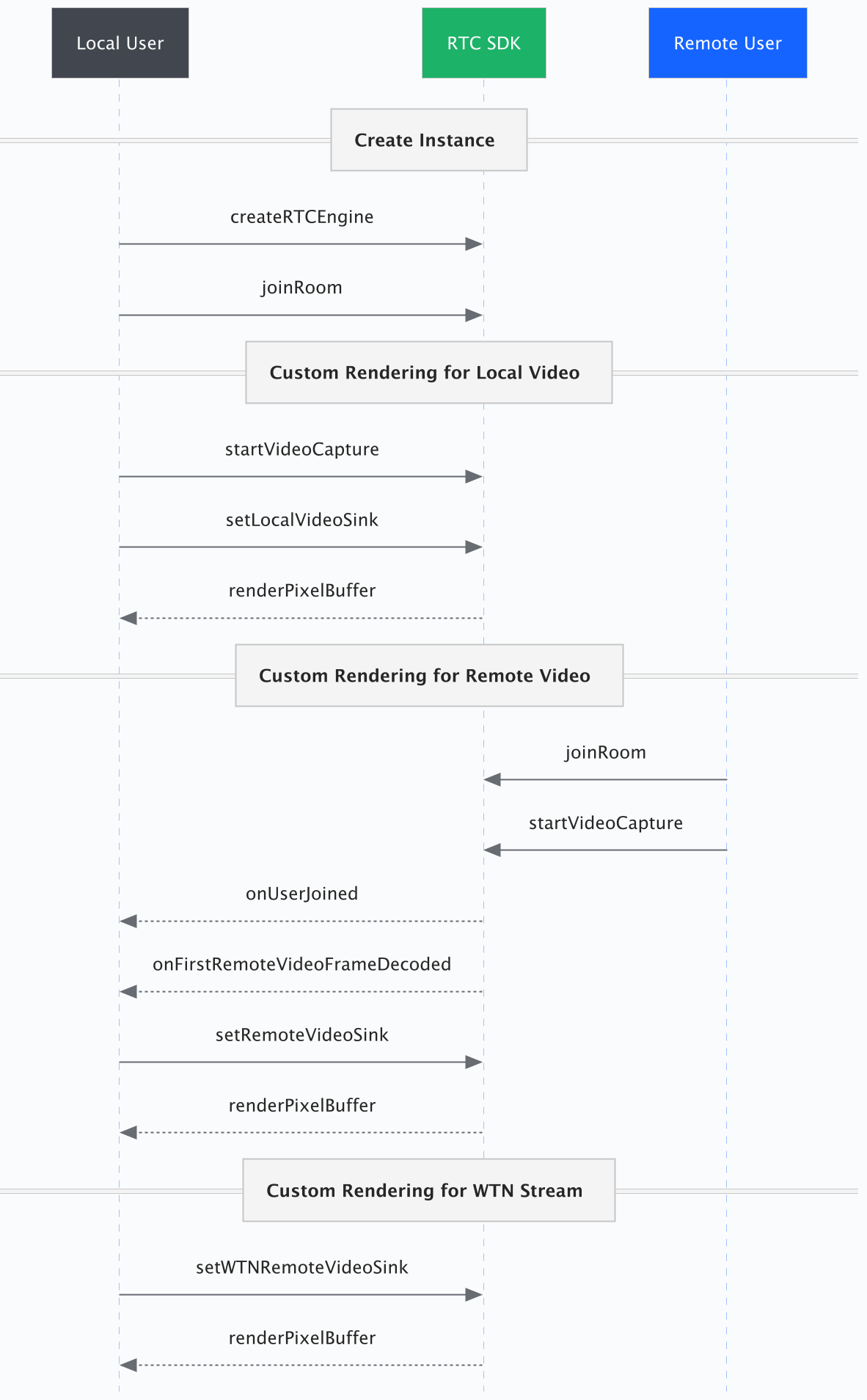
步骤1:构建自定义渲染器
注意:由于硬件差异,通过
onFrame收到的视频帧可能会呈一定角度。你可以调用getRotation获取该角度,并在自定义渲染器中进行相应处理。
- (void)rtcEngine:(ByteRTCEngine * _Nonnull)engine onFirstRemoteVideoFrameDecoded:(NSString * _Nonnull)streamId info:(ByteRTCStreamInfo* _Nonnull)info withFrameInfo:(ByteRTCVideoFrameInfo * _Nonnull)frameInfo {
    ByteRTCRemoteVideoSinkConfig *sinkConfig = [[ByteRTCRemoteVideoSinkConfig alloc] init];
    sinkConfig.requiredPixelFormat = ByteRTCVideoSinkPixelFormatNV12;
    CustomVideoRenderView *renderView = [[CustomVideoRenderView alloc] init];
    [self.rtcEngine setRemoteVideoSink:streamId withSink:renderView withRemoteRenderConfig:sinkConfig];
}
步骤2:绑定自定义渲染器
获取到视频流信息以后,将视频流绑定到自定义渲染器。通过传入参数 requiredFormat 指定视频数据的像素格式。
渲染本地视频
调用 setLocalVideoSink 为本地媒体流指定自定义渲染器。
在开始采集之后,视频帧将通过 onFrame 传递到自渲染模块。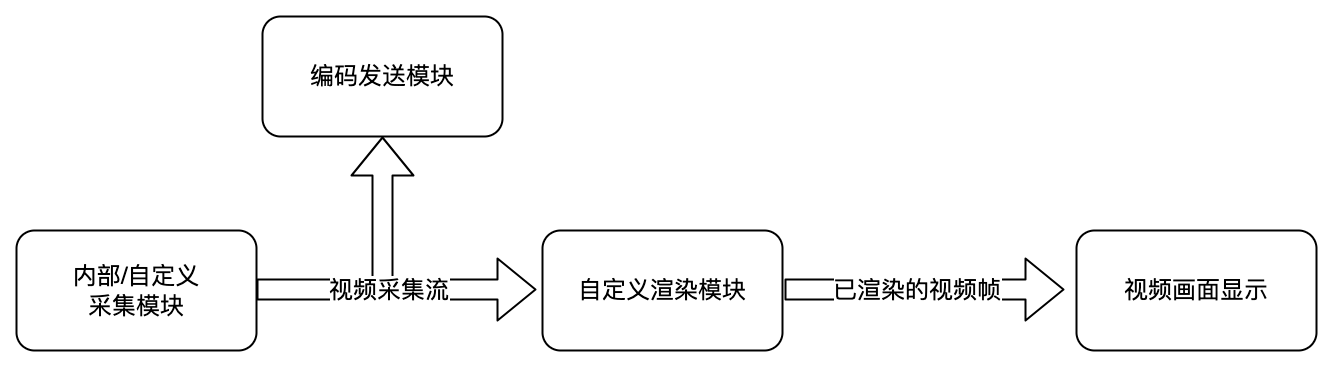
[self.rtcEngine startVideoCapture];
    CustomVideoRenderView *renderView = [[CustomVideoRenderView alloc] init];
    ByteRTCLocalVideoSinkConfig *sinkConfig = [[ByteRTCLocalVideoSinkConfig alloc] init];
    sinkConfig.requiredPixelFormat = ByteRTCVideoSinkPixelFormatNV12;
    [self.rtcEngine setLocalVideoSink:renderView withLocalRenderConfig:sinkConfig];
渲染远端视频
调用 setRemoteVideoSink 为远端媒体流指定自定义渲染器。
绑定自定义渲染器所需的媒体流参数可以从 onFirstRemoteVideoFrameDecoded 回调获取。
用户进入房间,并订阅了远端视频流,视频帧到达后将通过 onFrame 传递到自渲染模块。
- (void)rtcEngine:(ByteRTCEngine * _Nonnull)engine onFirstRemoteVideoFrameDecoded:(NSString * _Nonnull)streamId info:(ByteRTCStreamInfo* _Nonnull)info withFrameInfo:(ByteRTCVideoFrameInfo * _Nonnull)frameInfo {
    ByteRTCRemoteVideoSinkConfig *sinkConfig = [[ByteRTCRemoteVideoSinkConfig alloc] init];
    sinkConfig.requiredPixelFormat = ByteRTCVideoSinkPixelFormatNV12;
    CustomVideoRenderView *renderView = [[CustomVideoRenderView alloc] init];
    [self.rtcEngine setRemoteVideoSink:streamId withSink:renderView withRemoteRenderConfig:sinkConfig];
}
渲染 WTN 流视频
调用 setWTNRemoteVideoSink 为 WTN 流指定自定义渲染器。
用户订阅了 WTN 流,视频帧到达后,将通过 onFrame 传递到自渲染模块。
更多关于 WTN 流的信息详见发布和订阅 WTN 流。
/**
 * 设置 WTN 流视频渲染
 * @param streamId  WTN 流ID
 */
- (void)setPublicStreamCustomVideoRender:(NSString *)streamId {
    ByteRTCWTNStream *stream = [self.rtcEngine getWTNStream];
    if (stream != nil) {
        CustomVideoRenderView *renderView = [[CustomVideoRenderView alloc] init];
        ByteRTCRemoteVideoSinkConfig *sinkConfig = [[ByteRTCRemoteVideoSinkConfig alloc] init];
        sinkConfig.requiredPixelFormat = ByteRTCVideoSinkPixelFormatNV12;
        [stream setWTNRemoteVideoSink:streamId withSink:renderView withConfig:sinkConfig];
    }
}
步骤3:解绑自定义渲染器
调用步骤2 中提到的相应接口,将 videoSink 设置为 null。解绑之后,视频帧将通过 SDK 内部渲染器进行渲染。
/**
 * 解绑本地自定义渲染
 */
- (void)unBindLocalCustomVideoRender {
    ...
    [self.rtcEngine setLocalVideoSink:nil withLocalRenderConfig:sinkConfig];
}
/**
 * 解绑远端视频自定义渲染
 * @param streamId 远端视频信息
 */
- (void)unBindRemoteCustomVideoRender:(NSString *)streamId {
    ...
    [self.rtcEngine setRemoteVideoSink:streamId withSink:nil withRemoteRenderConfig:sinkConfig];
}
/**
 * 解绑 WTN 流视频自定义渲染
 * @param streamId  WTN 流ID
 */
- (void)unBindPublicStreamCustomVideoRender:(NSString *)streamId {
    ByteRTCWTNStream *stream = [self.rtcEngine getWTNStream];
        if (stream != nil) {
             ...
            [stream setWTNRemoteVideoSink:streamId withSink:nil withConfig:sinkConfig];
        }
}
API 参考
注:自3.60版本起,新的API:
setWTNRemoteVideoSink方法替代了原来的setPublicStreamVideoSink方法。方法参数亦有变化。以iOS端举例,原来为setPublicStreamVideoSink:withSink:withPixelFormat:,现在为setWTNRemoteVideoSink:withSink:withConfig:。