Billing Center
Billing Center


Document

- Documentation
 Billing CenterCoupon Management
 Copy page
 Download PDF
Billing Center
Coupon Management
Copy pageDownload PDFCoupon Management
Coupons are account assets issued to users by the Volcano Engine platform and can be used to offset the order amount of prepaid products and the bill amount of postpaid products. Users can log in to the Volcano Engine official console and view their coupons on the [Billing Center] > [Coupon Management] page.
Coupons cannot be withdrawn, transferred, invoiced, extended, used across accounts, or applied to unpaid balances. Once used, coupons are non-refundable.
Coupon Inquiry
1. Log in to the Volcano Engine official console and click [Billing Center] at the top right to enter the billing center.
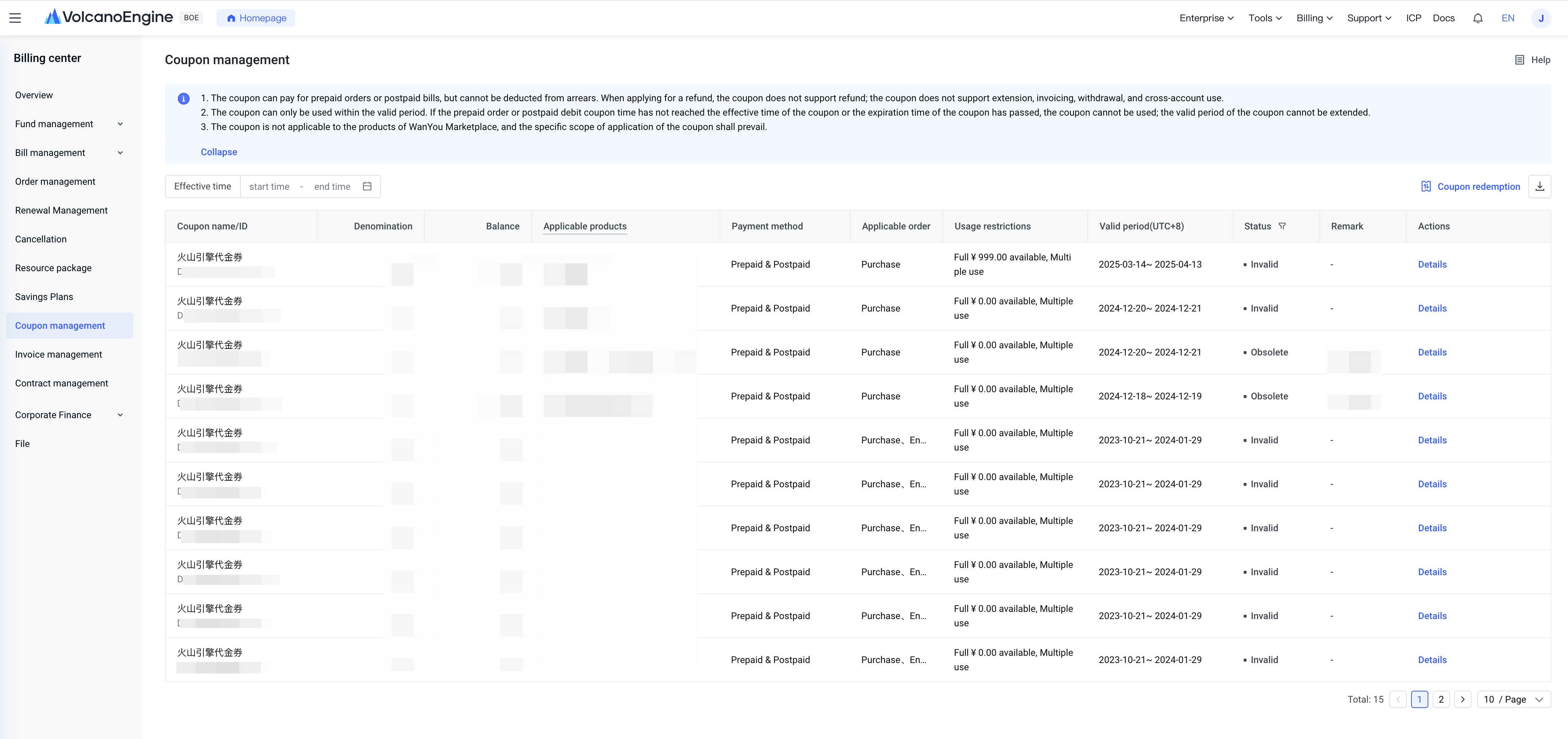
2. Click the [Coupon Management] menu in the left navigation bar to access the coupon management list page.
3. You can directly view each coupon's name, ID, denomination, balance, applicable products, payment method, applicable order types, usage restrictions, validity period, and status in the list. You can also search by coupon status and effective date.
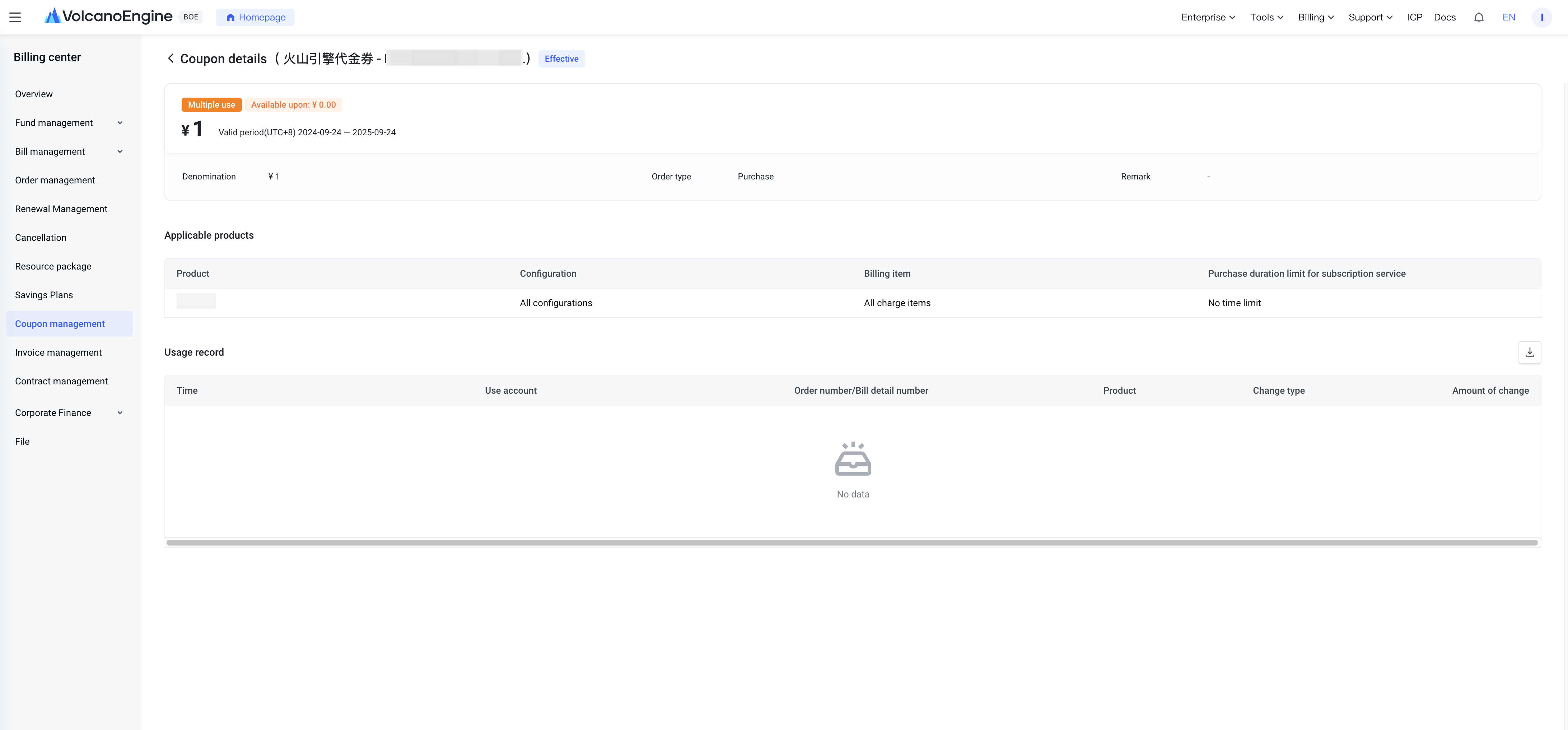
4. Click "Details" in the actions column to see detailed usage records of the coupon.
Use of coupons
Coupons issued by Volcano Engine platform currently support use for both prepaid orders and postpaid bills.
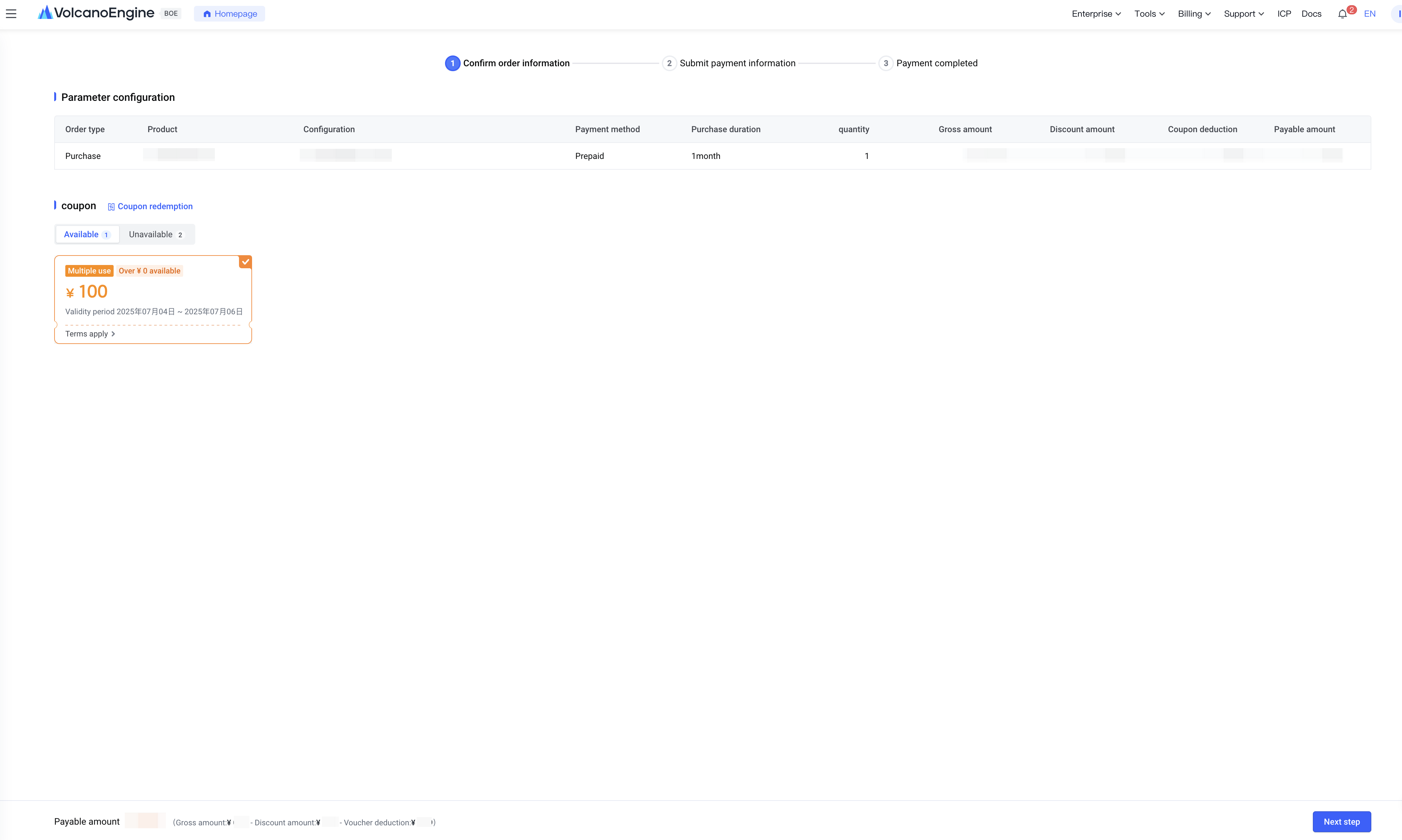
For prepaid orders, the system displays applicable coupons on the order confirmation page based on product, order type, order amount, and other conditions. Only one coupon can be used per order. If multiple coupons are available, the system selects one by default according to priority. Users can choose another available coupon or opt not to use a coupon for this order. If the coupon balance is less than the order amount, the remaining amount must be paid with cash or account balance.
For postpaid bills, when deducting payment from the bill, the system matches applicable coupons based on the product and bill amount. If multiple coupons are available, the system sorts them by priority and applies them sequentially until the bill is fully covered or coupon balances are exhausted. If the coupon balance is still less than the bill amount, users must repay the remaining part.
Coupon usage restrictions
1. Coupon status
Coupon statuses are: Not effective, Effective, Invalid, Used up, and Obsolete.
- Not effective: before the coupon’s start date, and balance > 0.
- Effective: within the coupon validity period and balance > 0.
- Invalid: beyond the coupon validity period, and balance was > 0 during validity, or the coupon limits single-use and has been used; any of these conditions apply.
- Used up: balance exhausted within the coupon validity period.
- Obsolete: coupon reclaimed by the platform backend.
2. Applicable product scope
Coupons apply to one or more product configurations on Volcano Engine's official website. The applicable product scope varies by channel or promotion. The actual applicable products are those shown under "Applicable Products" on the coupon management page or automatically matched usable coupons on the order confirmation page.
1) Product:
This coupon applies to expenses incurred on specified products.
2) Configuration:
- All configurations: This coupon applies to expenses incurred on all configurations under the available products.
- All prepaid configurations: The coupon applies to consumption generated by all prepaid configurations under the available products.
- All postpaid configurations: The coupon applies to consumption generated by all postpaid configurations under the available products.
- Specified configuration (displaying the specific configuration name): The coupon applies to consumption generated by the specified configuration under the available products.
3) ChargeItem:
- All chargeItems: The coupon applies to consumption generated by all charge items under the specified configuration of the available products.
- Specified charge item (displaying the specific charge item): The coupon applies to consumption generated by the specified charge item under the specified configuration of the available products.
3. prepaid purchase duration limit
Within the validity period, limit the duration for each purchase, change config, or renewal. For example, for a product configuration with monthly billing, if the coupon’s purchase duration limit is 0 to 6 months, then each order must have a purchase duration within 0 to 6 months to use the coupon.
Purchase duration limits for daily/monthly/annual billing methods are independent and cannot be converted between each other. For example: the coupon purchase limit period is: monthly subscription valid for 0 to 6 months & yearly subscription valid for 0 to 1 year. When purchasing a product configured with the monthly billing method, the system matches the monthly purchase limit period. If you buy 12 months, which exceeds the 0 to 6 months valid range, the coupon cannot be used.
4. applicable order types
For prepaid orders, coupons apply to one or more of the following order types: “purchase” “end trial” “change config” “renew” and “temporary upgrade.” The applicable order types vary depending on the channel or promotional activity issuing the coupons. The actual applicable order types are those shown under “applicable orders” on the coupon management page or those automatically matched by the system on the order confirmation page.
5. minimum amount for use
This applies only to a single payment. The order or bill amount must reach XX yuan to use the coupon for deduction.
6. validity period
Coupons can only be used within their validity period. If the coupon has not yet taken effect during prepaid order placement or postpaid billing, please wait patiently for it to become effective before using. If the coupon expires during prepaid order placement or postpaid billing, it can no longer be used. The coupon validity period cannot be extended.
7. usage limit
Coupons are classified as single-use or multi-use based on usage frequency.
- Single-use: The coupon can be used only once. After use, if the balance is greater than 0, its status changes to "invalid"; if the balance is 0, the status changes to "used up." In both cases, it cannot be reused regardless of balance.
- Multi-use: The coupon can be used multiple times until the expiration date or until the balance is fully used, after which it becomes unusable.
8. Specify applicable accounts
If your account is a financial custody primary account, the business can specify the applicable account range when issuing coupons to you.
- If there is no restriction on applicable accounts, the coupon page will not display the "Specify applicable account" section. This means the financial custody primary account and all its custody sub-accounts can share the coupon.
- If the applicable account range is restricted, the coupon page will display the "Specify applicable account" field, indicating that only the account IDs in "Specify applicable account" can use the coupon.
- If the "Specify applicable account" is the custody primary account, only the custody primary account itself can use the coupon when placing orders or incurring charges.
- If the "Specify applicable account" is a custody sub-account, only the specified custody sub-account can use the coupon during custody when placing orders or incurring charges. After terminating custody, the specified custody sub-account can no longer use the coupon.
9. Coupon priority rules
To improve payment success rates, coupons will be prioritized in the following order. If conditions are equal, the next criterion is considered:
- larger deductible amount > smaller deductible amount: coupons with a larger deductible amount are used first;
- closer to expiration > farther from expiration: coupons that expire sooner are used first;
- multiple-use > single-use: coupons that allow multiple uses are prioritized;
- smaller balance > larger balance: coupons with a smaller balance are used first;
- narrower applicable range > wider applicable range: coupons with a narrower product scope are prioritized;
- higher amount limit > lower amount limit: coupons with a higher minimum spend requirement (X or more) are prioritized;
- fewer specified applicable accounts > more specified applicable accounts: coupons limited to fewer accounts are prioritized;
- If priorities cannot be determined after the above criteria, in prepaid scenarios, the system randomly displays coupons with equal conditions first; in postpaid and auto-renewal scenarios, the system randomly applies coupons with equal conditions;
-
Coupon acquisition and redemption
1. How to obtain
You can usually obtain coupons through the following methods:
- Get coupons from the Volcano Engine official website activity page. coupons vary by promotion. Please check the Volcano Engine official website for detailed event information.
- Redeem codes obtained through other channels into coupons. For details, refer to the coupon redemption process below.
2. Redemption process
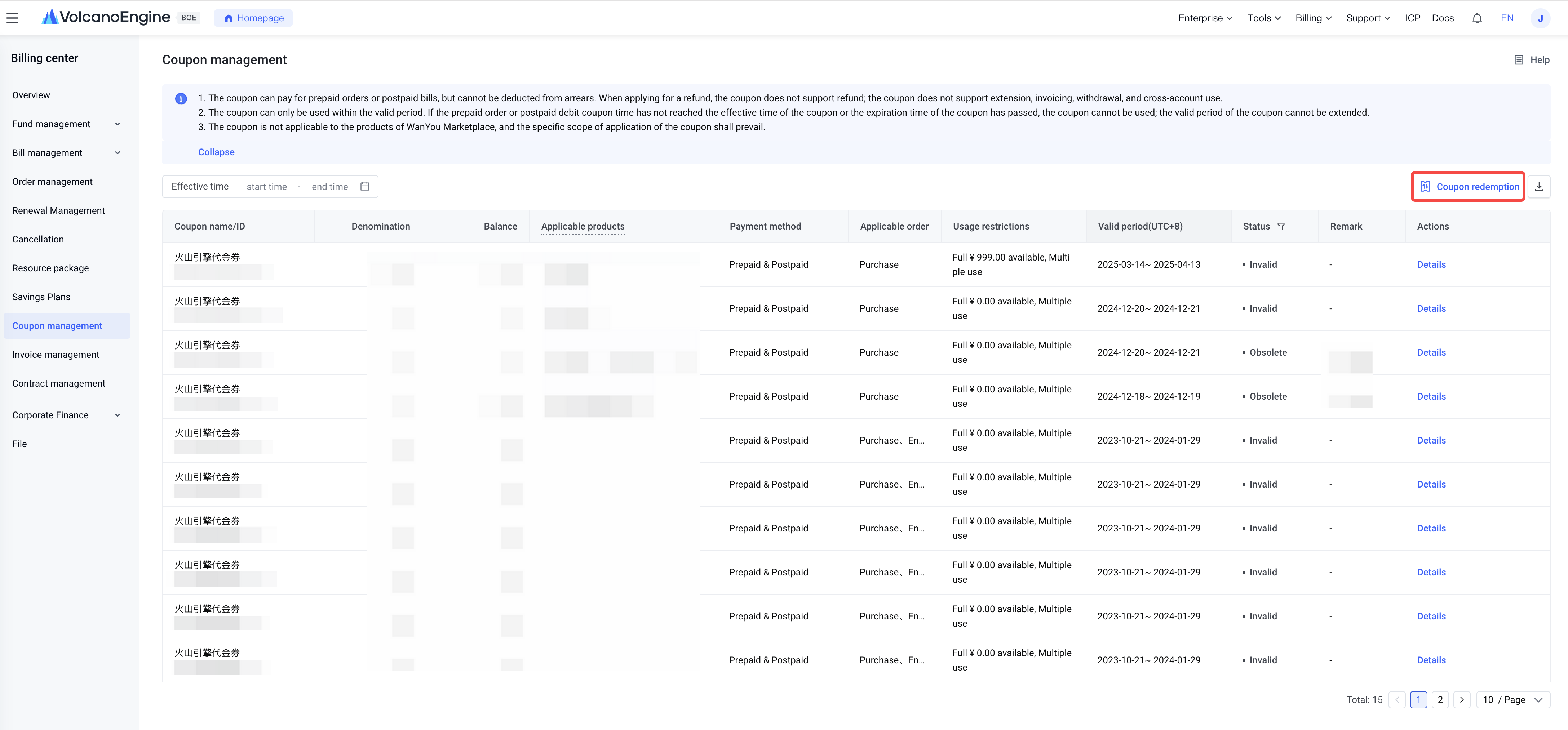
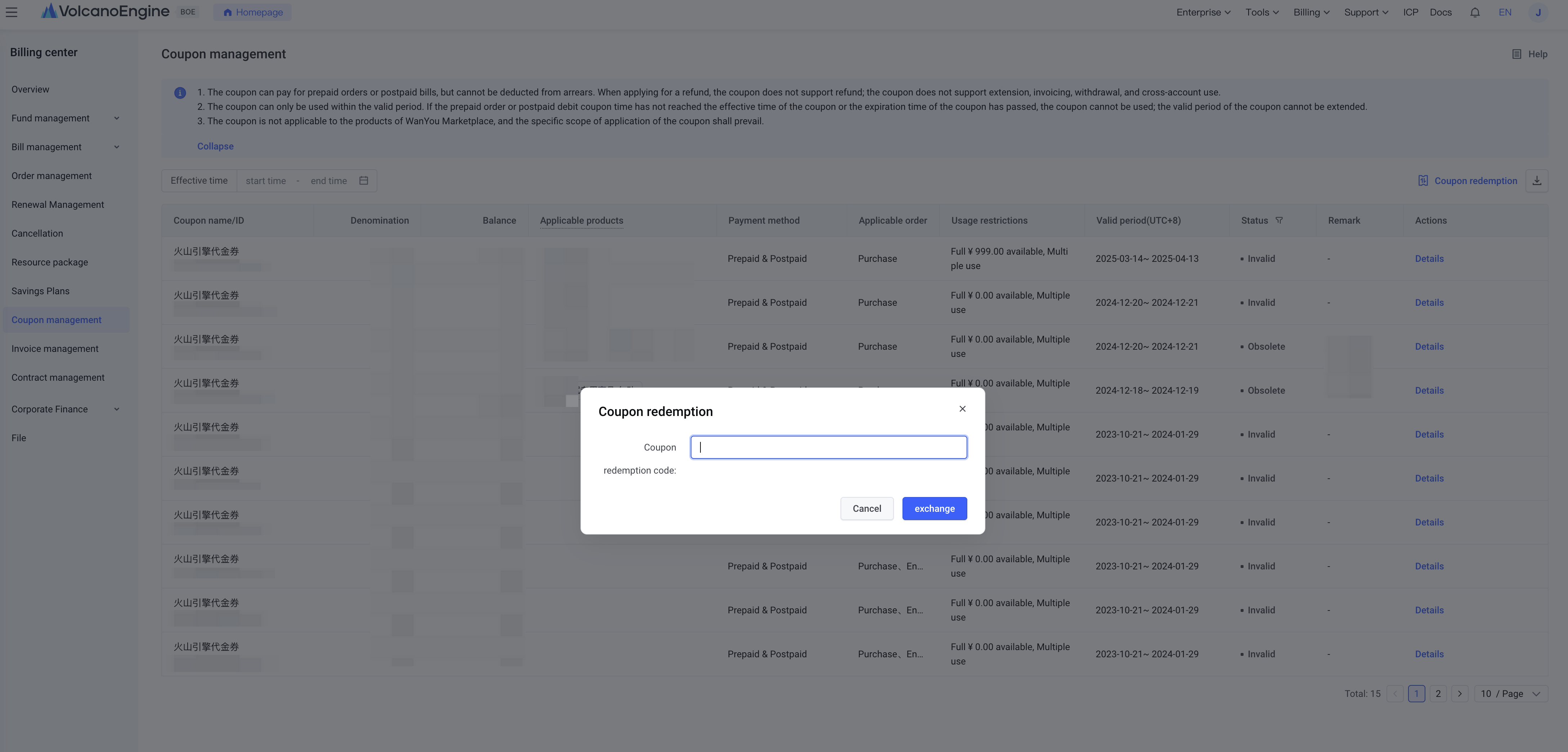
1. Log in to the Volcano Engine official website console. Go to [Billing Center] > [Coupon Management], click [Coupon Redemption] at the top right of the list, enter the coupon code in the popup window, then click [Redeem] to complete the redemption.
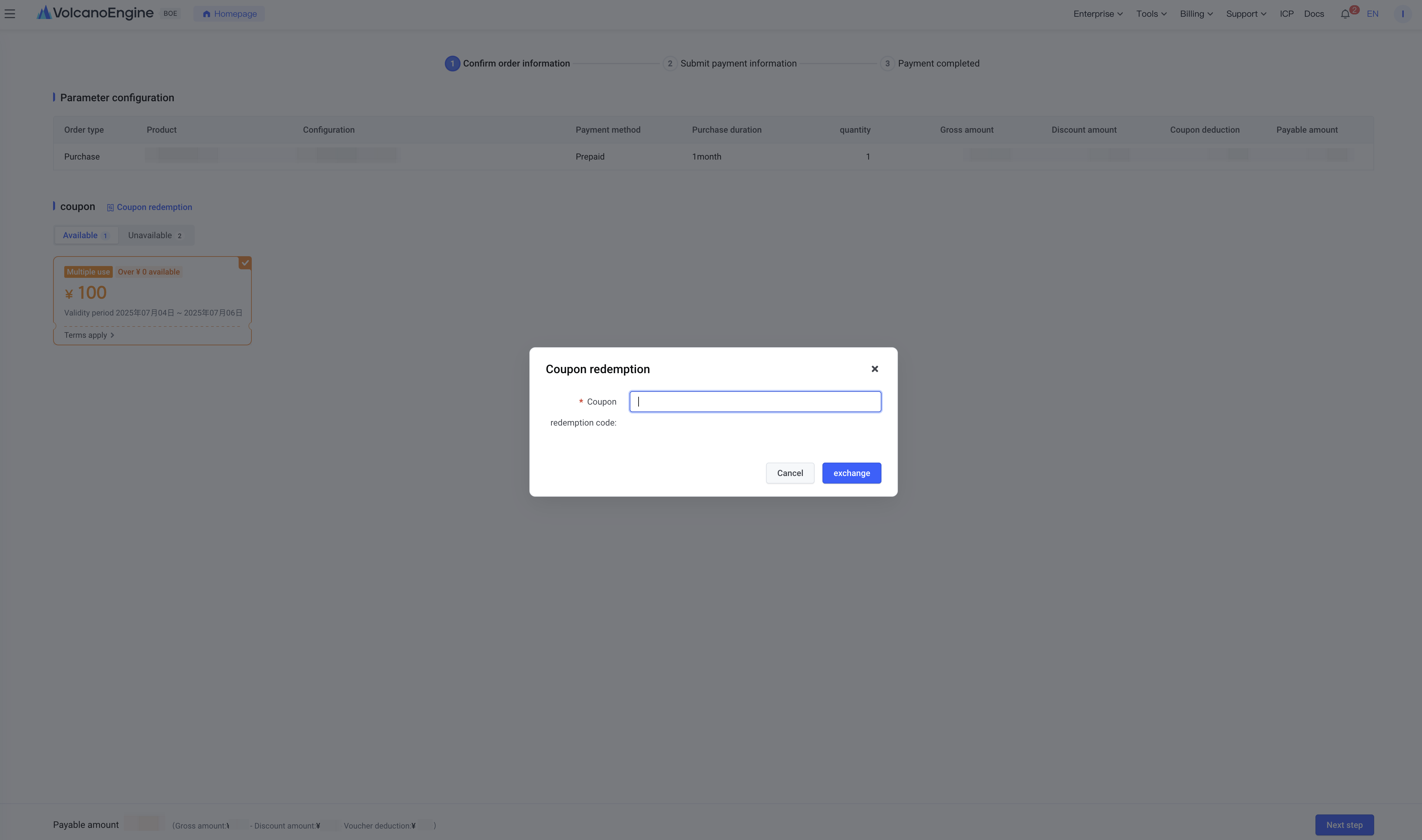
2. When purchasing Volcano Engine products, click [Coupon Redemption] on the order confirmation page on the right, enter the coupon code in the popup window, then click [Redeem] to complete the redemption.
Last updated: 2025.07.10 15:21:55
All rights reserved © Beijing Volcano Engine Technology Co., Ltd2024
