Billing Center
Billing Center


Document

- Documentation
 Billing CenterAccount OverviewSet up bill consumption alerts
 Copy page
 Download PDF
Account Overview
Set up bill consumption alerts
Copy pageDownload PDFSet up bill consumption alerts
Function introduction
You can set up billing consumption alerts on demand. When the accumulated consumption amount of the postpaid daily bill of the product or account is greater than the warning threshold, the user will be reminded by text message.
- Warning rules:
- The statistical range is the amount payable by the bill at 0-24 o'clock on the day of the transaction.Currently, we support up to 30 warning items. When there are many warning items that meet the warning conditions, you may not be able to receive SMS due to channel frequency control restrictions. Please set warning items as needed; you can go to to adjust the account contact person for bill consumption warning notifications.
- A warning item is reminded once a day. The notification time is the morning of the next day, the recipient is the account contact, and the default notification channel is SMS. You can go to the to adjust the contacts and notification channels of the bill consumption warning notification.
Operation steps
- Access to account overview :
Click the "Bill Consumption Warning" button to expand the setting warning item drawer page;
- Add warning items:
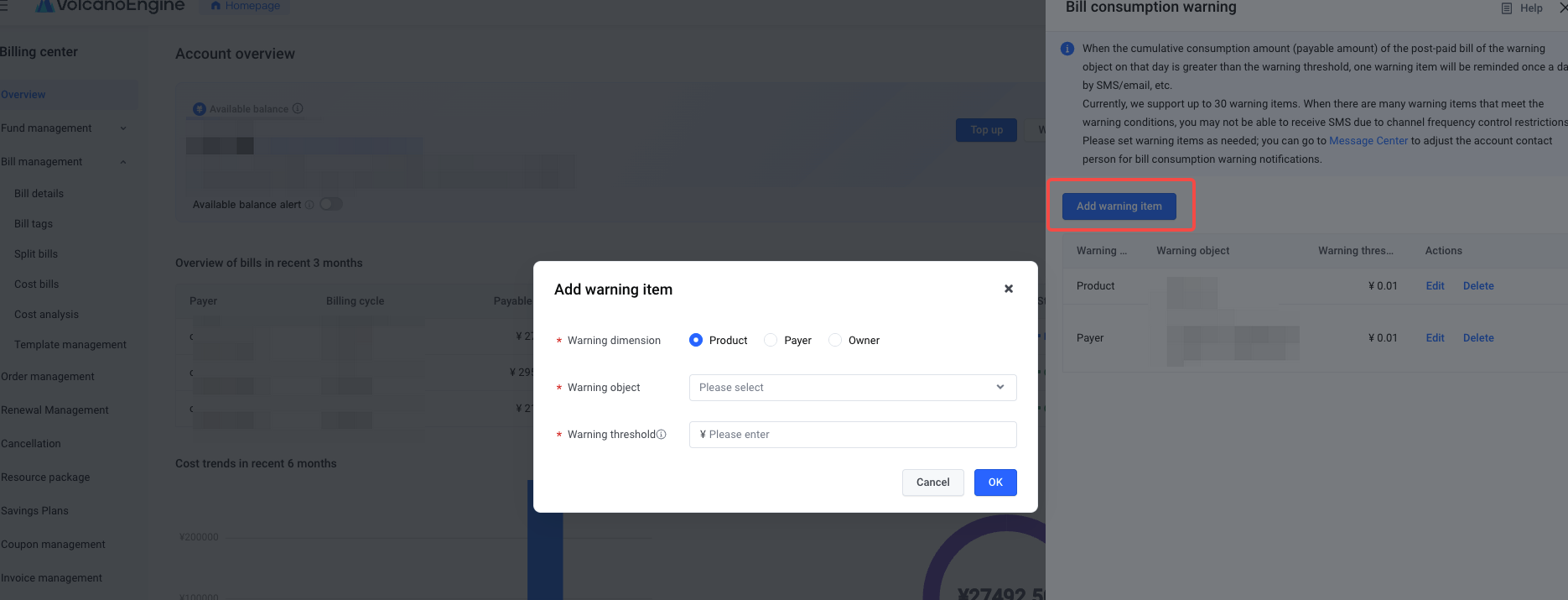
- Click "Add Warning Item", you can set the early warning dimension, early warning object, and early warning threshold on demand in the pop-up window; currently supports early warnings for three dimensions: product, Payer, and Owner;
- Check the warning items:
In the list of drawer pages, you can view added alerts, edit to adjust the contents of alerts, or delete alerts as needed.
- Receive early warning notifications:
The content of the channel notification is as follows. After the alarm, you can choose to go to the console - expense center to view the complete billing data.
Last updated: 2025.07.11 20:20:09
All rights reserved © Beijing Volcano Engine Technology Co., Ltd2024
