Billing Center
Billing Center


Document

- Documentation
 Billing CenterFund ManagementFunding FAQ
 Copy page
 Download PDF
Fund Management
Funding FAQ
Copy pageDownload PDFFunding FAQ
This document summarizes common problems and solutions in the use of Volcano Engine funds recharge, acknowledge receipt of money, withdrawal, etc. If you encounter problems during use, you can refer to the following solutions.
First, recharge:
- What recharge methods does Volcano Engine support?
Volcano Engine currently supports online recharge and public remittance transfer two types of recharge methods.
- Online recharge : support Alipay, WeChat, personal online banking, corporate online banking 4 online payment methods;
- Public remittance transfer : It is recommended that you use your exclusive remittance account for public remittance to recharge your Volcano Engine account;
- If you need to apply for an exclusive account, you can go to the [expense center] - [recharge] - [offline remittance] page to apply. You can refer to this recharge guide
- If you send money to the payment account of Volcano Engine, after the transfer is completed, please go to the console to use the self-service acknowledge receipt of money function, enter the relevant information, and manually acknowledge receipt of money. If you enter the correct remittance information and do not acknowledge receipt of money, it may be due to bank processing reasons, the flow has not yet reached the volcano, please wait 1-2 hours to refresh and try again.
-
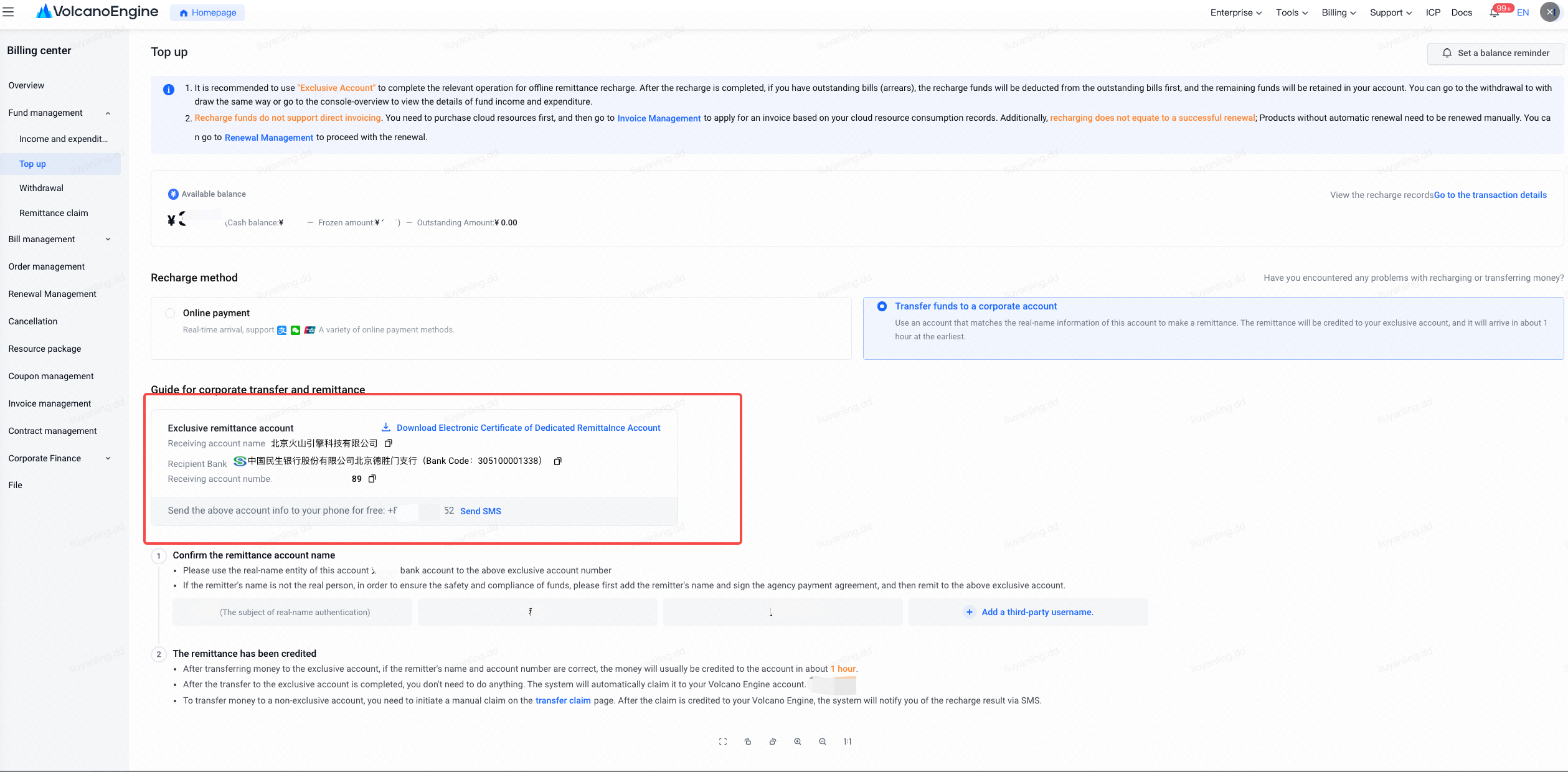
- How to get the public remittance account?
You can go to the expense center and click [ Recharge ] - [Offline Remittance] page to get the exclusive payment account information.
- Change the bank account when recharging, or pay by others, Huoshan Account can still be remitted and claimed normally?
- If your bank account name is consistent with Huoshan Account real-name authentication, you can claim it normally;
- If the remittance subject is inconsistent with the acknowledge receipt of money Huoshan Account subject, you need to go to [ Contract Management - Payment Contract ] to sign the payment agreement and then acknowledge receipt of money by yourself. Please check the document for detailed steps for signing the payment contract;
Please note: If the public remittance is paid by others, it cannot be withdrawn to your real-name verified bank card, only support refund to the bank account of the payer , in order to protect the security of your transaction funds, it is recommended that the payment account you use belongs to the enterprise/individual, which is consistent with the current account real-name authentication.
- What should I do if the online payment recharge interface prompts the limit/risk?
The online payment recharge interface prompts that the limit/risk is limited by the third-party channel of transactions. Volcano Engine does not limit the user's remittance limit. You can follow the prompts on the third-party page to reduce the amount of recharge, or change the recharge and remittance method and use public remittance.
- When recharging online banking, it shows that the recharge failed. How to deal with it?
You can first confirm that the Volcano Engine matching account number you recharged is correct. If the payment account number is correct and the online banking prompts that the recharge fails, you need to contact the corresponding bank for consultation.
- How to invoice and reimburse the recharge amount?
The recharge amount cannot be invoiced directly. You can apply for an invoice according to the consumption order and bill after the recharge is completed and the recharge amount is placed to purchase resource consumption.
- Why can't I recharge?
You may not be able to recharge under the following circumstances:
(1) The account has not completed real-name authentication, and you need to complete real-name authentication. Reference How to choose a real-name authentication method? , to recharge.
(2) The main account administrator of your company has not granted the expense center permission to your account. You can contact the main account to inquire about opening the expense center permission according to the corresponding prompts, and then perform the recharge operation.
(3) The Douyin cloud account is not bound to secure email information, so it cannot be recharged. You can find it in the left navigation bar of the Douyin Store Cloud console, on the Support-Rights Management page, click Identity Management, select the currently logged in sub-account in the user list, and bind a secure mobile phone or a secure email.
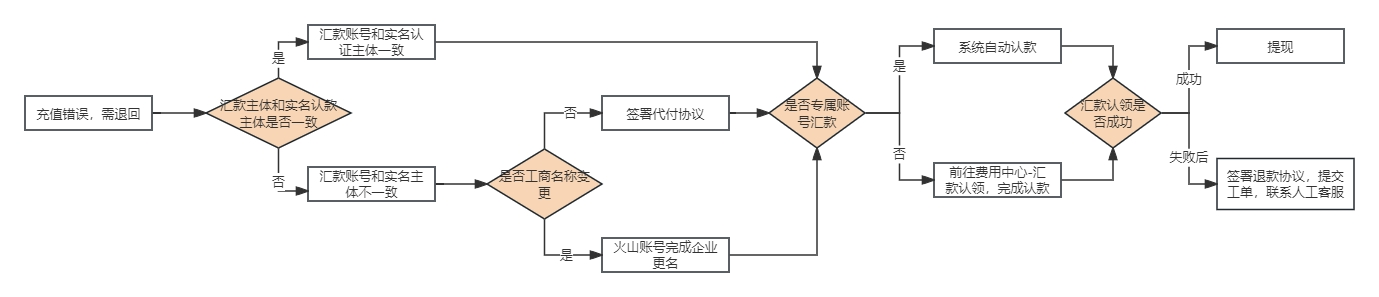
- How to refund for recharge errors?
If you fill in the wrong exclusive account number, wrong remittance main body, etc., the payment main body and payment account number do not meet expectations and need to be returned, you can refer to the following process:
(1) If the main body of the recharge account and the main body of the remittance are the same main body , you can withdraw and recharge after acknowledging receipt of money. (For example, the subject has the account number A\ B, and the exclusive remittance account of the recharge account B this time causes the system to acknowledge receipt of money to B and need to recharge A);
Note: If there is a bill to be paid in the account of the recharge acknowledging receipt of money, the recharge amount will be verified by the bill amount by default, resulting in a reduction in the withdrawal amount
(2) If the main body of the recharge account and the main body of the remittance are different entities , the acknowledge receipt of money account can go to the console [ Contract Management - Payment Contract ] to acknowledge receipt of money after signing the payment agreement (for example, the main body A makes the payment main body B, need to acknowledge receipt of money to A);
(3) If the exclusive account number of the remittance is wrong and cannot acknowledge receipt of money, you need to refund directly. Please follow the Volcano Engine - Refund Confirmation Letter, fill in the relevant information and stamp it, and submit the work order to contact the Volcano Engine after-sales classmate. We expect that the money will be returned to your recharged account within 10-15 working days.
(4) If the remittance subject (new name) is inconsistent with the account subject (former name) due to the change of the company name, please go to the account management - Volcano Engine reference document ( company name change - account related - Volcano Engine ) to acknowledge receipt of money after the company name change.
II. Remittances to businesses
- Did you not find the bank flow information for the remittance claim?
The following possibilities exist if the flow cannot be queried:
(1) Remittance bank account number, remitter, and remittance amount are required. Please enter the correct information. If the input information is wrong, the remittance flow may not be checked.
(2) Please go to the remittance claim function to check the flow about 1h after the customer's bank has completed the remittance operation to ensure that the remittance has arrived at Volcano Engine at this time
(3) The customer's remittance bank account number is 04-328300040000000 for this type of data, and the "-" query needs to be removed.
(4) There are parentheses () in the customer's remittance name, please ensure that it is consistent with the parentheses used in the bank's registered name.
- What is the reason why the offline public remittance did not arrive?
(1) Check whether the remittance information is correct: According to the bank's payment requirements, the payee name, payment account number, account opening branch and other information filled in when transferring money are all correct to successfully transfer money.
(2) If the remittance using the exclusive remittance account does not arrive, the reasons are as follows:
① Affected by the bank processing time, there will be a delay in the arrival of offline remittance methods, generally 1-24 hours.
② Please check that the exclusive account number used for remittance corresponds to the main body of Huoshan Account and the bank account used for this remittance. If the main body of remittance is inconsistent, you need to go to the expense center - [ Contract Management - Payment Contract ] to apply for a payment contract. After signing, the system will automatically claim the money (after receiving the money, the system will complete the acknowledge receipt of money within 30 minutes)
(3) If the remittance using the Volcano payment account does not arrive, the reasons are as follows:
① Affected by the processing time of the bank, you need to go to the expense center - [ Remittance Claim ] to enter the remittance flow for manual claim after confirming the completion of the bank payment.
② If the remittance subject is inconsistent with the acknowledge receipt of money Huoshan Account subject, you need to go to [ Contract Management - Payment Contract ] to sign the payment agreement and then acknowledge receipt of money by yourself.
- How long does it take for offline remittance recharge to arrive?
If you transfer money to a non-exclusive account , you can go to the expense center - [ Remittance Claim ] 1h after the bank transfer to manually claim.
If the remittance subject matches the real name of the account and uses the exclusive remittance account to recharge, it will be recharged to the account balance within 1-24 hours. If it has not arrived for a long time, you can contact the Volcano Engine side and provide a bank receipt for confirmation.
- How to make a business transfer?
At present, Volcano Engine supports two types of recharge methods: online recharge and offline remittance. You can go to the account overview, click the " Recharge " button, and jump to the recharge page to operate. Offline remittance (public remittance): Refers to the user using public remittance to top up funds to the Volcano Engine account. For specific operations, please refer to the recharge operation guidelines
Note: If you transfer money to the public, it is recommended that you use the bank transfer method to make money to the Volcano Engine account. It is not recommended that you use a third party (Alipay/WeChat wallet) to make money to the Volcano Engine account . Volcano Engine will not be able to identify the remittance subject, which will increase the difficulty for you to acknowledge receipt of money.
- What is the difference between an exclusive remittance account and a basic remittance account?
After recharging with the exclusive remittance account, when the remittance bank completes the transfer operation, the system will automatically acknowledge receipt of money to the Huoshan Account associated with the exclusive remittance account.
- To apply for an exclusive remittance account, you can go to the expense center and click [ Recharge ] - [Offline Remittance] page to get the exclusive payment account information. The exclusive account application is completely free.
- After using Volcano Engine to recharge the payment account, after the remittance bank completes the transfer operation, you need to go to the remittance claim console to complete the self-service acknowledge receipt of money operation. See the document for activity details https://www.volcengine.com/docs/6269/1231124
-
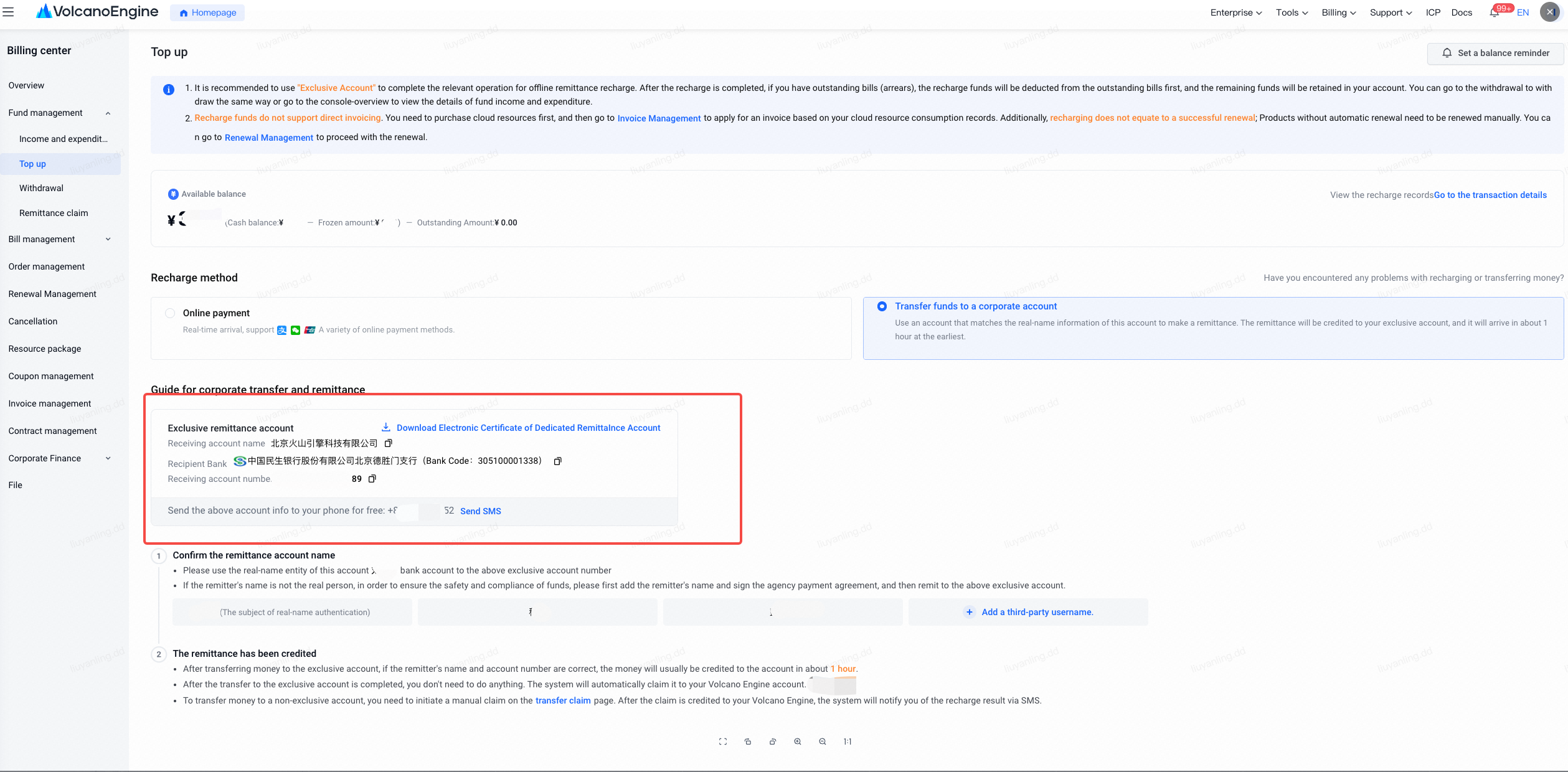
- How to obtain exclusive account documents?
You can apply for an exclusive remittance account under expense center -- recharge -- offline recharge, and click the exclusive remittance account electronic certificate to download to get your exclusive account description file.
- When do I need to sign a payment agreement?
If the remittance subject is inconsistent with the acknowledge receipt of money Huoshan Account subject, you need to go to [ Contract Management - Payment Contract ] to sign the payment agreement and then acknowledge receipt of money by yourself. If you sign the payment agreement and transfer money to the exclusive account, you do not need to claim it manually, and the system will automatically acknowledge receipt of money.
Note: Detailed steps for signing the payment contract can be seen in the document https://www.volcengine.com/docs/6269/1338065
- If the offline remittance is not successfully claimed, will the system automatically return it? How do I get my money back?
If your remittance cannot be claimed (refer to the question "Did you find the bank flow information for the remittance claim?" in the investigation guidelines) or the claim fails for other reasons, the remittance flow system will not automatically initiate a refund after the claim fails. If you want to refund the money, please refer to the following plans:
(1) If the main body of the recharge account and the main body of the remittance are the same main body, the money can be withdrawn and returned after acknowledging receipt of the money. (For example, the subject has the account A\ B, and the exclusive remittance account of the recharge B account this time causes the system to acknowledge receipt of money to B, and needs to return and recharge A);
Note: If there is a bill to be paid in the acknowledge receipt of money account, the recharge amount after acknowledging receipt of money will be verified by the bill amount, resulting in a reduction in the withdrawal amount.
(2) If the main body of the recharge account and the main body of the remittance are different entities, the acknowledge receipt of money account can go to the console [ Contract Management - Payment Contract ] to acknowledge receipt of money after signing the payment agreement (for example, subject A makes payment subject B, need to acknowledge receipt of money to A);
(3) If the system cannot acknowledge receipt of money and needs to refund directly, please fill in the relevant information and seal according to the "Refund Confirmation Letter" Volcano Engine - Refund Confirmation Letter.docx, and submit the work order to contact Volcano after-sales classmates. We expect 10-15 working days to return the money to your recharged account.
III. Withdrawal
- When withdrawing cash, the page prompts that there is no permission. What should I do?
(1) It may be because the current account has not set a secure mobile phone number and a secure email address. You can click the link in the red box according to the page prompts to bind a secure mobile phone or a secure email address on the user details page.
(2) The main account does not give the authorized expense center permission. Please contact the main account administrator to grant relevant permissions to the sub-account.
- Why is the withdrawal amount less than the cash balance?
- According to the formula for calculating the amount of cash that can be withdrawn, The amount that can be withdrawn = the cash balance - the amount frozen - the amount owed - the amount owed - the amount reserved , so your account balance may be sufficient, but it may not be possible to withdraw all of it.
- If there are pay-as-you-go resources, a certain reservation will be withheld when withdrawing cash to prevent you from withdrawing the full amount, and there will be arrears and downtime problems for the pay-as-you-go resources; if you no longer need to continue using the relevant post-paid products, you can choose to unsubscribe . After the unsubscription is completed and the billing resource is destroyed, the amount will no longer be reserved. The reserved amount will be released at that time, and you can withdraw the reserved amount normally.
- If there is an outstanding amount, the outstanding amount cannot be withdrawn. You can choose to withdraw cash after refunding .
3. How is the withdrawal to the account determined?
- Online recharge funds will be returned to your original account (such as WeChat Pay to WeChat); however, if WeChat and Alipay exceed 360 days and online banking payment takes 180 days, they only support returning to the payee's bank account consistent with the real name of this account. It cannot be returned to your original payment channel in the same way.
- Offline remittance funds: return according to the same way as your online remittance account, and allow to modify the account information (payee information is not allowed to be modified). For example, if others transfer money on behalf of others, only return it to the bank account paid for.
4. How long is it expected to arrive after the withdrawal application?
- Online recharge and no more than 360 days (WeChat/Alipay) or 180 days (online banking) of funds , after choosing to withdraw, the default return to your original three-party recharge account, the estimated arrival time 1-2 working days.
- Offline remittance and online recharge for more than 360 days (WeChat/Alipay) or 180 days (online banking) After choosing to withdraw, transfer it to you or your payer's bank account through bank transfer. The estimated arrival time is 10-15 working days.
IV. Income and expenditure details
- How do I know the reason for this deduction?
You can view the income and expenditure details of the cash account on the [expense center] - [ income and expenditure details ] page, and click [business transaction number] to jump to view the bill details of the corresponding deduction.
- Where can I find the deduction details for each product?
Hello, the deduction details can be viewed at expense center - [ Income and Expenditure Details ], click the business transaction number associated with the deduction data to jump to the bill details to view the deduction details.
Prepaid goods: The product information related to the deduction needs to be viewed in the bill details; Postpaid goods: Click on the business transaction number to view the product information.
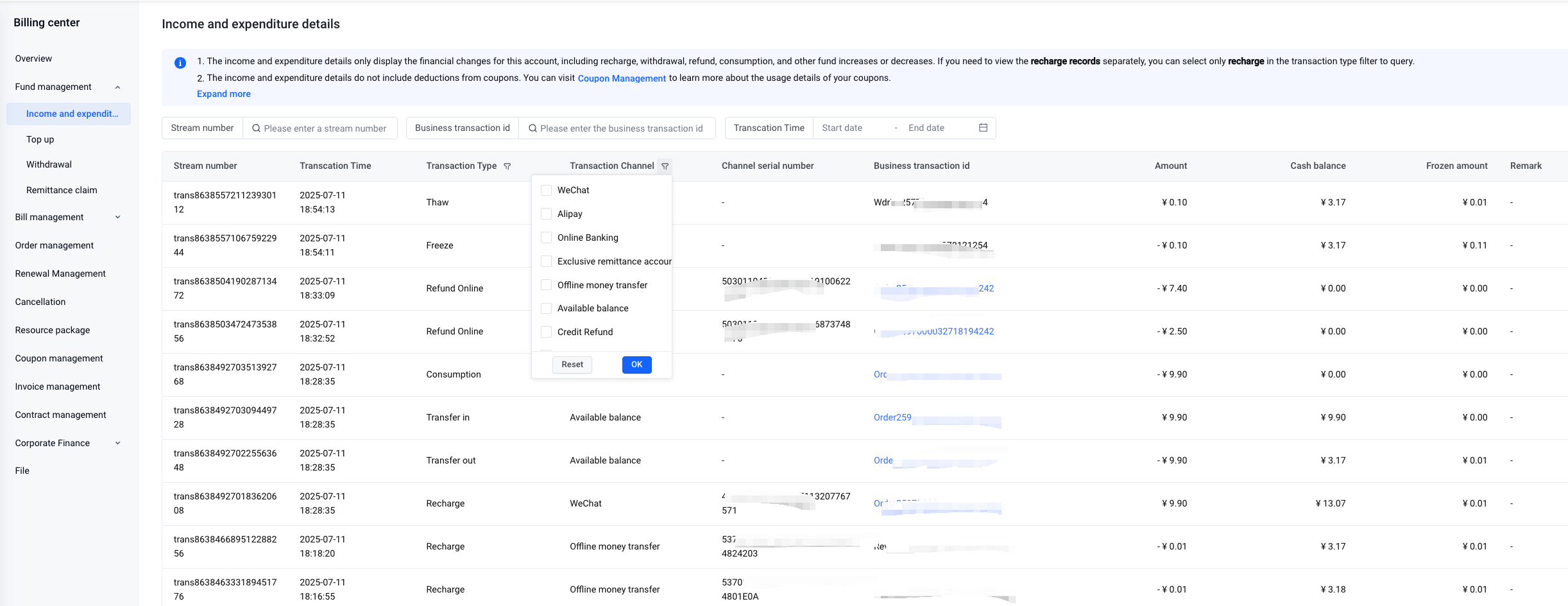
- How to check the recharge and withdrawal records?
You can go to the expense center -- fund management -- income and expenditure details Filter [transaction type] to "recharge" and "withdraw" to view all your recharge and withdrawal records under this account.
V. Notification of funds
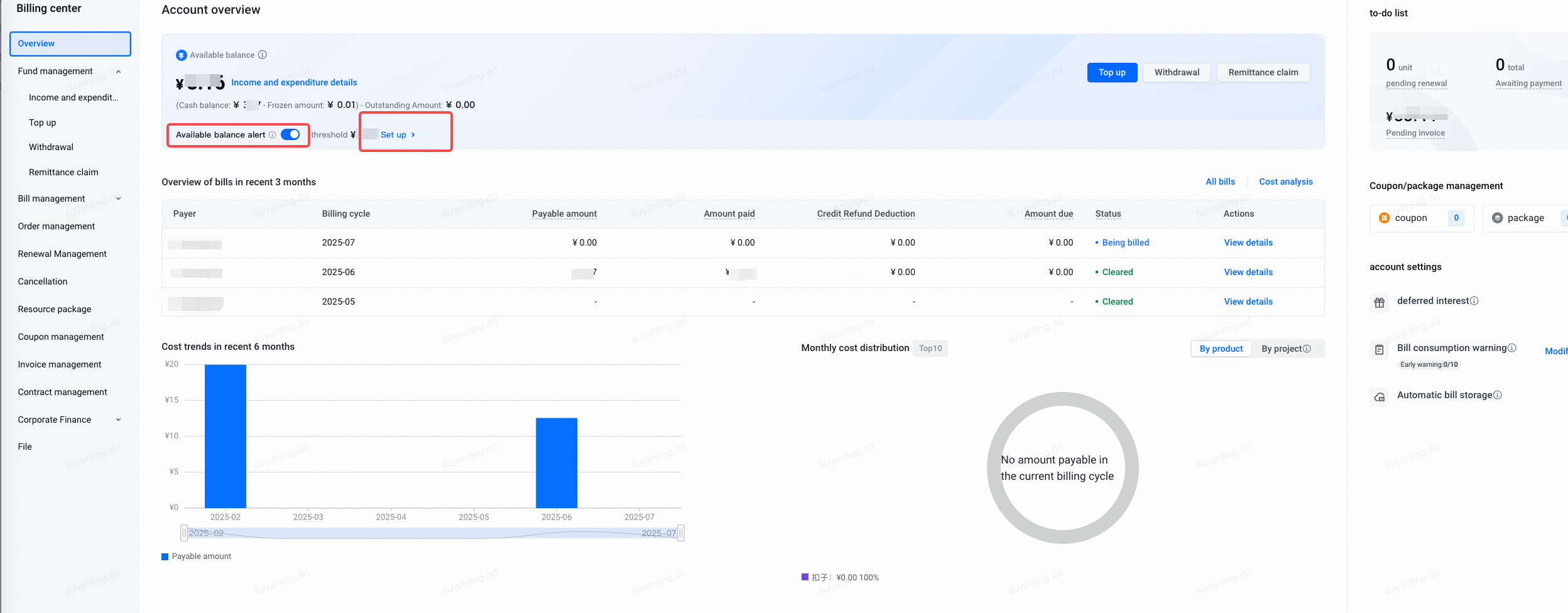
- How do I set up a notification for my balance exceeding a threshold? And how to modify the balance alert notification message recipient
You can go to the expense center - account overview page to activate the available balance warning function account overview . In the Balance Threshold Prompt, enter the threshold you need to prompt.
If you need to modify the notifier information and reception method, please go to the to configure.
- Is there a charge for SMS notification of fee warning?
After you turn on the balance threshold warning in the expense center, the SMS notification sent to you will not be charged.
- Why is there no prompt after the available balance is set?
Available Balance Alert When the balance alert threshold is first configured, a reminder will not be triggered if the cash balance falls below the threshold.
If there is a change in the available balance of the account in the future, a prompt will be triggered according to the configured account balance warning threshold. After setting the first trigger, if the available balance is still lower than the warning threshold, the system will remind 4 times in a row, once a day.
- When will the arrears notice be sent and what is the sending logic?
The account arrears notification will be sent in real time when your Huoshan Account is deducted as arrears. If the available balance of the account is still negative, a message reminder will be sent again at 10:00 the next day and the day after tomorrow. (3 days in total)
- How to set a one-day usage fee warning for a product?
For balance warning in the account dimension, you can go to the expense center account overview page to set the available balance warning function to understand the account consumption fee. Bill product warning, go to this page to open the bill consumption warning function according to the product dimension, see the document
VI. Information control
- How to open the information control?
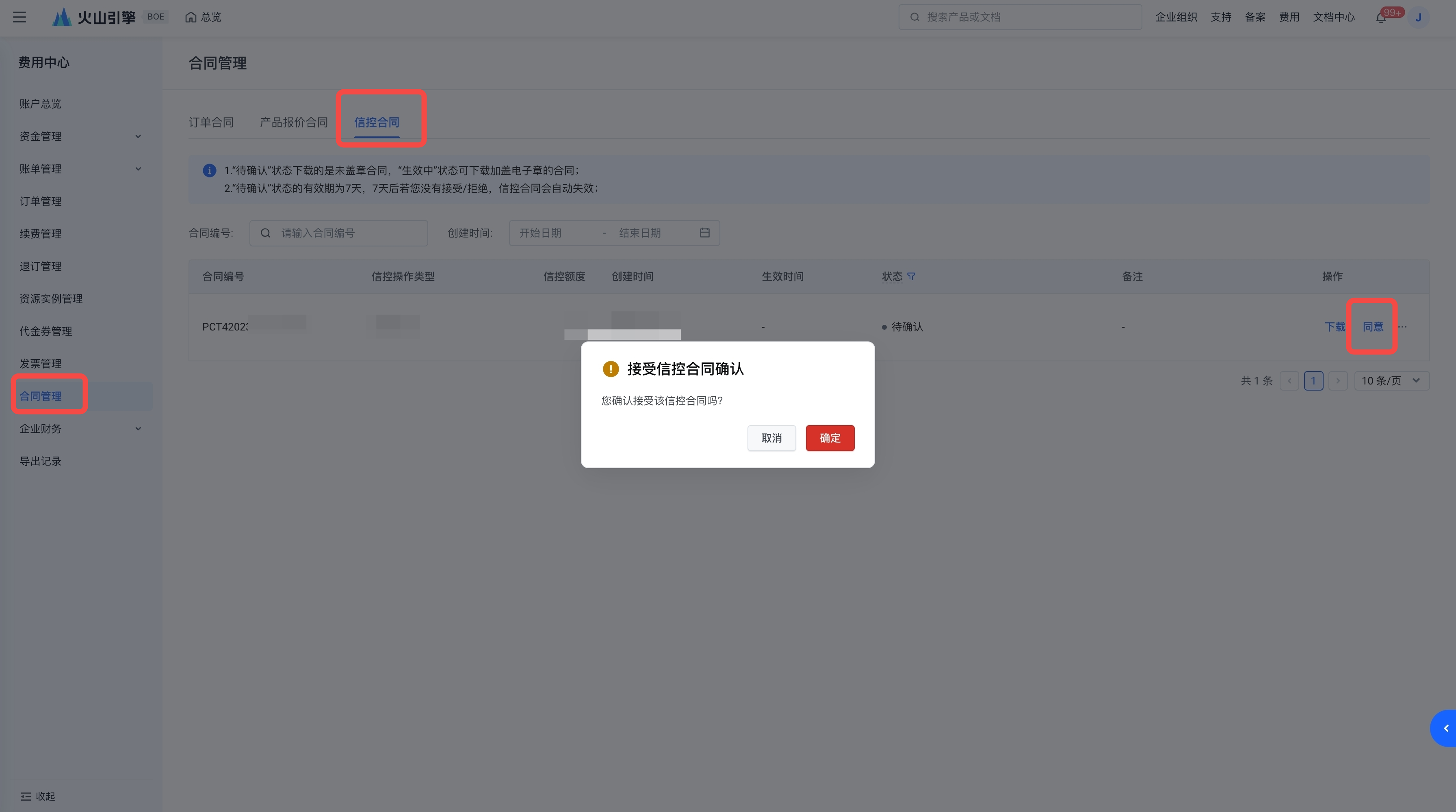
Please contact your business manager for the opening of the credit control. After your business manager initiates the credit and completes the approval, please go to the expense center - contract management to complete the signing. After the contract is signed, the credit control will take effect.
- How to sign a credit control contract?
The information control contract will be displayed on your console expense center - contract management page. You can go to this page, select the corresponding information control contract, and click the "Agree" button in the operation column to complete the signing of the information control contract.
- How to use the information control?
The credit limit refers to the maximum service fee amount that can be settled after you order or use Volcano Engine products or services. The credit limit will be used together with cash as your available amount.
If the service fee you need to settle will exceed the available amount (available amount = cash + credit control limit - the amount owed (if any)), you should immediately recharge your credit control account to restore the available amount in order to continue ordering products or services; otherwise (1) you will not be able to use the credit control limit to settle service fees; (2) the product or service in use will be interrupted due to insufficient available amount.
- How does Xinkong repay?
Normally recharge Huoshan Account, no need to follow the procedure to repay separately, the recharge amount will be offset by default credit control deduction part.
After you recharge or pay for the trust control account, Volcano Engine will deduct the service fee from your trust control account in real time to restore the trust control quota.
- I have a credit limit but the account is in arrears. Can I continue to use it?
If your available balance is still positive, you can continue to use Volcano Engine's services, and the business will not be shut down; if the available balance of your account is insufficient, Volcano will send you a notice of insufficient balance. Please pay attention to the notification. To modify the Insufficient Balance Notification recipient information and reception method, please go to the to configure.
Last updated: 2025.07.28 19:41:25
All rights reserved © Beijing Volcano Engine Technology Co., Ltd2024
