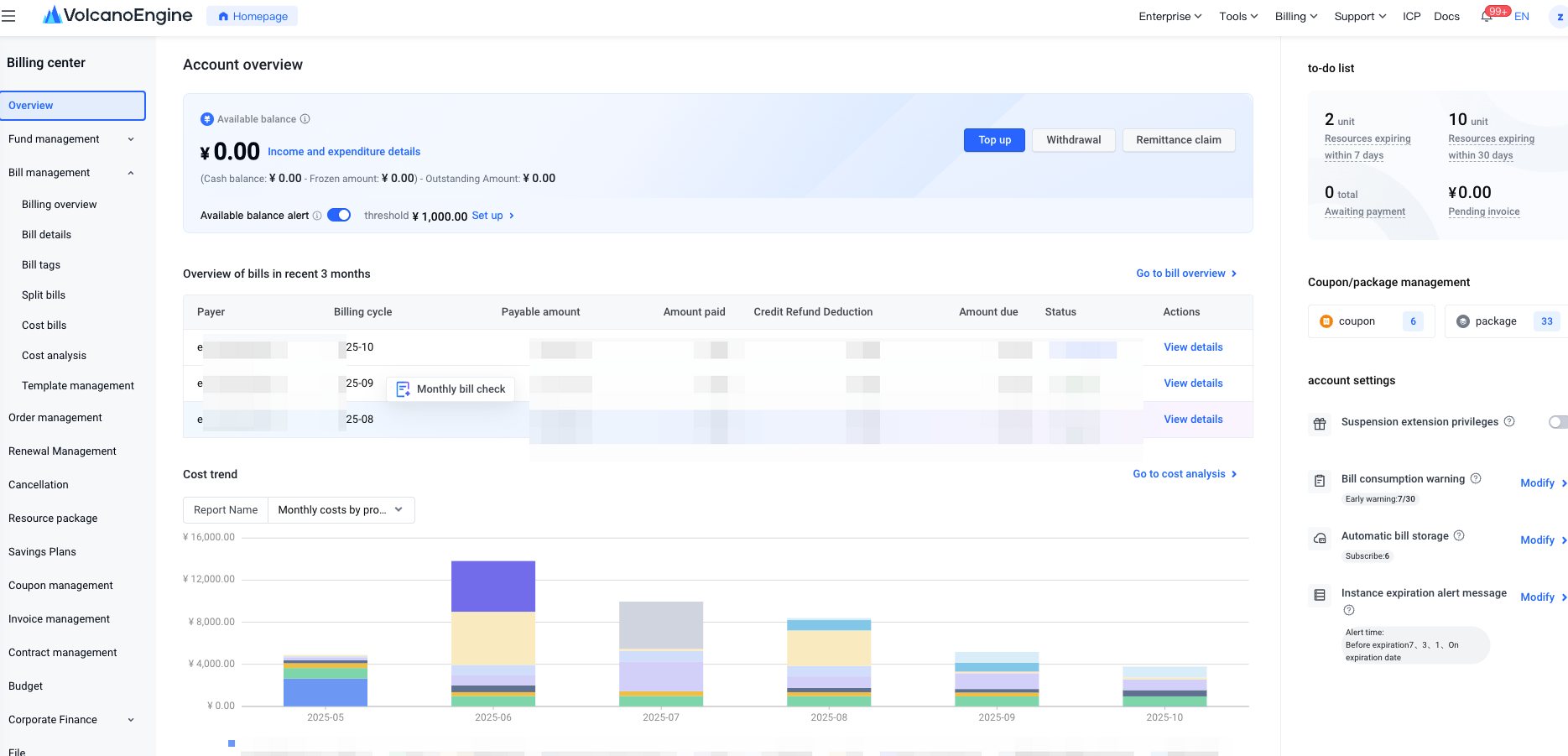
| | | Related Document Links/Operation Instructions |
| | Available Balance: Reflects your financial status on Volcano Engine. You can use this balance to control the stopping and restarting of your resources. Available Balance = (Cash Balance - Frozen Amount) + Credit Limit - Arrears Amount; Cash Balance: The current user's cash ledger balance; Frozen Amount: The portion of the cash balance that is frozen; Credit Control Limit: The effective credit amount after credit is granted, increased, decreased, or recovered. Outstanding Amount: the unpaid amount on the bill; ⚠️Note: If your available balance is negative, resources may be suspended. To ensure the normal operation of your business, please recharge promptly. | |
| | We provide a convenient entry point for recharge operations. Clicking “Recharge” will redirect you to the recharge page to perform the recharge operation. | |
| | A convenient entry point for withdrawal is provided. Clicking “Withdraw” will redirect you to the recharge page to complete the relevant operations. | |
| Income and Expenditure Details | A convenient entry point is provided for viewing Income and Expenditure Details. Clicking this will redirect you to the recharge page, where you can perform recharge operations. | |
| | You can set a balance alert for the current account. If the alert threshold is lower than the current available balance, the notification will not be triggered immediately; it will only be sent when the available balance changes and remains below the threshold. Alerts will be sent up to five consecutive times: the first notification is sent in real time, and the subsequent four are sent at 10:00 a.m. on the following day. | |
| | Customers can view the summary data of monthly bills for three months. | |
| | Customers can view the cost trend for six months. | |
| Instances Pending Renewal | Displays the total number of running instances expiring within 7 days and manually renewed instances that are about to be shut down. Click the number to navigate to the “Renewal Management – Manual Renewal” page for more details. | |
| | Displays the total number of orders with the status 'Pending Payment.' Clicking the number will redirect to the Order Management page to view details. | |
| Amount Pending Invoicing | Display the total amount pending for invoicing. Invoices are issued only for amounts that have already been consumed; the unspent portion of recharged funds cannot be invoiced. Click the number to go to the Invoice Application page for operation. | |
| Contract Pending Confirmation | | |
Voucher/Package Management | | Customers can view the number of vouchers pending activation and currently active. By clicking the number, they will be redirected to the Voucher Management page to view details. | |
| | Customers can view the number of active resource packages. By clicking the number, they can navigate to the Resource Package Management page to view details. | |
| | The Service Extension Benefit (also known as the Deferred Suspension Exemption Benefit) is a feature provided by Volcano Engine to ensure the continuity and stability of customer services. Customers need to log in to the official Volcengine website console to apply for activation of this entitlement. | |
| | You can set bill consumption alerts as needed. When the cumulative consumption amount on the postpaid daily bill for a product or account exceeds the warning threshold, the user will be notified via SMS or other means. | |
| | After the user sets bill storage to TOS, Volcengine will synchronously store the bill files in the bucket specified by you in TOS. | |


 Billing Center
 Copy page
 Download PDF