Billing Center
Billing Center


Document

- Documentation
 Billing CenterSavings PlansIntroduction to savings plans
 Copy page
 Download PDF
Savings Plans
Introduction to savings plans
Copy pageDownload PDFIntroduction to savings plans
Definition of savings plans
A savings plan is a discount plan provided by Volcano Engine. You can make a commitment to a spending amount over a period of time in advance in exchange for a lower discount on subsequent pay-as-you-go bills.
As a savings plan provides no cloud service resource, it must be used with pay-as-you-go instances. You can use the committed spend in a savings plan to deduct the costs of pay-as-you-go instances.
Savings plans fall into the following two types:
- Diminishing savings plan: The committed spend is fixed throughout the term and is deducted until the balance is used up or the savings plan expires.
- Periodic savings plan: The committed spend is fixed for each period and deducted within a period. Unused amount in the current term can be carried over to the next commitment term at a fixed ratio. The committed spend resets at the beginning of each new period until the savings plan expires.
Benefits of savings plans
- Reduced costs: Compared to pay-as-you-go, the additional use of a savings plan ensures a lower discount.
- Flexible usage: Compared to an annual or monthly subscription, a savings plan applies to different types of instances and thus allows more flexible use of cloud resources.
- Flexible payment: We support both all upfront and no upfront options, making payments more flexible and easing your cash flow pressure.
Application scenarios
- Stable workload
A stable workload refers to a business pattern where each business division has a stable consumption of cloud resources during different periods of time.
In this case, we recommend that you purchase a savings plan that matches the current overall consumption of cloud resources to reduce the total cloud costs.

- Hybrid workload
A hybrid workload refers to a business pattern where each business division has varying cloud usage demands at different times, but the total cloud resource consumption remains relatively stable.
In this case, we recommend that you purchase a savings plan that matches the current overall consumption of cloud resources to reduce the total cloud costs.

- Resonant workload
A resonant workload refers to a business pattern where business divisions have elastic cloud resource demands and experience simultaneous spikes in cloud resource consumption during specific periods of time.
In this case, we recommend that you purchase a savings plan for consistently used cloud resources and adopt the pay-as-you-go mode to meet elastic demands. This way, you can cut the overall cloud costs while adapting to changing demands.

- Growing workload
A growing workload refers to a business pattern where each business division experiences steady growth in cloud resource consumption over time.
In this case, we recommend that you purchase savings plans based on your cloud resource consumption in each period of time and your business plan to minimize the cloud costs.

How a savings plan works
During the term of a savings plan, the committed spend is applied to offset pay-as-you-go bills at a discount. Uncovered usage is charged in standard pay-as-you-go mode.
We take a periodic savings plan as an example:
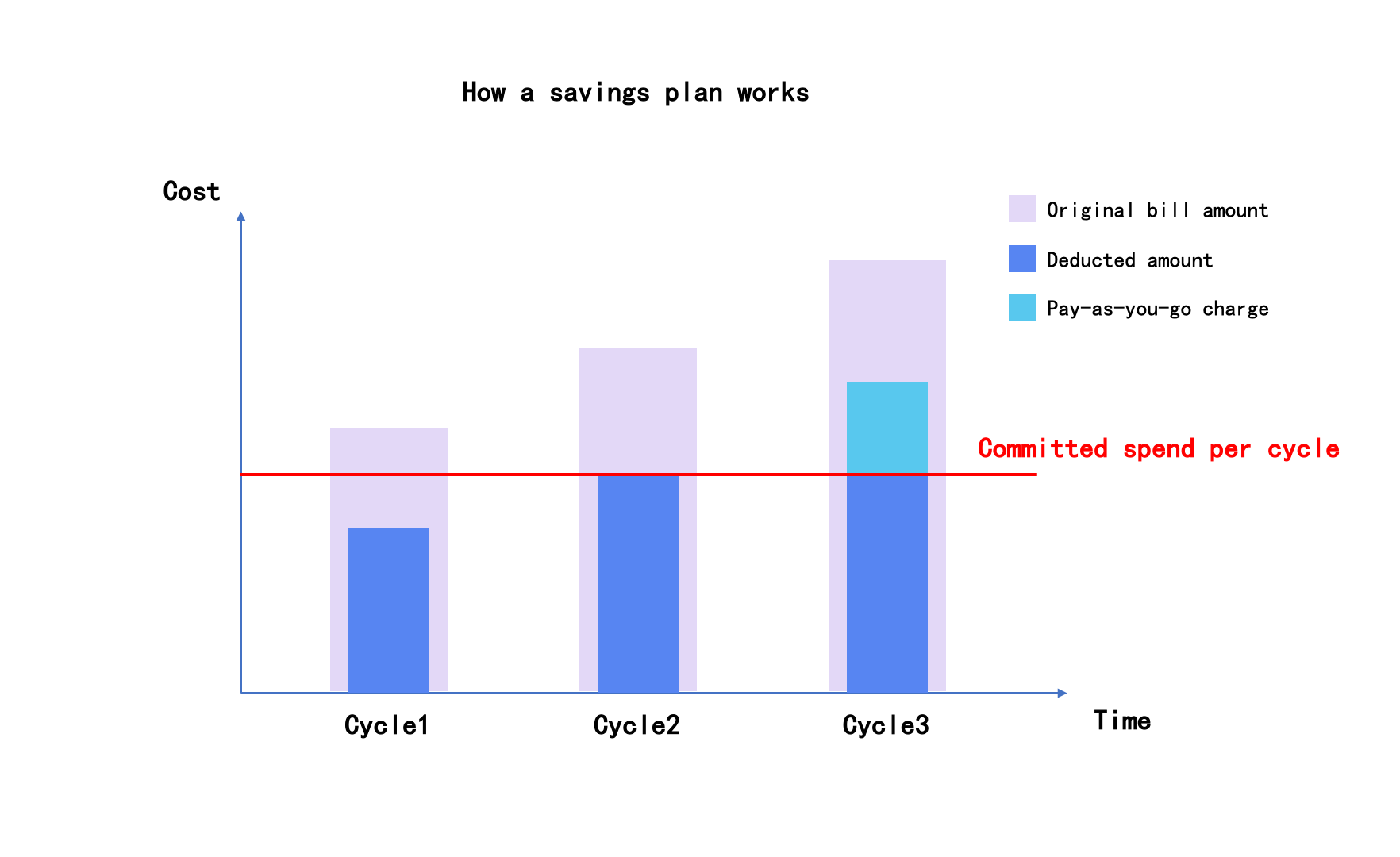
If your committed spend per month is CNY 1000, Model M has no contract discount. The savings plan offers a 20% discount on Model M, meaning it can deduct up to 1,000/0.8 = 1,250 yuan of Model M's pay-as-you-go consumption per commitment cycle.
The following table demonstrates the costs with and without a savings plan.
How to purchase a savings plan
To purchase a savings plan, go to the Savings plans page of the Billing Center, click Purchase savings plans, and select a cloud product in the drop-down list that appears.
Note:
- Each account ID can have up to 40 effective savings plans at the same time. Once this limit is reached, no additional savings plan can be purchased.
- End users from a resell partner cannot purchase savings plans.
- Savings Plan orders do not support cross-day payment.
How to unsubscription a savings plan
Once a purchase is successfully completed, refunds or modifications are not supported, except as otherwise required by law or explicitly committed by the platform. For any other special requests, please Submit a Ticket to discuss further.
Payment options for savings plans
The savings plans support two payment options: all upfront and no upfront.
1. All upfront
- When purchasing a savings plan, you are required to pay the full amount in one lump sum, with no additional payments needed for the plan thereafter.
- The all upfront savings plan takes effect immediately upon purchase. It remains valid until either the committed spend amount is used up or the plan expires, and is not affected by arrears.
- Payment via credit limit is not supported (including new purchases, renewals, and automatic renewals).
2. No upfront
- No advance payment is required when purchasing a savings plan. Based on the committed spend amount and cycle, the system will generate bills periodically and charge from your credit card. Please ensure your credit card is valid in advance to avoid service disruption due to unsuccessful payments.
- For the no upfront payment savings plan: If your account is in arrears, it will enter the "restricted" status after the extension period. During this period, you will be unable to continue the deduction of the committed spend amount, and the plan will resume effectiveness once the account is recharged.
- Payment via credit limit is supported.
- To activate no upfront mode, please contact your sales.
- For monthly committed savings plans under no upfront, bills will be issued and charged at the start of each monthly commitment cycle.
Example:
If you purchase a 3-month monthly committed savings plan with a monthly committed spend of USD 1,000 on on September 5, 2025 at 17:23:45.
- Effective Time: The Savings Plan takes effect at 17:00:00 on September 5, 2025 (applicable to bills whose deductible consumption ends after 17:00:00 and whose billing time is after 17:23:45).
- Expiration Time: The Savings Plan expires at 23:59:59 on December 5, 2025 (for a degressive Savings Plan, the expiration time is 16:59:59 on December 5, 2025).
- The corresponding three commitment periods are:
- September 5 – October 5
- October 6 – November 5
- November 6 – December 5
- The system will generate a committed spend bill of USD 1,000 for the savings plan on September 5, October 6, and November 6, 2025 respectively, with payment made from your credit card each time.
Carry-over Rules
For periodic Savings Plans, certain specifications are carry-over eligible:
- Any committed amount not fully consumed within the current commitment term (e.g., one month) may be carried over to the next commitment term at a specified ratio for continued use, providing you with greater spending flexibility
- The validity period of amount generated in each commitment term is calculated independently. For any unused credits, the maximum carry-over period shall not extend beyond the end of the next commitment term.
- Carry-over only applies to consecutive commitment terms under the same Savings Plan order. Remaining amount in the final commitment term will expire upon the expiration of the Savings Plan order and shall not be carried over to a new order (such as new or modify orders).
Activation in advance for Inactive Periods
For cycle-based Savings Plans, some specifications support early activation of the quota for inactive periods:
- When the amount for the current period is exhausted ahead of schedule and there are pay-as-you-go bills in the current period that exceed the deductible amount covered by the Savings Plan, the system will automatically activate the quota for the next period to continue offsetting the aforementioned pay-as-you-go bills.
- When the next period's amount is activated early, only the actual start time of that period is brought forward; the end time of the corresponding period and the carryover period end time remain unchanged.
- For a 0-prepayment Savings Plan, when the next period's amount is activated early, the system will simultaneously generate the Savings Plan bill for that period. Please ensure your account balance is sufficient to avoid the risk of service suspension due to overdue payments.
- If there is an order that has not yet taken effect (e.g., a configuration upgrade), early activation of the next order period is not supported until that order becomes effective.
Last updated: 2026.08.10 14:53:44
All rights reserved © Beijing Volcano Engine Technology Co., Ltd2024
