Billing Center
Billing Center


Document

- Documentation
 Billing CenterUnsubscribe ManagementUnsubscription
 Copy page
 Download PDF
Unsubscribe Management
Unsubscription
Copy pageDownload PDFUnsubscription
Unsubscription
Prepaid instance unsubscription: The BytePlus Console - Billing Center - Unsubscription Management path supports the unsubscription of prepaid instances only, with two options available: seven-day unconditional full refund (seven-day refund), and non-seven-day refund. Refunds are applicable solely to payments made in cash (including credit control balance) by the user and exclude amounts covered by coupons. Upon successful unsubscription, the refund will be processed through the original payment method (see Refund Flow for details). For product unsubscription, please navigate to BytePlus Console - Billing Center - Unsubscription Management.
Unactivated renewal period unsubscription: You can separately unsubscribe a renewal period that has not yet begun. A full refund will be issued upon unsubscription. Any Coupons or pickup vouchers used during the initial payment will also be returned.
Postpaid instance unsubscription: To unsubscribe postpaid services, please visit the product Console or submit a support ticket to initiate the unsubscription process.
Note: If the refund amount has been invoiced, you are required to prepare the necessary documentation for invoice return. You can submit the invoice return request through BytePlus Console - Billing Center - Invoice Management or any other methods supported by BytePlus. Provide the relevant documents for invoice return when you request a service unsubscription. We will proceed with the refund after verifying that the documents are accurate.
I. Seven-Day Unconditional Refund Policy
Seven-day unconditional refund rules
- For subscription-based products supporting no-reason unsubscription within seven days, you can apply for a full refund without reason within seven days of purchase.
- For resource package products that support seven-day no-reason cancellation, a full refund can be requested within seven days of purchase if unused. Resource packages that have been used are not eligible for cancellation.
- If renewal, configuration adjustment, or reserved instance modification occurs within seven days of purchase, the seven-day no-reason full refund does not apply.
- Each account is allowed one instance per product per calendar year (January 1 to December 31) to be canceled with a full refund within seven days without reason by default.
- Expired instances are not eligible for cancellation.
- Instances with strong binding relationships must be canceled as a whole.
- If product purchase is part of a promotion and cancellation rules conflict, the promotion rules prevail.
- Prepaid instances purchased during hosting and paid by the main account will have the remaining value refunded to the main account after cancellation. Prepaid instances purchased before hosting or purchased during hosting but canceled after termination of hosting will not be refunded.
- Prepaid instances purchased before establishing reseller or agency relationships can be canceled during the relationship without refund. Prepaid instances purchased during reseller or agency periods cannot be refunded after the relationship ends, only cancellation is allowed.
II. Non-seven-Day Refund Policy
Newly purchased annual and monthly subscription products: public IP, NAT gateway, VPN connections, load balancing (excluding dedicated clusters), cloud enterprise network, advanced network threat detection system, big data research and governance suite, Flylink public cloud edition, ByteHouse cloud data warehouse edition SaaS, global data integration, TrafficRoute resolution and scheduling suite—cloud DNS, shared bandwidth packages, cross-border bandwidth for transit routers, cross-region bandwidth for transit routers. Specific cancellable annual and monthly subscription specifications depend on product rules.
New resource packages: Object Storage, Content Delivery Network, Video On Demand, Real-Time Audio and Video, veImageX, Business Risk Identification, Container Service VCI resource packages, Intelligent Processing, TrafficRoute Resolution and Scheduling Suite–Mobile Resolution (HTTPDNS), Shared Traffic Package, Transit Router. Specific unsubscribable resource package specifications are subject to product rules.
Note: Except for the products listed above, other annual or monthly subscription packages or resource package products do not support a seven-day unconditional cancellation policy.
tip
- veImageX: Each account can unsubscribe from up to 10 resource packages with a full refund within seven days of no reason each calendar year.
- Video On Demand: Each account can unsubscribe from up to 10 resource packages with a full refund within seven days of no reason each calendar year.
- Real-Time Audio and Video: Each account can unsubscribe from up to 20 resource packages with a full refund within seven days of no reason each calendar year.
- Intelligent Processing: Each account can cumulatively unsubscribe from up to 10 resource packages with a full refund within seven days of no reason each calendar year.
- TrafficRoute Resolution and Scheduling Suite–Cloud Resolution (DNS): Each account can cumulatively unsubscribe from up to 10 instances with a full refund within seven days of no reason each calendar year.
- TrafficRoute Resolution and Scheduling Suite–Mobile Resolution (HTTPDNS): Each account can cumulatively unsubscribe from up to 10 resource packages with a full refund within seven days of no reason each calendar year.
- Shared Traffic Package: Each account can unsubscribe from up to 10 resource packages with a full refund within seven days of no reason each calendar year.
- Transit Router: Each account can unsubscribe from up to 10 resource packages with a full refund within seven days of no reason each calendar year.
- Container Service VCI Resource Package: Each account can cumulatively unsubscribe from up to 5 resource packages with a full refund within seven days without reason each calendar year.
- Big Data Development and Governance Suite: Each account can cumulatively unsubscribe from up to 3 instances with a full refund within seven days without reason each calendar year.
- Other products: Each account can unsubscribe from 1 instance per product with a full refund within seven days without reason each calendar year.
2. Non-seven-day unconditional unsubscribe explanations
Products supporting refunds without seven-day unconditional unsubscribe
Annual and monthly subscription products: Cloud Server, Elastic Block Storage, Image Service, Cloud Database MySQL Edition, Cloud Database PostgreSQL Edition, Cache Database Redis Edition, Cloud Database RDS SQL Server Edition, Document Database MongoDB Edition, Table Database HBase Edition, Cloud Database veDB MySQL Edition, Message Queue RabbitMQ Edition, Message Queue RocketMQ Edition, Message Queue Kafka Edition, Cloud Search Service, Machine Learning Platform, Public IP, Load Balancer, NAT Gateway, VPN Connection, Cloud Enterprise Network, Dedicated Connection, Global Acceleration, Cloud Phone, Cloud Gaming, ByteHouse Enterprise Edition, ByteHouse-Cloud Data Warehouse SaaS Edition, Database Transmission Service, Advanced Network Threat Detection System, Feilian Public Cloud Edition, Cloud Scheduling GTM, Live SDK, Multi-cloud CDN, Security Hosting Service, Edge Computing Node, Shared Bandwidth Package, Transit Router Cross-border Bandwidth, Transit Router Cross-domain Bandwidth, Cloud-native Message Engine, E-MapReduce-Serverless. Other products do not currently support non-seven-day unconditional unsubscribe.
Non-seven-day unconditional unsubscribe rules
- Refund calculation formula: refund amount = actual order value − amount used
tip
There are three different methods for calculating the refund amount upon unsubscribe; the specific applicable rules are subject to the cloud product billing documentation.
- Refund amount upon unsubscribe = actual order value − purchase monthly list price × [usage duration (days)/(365/12)] × applicable discount × [actual order value/(actual order value + voucher deduction amount)] × cloud product unsubscribe coefficient
- Refund amount for cancellation = order's actual value - (order's actual value - monthly subscription price at purchase * [usage duration (days) / (365/12)] * applicable discount * [order's actual value / (order's actual value + voucher deduction)]) * cloud product cancellation coefficient
- Refund amount for cancellation = order's actual value - order's actual value * deducted usage / total usage
- Order's actual value: refers to the amount actually paid by the customer, i.e., the total amount paid in cash or on credit
tip
- The order's actual value for new purchases, renewals, and reserved instance adjustments is the amount actually paid for the order.
- The actual value of the instance after adjustment: used for recalculating the real value after adjustment and refunding the remaining value.
- The actual value of the instance after adjustment = total payable amount for this adjustment + remaining real value of the old configuration.
- Remaining real value of the old configuration = min{theoretical remaining value of the old configuration, original order's actual remaining value of the old configuration}.
- Original order's actual remaining value of the old configuration = original order's actual value * (remaining duration of the original order / total duration of the original purchase), with duration accurate to the second.
- Instances that have expired do not support cancellation.
- Instances with strong binding relationships must be canceled together.
- For products purchased during the promotion, if the product cancellation policy conflicts with the promotion rules, the promotion rules take precedence.
- For prepaid instances purchased during托管 and paid by the primary account, the remaining value will be refunded to the primary account after cancellation; prepaid instances purchased before托管, or prepaid instances purchased during托管 but after termination of托管 relationship, are non-refundable upon cancellation.
- Prepaid instances purchased before establishing reselling or agency sales relationships support cancellation without refund during the reselling or agency sales period; prepaid instances purchased during the reselling or agency sales period allow cancellation without refund after the relationship ends.
- The refund calculation rules for non-7-day unconditional cancellations of each product are as follows:
Product Name | Calculation formula for unsubscribing refund amount |
Cloud server (annual and monthly packages), cloud server (reserved instance coupons), elastic block storage (annual and monthly packages), image service, cloud database MySQL edition, cloud database PostgreSQL edition, cache database Redis edition, cloud database RDS SQL Server edition, document database MongoDB edition, table database HBase edition, cloud database veDB MySQL edition, message queue RabbitMQ edition, message queue RocketMQ edition, message queue Kafka edition, cloud search service, ByteHouse-cloud data warehouse edition-SaaS, edge computing nodes, database transmission service,TRAE CN | Usage under 30 days: refund amount = order actual value - monthly list price at purchase * [usage days / (365/12)] * applicable discount * 1.5 * [order actual value / (order actual value + voucher deduction amount)] Usage of 30 days or more: refund amount = order actual value - monthly list price at purchase * [usage days / (365/12)] * applicable discount * [order actual value / (order actual value + voucher deduction amount)] |
Public IP, load balancing (only small, medium & large specifications), NAT gateway, VPN connection, Cloud Enterprise Network, dedicated line connection (only physical dedicated lines, excluding cloud services), shared bandwidth package, transit router cross-border bandwidth, transit router cross-region bandwidth | Refund amount = order actual value - monthly list price at purchase * [usage days / (365/12)] * applicable discount * 1.15 * [order actual value / (order actual value + voucher deduction amount)] |
Load balancing (ultra-large specification), global acceleration, cloud phone, cloud gaming | Refund amount = order actual value - monthly list price at purchase * [usage days / (365/12)] * applicable discount * 1.5 * [order actual value / (order actual value + voucher deduction amount)] |
Machine learning platform (monthly subscription), ByteHouse Enterprise Edition, advanced network threat detection system, Feilian public cloud edition, cloud scheduling GTM, live streaming SDK, multi-cloud CDN, secure hosting service, cloud-native messaging engine, E-MapReduce-Serverless | Refund Amount for Cancellation = Actual Order Value - Standard Monthly Price at Purchase * [Usage Duration (days) / (365 / 12)] * Applicable Discount * [Actual Order Value / (Actual Order Value + Voucher Deduction Amount)] |
Machine learning platform (daily packages) | Unsubscribing refund amount = actual order value - daily publication price at purchase * [usage duration (days)] * applicable discount * [actual order value / (actual order value + voucher deduction amount)] |
Load balancing (dedicated cluster) | Refund amount = [order actual value - monthly list price at purchase * [usage days / (365/12)] * applicable discount * [order actual value / (order actual value + voucher deduction amount)]] * 0.5 |
Elastic Block Storage (Reserved Block Storage Capacity Package) | Refund amount = order actual value - order actual value * deducted usage / total usage |
- Special instructions:
- For non-7-day unconditional cancellation refunds, usage duration refers to the actual consumption period of the order. Usage duration = refund time - order start time, counted in calendar days; any fraction of a day counts as one full day.
- Applicable discount: match the discount corresponding to the actual usage duration at the time of order placement.
- For cloud server reserved instance coupon adjustments, the original coupon's remaining value is calculated as follows:
- Usage duration < 30 days: original coupon remaining value = order actual value - used amount = order actual value - monthly list price at purchase × [usage duration (days) / (365/12)] × applicable discount × [order actual value / (order actual value + coupon deduction amount)] × 1.5
- Usage duration ≥ 30 days: original coupon remaining value = order actual value - used amount = order actual value - monthly list price at purchase × [usage duration (days) / (365/12)] × applicable discount × [order actual value / (order actual value + coupon deduction amount)]
- When calculating the remaining value of the reserved instance coupon, the usage duration of the original coupon is calculated up to the day before adjustment (natural day), and the adjustment day (natural day) is counted as the usage duration of the new coupon.
- Example
The customer purchased a monthly RabbitMQ message queue instance on 2021/11/02 for 6 months. The monthly price is 100.00 yuan, with a 20% discount for a full 6-month purchase. The original order price is 600.00 yuan, the discounted price is 480.00 yuan, the payable amount is 480.00 yuan, the voucher deduction is 100.00 yuan, the cash payment is 380.00 yuan, and the instance expires on 2022/05/02. On 2021/11/06, the customer canceled the above instance (not within the 7-day no-reason cancellation period). The actual usage duration was 5 days (from November 2 to November 6, a total of 5 natural days). The calculation is as follows:
Refund amount upon cancellation = actual order value - monthly unit price at purchase * [ usage duration (days) / (365/12) ] * applicable discount *
[ actual order value / (actual order value + voucher deduction) ] * 1.5 = 380 - 100 * [5 / (365/12)] * 1 * [380/(380 + 100)] * 1.5 = 360.48
3. Unactivated Renewal Period Unsubscription
After you complete an instance renewal, if the new renewal period has not yet started (i.e., the renewal effective time has not been reached), you can separately unsubscribe this "Unactivated renewal period" in the Billing center to cancel this not-yet-effective renewal.
Unsubscription effects:
- The system issues a full refund based on the actual amount paid for the renewal order, and returns the coupons, pickup vouchers, and points used for this renewal.
- The actual expiration time of the instance is restored to the expiration time before this renewal. The resources are not released and can continue to be used normally until that expiration time.
Difference from "Instance unsubscription": Instance unsubscription cancels and releases the entire resource; Unactivated renewal period unsubscription only cancels the not-yet-effective renewal, while the resources remain retained and can be used normally until the post-unsubscription expiration time.
The following situations do not support Unactivated renewal period unsubscription:
- Renewal already effective: The renewal period has reached its start time and taken effect, so the unactivated renewal period can no longer be unsubscribed.
- Changes made after renewal: Operations such as configuration change, temporary configuration change, reserved instance adjustment, or resource transfer have been performed after the renewal.
- Renewal fee adjusted: Renewal orders that have undergone fee adjustment do not support unsubscription.
- Promotion rule restrictions: Renewal orders participating in specific promotional activities whose rules do not allow unsubscription.
- Product not supported: Please consult the product console to check whether your subscribed product supports renewal unsubscription.
- If the instance to be unsubscribed has a strongly bound instance group relationship with other instances, or belongs to an agreement-based auto-renewal instance, the unactivated renewal periods of these instances must be unsubscribed together.
4. Non-refundable
- Instances temporarily upgraded do not support cancellation.
5. Steps
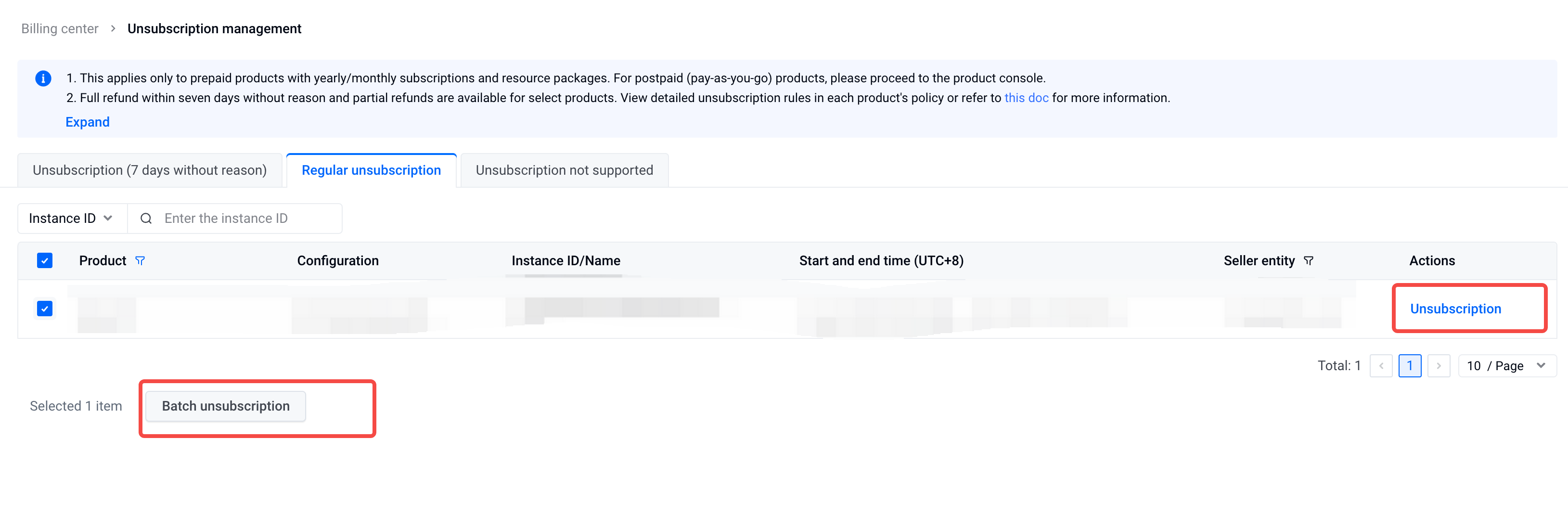
- Go to the "Billing Center - Cancellation Management" page.
- Select the tab "Cancelable with no reason within seven days" or "Non seven-day no-reason cancellation".
- You can cancel individual orders or batch cancellations based on the actual situation.
- Cancel individual order: Select the instance to cancel and click the "Cancel" button to enter the "Cancellation Information Confirmation" page.
- Batch cancellation: Check multiple instances to cancel in the cancellation list, then click the "Batch Cancel" button at the bottom left of the list to enter the "Cancellation Information Confirmation" page.
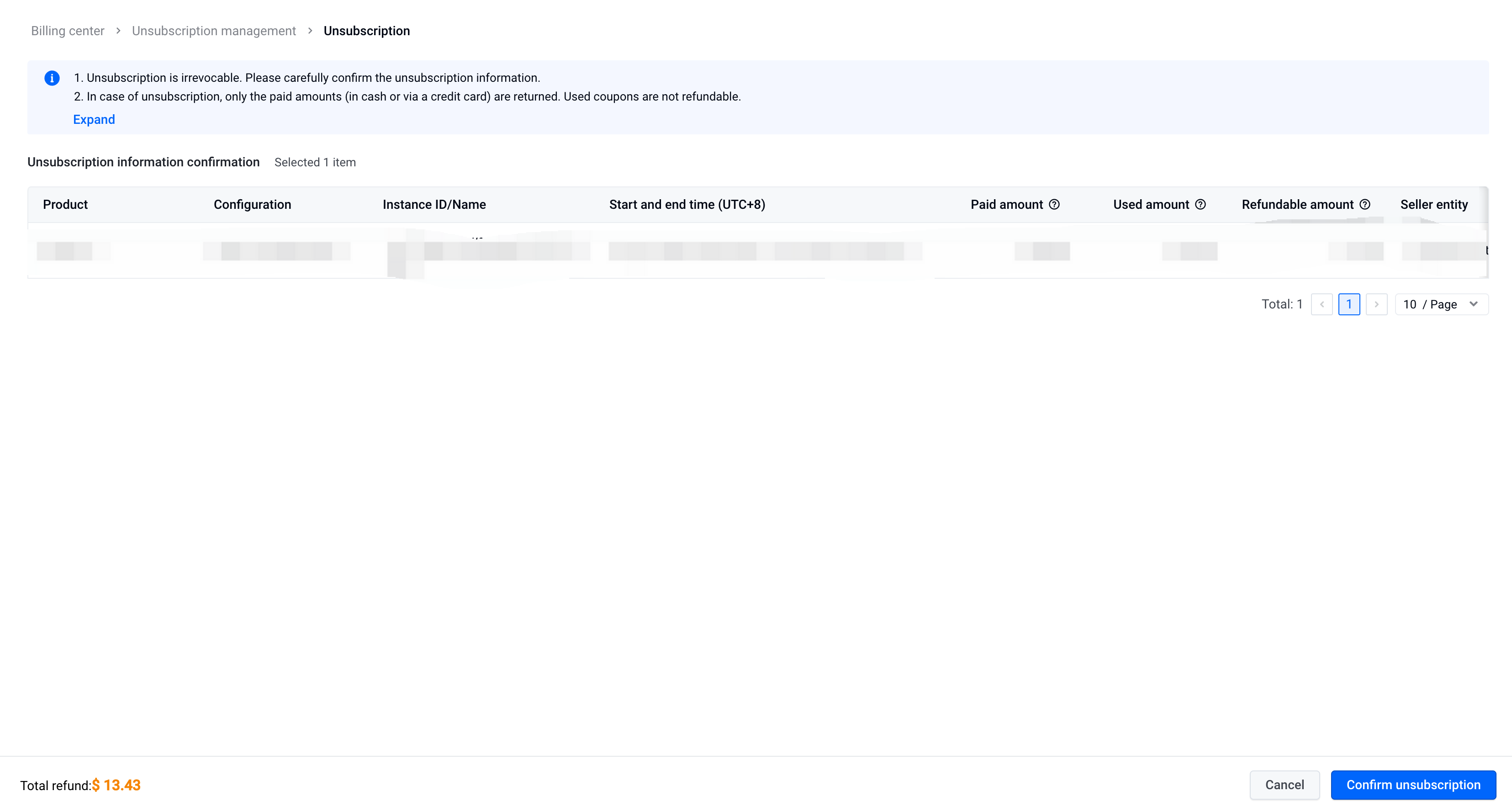
- Cancellation Information Confirmation: View the refundable amount of the instance to be canceled, check the confirmation prompt before cancellation (if any), then click "Confirm Cancellation".
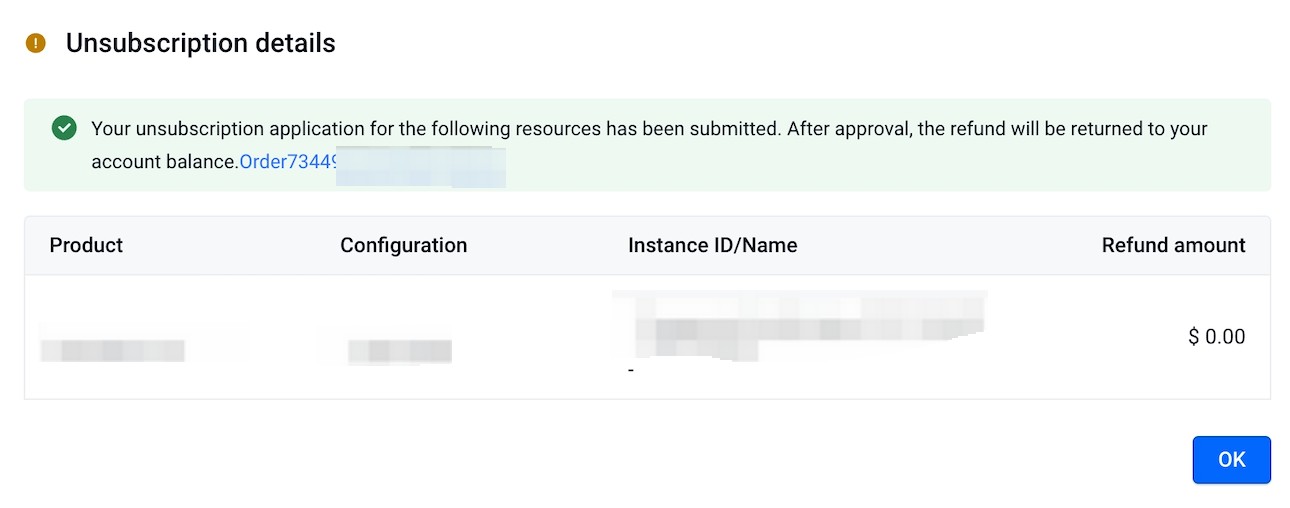
- Cancellation Details: After the cancellation application succeeds, click the "Order Number" to jump to the cancellation order details page.
Last updated: 2026.09.17 15:02:43
All rights reserved © Beijing Volcano Engine Technology Co., Ltd2024
