云服务器
云服务器


文档指南

请输入


- 文档首页
 云服务器云服务器ECS用户指南安全密码和密钥对升级密码插件
 复制全文
复制全文 下载 pdf
升级密码插件
 文档反馈
文档反馈 问问助手
问问助手操作场景
操作步骤
Linux镜像
请根据您的Linux操作系统发行版本参考下文进行密码插件升级操作。
说明
- 使用CentOS 6.9/6.10、Ubuntu 14.04创建的实例不支持更改主机名。
- 华北2(北京)地域的实例,如果未绑定公网IP,可以使用私网域名下载密码插件。其它地域的实例请绑定公网IP后,使用公网域名进行下载。
- 执行如下命令,查看是否安装密码插件。
- dpkg -s reset-authentication
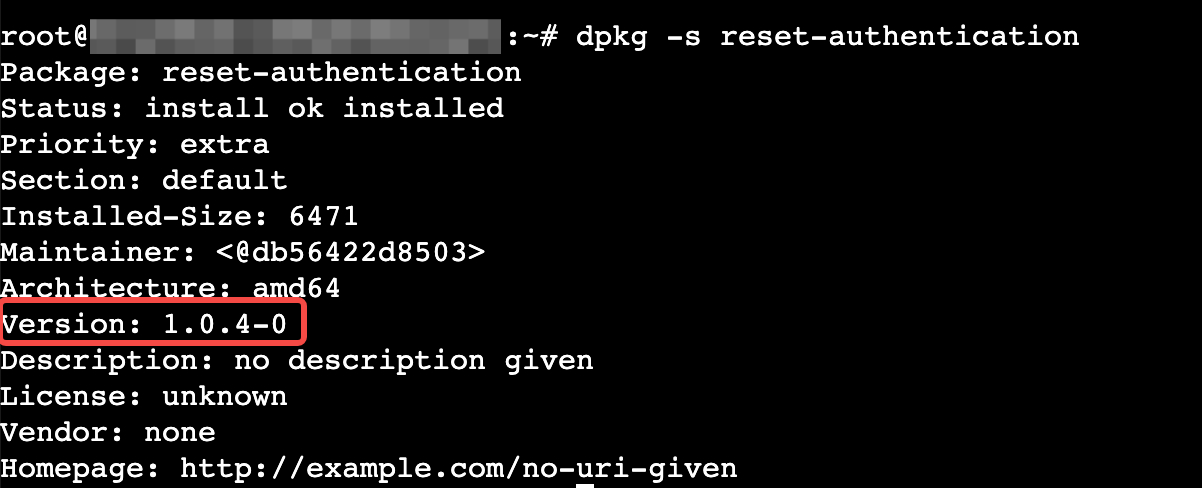
- 回显如下,表示已安装1.0.4版本的密码插件,执行步骤3。
-
- 回显如下,表示未安装插件,执行步骤4。
-

- 执行如下命令,卸载旧版密码插件。
- dpkg -r reset-authentication
- 执行如下命令,下载新版插件。
- 通过公网下载
- wget http://volc-ecs.tos-s3-cn-beijing.volces.com/reset-authentication_1.0.11-0_amd64.deb
- 通过内网下载
注意
仅华北2(北京)地域支持。
- wget http://volc-ecs.tos-s3-cn-beijing.ivolces.com/reset-authentication_1.0.11-0_amd64.deb
- 执行如下命令,安装新版插件。
- dpkg -i reset-authentication_1.0.11-0_amd64.deb
- 验证结果。
- 执行如下命令,结果为“active”即代表插件安装成功。
- systemctl is-active reset-authentication.service
- 执行如下命令,结果为“enabled”即代表插件安装成功。
- systemctl is-enabled reset-authentication.service
-
- 执行如下命令,查看是否安装密码插件。
- rpm -q reset-authentication
- 回显如下,表示已安装1.0.4版本的密码插件,执行步骤3。
-

- 回显如下,表示未安装插件,执行步骤4。
-

- 执行如下命令,卸载旧版密码插件。
- rpm -e reset-authentication
- 执行如下命令,下载新版插件。
- 通过公网下载
- wget http://volc-ecs.tos-s3-cn-beijing.volces.com/reset-authentication-1.0.11-0.x86_64.rpm
- 通过内网下载
注意
仅华北2(北京)地域支持。
- wget http://volc-ecs.tos-s3-cn-beijing.ivolces.com/reset-authentication-1.0.11-0.x86_64.rpm
- 执行如下命令,安装新版插件。
- rpm -i reset-authentication-1.0.11-0.x86_64.rpm
- 验证结果。
- 执行如下命令,结果为“active”即代表插件安装成功。
- systemctl is-active reset-authentication.service
- 执行如下命令,结果为“enabled”即代表插件安装成功。
- systemctl is-enabled reset-authentication.service
-
Windows镜像
- 查看是否安装密码插件。
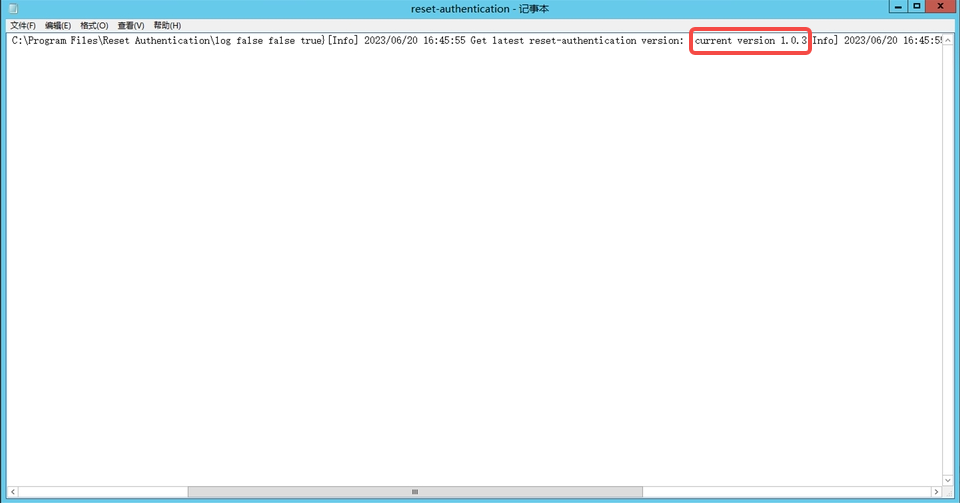
- 请确认是否存在C:\Program Files\Reset Authentication目录,目录下是否有文件和log文件夹,打开log文件,查看版本。
- 若存在上述文件,表示已安装旧版插件(如下图),您可重新下载新的插件,并执行如下命令启动密码插件即可。
- "C:\Program Files\Reset Authentication\reset-authentication.exe"
-
- 若不存在上述文件,表示未安装密码插件,执行步骤3。
- 下载并安装新版插件。
- 创建 C:\Program Files\Reset Authentication 目录。
- 在云服务器桌面单击“开始 > Windows PowerShell“,打开PowerShell。
- 在PowerShell中执行如下命令下载ps1自启动脚本和密码插件并保存至相应目录下。
- ps1自启动脚本
- wget -Uri "http://volc-ecs.tos-s3-cn-beijing.volces.com/reset-authentication.ps1" -OutFile "C:\Program Files\Cloudbase Solutions\Cloudbase-Init\LocalScripts\reset-authentication.ps1"
- 密码插件
- wget -Uri "http://volc-ecs.tos-s3-cn-beijing.volces.com/reset-authentication.exe" -OutFile "C:\Program Files\Reset Authentication\reset-authentication.exe"
- 在PowerShell中依次执行如下命令进行初始化操作。
- 执行如下命令,获取实例UUID。
- $instance_id = ((Invoke-WebRequest -URI "http://100.96.0.96/openstack/latest/meta_data.json" -UseBasicParsing).Content | ConvertFrom-Json).uuid
- 执行如下命令,删除Cloudbase-init注册表部分配置,使密码插件能正常运行。
- 若您未运行过Cloudbase-init,无需执行此命令。
- Remove-ItemProperty "HKLM:\SOFTWARE\Cloudbase Solutions\Cloudbase-Init\$instance_id\Plugins" LocalScriptsPlugin
- 执行如下命令,启动密码插件。
- "C:\Program Files\Reset Authentication\reset-authentication.exe"
-
最近更新时间:2025.04.25 10:45:30
这个页面对您有帮助吗?
有用
有用
无用
无用