You need to enable JavaScript to run this app.
ArkClaw Enterprise

ArkClaw Enterprise

Copy page
Download PDF
Billing
Instructions on expiration
Copy page
Download PDF
Instructions on expiration
You can view the instructions on expiration to check the validity period of your ArkClaw, understand the impact of expiration, plan renewal, and release resources. This helps you properly arrange usage and operations.​
Expiration rules​
When your ArkClaw expires, it will be suspended after 12 hours, and its associated resources are retained for 7 days. If you do not renew or activate within this period, the system automatically deletes your data.​
​
Purchase method​
Package​
Included resources​
Instructions on Agent Plan/Coding Plan expiration​
Bundle purchase (with Agent Plan)​
Starter (with Agent Plan Small)​
With ArkClaw Starter and Agent Plan Small LLM subscription package​
Expires simultaneously with ArkClaw.​
​
Starter (with Agent Plan Medium)​
With ArkClaw Starter and Agent Plan Medium LLM subscription package​
​
​
Standard (with Agent Plan Small)​
With ArkClaw Standard and Agent Plan Small LLM subscription package​
​
​
Standard (with Agent Plan Medium)​
With ArkClaw Standard and Agent Plan Medium LLM subscription package​
​
​
Premium (with Agent Plan Medium)​
With ArkClaw Premium and Agent Plan Medium LLM subscription package​
​
​
Premium (with Agent Plan Large)​
With ArkClaw Premium and Agent Plan Large LLM subscription package​
​
​
Bundle purchase (with Coding Plan)​
Starter (with Lite Plan)​
With ArkClaw Starter and Coding Plan Lite model subscription package​
Expires simultaneously with ArkClaw.​
​
Starter (with Pro Plan)​
With ArkClaw Starter and Coding Plan Pro LLM subscription package​
​
​
Standard (with Lite Plan)​
With ArkClaw Standard and Coding Plan Lite LLM subscription package​
​
​
Standard (with Pro Plan)​
With ArkClaw Standard and Coding Plan Pro LLM subscription package​
​
​
Premium (with Pro Plan)​
With ArkClaw Premium and Coding Plan Pro LLM subscription package​
​
Separate purchase​
Starter edition​
Only ArkClaw Starter​
The Agent Plan/Coding Plan expiration time depends on the validity period of the subscription.​
If your Coding Plan subscription expires, the ArkClaw cannot use model services. We recommend you renew your service in a timely manner.​
​
Standard edition​
Only ArkClaw Standard​
​
​
Premium edition​
Only ArkClaw Premium​
​
​
Impact of expiration and resource status after expiration​
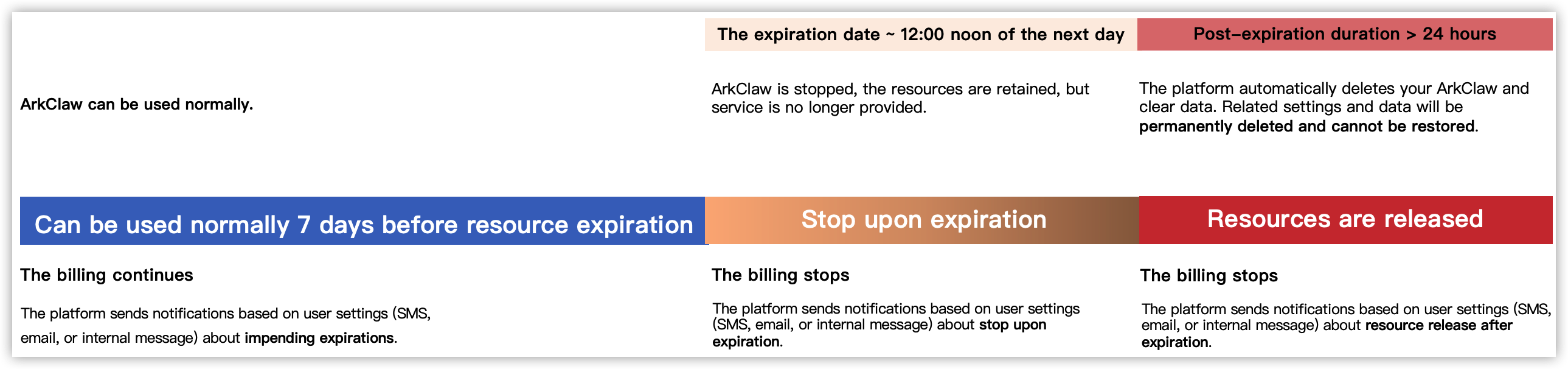
The status of ArkClaw after expiration is shown in the following chart.​
​​​
tip​
Based on the notification method you specify, the platform sends notifications via SMS, email, or internal message 7 days before expiration, on the expiration date, and 7 days after expiration of your ArkClaw instance. These notifications inform you of pending expiration, resource suspension, and resource release. Please monitor these notifications closely.​
Instructions on release after expiration​
​
Item​
Description​
Expiration time​
23:59:59 on the expiration day​
Shutdown time​
Suspended 12 hours after expiration.​
After your ArkClaw is shut down, "Application stopped" appears.​
Release time​
7 days after expiration.​
Data: Retained for 7 days and automatically cleared after timeout.​
​
View expiration time​
You can view the ArkClaw package expiration time to plan renewals and prevent service interruptions when ArkClaw expires.​
  1. Log in to the ArkClaw console.​
  1. Switch to the target ArkClaw page. In the upper-right corner of the page, click the details icon.​
  1. On the ArkClaw details page, select the "Status and usage" tab.​
  1. You can view the expiration time directly on the corresponding ArkClaw card.​
Last updated: 2026.07.03 15:43:47