容器服务
容器服务
容器服务


文档指南
请输入


容器服务 VKE
产品动态
Kubernetes 版本发布记录
组件发布记录
监控组件
DNS 组件
GPU 组件
Sandbox 组件
安全公告
产品公告
历史公告
用户指南
集群
节点池
授权
网络
容器网络
服务(Service)
路由(Ingress)
APIG Ingress
ALB Ingress
自定义转发规则配置示例
CLB Ingress
Nginx Ingress
Gateway API
工作负载
存储
数据管理中心(DMC)
对象存储(TOS)
FSX 访问方式
文件存储(NAS)
FSX 访问方式
弹性文件存储(EFS)
文件存储(vePFS)
FSX 访问方式
vePFS Client 访问方式
NFS 访问方式
大数据文件存储(CloudFS)
弹性伸缩
工作负载弹性伸缩
事件驱动伸缩(KEDA)
组件管理
网络组件
监控组件
DNS 组件
GPU 组件
Sandbox 组件
异构计算
调度管理
可观测性
基础观测
诊断与巡检
最佳实践
网络
可观测性
安全合规
API 参考
集群管理
节点池管理
组件管理
机型镜像管理
云原生观测
巡检诊断
弹性容器实例
附录
开发指南
常见问题
通用 FAQ
集群 FAQ
集群管理
集群升级
节点与节点池 FAQ
授权 FAQ
工作负载 FAQ
服务与路由 FAQ
存储 FAQ
弹性伸缩 FAQ
可观测性 FAQ
配额 FAQ
组件 FAQ
容器镜像 FAQ
AI 云原生
推理套件
Helm 模板 AI 应用
Deepseek 实践
Qwen 实践
最佳实践
MiniMax 模型部署
Qwen 模型部署
弹性容器实例 VCI
最新动态
用户指南
虚拟节点
VKE 集群使用虚拟节点
自建/跨云集群使用虚拟节点
创建 VCI 实例
VCI Agent Sandbox
安全合规
- 文档首页
 容器服务容器服务 VKE用户指南网络路由(Ingress)Nginx IngressNginx Ingress 配置 HTTPS 协议
 复制全文
复制全文 下载 pdf
Nginx Ingress 配置 HTTPS 协议
 文档反馈
文档反馈 问问助手
问问助手为保证公网环境下的通信安全,业务使用 Ingress 暴露到公网时,通常使用 HTTPS 协议通信。本文为您介绍如何配置 HTTPS 协议的 Nignx Ingress。
注意
前提条件
- 已连接集群。详情请参见 连接集群。
- 已在集群中安装 ingress-nginx 组件。详情请参见 ingress-nginx 组件。
- 已在火山引擎 SSL 证书服务 购买或使用 OpenSSL 创建 SSL 证书和密钥。
操作步骤
步骤一:配置保密字典
- 已获取 SSL 证书和密钥,本文以tls.key和tls.crt为例。
- 执行以下命令,创建名称为 ingress-secret,类型为kubernetes.io/tls的保密字典。
- kubectl create secret tls ingress-secret --key tls.key --cert tls.crt
步骤二:部署应用和服务
- 创建工作负载的 YAML 文件。示例文件deployment-demo.yaml代码如下:
- apiVersion: apps/v1kind: Deploymentmetadata:name: deployment-demo # 无状态负载名称namespace: default # 无状态负载所在的命名空间spec: replicas: 1 # 无状态负载的副本数selector: matchLabels: app: nginxtemplate: metadata: labels: app: nginxspec:containers:- name: nginx # 容器名称image: nginx:latest # 容器镜像地址和 Tagports:- containerPort: 80 # 容器开放的端口号
- 执行以下命令,创建工作负载。
- kubectl apply -f deployment-demo.yaml
- 创建服务的 YAML 文件。示例文件service-demo.yaml代码如下:
- apiVersion: v1kind: Servicemetadata:name: service-demo # 服务名称spec:selector:app: nginx # 通过标签选择器将服务与后段容器组(Pod)绑定。ports:- name: rule # 端口映射规则名称protocol: TCP # 服务协议,支持 TCP 或 UDPport: 80 # 服务端口nodePort: 30000 # 节点端口,取值范围为 30000~32767。targetPort: 80 # 容器端口,即工作负载对外提供服务的端口号或端口名称,例如:Nginx 开放的默认端口号为 80type: NodePort # 服务的类型
注意
- 当集群的容器网络模型为 Flannel 时,仅支持关联和选择 NodePort、LoadBalancer 类型的服务。
- 当集群的容器网络模型为 VPC-CNI 时:
- 若 Ingress 开启了 直通 Pod 模式,则支持关联和选择 NodePort、LoadBalancer、ClusterIP 类型的服务。
- 若 Ingress 未开启 直通 Pod 模式,则仅支持关联和选择 NodePort、LoadBalancer 类型的服务。
- 执行以下命令,创建服务。
- kubectl apply -f service-demo.yaml
步骤三:配置 Nginx Ingress
- 创建 Ingress 的 YAML 文件。示例文件nginx-ingress.yaml代码如下:
- apiVersion: networking.k8s.io/v1kind: Ingressmetadata:name: nginx-ingress # 路由规则的名称spec:ingressClassName: nginx # 指定 Ingress Controllerrules:- host: example.com # 转发规则域名http:paths:- backend:service:name: service-demo # 请求被转发到的目标服务名称port:number: 80 # 请求被转发到的目标服务开放端口号path: / # 访问路径pathType: Prefix # 路径类型:Exact(精确匹配)/Prefix(前缀匹配)tls:- hosts:- example.com # (可选)指定需要加密的域名。不配置表示加密所有的域名secretName: ingress-secret # 指定 ingress 使用的保密字典名称
说明
- 您需要自主保障在公网环境下,自定义域名和 ingress 负载均衡 EIP 的 DNS 解析关系。
- 当选择 HTTPS 协议时,系统默认会同时开放 80 端口和 443 端口。为保证数据安全,建议配置 80 端口重定向,即将 HTTP 重定向到 HTTPS,详情请参见 Nginx Ingress 配置重定向规则。
- 执行以下命令,创建 Ingress。
- kubectl apply -f nginx-ingress.yaml
结果验证
查看配置
执行以下命令,查看 ingress 配置。
kubectl get ingress
预期返回结果如下,表示 Ingress 创建成功。其中180.xxx.xxx.xxx为 Nginx Ingress 对应 CLB 的公网或私网 IP 地址。
NAME CLASS HOSTS ADDRESS PORTS AGE
nginx-ingress nginx example.com 180.xxx.xxx.xxx 80,443 74s
访问服务
使用以下命令,通过域名访问服务。
curl -H "Host: example.com" https://180.xxx.xxx.xxx --insecure
注意
- 当您使用自签名证书时,可以使用-k或--insecure参数忽略证书的验证。
- 在生产环境中使用 TLS 证书时,建议您使用官方可信证书。使用自签名证书且忽略证书验证,可能导致您受到中间人攻击。
预期输出如下,表示可以通过域名访问到后端服务。
<!DOCTYPE html>
<html>
<head>
<title>Welcome to nginx!</title>
<style>
html { color-scheme: light dark; }
body { width: 35em; margin: 0 auto;
font-family: Tahoma, Verdana, Arial, sans-serif; }
</style>
</head>
<body>
<h1>Welcome to nginx!</h1>
<p>If you see this page, the nginx web server is successfully installed and
working. Further configuration is required.</p>
<p>For online documentation and support please refer to
<a href="http://nginx.org/">nginx.org</a>.<br/>
Commercial support is available at
<a href="http://nginx.com/">nginx.com</a>.</p>
<p><em>Thank you for using nginx.</em></p>
</body>
</html>
运维配置
如何使用 OpenSSL 创建自签名证书
- 在本地环境中,访问 OpenSSL 官网,下载并安装 OpenSSL。
- 执行以下命令,生成 4096 位的 RSA 私钥。
- openssl genrsa -out tls.key 4096
- 预期结果如下:
- Generating RSA private key, 4096 bit long modulus........+++++...+++++e is 65537 (0x10001)
- 执行以下命令,使用 RSA 私钥生成证书。
- openssl req -new -key tls.key -out tls.csr
- 预期结果如下,需要填写证书的相关信息,包括:国家、地区、组织名称、域名、电子邮件地址等。
- You are about to be asked to enter information that will be incorporatedinto your certificate request.What you are about to enter is what is called a Distinguished Name or a DN.There are quite a few fields but you can leave some blankFor some fields there will be a default value,If you enter '.', the field will be left blank.-----Country Name (2 letter code) []:CN # 2 位国家代码,例如 CNState or Province Name (full name) []:Shanghai # 地区名称,例如 ShanghaiLocality Name (eg, city) []:Shanghai # 城市名称,例如 ShanghaiOrganization Name (eg, company) []:vke # 组织名称Organizational Unit Name (eg, section) []:vke # 组织中的单位名称Common Name (eg, fully qualified host name) []:example.com # 该证书对应的域名Email Address []:user@example.com # 电子邮件地址Please enter the following 'extra' attributesto be sent with your certificate requestA challenge password []:mypassword # 密码,可以为空
- 执行以下命令,使用私钥对证书进行签名,有效期配置为 365 天。
- openssl x509 -req -in tls.csr -out tls.crt -signkey tls.key -days 365
- 至此,完成创建 HTTPS 加密所需的私钥tls.key和证书tls.crt。
如何更换 HTTPS 证书
当需要更换 Nginx Ingress 的 HTTPS 证书时,需要遵循以下操作步骤:
- 登录 容器服务控制台。
- 在集群列表页面,单击目标集群名称,进入集群管理页面。
- 在左侧导航栏中,选择 服务与路由 > 路由规则,在路由规则中选择需要更新 HTTPS 证书的 Ingress 规则,在右侧 操作 列中选择 更新。
-

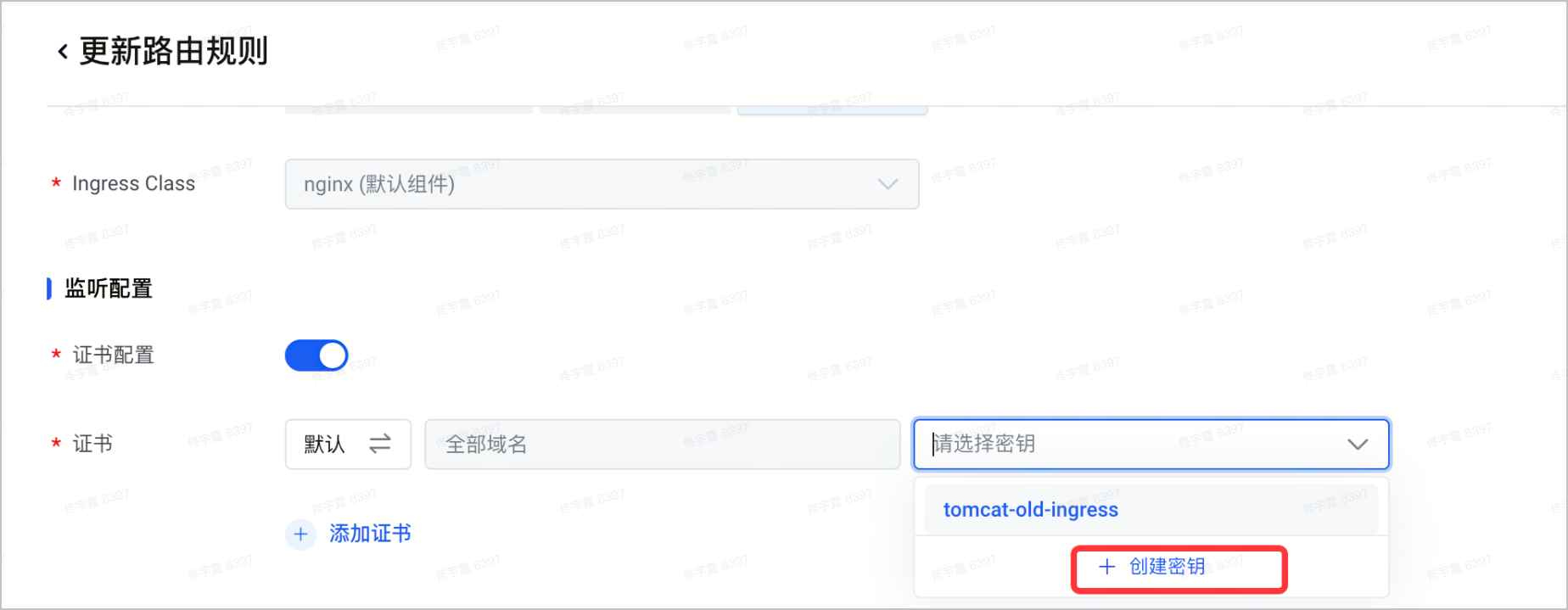
- 在 监听配置 处,单击 创建密钥,创建新的密钥。
-
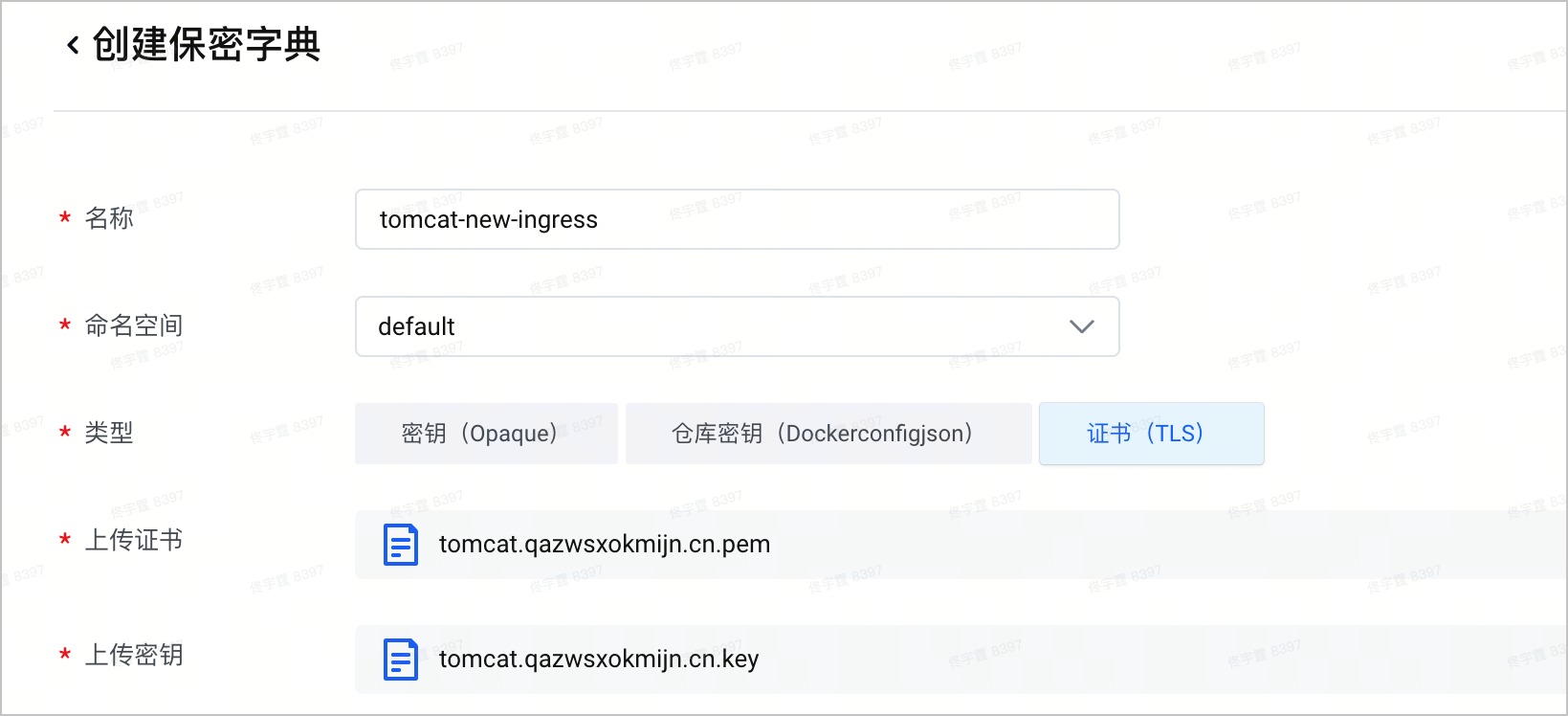
- 创建并上传新的证书和密钥,单击 确定,完成路由规则更新。
-
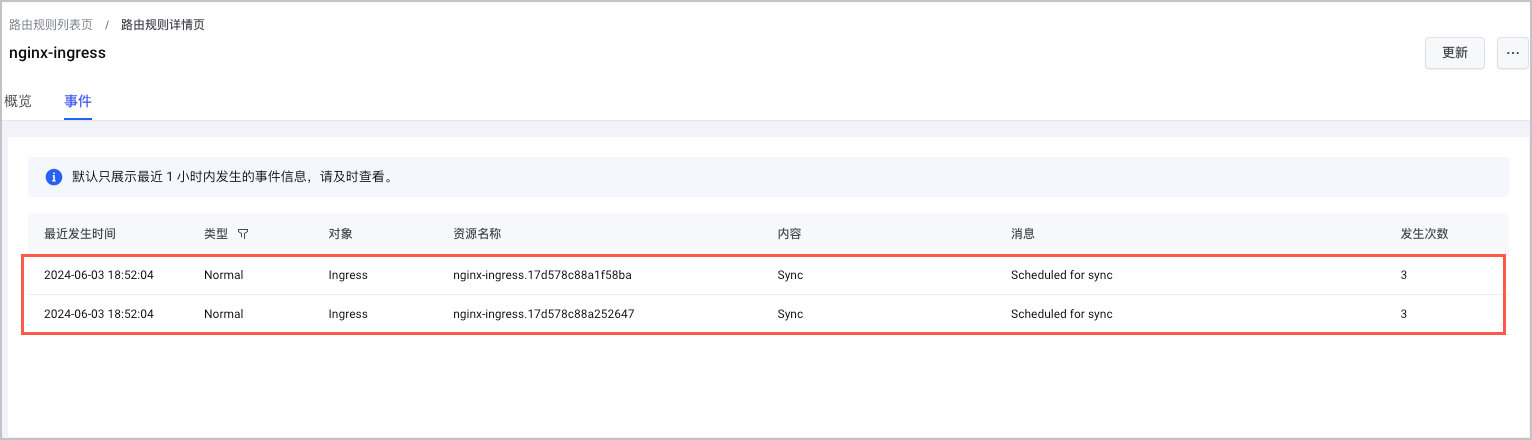
- 单击路由规则名称,在路由规则详情页中,选择 事件 页签,可以查看路由规则的调谐成功事件。
-
最近更新时间:2026.04.07 14:29:43
这个页面对您有帮助吗?
有用
有用
无用
无用