容器服务
容器服务
容器服务


文档指南
请输入


容器服务 VKE
产品动态
Kubernetes 版本发布记录
组件发布记录
监控组件
DNS 组件
GPU 组件
Sandbox 组件
安全公告
产品公告
历史公告
用户指南
集群
节点池
授权
网络
容器网络
服务(Service)
路由(Ingress)
APIG Ingress
ALB Ingress
自定义转发规则配置示例
CLB Ingress
Nginx Ingress
Gateway API
工作负载
存储
数据管理中心(DMC)
对象存储(TOS)
FSX 访问方式
文件存储(NAS)
FSX 访问方式
弹性文件存储(EFS)
文件存储(vePFS)
FSX 访问方式
vePFS Client 访问方式
NFS 访问方式
大数据文件存储(CloudFS)
弹性伸缩
工作负载弹性伸缩
事件驱动伸缩(KEDA)
组件管理
网络组件
监控组件
DNS 组件
GPU 组件
Sandbox 组件
异构计算
调度管理
可观测性
基础观测
诊断与巡检
最佳实践
网络
可观测性
安全合规
API 参考
集群管理
节点池管理
组件管理
机型镜像管理
云原生观测
巡检诊断
弹性容器实例
附录
开发指南
常见问题
通用 FAQ
集群 FAQ
集群管理
集群升级
节点与节点池 FAQ
授权 FAQ
工作负载 FAQ
服务与路由 FAQ
存储 FAQ
弹性伸缩 FAQ
可观测性 FAQ
配额 FAQ
组件 FAQ
容器镜像 FAQ
AI 云原生
推理套件
Helm 模板 AI 应用
Deepseek 实践
Qwen 实践
最佳实践
MiniMax 模型部署
Qwen 模型部署
弹性容器实例 VCI
最新动态
用户指南
虚拟节点
VKE 集群使用虚拟节点
自建/跨云集群使用虚拟节点
创建 VCI 实例
VCI Agent Sandbox
安全合规
- 文档首页
 容器服务容器服务 VKE最佳实践可观测性监控集群中的 Golang 应用
 复制全文
复制全文 下载 pdf
监控集群中的 Golang 应用
 文档反馈
文档反馈 问问助手
问问助手当您在容器服务集群中部署 Golang 应用时,可以使用云原生观测对 Golang 应用进行监控。本文为您介绍在集群中监控 Golang 应用的方法和操作步骤。
背景信息
说明
安装依赖
您可以通过 go get 命令来安装相关依赖,示例如下:
go get github.com/prometheus/client_golang/prometheus
go get github.com/prometheus/client_golang/prometheus/collectors
go get github.com/prometheus/client_golang/prometheus/promhttp
运行时指标
- 创建一个 HTTP 服务,路径使用 /metrics。可以直接使用 prometheus/promhttp 里提供的 Handler 函数。
- 如下是一个简单的示例,通过 http://localhost:2023/metrics 暴露 Golang 应用的一些默认指标数据,包括:运行时指标、进程相关指标以及构建相关的指标。
- package mainimport ("math""math/rand""net/http""time""github.com/prometheus/client_golang/prometheus""github.com/prometheus/client_golang/prometheus/collectors""github.com/prometheus/client_golang/prometheus/promhttp")func main() {// Create a new registry.reg := prometheus.NewRegistry()// Add Go module build info.reg.MustRegister(collectors.NewBuildInfoCollector())// Add go runtime metrics and process collectors.reg.MustRegister(collectors.NewGoCollector(),collectors.NewProcessCollector(collectors.ProcessCollectorOpts{}),)http.Handle("/metrics", promhttp.HandlerFor(reg, promhttp.HandlerOpts{},))http.ListenAndServe(":2023", nil)}
- 执行以下命令,启动应用。
- go run main.go
- 执行以下命令,即可查看运行时的指标数据。
- curl http://localhost:2023/metrics
应用层指标
- 上述示例仅仅暴露了一些基础的内置指标。应用层面的指标还需要额外添加。
- 如下示例暴露了一个名为 rpc_durations_seconds 的指标,用于对服务的 RPC 延迟进行统计。
- package mainimport ("math""math/rand""net/http""time""github.com/prometheus/client_golang/prometheus""github.com/prometheus/client_golang/prometheus/collectors""github.com/prometheus/client_golang/prometheus/promhttp")var rpcDurations = prometheus.NewSummaryVec(prometheus.SummaryOpts{Name: "rpc_durations_seconds",Help: "RPC latency distributions.",Objectives: map[float64]float64{0.5: 0.05, 0.9: 0.01, 0.99: 0.001},},[]string{"service"},)func main() {// Create a new registry.reg := prometheus.NewRegistry()// Add Go module build info.reg.MustRegister(collectors.NewBuildInfoCollector())// Add go runtime metrics and process collectors.reg.MustRegister(collectors.NewGoCollector(),collectors.NewProcessCollector(collectors.ProcessCollectorOpts{}),)reg.MustRegister(rpcDurations)start := time.Now()oscillationFactor := func() float64 {return 2 + math.Sin(math.Sin(2*math.Pi*float64(time.Since(start))/float64(10*time.Minute)))}// Periodically record some sample latencies for the three services.go func() {for {v := rand.Float64() * 0.0002rpcDurations.WithLabelValues("uniform").Observe(v)time.Sleep(time.Duration(100*oscillationFactor()) * time.Millisecond)}}()go func() {for {v := (rand.NormFloat64() * 0.0002) + 0.00001rpcDurations.WithLabelValues("normal").Observe(v)time.Sleep(time.Duration(75*oscillationFactor()) * time.Millisecond)}}()go func() {for {v := rand.ExpFloat64() / 1e6rpcDurations.WithLabelValues("exponential").Observe(v)time.Sleep(time.Duration(50*oscillationFactor()) * time.Millisecond)}}()http.Handle("/metrics", promhttp.HandlerFor(reg, promhttp.HandlerOpts{},))http.ListenAndServe(":2023", nil)}
- 执行以下命令,启动应用。
- go run main.go
- 执行以下命令,即可查看运行时的指标数据。
- curl http://localhost:2023/metrics
- 从输出结果我们可以看到 rpc_durations_seconds 计数器相关的信息,包括帮助文档、类型信息、指标名和当前值。
- # HELP rpc_durations_seconds RPC latency distributions.# TYPE rpc_durations_seconds summaryrpc_durations_seconds{service="exponential",quantile="0.5"} 7.427294276581254e-07rpc_durations_seconds{service="exponential",quantile="0.9"} 2.3157390817424027e-06
监控 Golang 应用示例
前提条件
打包应用
- 您可以将上面的 Golang 源代码,使用如下形式的 Dockerfile 打包为镜像,方便部署在容器服务 VKE 集群中。
说明
该 Dockerfile 仅为示例,您需要按需修改里面的参数。
- FROM golang:1.19 as builderCOPY . /go/src/demoWORKDIR /go/src/demoRUN go env -w GOPROXY=https://goproxy.cn,direct && \go mod init && \go mod tidy && \go mod vendor && \go build -v -o /golang-demoFROM buildpack-deps:bullseye-curlRUN mkdir -p /appCOPY --from=builder /golang-demo /appWORKDIR /appENV TZ Asia/ShanghaiEXPOSE 2023ENTRYPOINT ["/app/golang-demo"]
- 镜像创建完成后,可以上传至 镜像仓库 中使用。也可以使用其他公有云或自建镜像仓库。
说明
部署应用
您可以使用镜像仓库中的镜像,在容器服务 VKE 集群中部署应用。步骤如下:
- 登录 容器服务控制台。
- 单击左侧导航栏中的 集群。
- 在集群列表页面,单击目标集群,进入集群管理页面。
- 在左侧导航栏中选择 工作负载 > 无状态负载。 单击 使用 Yaml 创建 ,部署应用。
- apiVersion: apps/v1kind: Deploymentmetadata:name: golang-demo # 配置应用的名称namespace: volcano-metrics # 配置应用所在的命名空间labels:app: golang-demo # 配置应用的标签spec:replicas: 2 # 配置应用副本数selector:matchLabels:app: golang-demotemplate:metadata:labels:app: golang-demospec:containers:- name: golang-demo # 配置容器名称image: doc-cn-beijing.cr.volces.com/vmp/golang-demo:1.0 # 配置应用镜像的地址和版本ports:- containerPort: 2023 # 配置容器端口
- 在左侧导航栏中,选择 服务与路由 > 服务,单击 使用 Yaml 创建 ,配置服务。
- apiVersion: v1kind: Servicemetadata:name: golang-service-demonamespace: volcano-metrics # 配置 Service 的命名空间labels: app: golang-service-demo # 配置 Service 的标签spec:selector:app: golang-demoports:- protocol: TCPport: 2023targetPort: 2023name: metrics # 配置服务端口名称type: ClusterIP
配置服务发现
当应用部署并正常运行后,可以使用 ServiceMonitor 配置服务发现,具体的操作步骤如下:
- 在左侧导航栏中选择 工作负载 > 对象浏览器。 单击 使用 Yaml 创建 ,通过 ServiceMonitor 配置服务发现。
- 在 类型 下拉菜单中选择 自定义。
- 在 Yaml 配置框内输入 Yaml 配置。
- apiVersion: monitoring.coreos.com/v1kind: ServiceMonitormetadata:name: golang-demo # 填写一个唯一名称namespace: default # 配置 ServiceMonitor 命名空间labels: volcengine.vmp: "true" # 配置 ServiceMonitor 的标签,允许被 Prometheus-agent 发现spec:endpoints:- interval: 30sport: metrics # 配置服务端口名称path: /metricsrelabelings:- action: replacesourceLabels: [__meta_kubernetes_pod_label_app]targetLabel: applicationnamespaceSelector:matchNames:- volcano-metrics # 配置服务所在的命名空间selector:matchLabels:app: golang-service-demo # 配置服务的 Label 值,以定位目标服务
查看监控数据
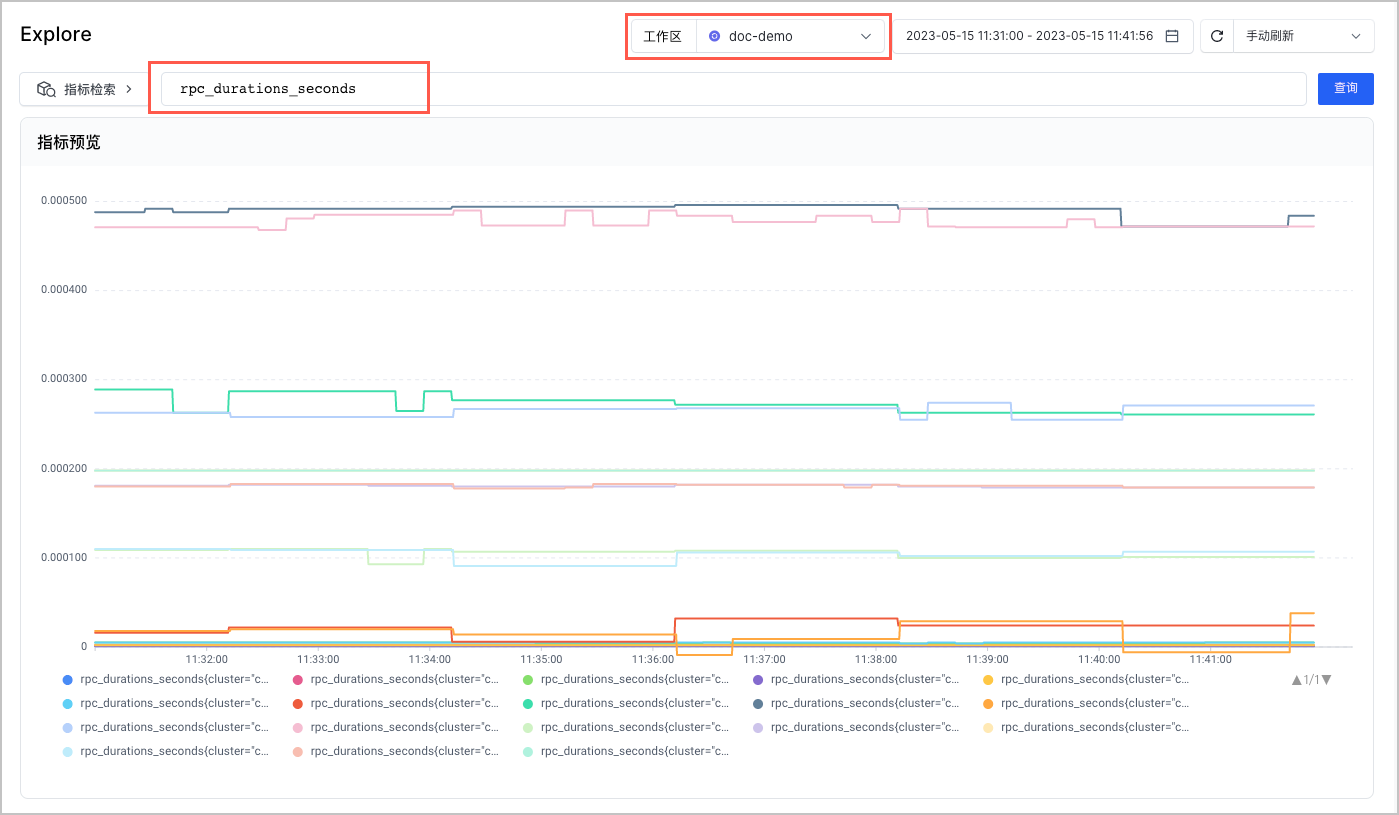
最近更新时间:2025.12.15 19:15:39
这个页面对您有帮助吗?
有用
有用
无用
无用