容器服务
容器服务
容器服务


文档指南
请输入


容器服务 VKE
产品动态
Kubernetes 版本发布记录
组件发布记录
监控组件
DNS 组件
GPU 组件
Sandbox 组件
安全公告
产品公告
历史公告
用户指南
集群
节点池
授权
网络
容器网络
服务(Service)
路由(Ingress)
APIG Ingress
ALB Ingress
自定义转发规则配置示例
CLB Ingress
Nginx Ingress
Gateway API
工作负载
存储
数据管理中心(DMC)
对象存储(TOS)
FSX 访问方式
文件存储(NAS)
FSX 访问方式
弹性文件存储(EFS)
文件存储(vePFS)
FSX 访问方式
vePFS Client 访问方式
NFS 访问方式
大数据文件存储(CloudFS)
弹性伸缩
工作负载弹性伸缩
事件驱动伸缩(KEDA)
组件管理
网络组件
监控组件
DNS 组件
GPU 组件
Sandbox 组件
异构计算
调度管理
可观测性
基础观测
诊断与巡检
最佳实践
网络
可观测性
安全合规
API 参考
集群管理
节点池管理
组件管理
机型镜像管理
云原生观测
巡检诊断
弹性容器实例
附录
开发指南
常见问题
通用 FAQ
集群 FAQ
集群管理
集群升级
节点与节点池 FAQ
授权 FAQ
工作负载 FAQ
服务与路由 FAQ
存储 FAQ
弹性伸缩 FAQ
可观测性 FAQ
配额 FAQ
组件 FAQ
容器镜像 FAQ
AI 云原生
推理套件
Helm 模板 AI 应用
Deepseek 实践
Qwen 实践
最佳实践
MiniMax 模型部署
Qwen 模型部署
弹性容器实例 VCI
最新动态
用户指南
虚拟节点
VKE 集群使用虚拟节点
自建/跨云集群使用虚拟节点
创建 VCI 实例
VCI Agent Sandbox
安全合规
- 文档首页
 容器服务容器服务 VKE用户指南网络路由(Ingress)ALB Ingress自定义转发规则配置示例配置转发至多个后端服务
 复制全文
复制全文 下载 pdf
配置转发至多个后端服务
 文档反馈
文档反馈 问问助手
问问助手ALB Ingress 支持在配置转发规则时,配置多个后端服务器组,允许指定集群中的 Service 或已存在的后端服务器组。当请求经过 ALB 时,ALB 可以按照权重向不同后端服务器组转发。
注意
前提条件
- 已连接集群,详情请参见 连接集群。
- 已创建 ALBInstance,详情请参见 通过 kubectl 创建 ALB Ingress。
- 已安装 alb-ingress-controller 组件,并升级至 v0.35.0 及以上版本。详情请参见 升级组件。
操作步骤
通过控制台配置
说明
仅对接 ALB 标准版时支持使用控制台配置,如需对接 ALB 基础版,请参见下文中的 YAML 配置。
- 登录 容器服务控制台。
- 单击左侧导航栏中的 集群。
- 在集群列表页面,单击需要配置路由规则的目标集群。
- 在集群管理页面的左侧导航栏中,选择 服务与路由 > 路由规则,单击 创建路由规则。
- 在 Ingress 类型 配置项中,选择 应用型负载均衡 ALB。
- 在 自定义转发规则 配置项中,勾选 启用,开启自定义转发规则,并配置转发规则详情。
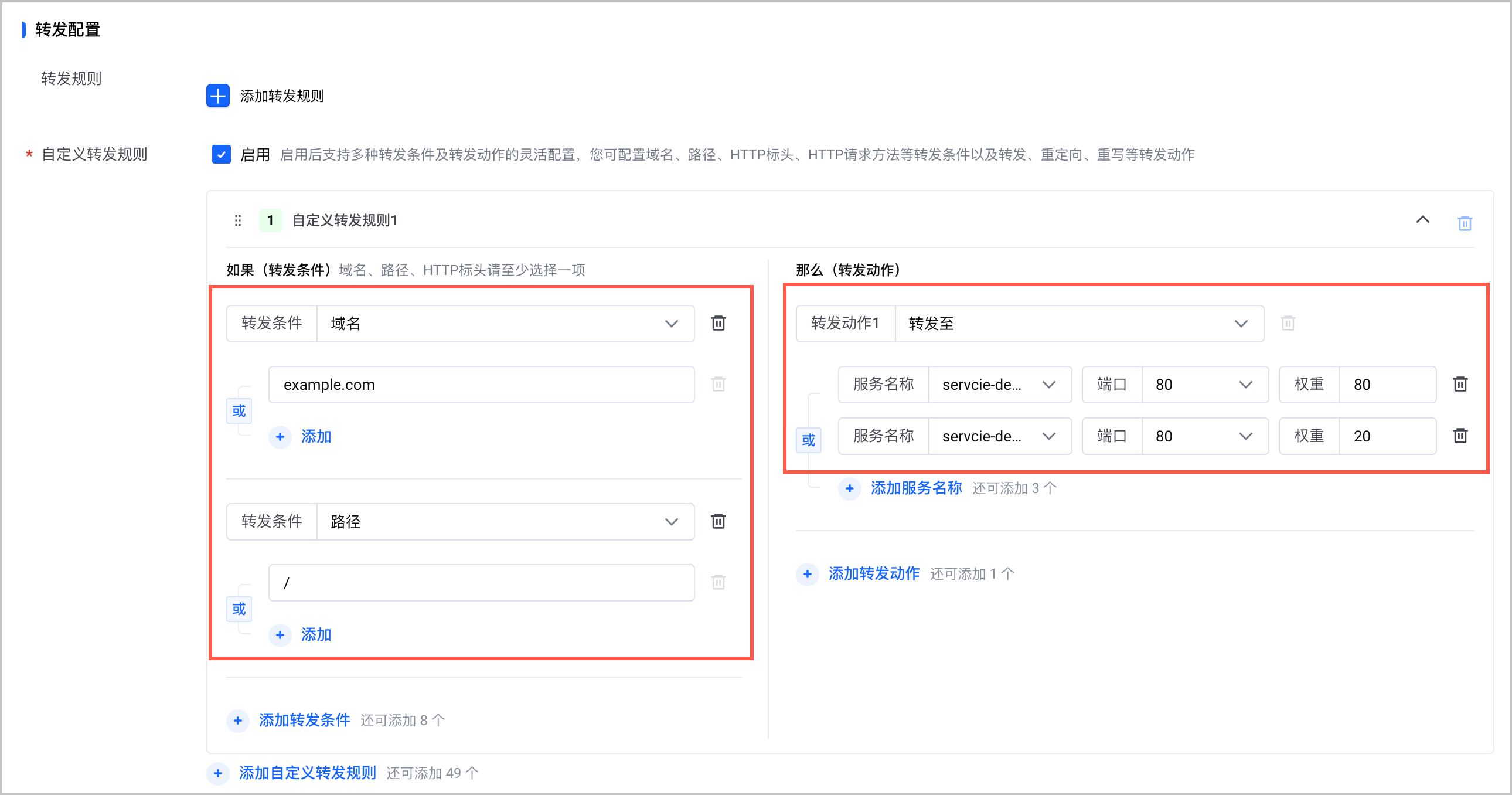
配置项 | 说明 |
配置项 | 说明 |
转发条件 | 配置转发条件,包括 域名、路径 和 HTTP 标头。
|
转发动作 |
- 单击 确定,完成配置。
通过 kubectl 命令行配置
ALB Ingress 支持通过 Annotation 指定多个后端服务器组。对接 ALB 标准版和基础版时的配置略有不同。
ALB 标准版
ALB 基础版
ALB 标准版的配置示例和注解说明,如下所示:
注意
注解中的{{service-name}}字段必须与spec.rules中配置的后端服务名称对应一致,例如在本例中,正确的注解为ingress.vke.volcengine.com/loadbalancer-actions.service-demo。
apiVersion: networking.k8s.io/v1
kind: Ingress
metadata:
name: alb-ingress # 自定义路由规则名称
namespace: default # 路由规则所属的命名空间
annotations:
ingress.vke.volcengine.com/loadbalancer-actions.{{service-name}}: |
[{
"type": "ForwardGroup",
"forwardGroupConfig": {
"serverGroupStickySession": {
"enabled": "on",
"timeout": 100
},
"backends": [
{
"serviceName": "service-demo-a",
"weight": 80,
"servicePort": 80
},
{
"serviceName": "service-demo-b",
"weight": 20,
"servicePort": 80
}
]
}
}]
spec:
ingressClassName: alb
rules:
- host: example.com
http:
paths:
- pathType: Prefix
path: /
backend:
service:
name: service-demo # 服务名称,注意需要和注解 loadbalancer-actions.{{service-name}} 里的 {{service-name}} 一致
port:
name: use-annotation # 固定值,配置多个后端服务器组时,port.name 必须为 use-annotation
ingress.vke.volcengine.com/loadbalancer-actions.{{service-name}}注解中的参数说明如下表所示。
字段 | 类型 | 描述 | 默认值 |
字段 | 类型 | 描述 | 默认值 |
type | String | 自定义转发规则的动作类型,当配置转发至多个后端服务器组时,必须配置为ForwardGroup。 | 无 |
forwardGroupConfig | Object of StickySessionConfig | 后端服务器组间会话保持配置。 | 无 |
backends | Array of BackendConfig | 后端服务器配置。 | 无 |
StickySessionConfig
字段 | 类型 | 描述 | 默认值 |
字段 | 类型 | 描述 | 默认值 |
serverGroupStickySession.enabled | String | 是否开启后端服务组组间会话保持功能,取值:
| 禁用 |
serverGroupStickySession.timeout | Integer | 配置后端服务组组间会话保持超时时间。
| 1000 |
BackendConfig
ALB Ingress 支持通过 Annotation 指定多个后端服务器组。后端服务器组支持配置为集群中的 Service,也支持通过 ID 指定 ALB 中已存在的服务器组。示例和注解说明如下:
apiVersion: networking.k8s.io/v1
kind: Ingress
metadata:
name: alb-ingress # 自定义路由规则名称
namespace: default # 路由规则所属的命名空间
annotations:
ingress.vke.volcengine.com/loadbalancer-rules-configs-forward: |
[
{
"host": "example.com",
"path": "/",
"serverGroups" : [{
"serviceName": "service-demo-a",
"weight": 80,
"servicePort": 80
},
{
"serverGroupId": "rsp-1ij9jfh***",
"weight": 30
},
{
"serviceName": "service-demo-b",
"weight": 20,
"servicePort": 80
}]
}
]
spec:
ingressClassName: alb # ALBInstance 的资源名称
rules:
- host: example.com
http:
paths:
- pathType: Prefix
path: / # 请求匹配的路径
backend:
service:
name: forward # 服务名称,固定为 forward,表示按照注解配置进行流量转发
port:
name: use-annotation # 端口名称,固定为 use-annotation,表示按照注解配置进行流量转发
ingress.vke.volcengine.com/loadbalancer-rules-config-forwad注解中的参数说明如下表所示。
字段 | 类型 | 描述 | 默认值 |
字段 | 类型 | 描述 | 默认值 |
host | String | 匹配转发规则中的域名。 | 无 |
path | String | 匹配转发规则中的路径。 | 无 |
serverGroups | Array of serverGroupConfig | 配置 ALB Ingress 后端服务器组。最多支持配置 5 个后端服务器组。 | 无 |
stickySessionEnabled | Boolean | 是否开启组间会话保持。取值:
| false |
stickySessionCookieTimeout | Integer | 服务器组间会话保持超时时间。单位为秒,取值范围为 1~86400。 | 1000 |
serverGroupConfig
字段 | 类型 | 描述 | 默认值 |
字段 | 类型 | 描述 | 默认值 |
serviceName | String | 集群中的服务名称。 说明 配置该字段时,必须同时配置servicePort字段。 | 无 |
servicePort | Integer | 服务端口号。取值范围:1~65535 | 80(HTTP)443(HTTPS) |
serverGroupID | String | 已存在后端服务器组 ID。 说明 该字段与serviceName字段不能同时配置。 | 无 |
weight | Integer | 后端服务器组权重,取值范围为 0~100。
说明 | 无 |
结果验证
查看配置
说明
ALB 标准版和基础版的转发规则详情界面略有不同,本文以查看 ALB 标准版界面为例。
- 登录 应用型负载均衡控制台。
- 单击左侧导航栏中 实例管理,在实例列表中选择目标 ALB 实例,在 操作 栏中单击 配置监听器。
-

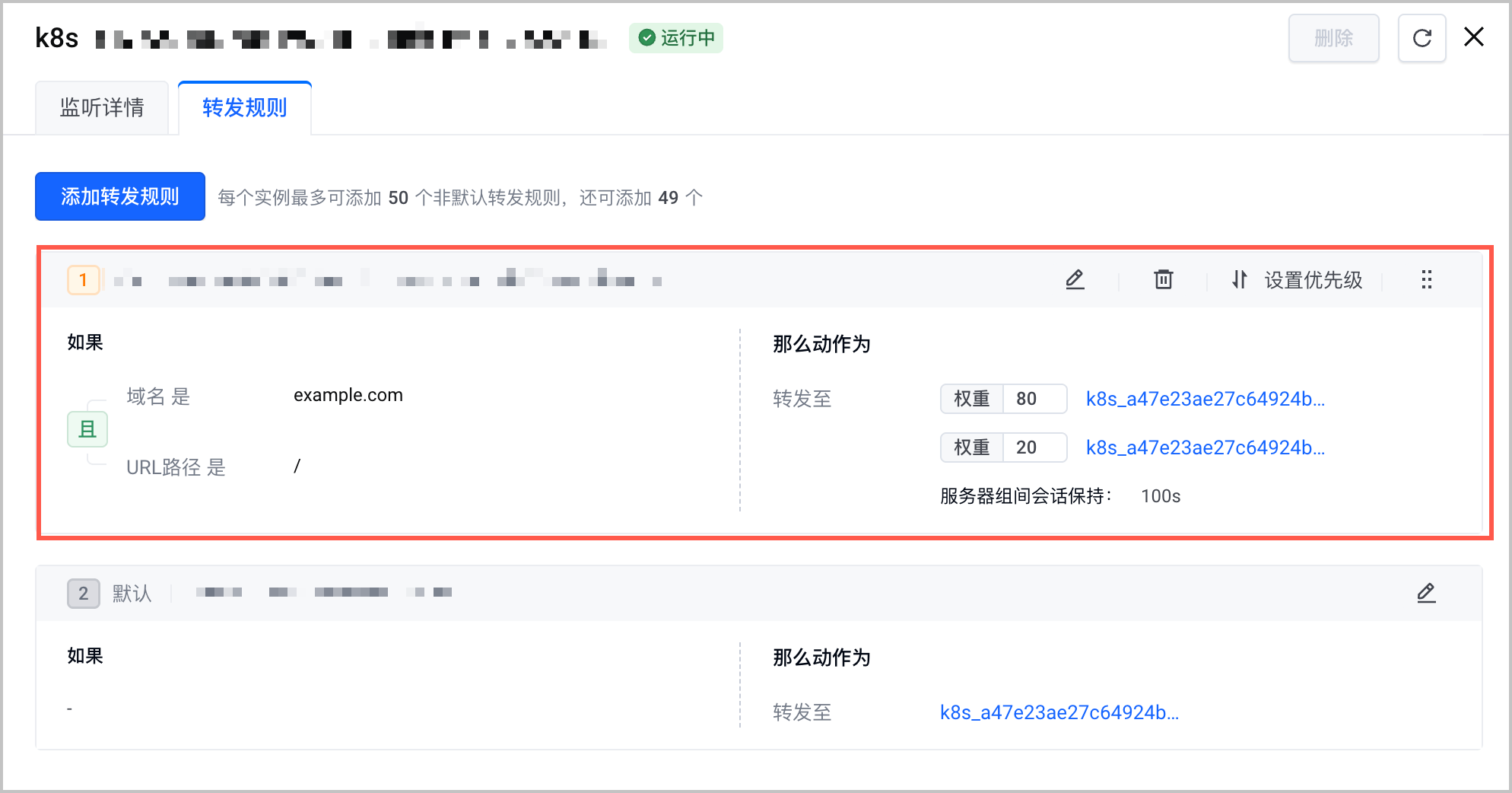
- 在 监听器 页面中,选择目标监听器,在 操作 栏中单击 编辑转发规则,查看当前监听器的转发规则。可以看到有多个后端服务器组。规则配置详情,应该与下发的规则一致。
-
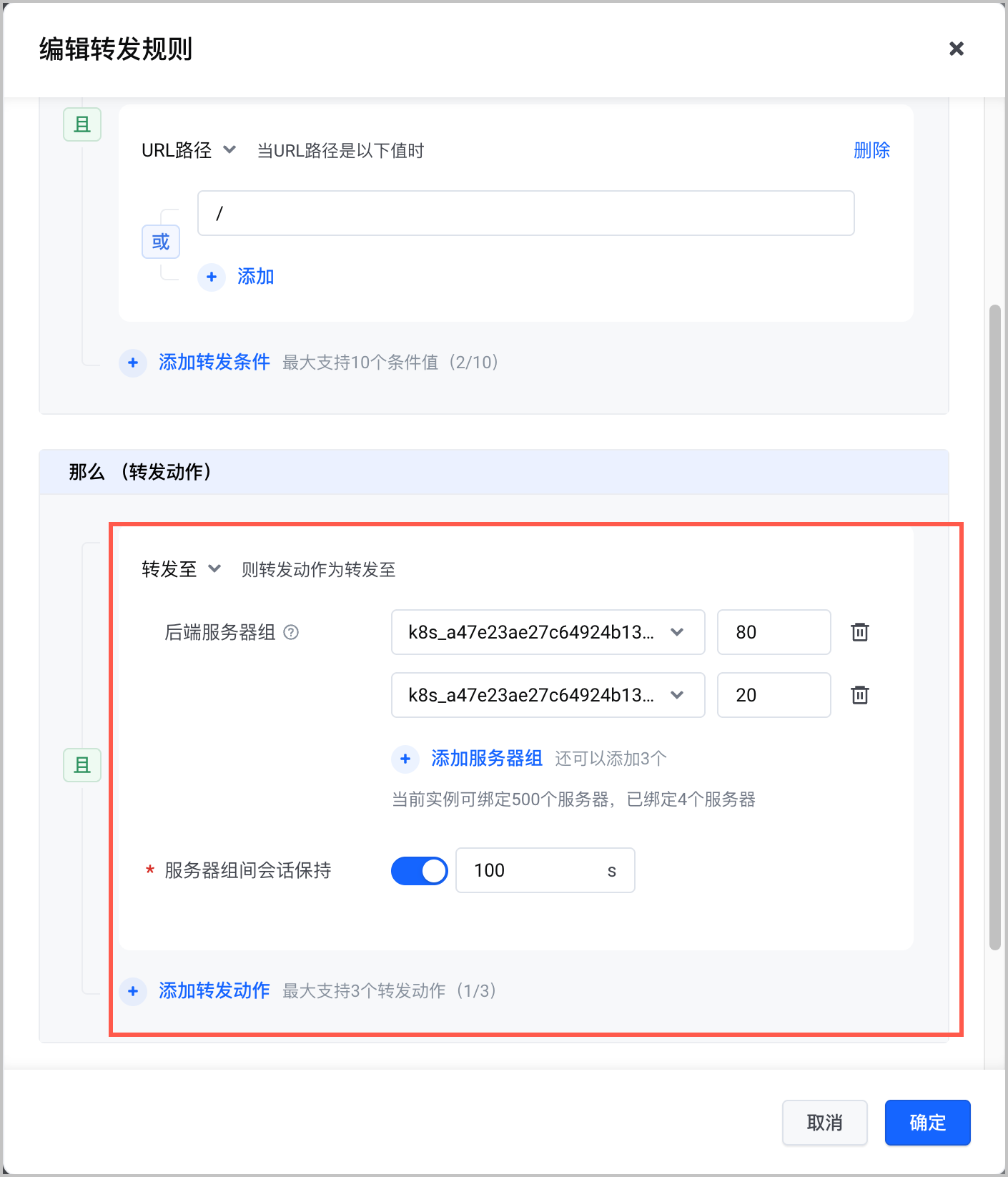
- 单击转发规则中的
 ,支持查看规则详情。规则配置详情,应该与下发的规则一致。
-
访问验证
说明
使用 ALB Ingress 中配置的域名访问服务。其中14.***.***.***为 ALB 公网 IP 地址。
curl -H "Host: example.com" http://14.***.***.***
预期结果如下,当访问请求的域名为example.com,原始路径为/时,能够通过 ALB Ingress 正确访问到后端的服务。
<!DOCTYPE html>
<html>
<head>
<title>Welcome to nginx!</title>
<style>
html { color-scheme: light dark; }
body { width: 35em; margin: 0 auto;
font-family: Tahoma, Verdana, Arial, sans-serif; }
</style>
</head>
<body>
<h1>Welcome to nginx!</h1>
<p>If you see this page, the nginx web server is successfully installed and
working. Further configuration is required.</p>
<p>For online documentation and support please refer to
<a href="http://nginx.org/">nginx.org</a>.<br/>
Commercial support is available at
<a href="http://nginx.com/">nginx.com</a>.</p>
<p><em>Thank you for using nginx.</em></p>
</body>
</html>
当您为 ALB Ingress 配置多个后端服务器组,并为不同的服务器组配置不同的业务和权重。多次访问时,可以看到流量按照权重比例被分配到不同的后端服务器组中。例如执行以下命令,进行 20 次访问测试。
for i in {1..20}; do curl -H "Host: example.com" http://14.***.***.***; done;
预期结果如下,流量按照配置的权重转发到了不同的后端服务器组。
This is the new version of nginx
This is the new version of nginx
This is the new version of nginx
This is the old version of nginx
This is the new version of nginx
This is the new version of nginx
This is the new version of nginx
This is the new version of nginx
This is the new version of nginx
This is the old version of nginx
This is the new version of nginx
This is the old version of nginx
This is the new version of nginx
This is the new version of nginx
This is the new version of nginx
This is the old version of nginx
This is the new version of nginx
This is the new version of nginx
This is the new version of nginx
This is the new version of nginx
最近更新时间:2026.10.16 16:53:02
这个页面对您有帮助吗?
有用
有用
无用
无用