Container Registry
Container Registry


Document

- Documentation
 Container RegistryContainer Registry (CR)Best practicesImage push and pullConnecting cross-account VPCs via PrivateLink
 Copy page
 Download PDF
Image push and pull
Connecting cross-account VPCs via PrivateLink
Copy pageDownload PDFConnecting cross-account VPCs via PrivateLink
To pull images from a CR instance in another account through a VPC in one account, use PrivateLink together with Cloud Load Balancer (CLB). This enables cross-account image pulls within the same region through connected VPCs. This topic describes how to configure PrivateLink and CLB for cross-account access to CR through connected VPCs.
Background
The core traffic flow is as follows:
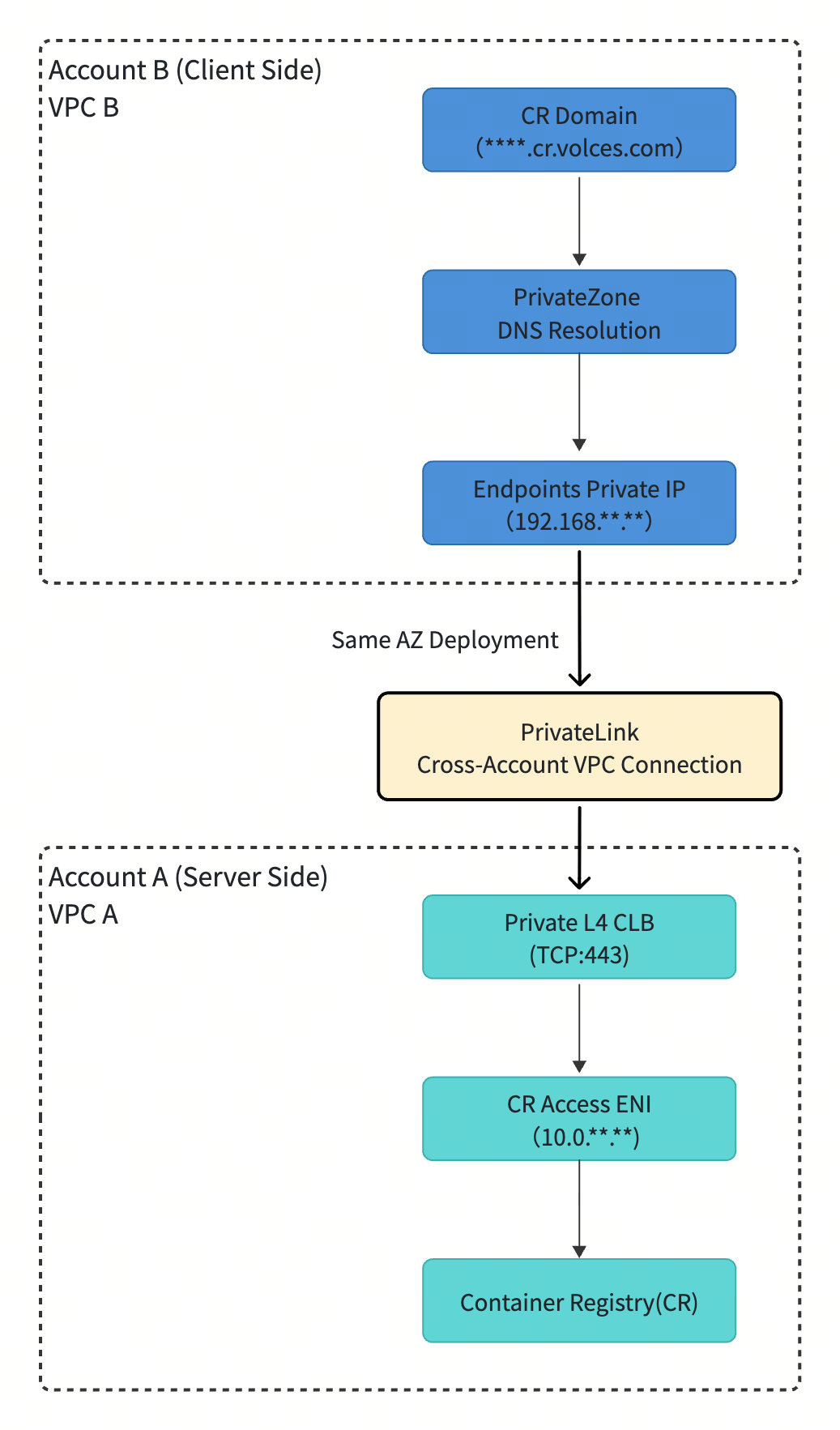
- Root user B (consumer):
- A client, such as a Kubernetes pod, sends an image pull request through the private domain name ****-cn-beijing.cr.volces.com.
- PrivateZone in the VPC resolves this domain name to the private IP address 192.168.**.** of the PrivateLink endpoint.
- Traffic leaves the VPC through the endpoint's elastic network interface (ENI).
- Cross-account connection through PrivateLink:
- Traffic is securely forwarded in one direction through PrivateLink from Account B to the endpoint service in Account A.
- Root user A (service provider):
- Traffic reaches the private CLB and is forwarded using end-to-end TLS passthrough.
- CLB forwards the traffic to a backend server group. Its backend address is 10.0.**.**, the private IP address of the access ENI created by CR in Account A's VPC.
- The traffic finally reaches CR, completing the image pull.
Prerequisites
This topic uses VPC connectivity between root user A, the CR instance owner, and root user B, the image consumer, to describe the procedure. Before you begin, obtain the following information:
- Account information
- The IDs for root users A and B have been obtained.
- VPCs and subnets
tip
The VPCs of root user A and root user B are in the same availability zone.
- VPCs and subnets have been created under root user A and root user B.
- CR instance (root user A)
- A CR Standard Edition instance has been created. For more information, see Creating Standard Edition instances.
- The CR instance has been initialized, and its login password has been obtained. For more information, see Initializing instances.
- The domain name of the CR instance has been obtained. You can obtain this information from the Access domain name field of the CR instance's Overview page.
- Images are already stored in the CR instance. For information about how to push an image to a CR instance, see Pushing and pulling artifacts.
Procedure
Step 1: Enable VPC access to CR in root user A
Create a VPC access point for the CR instance under root user A and obtain its VPC access address.
- Associate the CR instance with an existing VPC under root user A.
- Log in to the CR console.
- Select the target region in the top navigation bar.
- In the left navigation pane, click Instance list. In the Instance list section on the right, locate the target instance and click Enter instance.
- In the left navigation bar, click Access control. On the Access control page, click Add VPC.
- Configure the VPC to be added.
- ParameterDescriptionAccountSelect This account.Associated projectThe associated target project. After the project is associated, members of the project obtain the corresponding CR instance permissions based on project authorization. In this example, select the default project.VPCSelect the VPC created under root user A during preparation.SubnetSelect the subnet created under root user A during preparation.
- Click Confirm to complete the configuration.
- In the User VPC list, view the Intranet resolution IP column of the target VPC. This IP address is the VPC access address for the CR instance.
tip
Make sure that the security group associated with this VPC access address has appropriate inbound and outbound rules. Alternatively, retain the default rules for now.
Step 2: Deploy a private CLB instance in root user A
This CLB instance serves as the traffic entry point for PrivateLink. It forwards requests to the VPC access address of the CR instance, namely the Intranet resolution IP obtained in the previous step.
- In the console of root user A, create a classic CLB instance. For more information, see Creating CLB instances.
- ParameterDescriptionRegionSelect the region where root user A is located.Availability zoneSelect the availability zone of the VPC created under root user A during preparation.Network typeSelect Private.VPCSelect the VPC created under root user A during preparation.SubnetSelect the subnet created under root user A during preparation.
- After the instance is created, configure a TCP listener on the instance details page. This topic describes only the parameters relevant to this scenario. For other parameters, see Creating TCP listeners.
- Configure the protocol and listener settings, and then click Next step.
- ParameterDescriptionCLB protocolSelect the protocol on which the CLB instance listens. In this example, select TCP.Listening portEnter the port on which the listener listens. In this example, enter 443.Scheduling algorithmSelect the algorithm that the listener uses to forward requests. In this example, select Weighted Round Robin (WRR). Backend servers with higher weights are selected more frequently.
- Configure the backend server group settings, and then click Next step.
- ParameterDescriptionAdd methodSelect Create Server Group.TypeSelect the backend server group type. In this example, select IP type to use IP addresses directly as backend servers.IP versionSelect the protocol version of the backend servers' private IP addresses. In this example, select IPv4.
- Configure the backend service IP settings. Retain the default settings for all subsequent steps until the listener is created.
- ParameterDescriptionAdd methodSelect Add Now.IP addressEnter the backend server IP address. In this example, enter the Intranet resolution IP of the CR instance in the VPC.PortEnter the port on which the backend server provides services. In this example, enter 443.WeightEnter the percentage of requests assigned to the backend server. In this example, enter 100 to forward all traffic to this backend IP address.
Step 3: Publish an endpoint service in root user A
Create an endpoint service for the CLB instance. Through PrivateLink, this endpoint service allows root user B to access the CLB instance in root user A. After the service is created, obtain the endpoint service name from the endpoint service details page.
- Create the endpoint service. This topic describes only the parameters relevant to this scenario. For other parameters, see Creating endpoint service.
- ParameterDescriptionRegionSelect the region of the endpoint service. In this example, select the same region as the existing CR instance.ProjectSelect the project of the endpoint service. In this example, select the same project as the existing CR instance.IP address typeSelect the IP address type of the endpoint service. In this example, select IPv4.TypeSelect the service resource type provided by the endpoint service. In this example, select CLB.Service ResourceSelect a CLB instance. Select the CLB instance created in Step 2.
- Add root user B to the endpoint service allowlist. This topic describes only the parameters relevant to this scenario. For other parameters, see Adding service allowlists.
- ParameterDescriptionAllowlist rangeSelect the allowlist scope for the endpoint service. In this example, select Specified Account. Only endpoints under specified accounts can connect to the endpoint service and access its service resources.Account IDEnter the target account ID. In this example, enter the ID of root user B.
- After the service is created, obtain the endpoint service name from the endpoint service details page.
Step 4: Create an endpoint in root user B
Create an endpoint in the VPC of root user B and connect it to the endpoint service of root user A. Then, obtain its private IP address in the target availability zone.
- Use root user B to sign in to the Endpoint console, and click Create Endpoint. This topic describes only the parameters relevant to this scenario. For other parameters, see Creating endpoints.
- ParameterDescriptionRegionSelect the region of the endpoint. In this example, select the same region as the existing CR instance.TypeSelect the endpoint type. In this example, select Interface.ProjectSelect the project of the endpoint. In this example, select the same project as the existing CR instance.Add methodSelect how to add the endpoint service to be associated. In this example, select Add by Service Name.Endpoint ServiceIn this example, enter the endpoint service name obtained in Step 3.IP address typeSelect the IP address type of the endpoint. In this example, select IPv4.VPCSelect the VPC of the endpoint. Select the VPC created under root user B during preparation.Availability Zone and SubnetSelect the endpoint service availability zone to connect to and its corresponding subnet. Select the same availability zone as the CLB instance under root user A. In this example, select Availability Zone D.
- After the endpoint is created, click its name to go to the endpoint details page. Select the Availability zone and network interface tab. In the availability zone list, obtain the private IP address for the target availability zone.
Step 5: Configure private DNS in root user B
Point the CR instance domain name in root user A to the endpoint private IP address in root user B.
- Log in to the PrivateZone console.
- Click Add domain.
- On the Add domain page, complete the following configuration. This topic describes only the parameters relevant to this scenario. For other parameters, see Adding domain names.
- ParameterDescriptionDomain nameEnter the CR instance domain name under root user A, such as test-example-cn-beijing.cr.volces.com.AccountSelect the VPC where the DNS record takes effect. Select the VPC created under root user B during preparation.
- Go to the details page of the newly added domain name and click Create record set. This topic describes only the parameters relevant to this scenario. For other parameters, see Adding DNS records.
- ParameterDescriptionDomain nameEnter the domain name prefix. In this example, enter @ to indicate an empty prefix.Record typeSelect the DNS record type. Select A to point the domain name to an IPv4 address.TTLSet the cache expiration time of the DNS record. In this example, select 1 minute.Record valueEnter the record value in the record set. Enter the private IP address of the endpoint in root user B.
Validate results
Execute the following command on an ECS instance in the target VPC of root user B to verify connectivity.
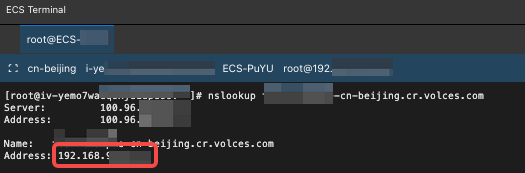
- Verify DNS resolution.
- CategoryContentCommandQuery the IP address corresponding to the domain name.Example:Response resultThe IP address displayed in the red box should be the endpoint's private IP address obtained in Step 4. If so, the verification is successful.
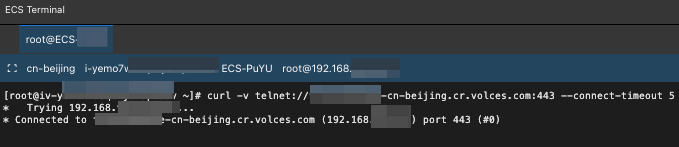
- Verify port connectivity.
- CategoryContentCommandTest connectivity to port 443 of CR.Example:Response resultIf Connected is displayed, the verification is successful.
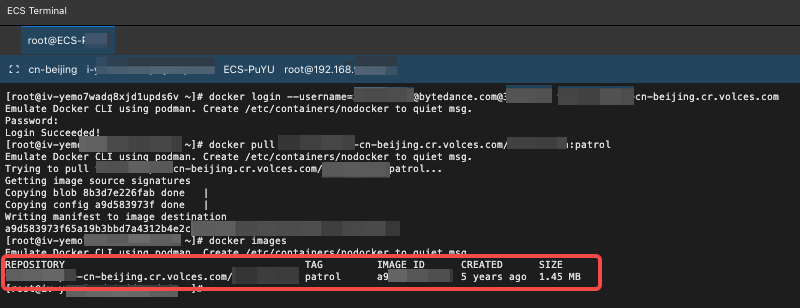
- Verify image pull.
- CategoryContentCommandPull an image from the CR instance under root user A.Example:Response resultThe image pulled from the CR instance under root user A exists locally.
FAQ
Issue description | Possible cause | Troubleshooting and resolution |
DNS resolution is incorrect or times out. | PrivateZone is not correctly associated with the VPC. | Confirm that PrivateZone in Account B is associated with the target VPC. |
| The PrivateZone record is incorrectly configured or has not taken effect. | Check whether the host record and record value are correct. |
| A conflict exists with the authoritative zone. | Execute ipconfig /flushdns on the client or restart the nscd service to refresh the DNS cache. |
The telnet connection to port 443 times out. | Cross-AZ connection: The endpoint and the CLB instance are not deployed in the same availability zone. | Ensure that the endpoint and the CLB instance share at least one availability zone. |
| Security group restrictions: The CLB security group in Account A or the endpoint ENI security group in Account B does not allow traffic on port 443. | Check whether the CLB security group allows inbound traffic from the PrivateLink CIDR block. |
| Routing issue: The route table in the VPC of Account B is incorrectly configured. | Check whether the endpoint ENI security group allows inbound traffic from the client subnet. |
docker login or docker pull returns a TLS error. | TLS termination by CLB: The CLB listener in Account A is incorrectly configured to use TLS/SSL instead of TCP. | Change the CLB listener protocol to TCP to ensure end-to-end TLS passthrough. |
| Client certificate issue: The client environment lacks a root certificate or has a certificate validation issue. | Troubleshoot the Docker daemon certificate configuration or system CA certificates on the client. |
The CLB backend health check fails. | The CR access ENI is in an abnormal state. | Confirm that the ENI under access control in CR is in the normal state. |
| The CLB security group does not allow outbound traffic to the CR access ENI. | Check the CLB security group's outbound rules and ensure that access to port 443 on the backend ENI is allowed. |
| The health check is incorrectly configured, such as with an incorrect port. | Confirm that the protocol and port configured for the health check match those of the backend service. |
Last updated: 2026.10.19 15:45:28
All rights reserved © Beijing Volcano Engine Technology Co., Ltd2024
