Container Registry
Container Registry


Document

- Documentation
 Container RegistryArtifact repository ARUser guideGeneric package managementDownloading packagesDownloading packages (command line)
 Copy page
 Download PDF
Downloading packages
Downloading packages (command line)
Copy pageDownload PDFDownloading packages (command line)
Downloading packages is one of the fundamental functions of an artifact repository, enabling you to download packages from the artifact repository to your local environment. This section explains how to download packages from the artifact repository to your local environment using the command line.
Prerequisites
- Have registered a Volcano Engine root user and activated the artifact repository Service.
- A repository instance has been created. For details, refer to Creating basic edition instances.
- A Generic-format artifact repository has been created. For details, please refer to Creating generic repositories.
- The credentials for the artifact repository have been configured. For details, please refer to Configuring permanent access credentials or Configuring temporary access credentials.
- The target package already exists in the artifact repository.
Procedure
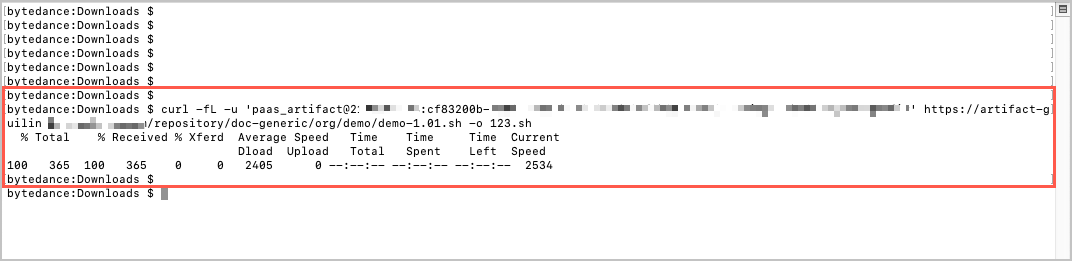
- Log in to your local environment (MAC/Linux) and execute the following command to download the Generic packages from the artifact repository.
Parameter | Description |
{username}:{password} | The login information for the artifact repository, including username and password.log in e.g., user_demo@2100012345:cf83200******. |
{repository target path} | The path of the package in the repository. This path comprises two parts. You can obtain the package's URL path by viewing its details in the repository. |
{output file name} | The name of the package downloaded and saved locally. |
- Press the Enter key, and the system will automatically download the packages.
Last updated: 2025.10.24 11:20:40
All rights reserved © Beijing Volcano Engine Technology Co., Ltd2024
