Container Registry
Container Registry


Document

- Documentation
 Container RegistryArtifact repository ARGetting startedUpload and download NPM packages
 Copy page
 Download PDF
Getting started
Upload and download NPM packages
Copy pageDownload PDFUpload and download NPM packages
An artifact repository supports hosted packages, allows users to create artifact repositories, and to upload and download packages. This document explains how to quickly use the artifact repository for uploading and downloading NPM packages.
Prerequisites
- A Volcano Engine root user has been registered. For details, please refer to How to register an account.
- To enable IAM users to operate the artifact repository, please ensure that the relevant policies and role authorization for the artifact repository have been completed. For specific operating instructions, refer to Permission management.
Procedure
Step 1: Create an instance
- Log in to the Artifact repository console.
- In the left navigation bar, click Instances. Then, in the Instances area on the right page, click Create a Basic Edition Instance.
- Configure the instance parameters.
- ParameterDescriptionInstance NameThe name of the instance, which cannot be modified.Repository Domain NameThe domain name for accessing the repository, which is automatically generated by the system and cannot be modified.Billing methodThe billing method of the instance. Currently, only Pay-as-you-go is supported and cannot be modified.
- Click Confirm to navigate to the Confirm Order interface.
- After confirming the configuration details, billing type, purchase quantity, and price in the order, if there are no issues, check the box for I have read and agreed to the "Service Terms for the Basic Edition of Artifact Repository".
- Click confirm and wait for the system to complete instance creation.
Step 2: Create a repository
- In the left navigation bar, select Instances. In the Instances area on the right page, click to enter the artifact repository instance.
- At the top of the left navigation bar, select the NPM package format, and then in the menu bar, choose Repository Management and click on New Repository to enter the repository configuration page.
- Configure the parameters of the artifact repository.
- Click Confirm.
Step 3: Configure repository credentials
- In the dropdown menu at the top of the left navigation bar, select the Maven package format, and in the menu bar, choose registry management.
- In the registry management list, click Set Permanent Credential. The credentials for the artifact repository can now be configured.
- Configure local credentials.
- When the local environment is a Mac system, execute the following command to configure access credentials.
-
- When the local environment is a Linux system, execute the following commands to configure access credentials.
-
Step 4: Upload package
Execute the following command to push the package to the artifact repository.
Step 5: Download package
Execute the following command to download packages.
View results
- Use the command to upload the package.
-
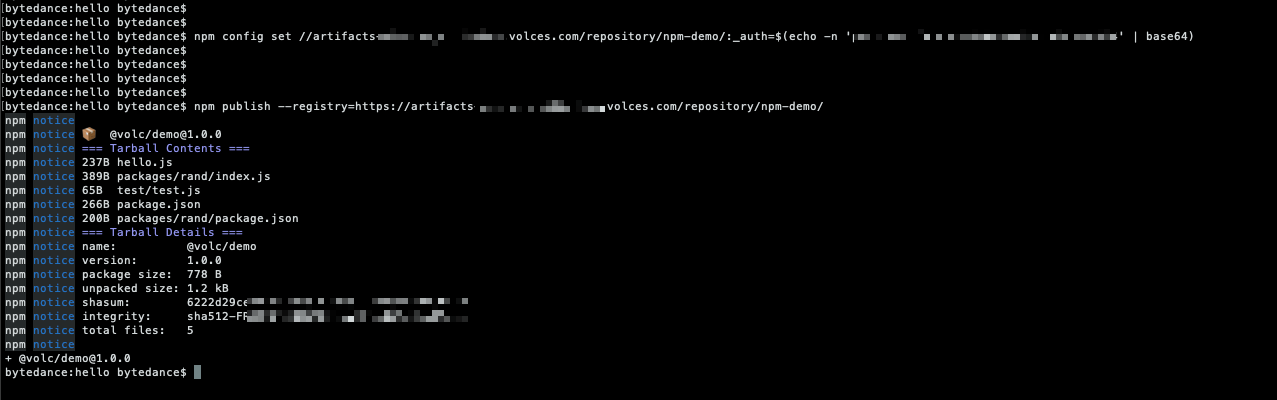
- Enter the artifact repository, and you will be able to view the uploaded packages.
Last updated: 2025.10.24 11:20:36
All rights reserved © Beijing Volcano Engine Technology Co., Ltd2024
