Container Registry
Container Registry


Document

- Documentation
 Container RegistryContainer Registry (CR)User guideDistribution accelerationImage lazy loadingLazy loading overview
 Copy page
 Download PDF
Image lazy loading
Lazy loading overview
Copy pageDownload PDFLazy loading overview
Container Registry (CR) supports image lazy loading. By converting container images to the Nydus format, it loads image data layers on demand, which significantly reduces container startup time.
Feature overview
In the traditional container startup process, the container runtime must download the complete container image to the local worker node before starting the container. When the image is large (several GB or even tens of GB), the image download time significantly prolongs the end-to-end startup time of the Pod.
Image lazy loading changes this process: the image does not need to be fully downloaded before the container starts, and only the required data blocks are loaded on demand during runtime. This method can reduce the impact of image pull on startup time from minutes to seconds.
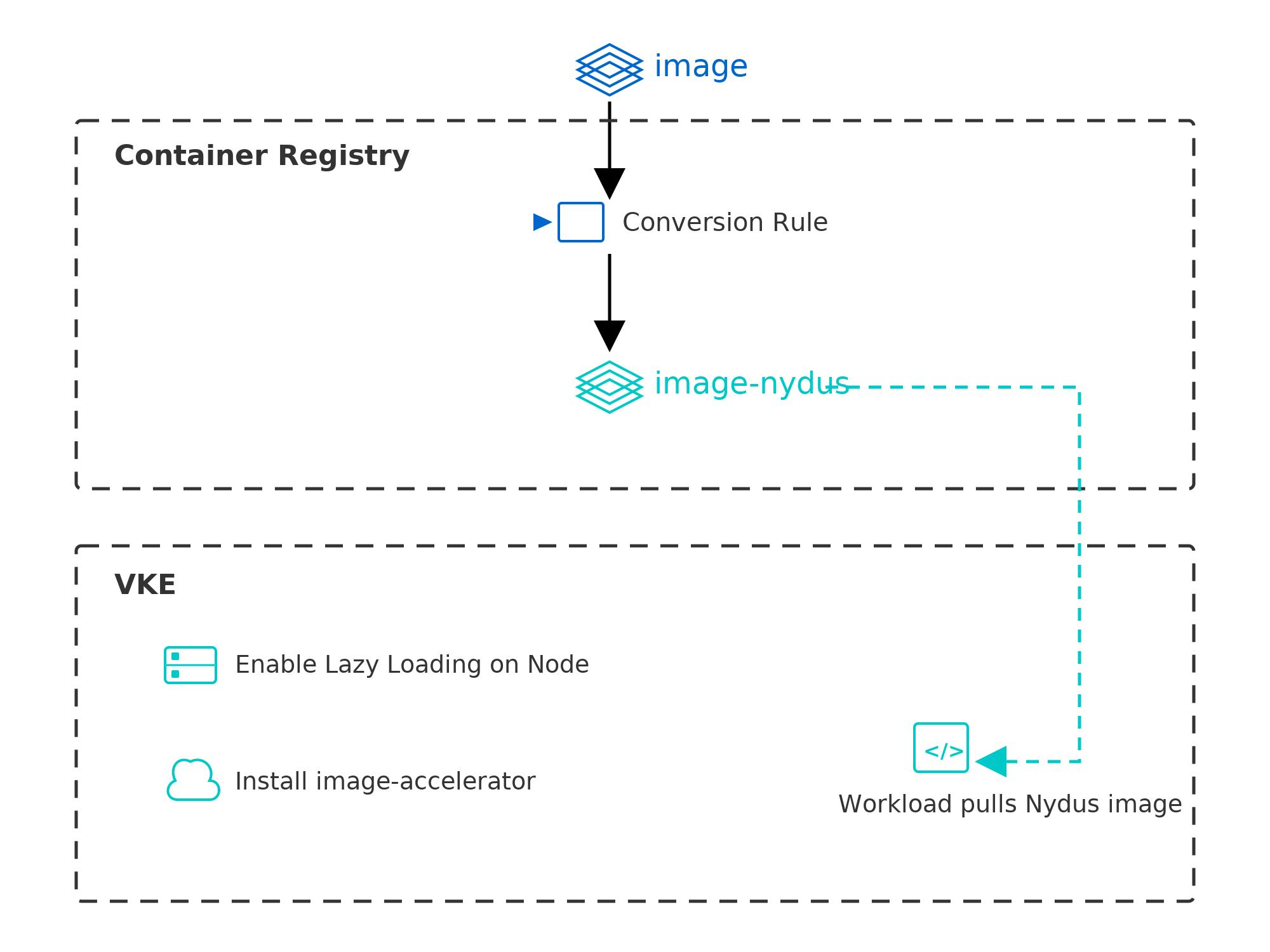
In CR, you only need to configure an image lazy loading conversion rule. The system automatically generates a Nydus-format accelerated replica for each target image pushed to the repository. After you install the image-accelerator add-on on VKE cluster nodes, workloads can directly use the Nydus image for on-demand loading, effectively shortening container startup time.
tip
For each image that matches a conversion rule, the system automatically generates a lazy-loaded image. This image is stored in the same OCI artifact repository as the source image, with the nydus suffix.
Application scenario
Scenario | Description |
Large image startup acceleration | For AI inference, big data processing, and other workloads with image sizes exceeding 1 GB, the startup time can be reduced from minutes to seconds. |
Autoscaling scenario | During cluster autoscaling, new nodes have no local image cache. Lazy loading avoids full downloads and significantly speeds up Pod readiness. |
Frequent CI/CD releases | Each time the image tag is updated during release, nodes without an image cache need to pull the image again. Image lazy loading enables only changed data blocks to load, reducing bandwidth consumption. |
Usage process
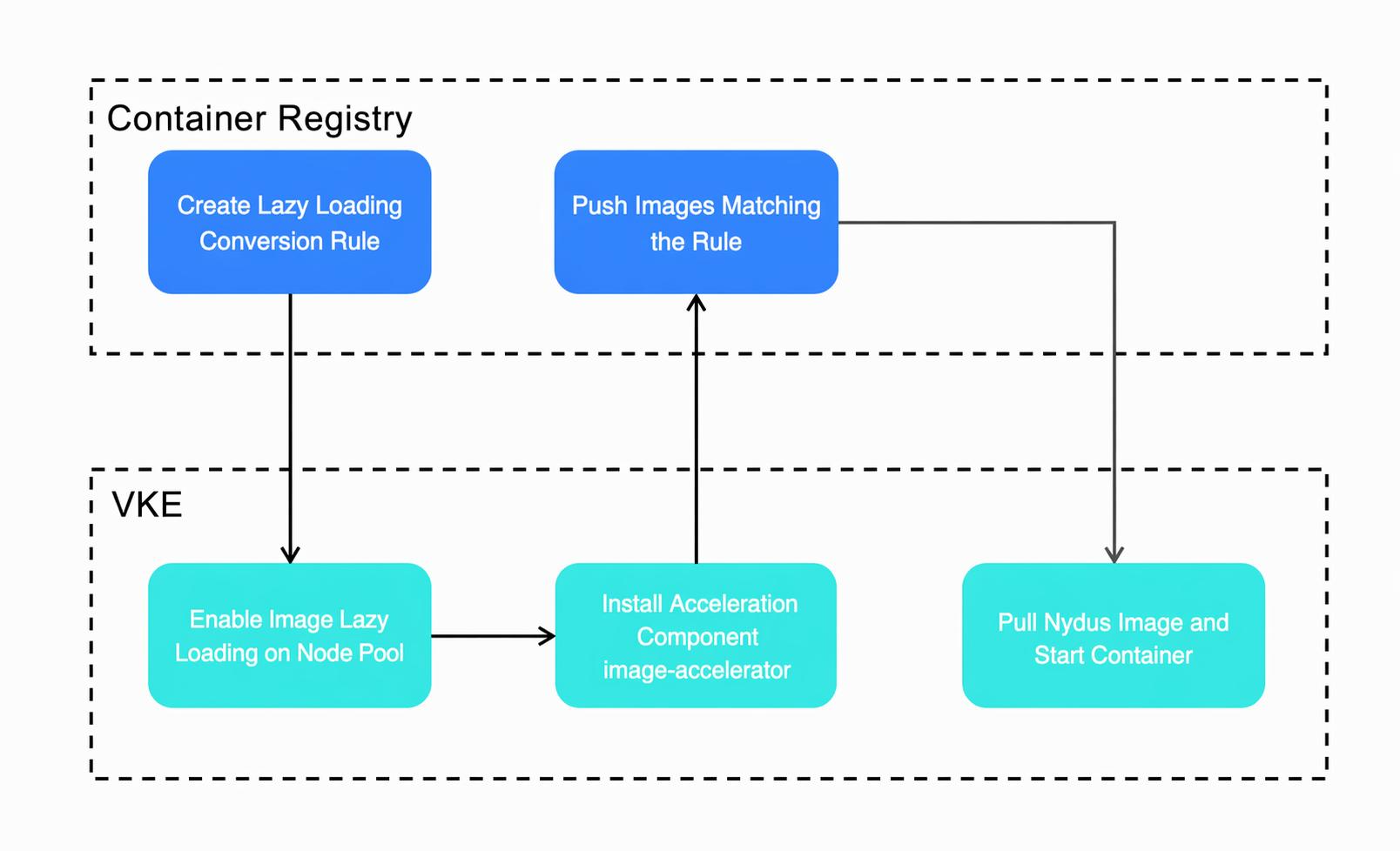
You can use CR and VKE to implement image lazy loading and rapidly start container images. The overall implementation process is as follows.
warning
- To convert an image to the Nydus format, the tag of the original image must be less than or equal to 122 characters (leaving 6 characters for the -nydus suffix). Otherwise, the conversion will fail.
- Pushing an image with the same name to the same OCI artifact repository will overwrite the existing image by default.
- Create an image lazy loading conversion rule in CR, which is described in this section.
- Enable the image loading feature on the nodes of the target VKE cluster. For details, see Managing node pools and Image lazy loading.
- Install the acceleration add-on in the target VKE cluster. For details, see the image-accelerator add-on section in Installing add-ons.
- Push a compliant image to CR to have a Nydus image replica automatically generated. For instructions on pushing images, see the push section in Pushing and pulling images.
- Pull the Nydus image in the workload to start the container, and add the label vke.volcengine.com/image-accelerate-mode: lazyload to the Pod. For details, see Updating Deployment.
Last updated: 2026.09.23 14:37:25
All rights reserved © Beijing Volcano Engine Technology Co., Ltd2024
