Container Registry
Container Registry
Container Registry


Document
Container Registry (CR)
What's new
Overview
Billing
Billing item
Getting started
User guide
User authorization
Authorization management
Robot account management
Instance management
Namespace management
OCI artifact repository management
OCI artifact management
Version management
Tag immutability rule management
Tag retention rules management
Access configuration
Access control
Distribution acceleration
P2P acceleration
Image lazy loading
Registry replication
Audit log management
Alerts and notifications
Best practices
Image push and pull
Image migration and synchronization
DevOps delivery
FAQ
Authorization
VPC
Image push and pull
Limits
Registry replication
P2P acceleration
Access control
API
Calling Method
Instance Management
Namespace Management
OCI Artifact Repository Management
OCI Artifact Version Management
Domain Management
Access Endpoint Management
Temporary Access Key
Robot Account Management
General Data Structure
Artifact repository AR
What's new
Product overview
Getting started
User guide
Instance management
Repository Management
Access control
Permanent access credentials
Temporary access credentials
Maven package management
Generic package management
PyPI package management
NPM package management
Uploading packages
Downloading packages
AI package management
Permission management
API Reference
Repository Management
Package management
Version Management
File Management
Temporary Key Management
General Data Structure
- Documentation
 Container RegistryContainer Registry (CR)FAQP2P accelerationWhat do I do if image pulls fail after VPC access control is disabled with P2P acceleration enabled?
 Copy page
 Download PDF
P2P acceleration
What do I do if image pulls fail after VPC access control is disabled with P2P acceleration enabled?
Copy pageDownload PDFWhat do I do if image pulls fail after VPC access control is disabled with P2P acceleration enabled?
Issue description
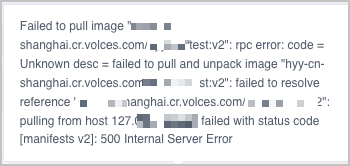
After P2P acceleration is successfully enabled, disabling it may cause image pulls to fail.
The following error message is returned:
500 Internal Server Error
Solution
Enable P2P acceleration. Then, uninstall and reinstall the P2P acceleration add-on in VKE. For more information, see Using P2P acceleration in VKE and Using P2P acceleration in VKE instances.
Last updated: 2026.10.19 15:46:50
All rights reserved © Beijing Volcano Engine Technology Co., Ltd2024
