Intelligent Data Insight
Intelligent Data Insight


- Documentation
 Intelligent Data InsightDataWind User GuideVisualized Query and AnalysisFunctionIntroduction to Commonly Used Functions
 Copy page
 Download PDFCopy pageDownload PDF
The product supports a variety of functions, including numerical, text, time, and array functions. During use, diverse calculations can be performed in datasets and dashboards by adding formulas or functions. Since the product provides data import and query services based on ClickHouse, this document only introduces the commonly used syntax of relevant ClickHouse functions.
More reference materials:
ClickHouse official function documentation
LOD Expression
2. Table calculation functions
2.1 Quick start with commonly used functions
Aggregate functions are used to quickly aggregate metrics according to the desired logic, such as summing, counting, and so on.
2.1.1 Counting
Format: count(xxx), that is, count xxx
Example:
FieldA |
|---|
1 |
1 |
3 |
4 |
Calculating count(Field A) yields an aggregate result of 4. To perform a distinct count, use count(distinct Field A), which yields a result of 3.
2.1.2 Summing
Format: sum(xxx), that is, sum xxx
Example:
FieldA |
|---|
1 |
1 |
3 |
4 |
Calculating sum(Field A) yields an aggregate result of 9.
Extension: The difference between SUM(Field A/Field B) and SUM(Field A)/SUM(Field B) is illustrated with two cases below
Case 1: Given a table with the following detailed data, when "Dimension" is used as the dimension, and aggregate calculations are performed on SUM(Field A/Field B) and SUM(Field A)/SUM(Field B) respectively
Dimension
FieldA
FieldB
FieldA/FieldB
Dimension item 1
1
2
0.5
Dimension item 1
1
2
0.5
Dimension item 1
2
2
1
Dimension item 1
1
4
0.25
Dimension item 2
3
3
1
Dimension item 2
2
4
0.5
Dimension item 2
1
5
0.2
Aggregate results:
SUM(Field A/Field B) calculates the sum of A/B values in the raw data, that is, division first then addition; while SUM(Field A)/SUM(Field B) calculates the quotient of the total values of Field A and Field B, that is, addition first then division. The results may differ significantly.Dimension
SUM(FieldA)
SUM(FieldB)
SUM(FieldA/FieldB)
SUM(FieldA)/SUM(FieldB)
Dimension item 1
5
10
2.25
0.5
Dimension item 2
6
12
1.7
0.5
Case 2: Application in combination with the product's Totalfeatures
If the expression is changed to SUM(Field A)/SUM(Field B) and Auto is selected in the analysis-total feature, the calculation result will be SUM(Field A)/SUM(Field B), that is, sum A and B separately, then perform the division. This is generally used to calculate overall conversion rates and so on.Dimension
FieldA
FieldB
Field A/Field B
Total
3
10
0.3
Dimension item 1
1
5
0.2
Dimension item 2
2
5
0.4
2.1.3 Averaging
Format: average(xxx), that is, calculate the mean of xxx
Example:
Field A |
|---|
1 |
1 |
3 |
4 |
Calculating average(Field A) yields an aggregate result of 2.25.
2.1.4 Calculating maximum/minimum values
Format: max(xxx) for the maximum value, min(xxx) for the minimum value
Example:
Field A |
|---|
1 |
1 |
3 |
4 |
Calculating max(Field A) yields 4; calculating min(Field A) yields 1.
2.1.5 Quantiles
Format: quantile(level)(xxx) or quantileExact(level)(xxx), which returns the quantile at the specified level for xxx. The latter returns the exact value, while the former has some error but offers better performance.
Example:
Field A |
|---|
1 |
1 |
3 |
4 |
Calculating quantile(0.75)(Field A) yields the 75th percentile of Field A, which is 3.
2.2 Detailed function description
Function name | Function format | Purpose | Example |
|---|---|---|---|
avg | avg(x) | Returns the average value of all values in the expression. Can only be used for numeric fields | avg(profit) returns the average profit |
max | max(x) | Returns the maximum value of all values in the expression. Can only be used for numeric fields | max(profit) returns the maximum profit |
min | min(x) | Returns the minimum value of all values in the expression. Can only be used for numeric fields | min(profit) returns the minimum profit |
count | count(x) | Counts the number of rows. | count(p_date) returns the total number of days |
sum | sum(x) | Returns the sum of all values in the expression. Can only be used for numeric fields | sum(profit) returns the total profit |
uniqCombined | uniqCombined(HLL_precision)(x[, ...]) | Calculates the approximate number of unique values. For large sets (200 million or more elements), due to poor choice of hash function, the estimation error will be greater than the theoretical value. | |
quantile | quantile(level)(x) | Returns the quantile of all values in the expression. Can only be used for numeric fields. Level range: 0 to 1. | quantile(0.5)(x) returns the 0.5 quantile of x |
uniq | uniq(x) | Counts the number of distinct values. Has the same effect as count(distinct), with an accuracy error of 0.5%. To obtain an exact value, use count(distinct), but the query takes longer and may not return a result due to timeout. Not recommended. | |
argMax | argMax(arg,val) | Calculates the maximum value based on the field val. Then returns the value of the Arg field in the row where the maximum value is found. | |
groupArray | groupArray(n)(fieldname) | Take the first n records. The result is an array. | |
any | any(x) | Selects the first value encountered. | |
quantileExact | quantileExact(level)(x) | Returns the quantile of all values in the expression. Can only be used for numeric fields. Level range: 0 to 1. Performs the same function as quantile, but is an exact query. When using quantileExact, the query takes longer and may not return a result due to timeout. Not recommended. | quantileExact(0.5)(x) returns the 0.5 quantile of x |
3.1 Quick start with common functions
Date functions are used for time format conversion, time processing, obtaining specified dates, and more.
3.1.1 Convert text to time or date
Format:
- toDate(xxx) and to_date(xxx) convert string fields in yyyymmdd or yyyy-mm-dd format to date format.
- toDateTime(xxx) converts strings in yyyy-mm-dd hh:mm:ss format to datetime format.
- toDateOrNull(xxx) and toDateTimeOrNull(xxx) have the same functionality as 1 and 2 above, and are suitable for cases where the field contains dirty data. Dirty data will be converted to null values.
Example:
Field A | toDate(Field A) | toDateTime(Field A) |
|---|---|---|
2020/12/21 | 2020/12/21 | 2020/12/21 0:00 |
20201221 | 2020/12/21 | 2020/12/21 0:00 |
2020/12/21 18:00 | 2020/12/21 | 2020/12/21 18:00 |
Field A is of string type; toDate(Field A) and toDateTime(Field A) are in datetime format.
3.1.2 Convert between time and timestamp
Format: Convert time or text-type time to timestamp using toUnixTimestamp(xxx), that is, convert yyyy-mm-dd hh:mm:ss to a timestamp.
Example:
Field A | toUnixTimestamp(Field A) | Extended usage: toDateTime(toUnixTimestamp(Field A)+28800) |
|---|---|---|
2020/12/21 18:00 | 1608544800 | 2020/12/22 2:00 |
Extension: Add the timestamp difference of 28,800 seconds (8 hours) to the converted timestamp to complete the conversion from UTC+0 to UTC+8, then use the toDateTime function to convert it to a more readable time format.
3.1.3 Return the current date
Format: now(), generates a dynamic parameter that changes with the system's real-time clock.
Example: If the current time is 2020-12-21 18:00:00, writing now() as a field means the current value of this field is 2020-12-21 18:00:00, and one hour later it will be 2020-12-21 19:00:00.
3.1.4 Return the date of this week's Monday
Format: toMonday(xx), retrieves the date of this week's Monday for the given date field.
Example:
Field A | toMonday(Field A) |
|---|---|
2020/12/22 | 2020/12/21 |
3.2 Detailed function description
Function name | Function format | Purpose | Example |
|---|---|---|---|
toDateTime | toDateTime(x) | Converts a string date and time to a date and time type. | toDateTime('2018-12-24 10:10:00') |
toStartOfFiveMinute | toStartOfFiveMinute(x) | Rounds down the date and time to the nearest multiple of 5 minutes, setting seconds to zero, and returns the date. | toStartOfFiveMinute(toDateTime('2018-12-11 11:12:13')) returns 2018-12-11 11:10:00 |
now | now() | Generate the current date and time | now() returns 2018-12-13 10:10:12 |
toStartOfFifteenMinutes | toStartOfFifteenMinutes(x) | Rounds down the date and time to the nearest multiple of 15 minutes, setting seconds to zero, and returns the date. | toStartOfFifteenMinute(toDateTime('2018-12-11 11:12:13')) returns 2018-12-11 11:00:00 |
toStartOfInterval | toStartOfInterval(time_or_data, INTERVAL x unit [, time_zone]) | This is the general function for all functions named toStartOf*. For example, toStartOfInterval(t, INTERVAL 1 year) returns the same result as toStartOfYear(t), toStartOfInterval(t, INTERVAL 1 month) returns the same result as toStartOfMonth(t), toStartOfInterval(t, INTERVAL 1 day) returns the same result as toStartOfDay(t), and toStartOfInterval(t, INTERVAL 15 minute) returns the same result as toStartOfFifteenMinutes(t). | toStartOfInterval(toDateTime('2019-10-10 09:09:20'), INTERVAL 1 year) returns 2019-01-01 |
toIntervalDay | toIntervalDay(x) | Convert a date to a timestamp at the day level. | toIntervalDay(toDateTime('2019-08-12 11:12:13')) returns 1565579533 |
toIntervalMinute | toIntervalMinute(x) | Convert a date to a timestamp at the minute level. | toIntervalMinute(toDateTime('2019-08-14 11:12:13')) returns 1565579533 |
toIntervalHour | toIntervalHour(x) | Convert a date to a timestamp at the hour level. | toIntervalHour(toDateTime('2019-08-14 11:12:13')) returns 1565579533 |
toMonday | toMonday(x) | Round a Date or DateTime down to the Monday of the current week. Returns a Date type. | toMonday(toDateTime('2019-08-14 11:12:13')) returns 2019-08-12 |
toStartOfHour | toStartOfHour(x) | Round a DateTime down to the start of the current hour. | toStartOfHour(toDateTime('2018-12-11 11:12:13')) returns 11 |
today | today( ) | Generate today's date. | today() returns 2018-12-13 |
toHour | toHour(x) | Extract the hour from a date and time. | toHour(toDateTime('2018-12-11 11:12:13')) returns 11 |
toStartOfTenMinutes | toStartOfTenMinutes(x) | Round a DateTime down to the nearest ten-minute mark. | toStartOfTenMinutes(toDateTime('2018-12-11 11:12:13')) returns 2018-12-11 11:00:00 |
toStartOfDay | toStartOfMinute(string date time) | Round a DateTime down to the start of the day. | |
toYear | toYear(string date) | Return the year from a date. | |
toRelativeWeekNum | toRelativeWeekNum(date) | Convert a Date or DateTime to the week number, starting from a fixed point in the past. | |
toMonth | toMonth(string date) | Return the month from a date. | |
toStartOfMinute | toStartOfMinute( ) | Truncate a date and time to the minute (zeroing out seconds), returning a date. | toStartOfMinute(toDateTime('2018-12-11 11:12:13')) returns 2018-12-11 11:12:00 |
toUnixTimestamp | toUnixTimestamp( ) | Convert a DateTime to a Unix timestamp. | |
addDays | addDays(date_time,int) | This function adds a time interval to a Date/DateTime and then returns the Date/DateTime. | |
toRelativeYearNum | toRelativeYearNum(date_time) | Convert a Date or DateTime to the year number, starting from a fixed point in the past. | |
year | year(Date/DateTime/String date) | Return the year from a date. | year(toDateTime('2018-12-11 11:12:13')) returns 2018 |
month | month(Date/DateTime/String date) | Return the month from a date. | month(toDateTime('2018-12-11 11:12:13')) returns 12 |
quarter | quarter(Date/DateTime/String date) | Return the quarter number from a date. | quarter(toDateTime('2018-12-11 11:12:13')) returns 12 |
day | day(Date/DateTime/String) | Returns the day of the month. | day('2019-09-12') returns 12 |
last_day | last_day(Date/DateTime/String date) | Return the last day of the month for the given date. | last_day(toDateTime('2018-12-11 11:12:13')) returns 2018-12-31 |
next_day | next_day(Date/DateTime/String date, string day_of_week) | Return the next day_of_week after the given date. | next_day(toDate('2015-01-14'), 'TU') returns 2015-01-20 |
dateDiff | dateDiff(Date/DateTime date1, Date/DateTime date2 [, String timezone]); dateDiff(String unit, Date/DateTime date1, Date/DateTime date2 [, String timezone]) | Return the difference between two dates. | dateDiff(now(), yesterday()) returns -1 |
date_sub | date_sub (string/Date/DateTime startdate, int days) | Return the date/time that is days before start_time. | date_sub('2019-09-08', 1) returns '2019-09-07' |
date_add | date_add (string/Date/DateTime startdate, int days) | Return the date/time that is days after start_time. | date_add('2019-09-08', 1) returns '2019-09-09' |
from_unixtime | from_unixtime(Date/DateTime/UInt32 date, String parttern[, String timezone]) | Convert a date or timestamp to a string in the specified pattern. | from_unixtime(toDateTime('2019-09-09 09:00:00'), 'time: %F %T', 'Asia/Shanghai') returns 'time: 2019-09-09 09:00:00' |
to_date,toDate | to_date(String/UInt16 date) | Convert a string or the date that is date days since 1970-01-01 to a date type. | toDate('20190909') returns '2019-09-09' |
date_format | date_format(Date/DateTime/String, String pattern) | Output the date in the specified format. | date_format('2019-09-09', 'yyyy') returns '2019' |
unix_timestamp | unix_timestamp(Date/DateTime/String) | Convert a date to a timestamp. | unix_timestamp(toDateTime('2019-09-09 09:00:00'), 'time: %F %T', 'Asia/Shanghai') returns 'time: 2019-09-09 09:00:00' |
toWeek | toWeek(date[,mode]) | Return the week number of the date, in the range [0, 53]. | toWeek(toDate('2019-12-06'), 3) returns 49 |
toDayOfWeek | todayofweek(date) | Return the day of the week for the date, in the range [1, 7]. | toDayOfWeek('2020-01-01') returns 3 |
4.1 Quick start with common functions
Type conversion functions are used to convert field types, such as between text and numbers.
4.1.1 Force conversion to any type
Format: cast(xxx, 'type'), converts xxx to a specified type.
Example:
cast(Field A, 'string') converts Field A to string format.
4.1.2 Convert to string (text)
Format: toString(xxx), converts field xxx to string format. This can convert fields of types such as numbers, characters, and dates.
Example:
Field A | toString(Field A) |
|---|---|
143876768892010 | 143876768892010 |
Before conversion, Field A is in numeric format. Because it is relatively long, it may be displayed in scientific notation during analysis; after converting to string, it can be stably preserved.
4.1.3 Convert to integer value
Format: toInt64(xxx), converts field xxx to an integer. Only numbers are allowed in xxx.
Field A | toInt64(Field A) |
|---|---|
143876768892010 | 143876768892010 |
123a | Conversion failed |
4.2 Detailed function description
Function name | Function format | Purpose | Example |
|---|---|---|---|
cast | cast(X, 'Y') | General type-casting function that converts data of any type named X to format Y. | Convert uid of int type to String type CAST (uid, 'String') |
toString | toString(x) | Convert numeric, character, date, and other types to character type | toString('2018-12-24') returns 2018-12-24 |
toInt64 | toInt64(x) | Convert data type to int format (64 bytes) | toInt64(123.883) returns 123 |
toUInt8OrZero | toUInt8OrZero(x) | Convert unsigned integer string type to integer type, otherwise returns 0 | toUInt8OrZero('123.12') returns 0 |
toDateOrZero | toDateOrZero(x) | Convert data type to DATE format, otherwise returns 0 | toDateOrZero(toDateTime('2018-12-11 11:12:13')) returns 2018-12-11 |
toUInt16OrZero | toUInt16OrZero(x) | Convert unsigned integer string type to integer type, otherwise returns 0 | toUInt8OrZero('123') returns 123 |
toUInt64OrZero | toUInt64OrZero(x) | Convert data type to 64-bit integer format; returns 0 if the conversion fails | toUInt64OrZero('123') returns 123 |
toDateOrNull | toDateOrNull(a) | Convert the data type of a to date or null | |
toUInt32OrZero | toUInt32OrZero(x) | Convert data type to 32-bit integer format; returns 0 if the conversion fails | |
toFloat32OrZero | toFloat32OrZero( ) | Convert numeric string type to numeric type | toFloat32OrZero('−123') returns −123 |
toIntervalMonth | toIntervalMonth( ) | Convert numeric parameter to Interval type (time interval) | |
toInt32 | toInt32(a) | Convert the data type of a to int32 | |
toDateTimeOrNull | toDateTimeOrNull(a) | Convert the data type of a to datetime or null | |
toFloat64 | toFloat64(a) | Convert the data type of a to float64 | |
toUInt8 | toUInt8(a) | Convert the data type of a to Uint8 | |
toFloat64OrZero | toFloat64OrZero(a) | Convert the data type of a to float; returns zero if the conversion fails | |
toUInt32 | toUInt32(a) | Convert the data type of a to Uint32 | |
parseDateTimeBestEffort | parseDateTimeBestEffort() | Parse numeric parameter as Date or DateTime type. Unlike toDate and toDateTime, parseDateTimeBestEffort can handle more complex date formats. | |
parseDateTimeBestEffortOrNull | parseDateTimeBestEffortOrNull() | Parse numeric parameter as Date or DateTime type; returns null if the date format cannot be processed | |
parseDateTimeBestEffortOrZero | parseDateTimeBestEffortOrZero() | Parse numeric parameter as Date or DateTime type; returns zero Date or zero DateTime if the date format cannot be processed |
5.1 Quick start with commonly used functions
String functions are used to concatenate or extract text.
5.1.1 String concatenation
Format: concat(xxx, xxx, xxx...), concatenates multiple fields together without separators
Example: concat(FieldA, FieldB, FieldC) results in: Under the bridge in front of the gate, 123
Field A | Field B | Field C |
|---|---|---|
Under the bridge in front of the gate | , | 123 |
5.1.2 String extraction
Format: substr(xxx, offset x, length y) or substring(xxx, offset x, length y), which means extracting a substring of length y from the string field xxx starting at position x.
Example:
Field A | substr(Field A,1,10) |
|---|---|
2020/12/22 18:00 | 2020/12/22 |
substr(FieldA, 1, 10) extracts 10 characters from FieldA starting from the first character, resulting in the output as above.
Extension: Combination of concat and substr
Field A | Field B |
|---|---|
Xiaoming | 8,9,8 |
concat(Field A, 'the score of the second item is', substr(Field B, 3, 1)) yields the result: Xiaoming's score for the second item is 9 |
5.1.3 Return string length
Format: length(xxx), calculates the length of the string field xxx
Example:
Field A | length(Field A) |
|---|---|
2020/12/22 18:00:00 | 19 |
5.2 Detailed function description
Function name | Function format | Purpose | Example |
|---|---|---|---|
substring | substring(s, offset, length) | Substring extraction | substring('123abcABC', 2, 3) returns 23a |
empty | empty(x) | Returns 1 if the string is empty, otherwise returns 0 | empty('123a') returns 0 |
length | length(x) | Returns the length of the string | length('123a') returns 4 |
extractAll | extractAll(haystack,pattern) | Returns all matched substrings as a list | extractAll('iioomAj12123124OOBJ123B', '\d+') returns [12123124,123] |
splitByChar | splitByChar(separator, s) | Split string by a single character | |
concat | concat(s1, s2, ...) | Concatenate multiple strings in the parameters without a separator | concat('123', 'abc', 'ABC') returns 123abcABC |
lower | lower(string) | Convert string to lowercase | |
char_length | char_length(string) | Assuming the string is text composed in UTF-8 encoding, returns the Unicode character length of the string. If the input string is not UTF-8 encoded, the function may return an unexpected value (no exception will be thrown). | |
startsWith | startsWith(s, prefix) | Returns whether the string starts with the specified prefix. If the string starts with the specified prefix, returns 1; otherwise, returns 0. | |
replaceRegexpAll | replaceRegexpAll(haystack,pattern,replacement) | Replaces all substrings matching the pattern using regular expression matching. | replaceOne('asd123cbbj464sd', 'sd', '-') returns a-123cbbj464- |
replaceRegexpOne | replaceRegexpOne(haystack, pattern, replacement) | Replaces using the 'pattern' regular expression. | |
replaceAll | replaceAll(haystack, pattern, replacement) | Replaces all occurrences of the 'pattern' substring in 'haystack' with the 'replacement' substring. | |
split | split(string str, string pat) | Splits str by the pat string and returns an array of the resulting substrings. | split('abc', 'b') returns ['a', 'c'] |
concat_ws | concat_ws(String delimiter, String str1, String str2, ...) | Returns a string joined by the 'delimiter'. | concat_ws('_', 'abc', 'def') returns 'abc_def' |
substring | substring(String str, int start, int len),substr(String str, int start, int len) | Returns the substring of length len starting from position start. | substring('abc', 2); returns 'bc' |
lpad,rpad | lpad(String, len, pad_str) | Pads str on the left with pad until it reaches len characters. | lpad('abcd', 10, '.') returns '......abcd' |
regexp_replace | regexp_replace(String str, String str1, String str2) | Returns the result of replacing str1 in str with str2; supports re2 regular expressions. | regexp_replace('world.', '^', 'hello ') returns 'hello world.' |
6.1 Quick start with commonly used functions
Returns the corresponding value based on the specified condition. For example, if a > 1, returns 1; if a < 1, returns 0. This needs to be implemented using conditional functions.
6.1.1 if function
Format: if(condition, a, b), returns value a if the condition is true, returns value b if the condition is false
Example:
Field A | if(Field A > 0, 'positive', 'negative') |
|---|---|
200 | positive |
6.1.2 case when function
Format:
case
when condition1 then result1
when condition2 then result2
……
else resultn
end
This function is relatively long, but the structure is simple. Conditions are checked from top to bottom in order. When condition1 is met, result1 is returned and no further conditions are checked. If none of the conditions are met, result n is returned.
Example:
Field A | case when Field A > 300 then '>300' when Field A > 200 then '(200,300]' else null end |
|---|---|
250 | (200,300] |
105 | |
350 |
|
6.2 Detailed function description
Function name | Function syntax | Purpose | Example |
|---|---|---|---|
multiIf | multiIf(cond_1, then_1, cond_2, then_2...else) | Allows you to write CASE operators more concisely in queries. Parameters: *cond_N — the condition for the function to return then_N. *then_N — the result of the function when executed. *else — the result of the function if none of the conditions are met. | multiIf(1 > 2, 'correct', 2 < 0, 'correct', 'incorrect') returns incorrect |
if | if(cond, then, else), cond ? operator then : else | If cond != 0, returns then; if cond = 0, returns else. cond must be of type UInt8, and then and else must have the lowest common type. if(1 > 2, 'correct', 'incorrect') returns incorrect | case |
case | CASE WHEN a THEN b [WHEN c THEN d]* [ELSE e] END | Function name |
The username function is not an official ClickHouse function, but is combined with project user information to return specified information about the current user.
USERNAME() can return the username of the current user, as shown below. This function can also be used in combination with other functions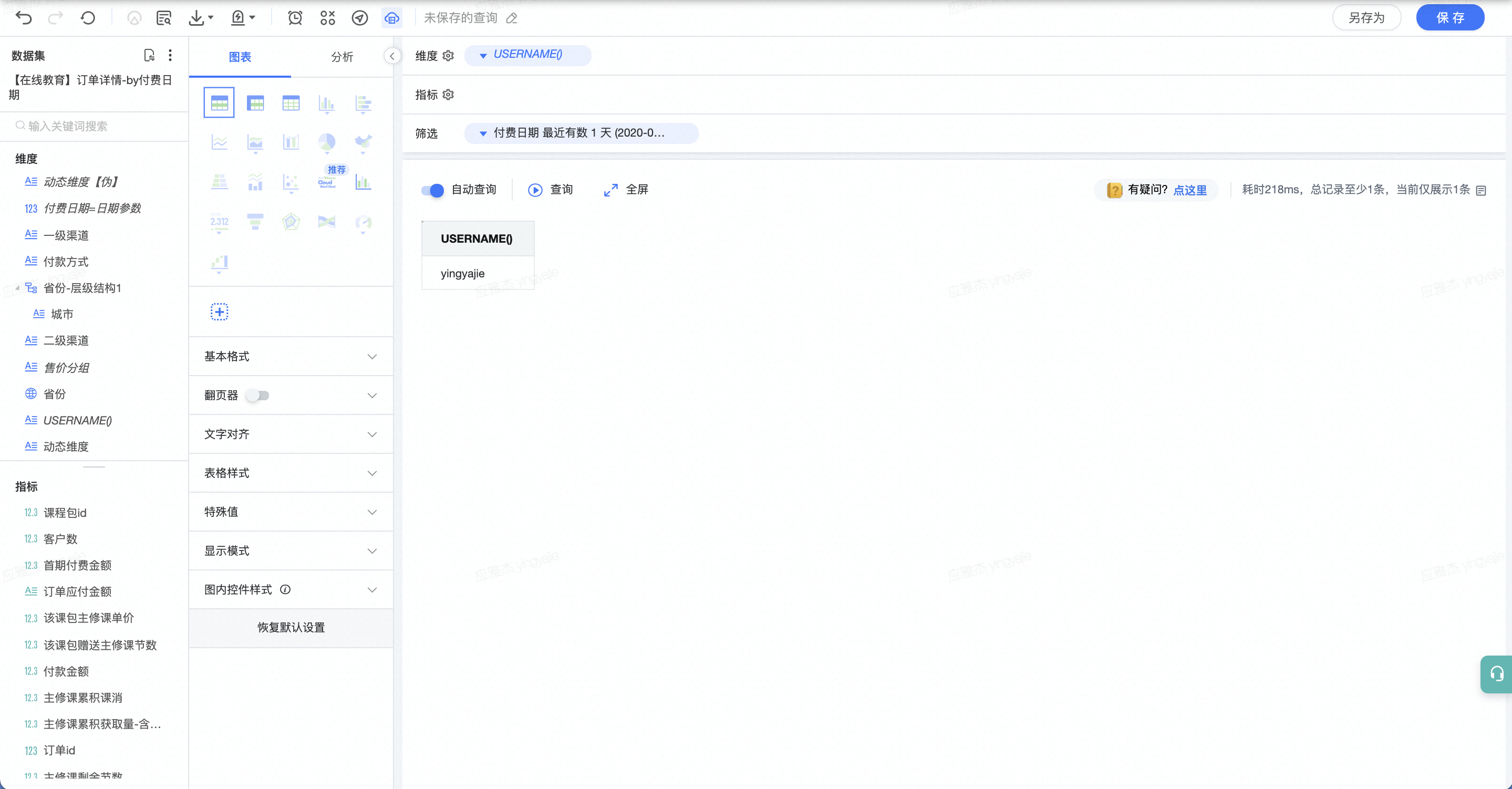
Function syntax | Purpose | Example | visitParamExtractInt |
|---|---|---|---|
visitParamExtractInt | visitParamExtractUInt(params, name) | If this is a string field, the function will attempt to parse a number from the beginning of the string. If the field does not exist, or a number cannot be parsed from it, returns 0. visitParamExtractFloat | |
visitParamExtractFloat | visitParamExtractFloat(params, name) | visitParamExtractBool | |
visitParamExtractBool | visitParamExtractBool(params, name) | The result is UInt8. visitParamHas | |
visitParamHas | visitParamHas(params, name) | visitParamExtractRaw | |
visitParamExtractRaw | visitParamExtractRaw(params, name) | visitParamExtractRaw('{"abc":{"def":[1,2,3]}}', 'abc') = '{"def":[1,2,3]}' | visitParamExtractRaw('{"abc":{"def":[1,2,3]}}', 'abc') = '{"def":[1,2,3]}' |
get_json_object | get_json_object(string json_string, string path) | get_json_object('{"n_s" : [{"ac":"abc","xz":"xz"}, {"def":"def"}], "n_i" : [1, 23]}', '$.n_s[0].ac'); returns 'abc' | Function name |
Function syntax | Purpose | Example | power |
|---|---|---|---|
power | power(x, y) | Returns x raised to the power of y. pow | |
pow | pow(x, y) | Returns x raised to the power of y. pow(2, 3) returns 8 | sqrt |
sqrt | sqrt(x) | Accepts a numeric parameter and returns its square root. | sqrt(4) returns 2 |
Function name | Function format | Purpose | Example |
isNotNull | isNotNull(x) | Checks whether the parameter is not NULL. Returns 1 if true, 0 if false. | sNotNull('abc') returns 1 |
isNull | isNull(x) | Checks whether the parameter is NULL. Returns 1 if it is NULL, otherwise returns 0. | isNull(null) returns 1 |
coalesce | coalesce(x,...) | Checks from left to right for any "NULL" parameter and returns the first non-NULL parameter. | coalesce(null, null, a, b, null) returns a |
assumeNotNull | assumeNotNull( ) | Converts a value of Nullable type to a value of non-Nullable type. |
Function name | Function format | Purpose | Example |
|---|---|---|---|
conv | conv(String/Int num, Int from_base, Int to_base) | Base conversion | conv('10', 10, 2) returns '1010' |
bin | bin(Int/DateTime/String) | Converts to a binary number. | bin(10) returns '1010' |
Function name | Function format | Purpose |
|---|---|---|
cityHash64 | cityHash64O() | Calculates the CityHash64 of any number of strings, or uses a specific implementation of a hash function to calculate the hash of any number of other types. |
intHash64 | intHash64( ) | Calculates a 64-bit hash code from any type of integer. |
Function name | Function format | Purpose | Example |
|---|---|---|---|
domain | domain(x) | Returns the domain name of a URL. | domain('http://www.baidu.com.cn') returns www.baidu.com.cn |
cutToFirstSignificantSubdomain | cutToFirstSignificantSubdomain( ) | Returns the content that includes the top-level domain and the first significant subdomain. | cutToFirstSignificantSubdomain('https://news.yandex.com.tr/')) = 'yandex.com.tr' |
parse_url | parse_url(String url, String name) | Returns the part of the url corresponding to name. If parsing fails, returns an empty string. | parse_url('https://bytedance.feishu.cn/space/xx#PN78WD', 'PROTOCOL') returns https |
Function name | Function format | Purpose | Example |
|---|---|---|---|
map key | [map field name]{'[field name to extract]'} | Extracts a specific field's data from a map type field. | select deductions{'Federal Taxes'} from employees limit 1; |
map | map(KeyType k1, ValueType v1, KeyType k2, ValueType v2 ...) | Constructs map type data. | map('a', 'b', 'c', 'd') returns {'a': 'b', 'c', 'd'} |
str_to_map | map(String value, String kv_delimiter, String item_delimiter) | Converts a String to map type. | str_to_map('a:b,c:d', ',', ':') returns {'a': 'b', 'c': 'd'} |
Function name | Function format | Purpose | Example |
|---|---|---|---|
arrayConcat | arrayConcat(array) | Merges all arrays passed as parameters. | SELECT arrayConcat([1, 2], [3, 4], [5, 6]) AS res ┌─res─────┐ │ [1,2,3,4,5,6] │ └───────┘ |
notEmpty | notEmpty() | Returns 0 for an empty string, and 1 for a non-empty string. |
Function name | Function format | Purpose | Example |
|---|---|---|---|
arrayJoin | arrayJoin(array) | This function takes an array as a parameter and duplicates the row in the result set as many times as there are elements in the array. Except for the values in the column where this function is applied, all other column values are simply duplicated; they are replaced by the corresponding array values. | SELECT arrayJoin([1, 2, 3] AS src) AS dst, 'Hello', src ┌dst-┬'Hello'-┬─src──┐ │ 1 │ Hello │ [1,2,3] │ │ 2 │ Hello │ [1,2,3] │ │ 3 │ Hello │ [1,2,3] │ └ ─ ┴ ─ ─ ┴─ ───┘ |
Function name | Function format | Purpose | Example |
|---|---|---|---|
pmod | pmod(Int a, Int b) | Floating-point numbers are converted to integers for modulo operation. If there are special requirements, support can be added later. | pmod(10, 3) returns 1 |
Function name | Function format | Purpose | Example |
|---|---|---|---|
round | round(x,[N]) | Rounds the value to the specified number of decimal places. This function returns the nearest number in sequence. If the given number has multiple nearest values, the function returns the value closest to an even number (banker's rounding method). | round(123.883, 1) returns 123.9 |
Function name | Function format | Purpose |
|---|---|---|
abs | abs(a) | Calculates the absolute value of the number (a). |
Function name | Function format | Purpose |
|---|---|---|
bitAnd | bitAnd(a, b) | The result type is an integer, with the number of bits equal to the maximum number of bits among its parameters. If at least one parameter is a signed number, the result is a signed number. If a parameter is a floating-point number, it is forcibly converted to Int64. |
Function name | Function format | Purpose |
|---|---|---|
rand | rand( ) | Returns a random number of type UInt32, where all UInt32 values have an equal probability of being generated. |
Function name | Function format | Purpose | Example |
|---|---|---|---|
hostName | hostName() | Returns a string containing the name of the host where this function is executed. | |
size | size(Array/Map/String) | Returns the number of elements inside. | size(map('a', 'b', 'c', 'd')) returns 2 |
