ArkClaw 企业版
ArkClaw 企业版


文档指南

请输入


- 文档首页
 ArkClaw 企业版ArkClaw故障处理ArkClaw 运行快速排查手册
 复制全文
复制全文 下载 pdf
ArkClaw 运行快速排查手册
 文档反馈
文档反馈 问问助手
问问助手说明
调试信息
在飞书 /WebUI 等 Channel 中输入:
问题快速排查
快速分类
快速定位问题层级:
# 第一步:整体状态(最重要)
openclaw status
# 第二步:Gateway 服务状态
openclaw gateway status
# 第三步:自动诊断
openclaw doctor
# 第四步:实时日志
openclaw logs --follow
排查三板斧
遇到任何问题,执行以下命令获取原因:
90% 的问题都能从这三条命令的输出中找到答案。
openclaw status --all
openclaw doctor --repair
openclaw logs --follow
关键命令速查
问题快速处理
飞书收不到消息
openclaw channels status --probe
openclaw pairing list --channel feishu
openclaw config get channels
openclaw logs --follow
排查方向:
- DM 配对:发消息的人需要先被批准。
- openclaw pairing list --channel feishuopenclaw pairing approve <requestId>
- 群组提及:群里需要 @机器人 才回复
- 检查requireMention设置
- 权限 /Scope:看日志是否有 `403` / `missing_scope`
飞书没有流式返回
- 升级飞书插件到最新版。
- npx -y @larksuite/openclaw-lark-tools update
- 开启流式输出。
- openclaw config set channels.feishu.streaming true
- 确认飞书应用已开通 cardkit:card:write 权限。
飞书其他问题
- 运行飞书诊断。
- # 在终端执行npx @larksuite/openclaw-lark-tools doctor
- 诊断可以手动修复,或者执行命令自动修复。
- # 在终端执行npx @larksuite/openclaw-lark-tools doctor --fix
不回复或报错
openclaw models status
openclaw models status --probe
openclaw logs --follow
常见问题:
说明
建议切换模型,如果是 coding plan 则在页面修改后3-5分钟生效。
命令无反应/执行很慢
问题
- 用户发送/new、/reset、/status等命令后无反应。
- 或等待很长时间才有回复。
排查流程
- 确认 Gateway 存活。
- openclaw gateway status
- 确认Runtime状态为running。
- 确认RPC probe为ok。
- 核查日志中是否有接收到消息的记录。
- # 开启日志,让客户发一条消息tail -f /tmp/openclaw/openclaw-$(date +%Y-%m-%d).log
- 定位问题所处环节。
-
- 常见根因与修复。
- 根因 A:Startup prompt 过重。
- /new会触发 startup prompt(如果有 BOOTSTRAP.md)
- 若system prompt过大,且叠加多个project context文件,会导致首次响应缓慢。
- 修复方案:精简BOOTSTRAP.md内容,减少不必要的启动检查逻辑。
- 根因 B:会话文件过大。
- ls -lhS ~/.openclaw/agents/*/sessions/*.jsonl | head -10du -sh ~/.openclaw/agents/*/sessions/
- 判定标准:单个JSONL > 50MB。
- 修复方案:
- 手动压缩超大会话文件或重置会话。
- 重启网关。
- openclaw gateway restart
模型认证/ API 错误
问题
- "429 You have exceeded the weekly usage quota. It will reset at 2026-03-23 00:00:00 +0800 CST. We recommend upgrading your plan for more quota, or waiting for the reset"
- "401 The API key doesn't exist. "
常见原因与修复
- 原因 A:Coding Plan 额度已用完。
-
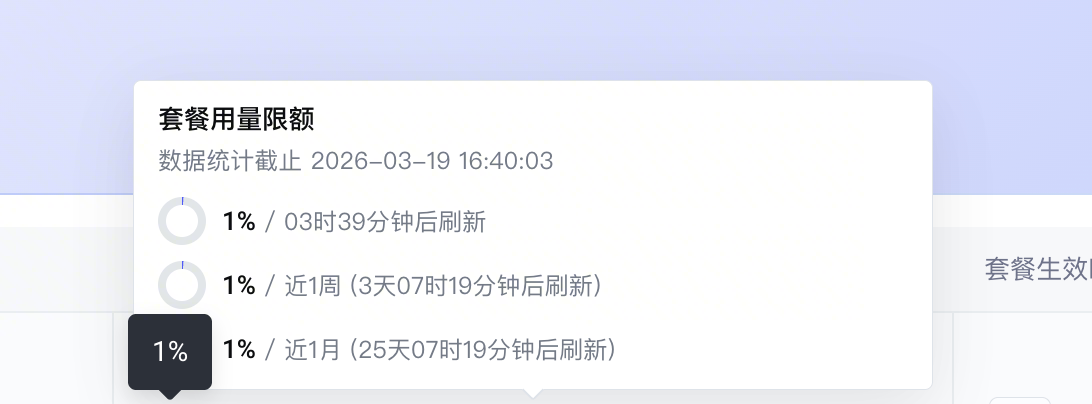
- 原因 B:API Key 错误。
- 检查 API Key 是否正确
- 原因 C:模型未开通。
- 前往火山方舟控制台开通管理页开通模型
消息未触发/收不到回复
问题
- 发消息给 bot 没有任何反应。
- 群聊中 @ bot 没反应。
- 某些人能触发,某些人不能。
排查流程
# 查看白名单和渠道配置
openclaw status
# 确认日志中是否有 blocked/skip/unauthorized
tail -f /tmp/openclaw/openclaw-$(date +%Y-%m-%d).log | grep "blocked\|skip\|unauthorized"
常见原因与修复
最近更新时间:2026.04.08 11:24:03
这个页面对您有帮助吗?
有用
有用
无用
无用