Volcengine Managed Service for Prometheus
Volcengine Managed Service for Prometheus


Document

- Documentation
 Volcengine Managed Service for PrometheusPrometheus basic knowledgeGet started with PromQLPromQL common functions
 Copy page
 Download PDF
Get started with PromQL
PromQL common functions
Copy pageDownload PDFPromQL common functions
PromQL offers a large number of built-in functions, which can be directly used to quickly process common metrics. This topic describes the most common built-in functions.
increase function
The increase function is one of the built-in functions provided by PromQL. This function is used to obtain the first and last samples in a range vector and return the increase between them.
For example, you can use the following expression to obtain the change in node storage within 5 minutes:
rate and irate functions
The rate function can directly calculate the average growth rate in a range vector within a time window. It will be automatically interrupted when monotonicity changes, such as counter resets due to sampling target restarts.
The irate function is used to calculate the per-second instant rate of increase in a range vector. The irate function calculates the growth rate in a range vector based on the last two sample data points. It will be automatically interrupted when monotonicity changes, such as counter resets due to sampling target restarts. This function can avoid a long tail within a time window and deliver higher sensitivity. The chart created through the irate function can better reflect the instant change status of sample data.
tip
rate and irate functions only apply to the counter-type metric.
For example, you can use the following expressions to obtain the change rate of HTTP requests within 5 minutes:
warning
Note that when you use rate() and irate() with an aggregation operator (such as sum()) or a function aggregating over time (any function ending in _over_time), perform rate() or irate() first and then aggregate. Otherwise, rate() cannot detect counter resets when your target restarts.
delta and idelta functions
The delta function takes a range vector as its parameter and returns an instant vector. It calculates the difference between the first value and the last value of each time series element in a range vector. The delta is extrapolated to cover the full time range as specified. Therefore, you may obtain a non-integer value even if the sample values are all integers.
The idelta function is similar to the delta function. The difference lies in that the idelta function calculates the difference between the latest two sample values.
tip
The idelta function and the delta function only apply to gauge-type time series.
For example, you can use the following expression to obtain the temperature difference of the CPU in the last two hours:
histogram_quantile function
The histogram_quantile function is used to calculate the quantiles of the histogram-type metric.
For example, you can use the following expression to calculate the 99th percentile of latency:
absent function
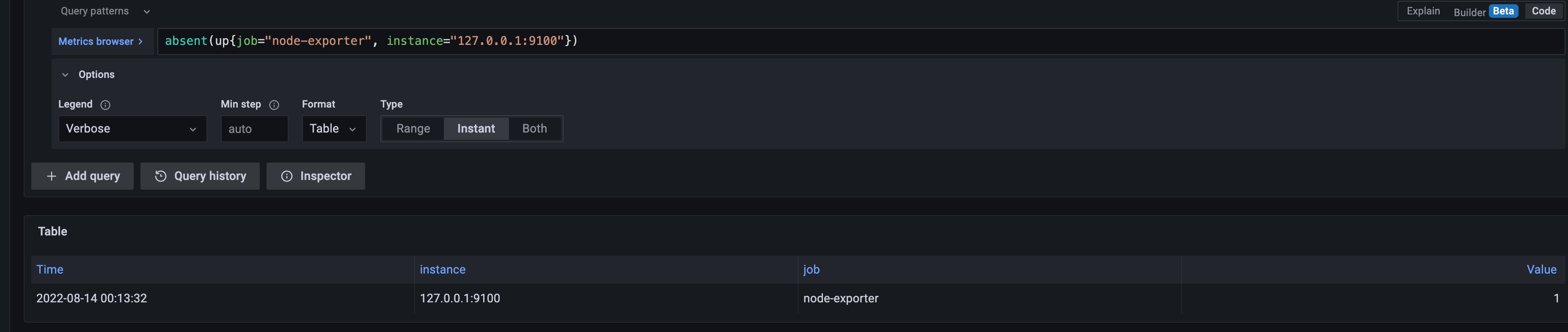
The absent function is used to check whether samples exist. An empty vector is returned if samples exist, and 1 is returned if no sample exists.
For example, you can use the following expression to check whether the node exporter exists in the node:
Last updated: 2026.07.10 11:37:29
All rights reserved © Beijing Volcano Engine Technology Co., Ltd2024
