Volcengine Managed Service for Prometheus
Volcengine Managed Service for Prometheus


Document

- Documentation
 Volcengine Managed Service for PrometheusUser guideWorkspaceCross-account/region Workspace Aggregation
 Copy page
 Download PDF
Workspace
Cross-account/region Workspace Aggregation
Copy pageDownload PDFCross-account/region Workspace Aggregation
Large enterprises often create multiple accounts in the cloud and assign different accounts to different departments or organizations. As an enterprise administrator, it is necessary to aggregate and query data across workspaces under different accounts to have an overview of the enterprise's resources and business information. The Volcengine Managed Service for Prometheus aggregation query workspace supports cross-account and cross-region aggregation, allowing the aggregation of workspaces from different accounts within the same enterprise.
Background Information
Enterprise organization
The enterprise organization service is a multi-account management service provided by Volcano Engine. The enterprise organization maintains the relationships between multiple accounts in the cloud and provides the underlying support capabilities for other services in enterprise cloud adoption. You can create an enterprise organization and unify the management of your Volcano Engine root user accounts of your company and its subsidiaries by inviting or creating accounts to join the enterprise organization. At the same time, accounts and organizational units can be tagged, classified, and managed through Resource tags, and permissions of accounts within the organization can be controlled through organizational policies.
In the Volcano Engine enterprise organization, the following roles are mainly involved:
- Enterprise administrator: administrator of the enterprise organization, with the highest data read and write permission within the account group, able to access, manage, and assign other member accounts.
- Organizational unit: a node that carries the organizational structure in the enterprise organization, supporting the binding of accounts or organizational units of other levels to this node. Using organizational units, it is easy to manage a category of accounts, for example, all accounts related to subsidiary A are bound under the A organizational unit node, while the control policy prohibit access to Cloud Enterprise Network is bound to the A organizational unit node, uniformly controlling the permission scope of all member accounts of subsidiary A.
- Member account: a member within the enterprise organization, subject to access, management, and assignment by the administrator. Resource and billing between member accounts are naturally completely isolated, and member accounts can be separately established to segment IT projects or company organizations with no resource interconnection or strict confidentiality requirements.
Trusted service
To help enterprise organizations integrate with cloud services, enterprise organizations support designating cloud services (for example: Volcengine Managed Service for Prometheus) as enterprise organization's trusted services, that is, configuring mutual trust relationships between the enterprise organization and the cloud service. Once the cloud service becomes a trusted service, it can access the account structure within the enterprise organization. The enterprise organization's administrator can also perform organization-based business operations within the trusted service, facilitating the achievement of enterprise cloud business goals.
tip
Usage Limits
- When aggregating cross-region workspaces, only aggregation of Common workspaces is supported. Local workspaces aggregation is not currently supported.
- When aggregating cross-region workspaces, the Johor region is not currently supported. For more details, refer to Regions and Availability Zones.
Prerequisites
- The enterprise organization has been created, and organizational units and control policies have been configured. For more details, refer to Enterprise organization documentation.
- Member accounts have been invited or created in the enterprise organization. For more details, refer to Member account management.
- The member account has created a Volcengine Managed Service for Prometheus common workspace. For details, please refer to Create a common workspace.
- The member account has integrated cloud product monitoring data into the Volcengine Managed Service for Prometheus common workspace. For details, please refer to Volcengine Kubernetes Engine integration and Cloud Monitor integration.
Operation Procedure
Scenario 1: Cross-region workspace aggregation
The cross-region workspace aggregation scenario allows you to aggregate workspaces in different regions under the same account. This is applicable for scenarios where monitoring data exists in multiple regions under one account. Perform the following steps:
- Log in to the VMP console.
- On the top navigation bar, select the target region.
- On the left navigation bar, click Workspace to go to the workspace list page.
- Click Create, and click the Aggregation workspace tab to configure the aggregation query workspace.
-
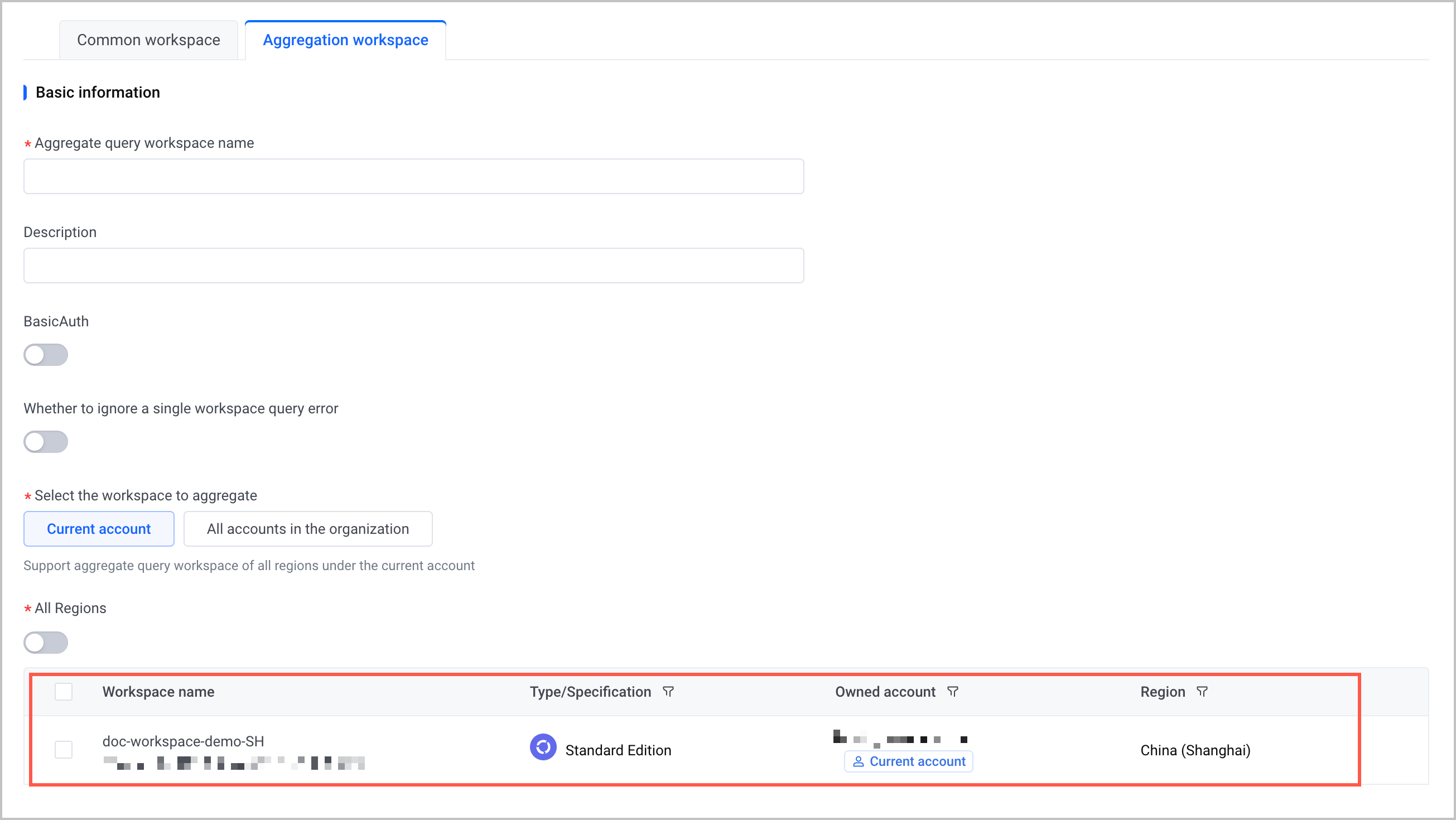
- ParameterDescriptionAggregation query workspace nameSpecify a name for the aggregation workspace. The name is in the string format and must be 1 to 100 characters in length.DescriptionSpecify the description of the aggregation query workspace. You can specify the detailed information about the workspace, including the purpose and scope of the workspace.BasicAuthConfigure the Basic Auth authentication feature.
- When the Basic Auth feature is disabled, the workspace only supports authentication via Volcano Engine AK/SK for data query.
- When the Basic Auth feature is enabled, the workspace supports authentication via username and password or Volcano Engine AK/SK for data query.
User nameSpecify a username used for basic authentication.- The username can contain uppercase and lowercase letters, digits, and underscores (_)_。
- The username must be 2 to 32 characters in length.
PasswordSpecify the password used for basic authentication.- The password can contain uppercase and lowercase letters, digits, and special characters and must contain at least three of the preceding characters.
- Special characters include!,@,#,$,%,^,*,&,(,),_,+,-,=.
- The password must be 8 to 32 characters in length.
Confirm passwordEnter the password used for basic authentication again to ensure the two passwords are identical.Whether to ignore a single workspace query errorSpecify whether to ignore the query errors of a single workspace during queries.-
 Ignores the query errors of a single workspace. If an error occurs in a workspace, only data queried from other workspaces will be returned. This is suitable for scenarios where high accuracy of monitoring data is not required.
-
 Does not ignore the query errors of a single workspace. If an error occurs in a workspace, an error in the entire aggregation workspace is reported during queries. This is suitable for scenarios where high accuracy of monitoring data is required.
Select the workspace to aggregateSelect the workspaces that need to be aggregated for query. select Current account to aggregate workspaces under the current account.All RegionsWhether to aggregate workspaces in different regions under the current account.- Enable: Queries all workspaces under the current account across different regions. Select workspaces in different regions in the workspace list to achieve cross-region workspace aggregation.
- Disable: Queries only the workspaces under the current account in the current region.
- Click Submit, and wait for the system to create the workspace.
Scenario 2: Cross-account workspace aggregation
warning
Only enterprise organization administrator accounts and proxy administrator accounts support cross-account aggregation of member accounts' workspaces within the enterprise.
The cross-account workspace aggregation scenario allows you to use enterprise organization administrator accounts and proxy administrator accounts to aggregate workspaces created by different member accounts in different regions. Perform the following steps:
- Log in to the VMP console with an enterprise administrator account or a proxy administrator account.
- On the top navigation bar, select the target region.
- On the left navigation bar, click Workspace to go to the workspace list page.
- Click Create, and click the Aggregation workspace tab to configure the aggregation query workspace.
-
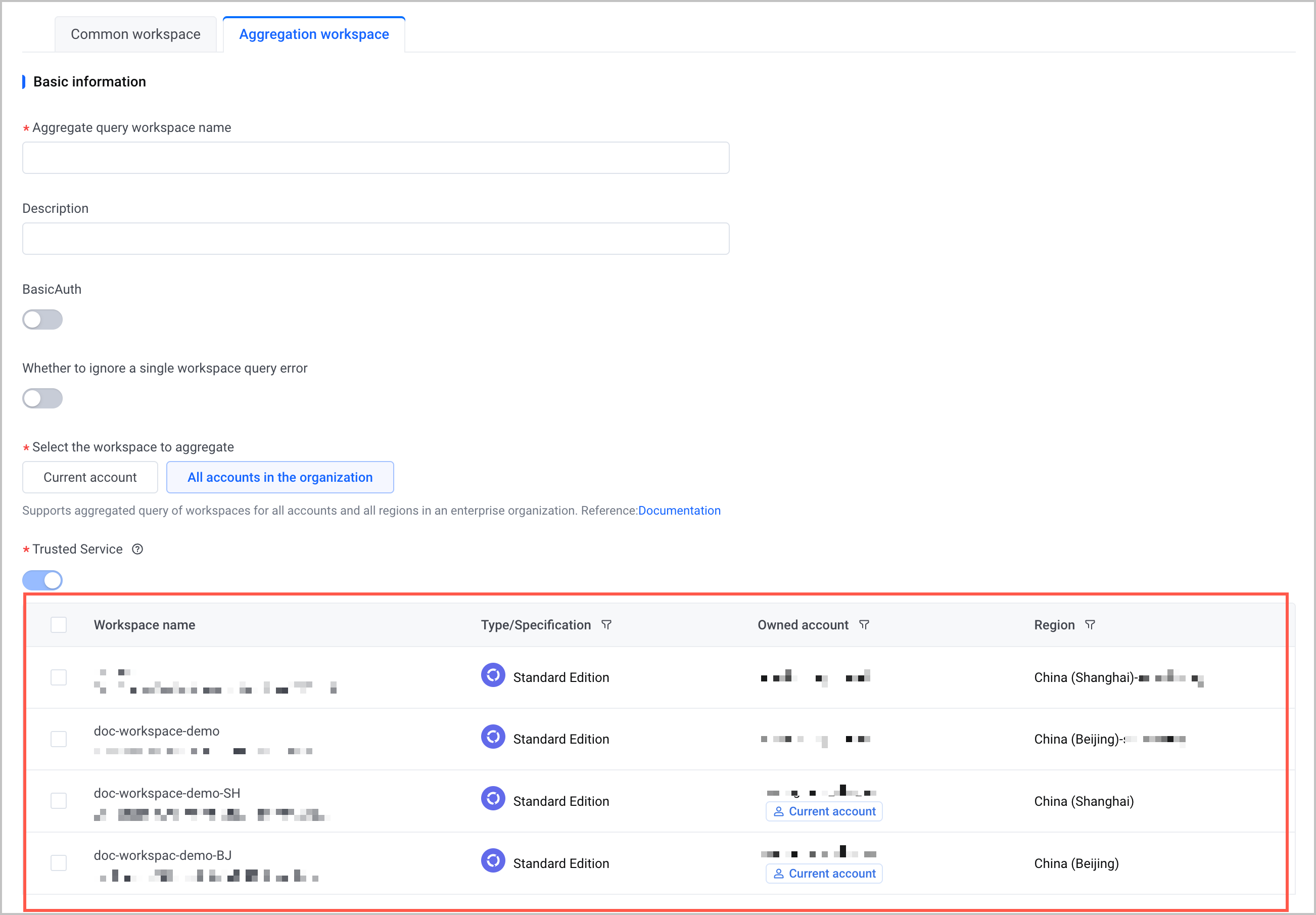
- ParameterDescriptionAggregation query workspace nameSpecify a name for the aggregation workspace. The name is in the string format and must be 1 to 100 characters in length.DescriptionSpecify the description of the aggregation query workspace. You can specify the detailed information about the workspace, including the purpose and scope of the workspace.BasicAuthConfigure the Basic Auth authentication feature.
- When the Basic Auth feature is disabled, the workspace only supports authentication via Volcano Engine AK/SK for data query.
- When the Basic Auth feature is enabled, the workspace supports authentication via username and password or Volcano Engine AK/SK for data query.
User nameSpecify a username used for basic authentication.- The username can contain uppercase and lowercase letters, digits, and underscores _.
- The username must be 2 to 32 characters in length.
PasswordSpecify the password used for basic authentication.- The password can contain uppercase and lowercase letters, digits, and special characters and must contain at least three of the preceding characters.
- Special characters include!,@,#,$,%,^,*,&,(,),_,+,-,=。
- The password must be 8 to 32 characters in length.
Confirm passwordEnter the password used for basic authentication again to ensure the two passwords are identical.Whether to ignore a single workspace query errorSpecify whether to ignore the query errors of a single workspace during queries.- Ignores the query errors of a single workspace. If an error occurs in a workspace, only data queried from other workspaces will be returned. This is suitable for scenarios where high accuracy of monitoring data is not required.
- Does not ignore the query errors of a single workspace. If an error occurs in a workspace, an error in the entire aggregation workspace is reported during queries. This is suitable for scenarios where high accuracy of monitoring data is required.
Select the workspace to aggregateSelect the workspaces that need to be aggregated for query. Select All accounts in the organization to aggregate workspaces created by other accounts in the enterprise organization.tipIn the Owned account column of the workspace list, the workspaces marked with Current account indicate the workspaces created by the currently logged-in account. Those not marked indicate the workspaces created by other accounts in the enterprise organization.Trusted serviceEnable or disable the trusted service. The default is enabled and configuration is not supported.- Enable: Enables the cross-account trusted service and allows the aggregation of workspaces created by other accounts in the enterprise organization.
- Disable: Disables the cross-account trusted service and prohibits the aggregation of workspaces created by other accounts in the enterprise organization.
- Click Submit, and wait for the system to create the workspace.
Result validation
Obtain the query URL
After the aggregation query workspace is created, you can view the workspace in the workspace list.
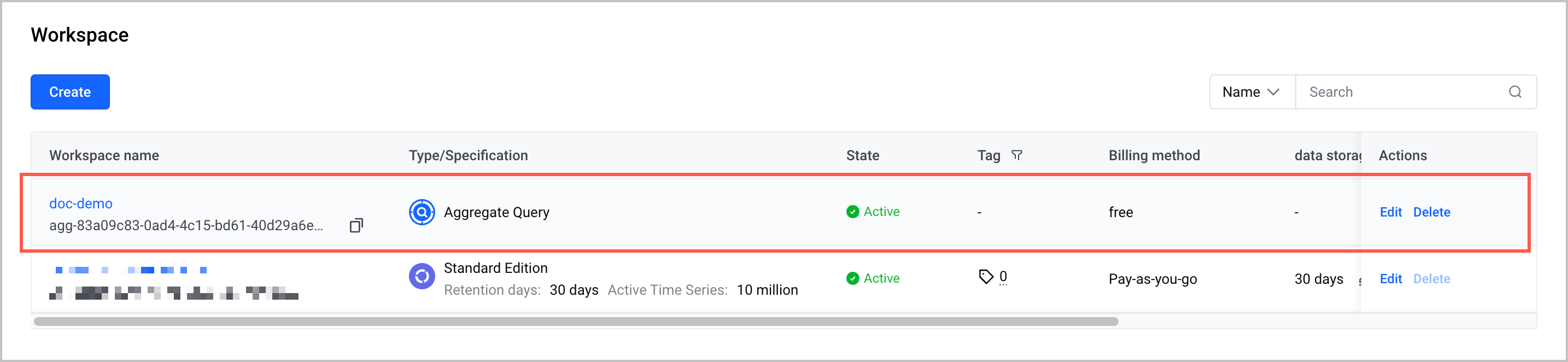
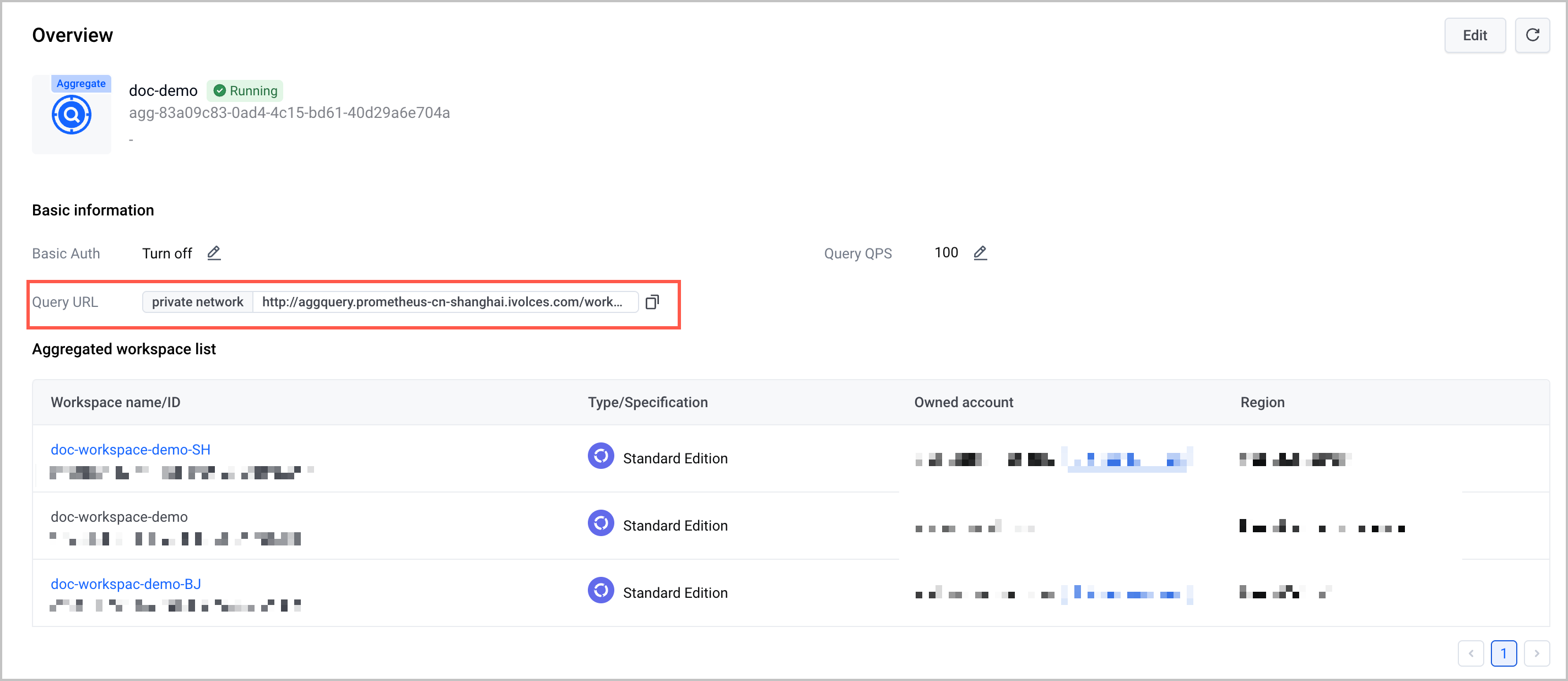
Click the workspace name to go to the workspace details page, where you can view and obtain the query URL of the workspace.
tip
You can install Grafana in a VKE cluster or an ECS instance and then use Grafana to view metrics and create dashboards.
Query aggregation metrics
You can use the Explore feature or Grafana to view the metrics in the aggregation query workspace. The __ws__ label will be added to the metrics, which indicates the ID of the workspace where the metrics belong, such as __ws__: f7a69888-***.
Last updated: 2026.07.10 11:37:30
All rights reserved © Beijing Volcano Engine Technology Co., Ltd2024
