Volcengine Managed Service for Prometheus
Volcengine Managed Service for Prometheus


Document

- Documentation
 Volcengine Managed Service for PrometheusFAQsHow do I create CRD resources such as ServiceMonitor in a cluster?
 Copy page
 Download PDF
FAQs
How do I create CRD resources such as ServiceMonitor in a cluster?
Copy pageDownload PDFHow do I create CRD resources such as ServiceMonitor in a cluster?
This article introduces how to create CRD resources such as ServiceMonitor or PodMonitor in a cluster.
Issue Description
After you install the collector in the cluster, you can use CRD resources such as ServiceMonitor and PodMonitor to meet custom service discovery requirements. However, these CRD resources may not be built into the cluster, and an error is reported when creating the CRD resources.
In this case, you need to first configure CRD resources such as ServiceMonitor and PodMonitor in the cluster. This topic describes how to create these CRD resources in a cluster.
Prerequisites
- A Volcano Engine root user is created and Volcengine Kubernetes Engine (VKE) is activated.
- A cluster is created. For more details, see Creating A Cluster.
- The kubectl tool is installed locally. For details, see Installing and Setting Up kubectl.
- kubectl has been used to connect to the target cluster. For details, see Connecting Clusters.
Configuration Procedure
Create ServiceMonitor CRD resources
- Use kubectl to connect to the target cluster.
- Based on the region where your cluster resides, run the corresponding command to create the ServiceMonitor CRD resources in the cluster.
Create PodMonitor CRD resources
- Use kubectl to connect to the target cluster.
- According to the region where your cluster is located, select the corresponding command to create PodMonitor CRD resources in the cluster.
Create Probe CRD resources
- Use kubectl to connect to the target cluster.
- Based on the region where your cluster resides, run the corresponding command to create the Probe CRD resources in the cluster.
View Results
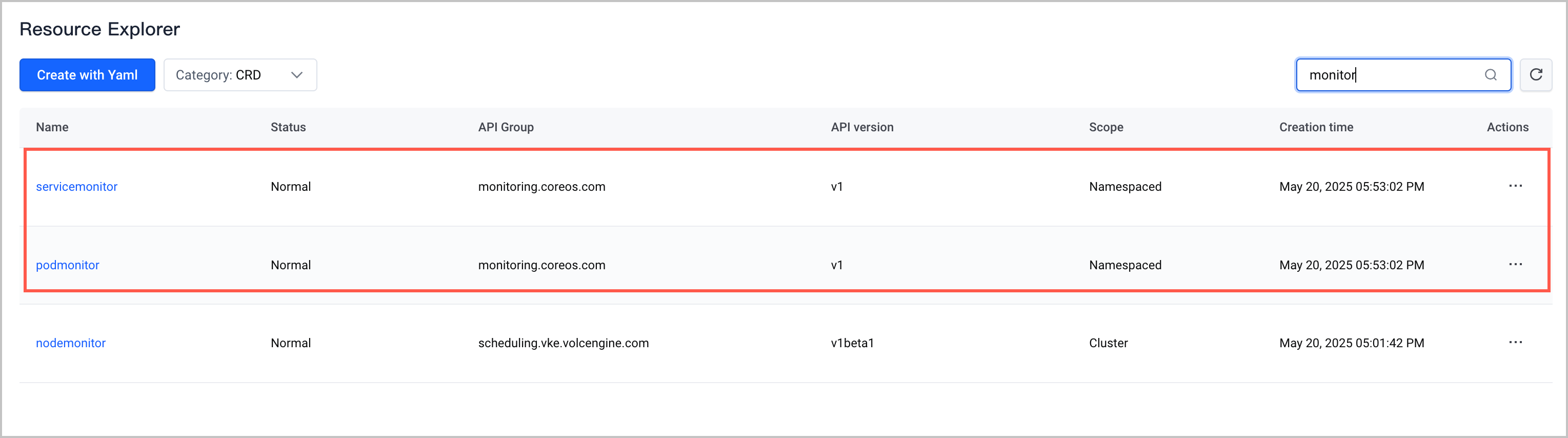
After you create the CRD resources in VKE, you can follow these steps to view the CRD information and verify that the configuration is correct:
- Log in to the VKE console.
- On the left menu bar, click Cluster. In the cluster list on the right side, select the target cluster.
- Click the name of the cluster to go to the cluster configuration page.
- In the left navigation pane, click Workload > Resource Explorer, and then select CRD from the Category drop-down list to view the created CRD resources.
-
Last updated: 2026.07.10 11:37:27
All rights reserved © Beijing Volcano Engine Technology Co., Ltd2024
