Volcengine Managed Service for Prometheus
Volcengine Managed Service for Prometheus


Document

- Documentation
 Volcengine Managed Service for PrometheusIntegration GuideCloud service integrationGPU/RDMA millisecond-level monitoring integration
 Copy page
 Download PDF
Cloud service integration
GPU/RDMA millisecond-level monitoring integration
Copy pageDownload PDFGPU/RDMA millisecond-level monitoring integration
VMP can be integrated with High Performance Computing Optimized ECS instances to provide millisecond-level GPU/RDMA monitoring. This meets your business requirements for centralized monitoring of cloud GPU/RDMA resources and custom businesses. This topic describes the procedure for integrating GPU/RDMA millisecond-level monitoring.
Background
Built on the GPU instance type, the High Performance Computing Optimized instance type integrates RDMA networks. This significantly improves network performance and increases acceleration ratios for large-scale clusters. This instance type applies to scenarios such as high-performance computing, AI, and machine learning. For more details, see High Performance Computing Optimized.
Prerequisites
- The VMP service has been activated, and a VMP workspace has been created. For more details, see Creating workspaces.
- The ECS service has been activated, and a High Performance Computing Optimized ECS instance has been created. For more details, see Purchasing ECS instances.
- Cloud assistant Agent and the O11yAgent collection add-on have been installed on the ECS instance. For more details, see Installing cloud assistant Agent and Installing the O11yAgent collection add-on by using the GUI.
- A security group has been configured for the ECS instance. For more details, see Creating security groups.
- A security group has been created for the managed collector, and the subnet and port of the ECS instance have been allowed in the outbound rule.
- Configure the security group to which the ECS belongs, and allow the security group used by the managed collector to access the corresponding port in the inbound rule.
- The VMP workspace and the target ECS instance must be deployed in the same region.
Procedure
Configure an integration task
- Log in to the VMP console.
- In the top navigation bar, select the target region.
- In the left navigation bar, click Access center > Component. On the page that appears, click GPU/RDMA millisecond-level Monitoring.
- (Optional) Service authorization.
- When you configure an ECS integration task for the first time, you need to grant permissions to allow VMP to access ECS and VPC. Click Authorize to configure service authorization.
- Click Authorize Now to authorize VMP to access other services.
- Configure the collector deployment environment. Click ECS environment and select the associated ECS instance.
tip
In this scenario, only High Performance Computing Optimized ECS instances that have cloud assistant Agent installed and are not associated with other GPU/RDMA millisecond-level monitoring integration tasks can be selected.
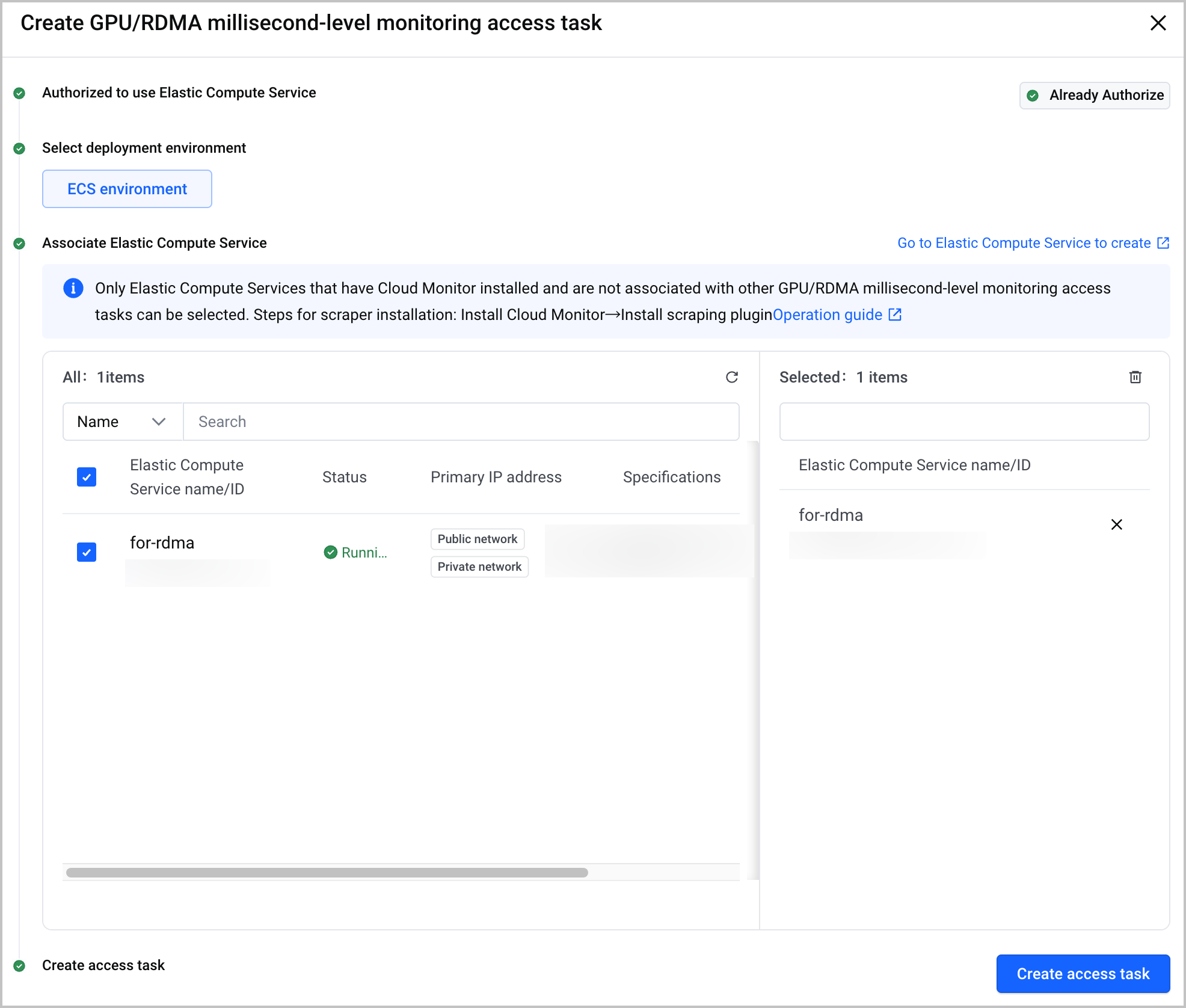
- Click Create access task. On the Start access tab, configure the details of the integration task. After the configuration is complete, click Confirm.
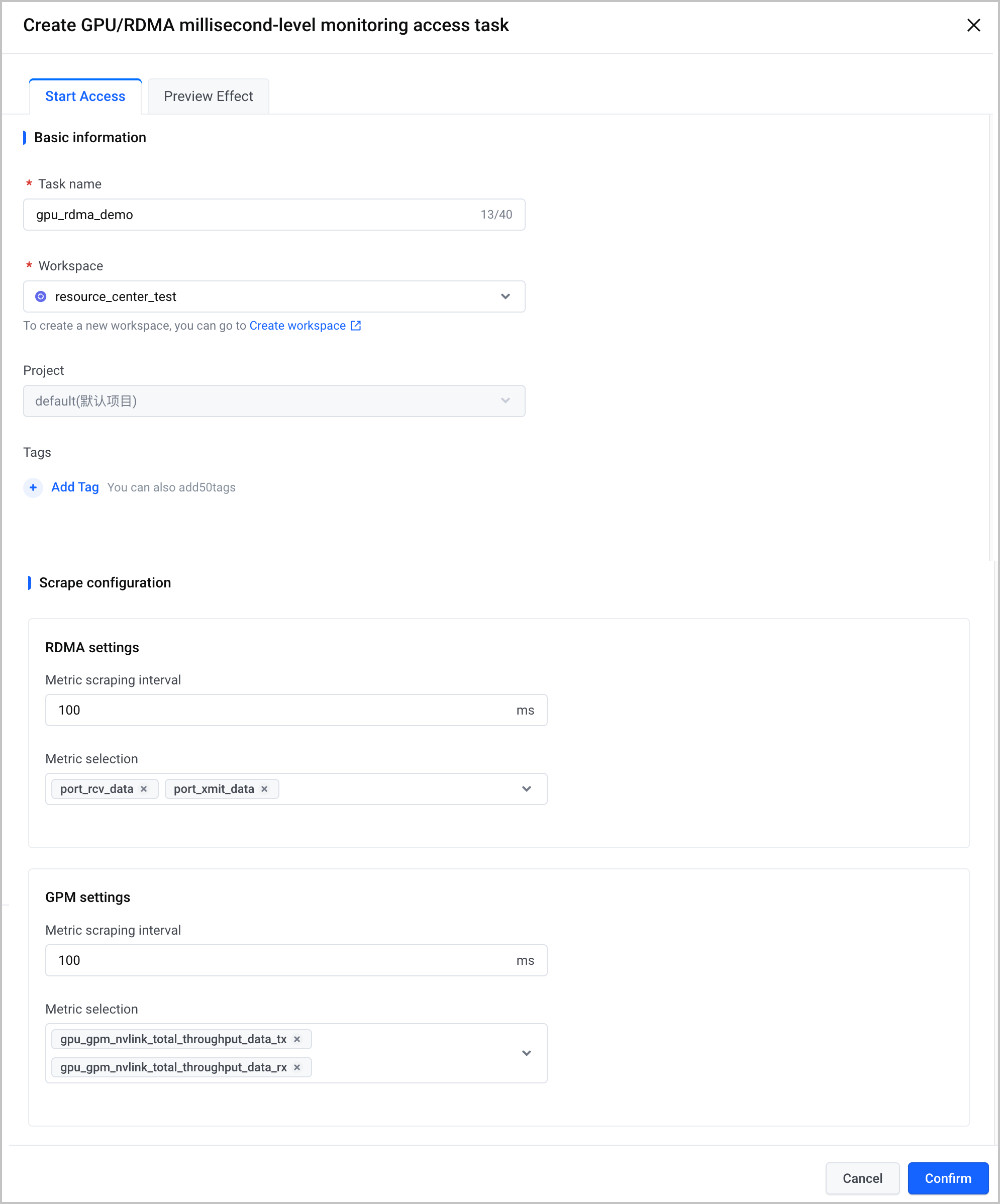
Category | Parameter | Description |
Basic information | Task name | Specify the name of the integration task. |
| workspace | Select a created VMP workspace to associate with the integration task. |
| Project | The project to which the instance belongs. A project is a resource management mechanism that Volcano Engine provides to enable grouping of cloud resources by project. Project-based authorization with Identity and Access Management (IAM) facilitates resource isolation and data security, as well as cost calculation across cloud resources. For details, see Project management. |
| Tags | Labels of the instance. A tag is a key-value pair that allows you to classify and aggregate cloud resources from different dimensions. You can use tags for resource authorization and bill splitting. For details, see Managing tags. tip You can add up to 50 labels. |
Scrape configuration | Metric scraping interval | Specify the interval at which the metrics of RDMA and GPM are collected. The value can be accurate to milliseconds. The default value is 100ms. |
| Metric selection | Select the metrics you want to collect based on your business requirements. |
Obtain monitoring dashboards
Click the Effect preview tab to view sample monitoring dashboards. Click Get the Grafana template to download the Grafana monitoring dashboard template in JSON format.
Validate results
After the configuration is complete, you can view the status and details of the task. Check whether the integration task is running as expected.
- In the left navigation bar, click Access center > Access task.
- Click the ECS environment tab. You can view the status of the integration task in the task list.
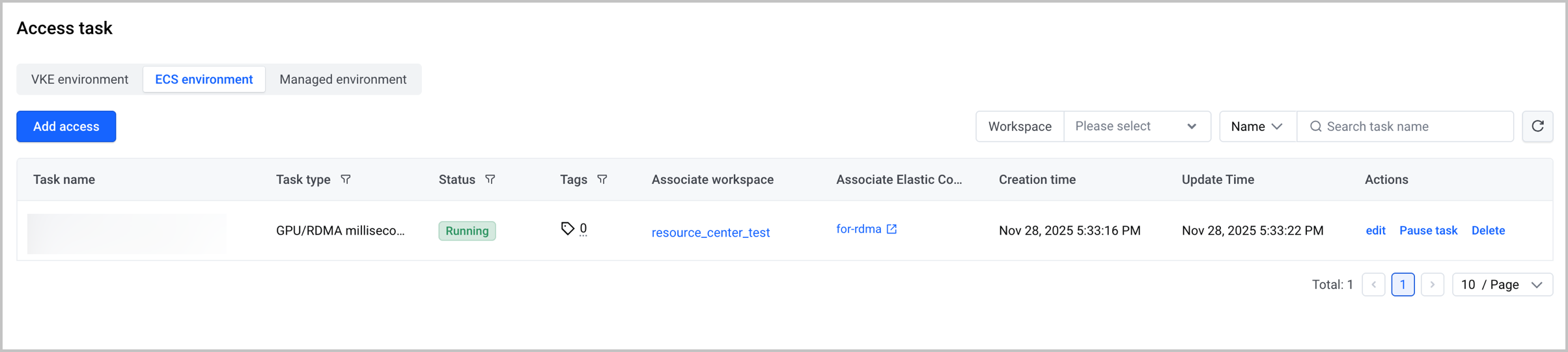
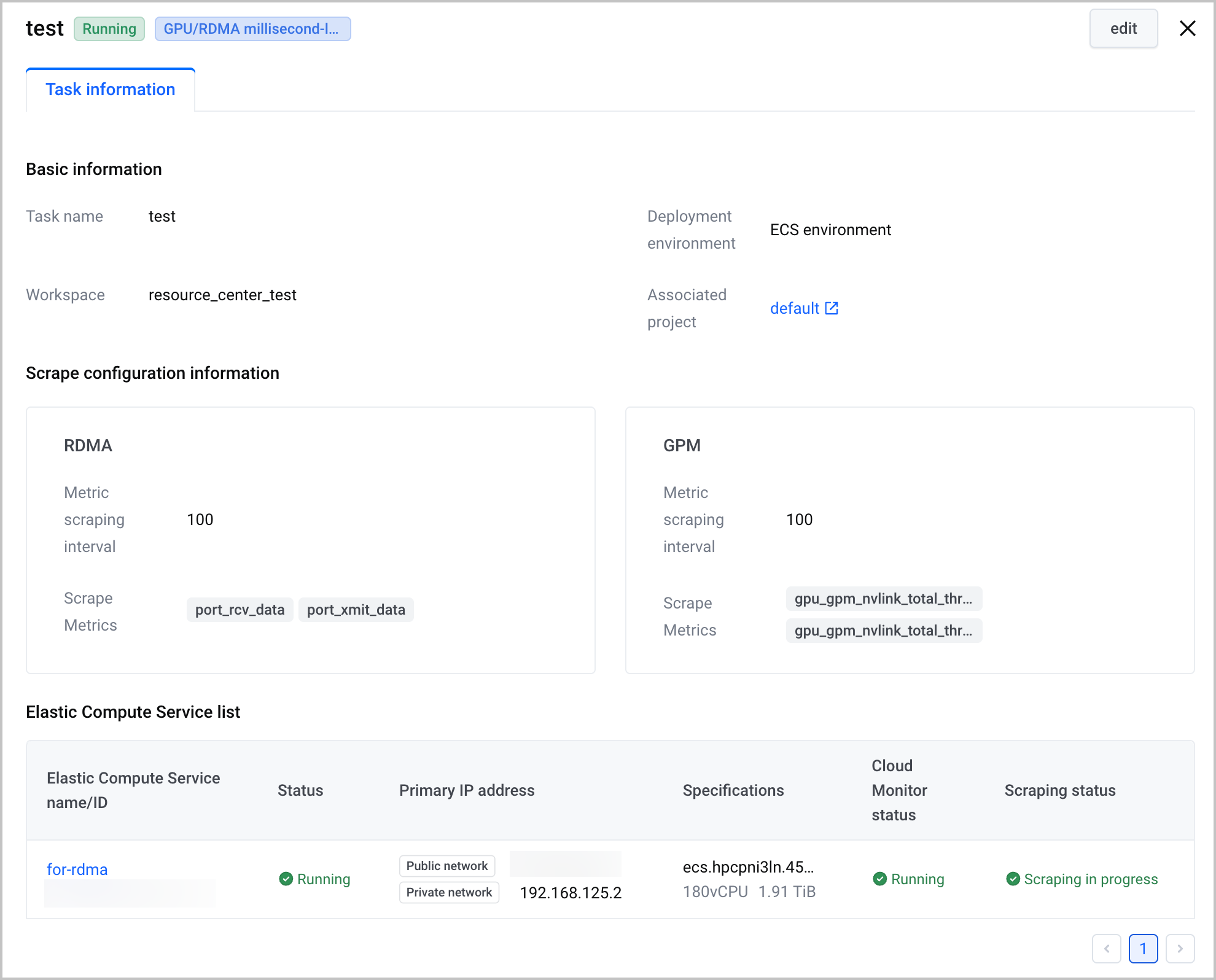
- Click the task name to go to the task details page, where you can view detailed information about the task, as well as the cloud assistant Agent status and collection status of the ECS instance.
Last updated: 2026.10.10 10:16:50
All rights reserved © Beijing Volcano Engine Technology Co., Ltd2024
