Volcengine Managed Service for Prometheus
Volcengine Managed Service for Prometheus


Document

- Documentation
 Volcengine Managed Service for PrometheusIntegration GuideAI add-on integrationSGLang integration
 Copy page
 Download PDF
AI add-on integration
SGLang integration
Copy pageDownload PDFSGLang integration
Volcengine Managed Service for Prometheus (VMP) allows you to monitor SGLang instances that are deployed in Volcengine Kubernetes Engine (VKE) clusters.
Background
SGLang serves as a fast serving framework for large language models (LLMs) and vision language models. SGLang makes your interaction with models faster and more controllable by co-designing the backend runtime and frontend language. SGLang provides the following core features:
- Fast backend runtime: provides efficient serving with RadixAttention for prefix caching, jump-forward constrained decoding, continuous batching, paged attention, tensor parallelism, FlashInfer kernel, and quantization (AWQ/FP8/GPTQ/Marlin).
- Flexible frontend language: offers an intuitive interface for programming LLM applications, including chained generation calls, advanced prompting, control flow, multi-modal inputs, parallelism, and external interactions.
You can use VMP to monitor SGLang instances that are deployed in VKE clusters to achieve key metric alerting and optimization.
Prerequisites
- VMP
- A VMP workspace has been created. For details, see Creating workspaces.
- VKE
- VKE has been activated.
- A cluster has been created. For details, see Creating clusters.
- An SGLang instance is deployed in the cluster.
- Cloud native observability has been enabled for the cluster, and prometheus-agent has been installed in the cluster. For details, see Enabling observability.
tip
The VMP workspace and the VKE cluster must be deployed in the same region.
Procedure
Configure an integration task
- Log in to the VMP console.
- In the top navigation bar, select the target region.
- In the left navigation bar, click Integration Center > Component. On the page that appears, click SGLang to configure the integration task.
- Configure the deployment environment of the collector. Click VKE environment and select an associated cluster.
- Click Create Integration Task to specify the details of the integration task.
-
- Click Confirm to complete the configuration.
Obtain monitoring dashboards
Click the Effect preview tab to view sample monitoring dashboards. Click Get the Grafana template to download the Grafana monitoring dashboard template in JSON format.
Query metrics
Click the Acquisition metric tab to view the list of metrics for the collection targets.
View preset alerts
Click the Alert template tab to view the preset alert templates for SGLang. Click Turn on alert. You are redirected to the alert group creation page, where you can swiftly create and enable alerts based on the current alert template.
Validate results
After the configuration is complete, you can view the status and details of the task. Check whether the integration task is running as expected.
- In the left navigation bar, click Access center > Access task.
- Click VKE environment. You can view the status of the integration task in the task list.
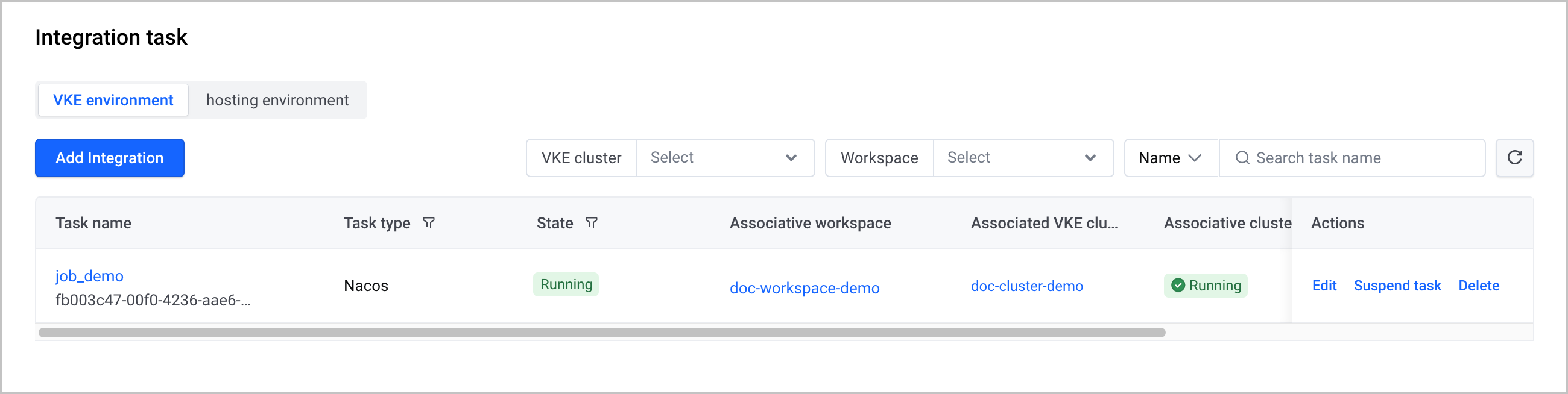
After the integration task is created, you can perform the following O&M operations:
- Click the name of the task to go to the task details page.
- Click Edit in the Actions column to edit the task.
- Click Suspend task in the Actions column to suspend the task.
- Click Delete in the Actions column to delete the integration task.
Monitoring information
Query metrics
You can quickly query and display metric data by using the Explore feature of VMP. For more details, refer to Querying metrics.
Create dashboards
You can install Grafana in a VKE cluster or an ECS instance and then use Grafana to view metrics and create dashboards.
Configure alerts
You can configure alerts in the alerting center of VMP. For more details, see Creating alert rules.
Last updated: 2026.10.10 10:16:50
All rights reserved © Beijing Volcano Engine Technology Co., Ltd2024
