Volcengine Managed Service for Prometheus
Volcengine Managed Service for Prometheus


Document

- Documentation
 Volcengine Managed Service for PrometheusUser guideMonitoring dashboardBuilt-in dashboard
 Copy page
 Download PDF
Monitoring dashboard
Built-in dashboard
Copy pageDownload PDFBuilt-in dashboard
Volcengine Managed Service for Prometheus (VMP) provides multiple types of built-in dashboards to facilitate viewing monitoring information. This topic describes how to view a built-in dashboard.
Prerequisites
- A VMP workspace is created. For more details, refer to Creating a workspace.
- Cloud services or custom business is integrated with VMP. For more details, refer to Access guide.
Procedure
- Log in to the VMP console.
- On the top navigation bar, select the target region.
- Click Monitor dashboard on the left navigation bar to go to the Monitor dashboard page.
- Select the dashboard that you want to view in the left-side Dashboard list panel, and configure the workspace and refresh method to view the monitoring information of the specified dashboard. For the basic operations on built-in dashboards, refer to Basic operations.
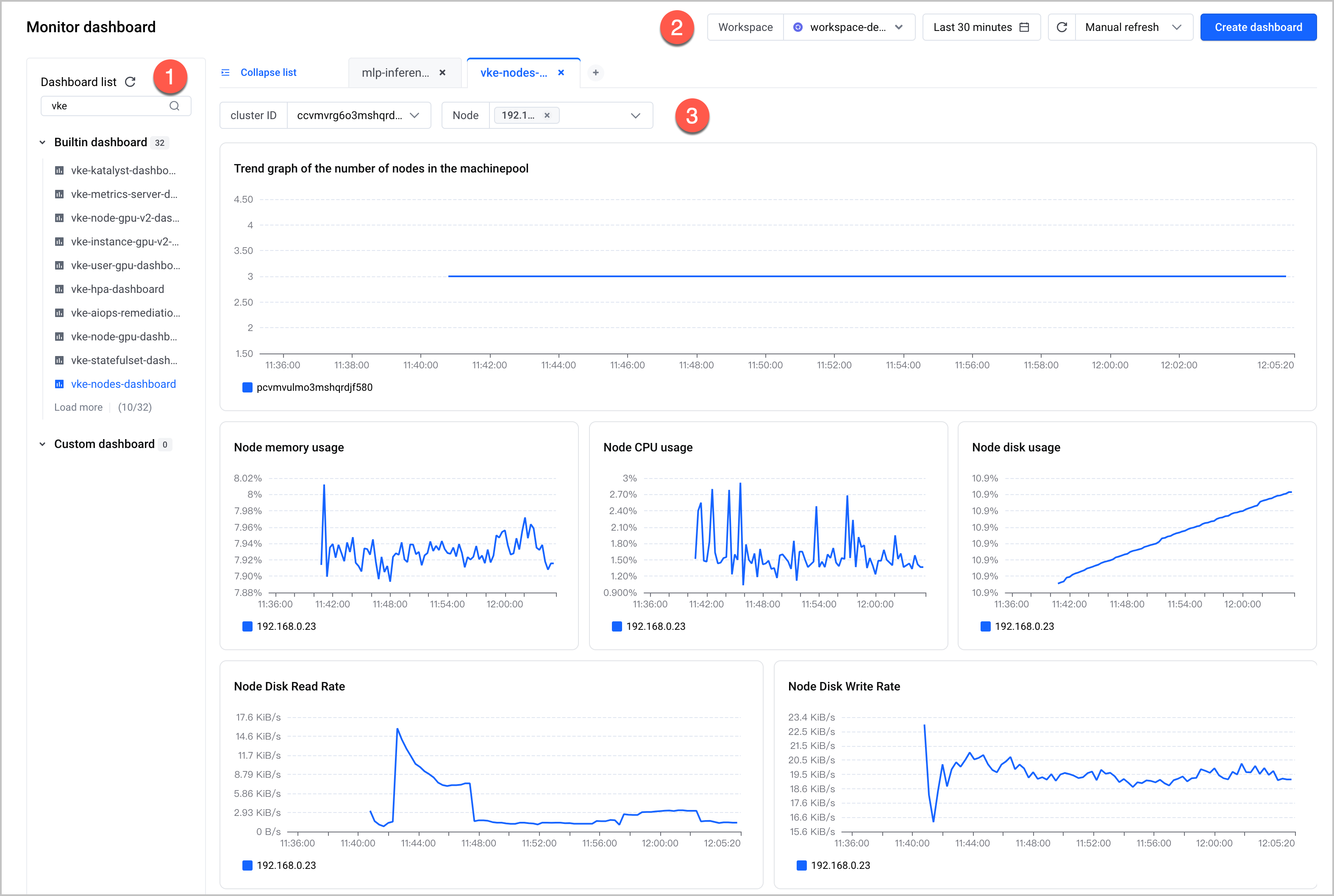
No. | Description |
1 | The dashboard list. The dashboard name starts with the abbreviation of a service name. For example, vke-xxx indicates the dashboard of VKE. Click a dashboard name in the list to view the details of the dashboard. |
2 | Select a data source for the dashboard, which is a VMP workspace, and configure the query time range, refresh method, and refresh interval. |
3 | The details of the dashboard. You can select cloud service resources. |
tip
- In addition to system built-in dashboards, it is recommended to use Grafana to view metrics and create dashboards. For more details, refer to Deploying Grafana and accessing workspaces in the VKE cluster.
- For specific descriptions of built-in dashboards for different services, refer to the documentation of the corresponding service. For example, for the description of the monitoring dashboards for VKE, see Basic observability.
Last updated: 2026.07.10 11:37:25
All rights reserved © Beijing Volcano Engine Technology Co., Ltd2024
