Volcengine Managed Service for Prometheus
Volcengine Managed Service for Prometheus


Document

- Documentation
 Volcengine Managed Service for PrometheusUser guideMetric exportingExporting metrics to TOS
 Copy page
 Download PDF
Metric exporting
Exporting metrics to TOS
Copy pageDownload PDFExporting metrics to TOS
VMP workspaces support exporting data to TOS buckets, meeting your needs for data consumption using TOS. This topic describes how to export data from a workspace.
tip
[Public beta]: This feature is currently in public beta.
Prerequisites
- A VMP workspace has been created. For more details, see Creating workspaces.
- TOS has been activated, and a bucket has been created in the region where the current workspace is located. For details, see Create buckets.
Limits
Only paid metrics can be exported. Free metrics (basic metrics stored for 15 days) are not supported for export. For more information, see Billing Items.
Procedure
- Log in to the VMP console.
- In the top navigation bar, select the target region.
- In the left navigation pane, click Export task to go to the "Export task" page.
- Click Create export task, configure the task details by referring to the following instructions, and then click OK
- ParameterDescriptionTask nameSpecify the name of the export task. It can contain Chinese characters, letters (uppercase and lowercase), digits, and underscores (_), and must be 1 to 40 characters in length.workspaceSelect the workspace for which you want to export data. Only a common workspace can be selected.tipWorkspaces with a storage duration of 15 days or less support exporting only custom and other metrics, but not basic metrics. For details, see Metric references.ProjectThe project to which the export task belongs. Project management is a resource management method that allows you to manage cloud resources in groups based on different businesses or projects. Project-based authorization with Identity and Access Management (IAM) facilitates resource isolation and data security, as well as cost calculation across cloud resources. For details, see Project management.TagsLabels are key-value pairs attached to export tasks to identify them. They can be used with selectors to quickly filter target export tasks. A tag is a key-value pair that allows you to classify and aggregate cloud resources from different dimensions. You can use tags for resource authorization and bill splitting. For details, see Managing labels.tipYou can add up to 50 labels.Data filteringFilter metrics in the workspace by using metric labels, such as job="prometheus" or __name__=~"job:.*". Regular expressions are supported. You can configure both AND rules and OR rules.
- AND rule: Metrics will be delivered only if they contain all specified labels.
- OR rule: Metrics will be delivered if they contain one of the specified labels.
tip- You must configure at least one data filtering rule.
- After configuring the filter rules, click Query Test in the upper-right corner to check the configuration results. If a configuration error occurs or no data can be queried, an error message will be provided.
Data query offsetSet the backward offset from the export timestamp to define the time range for raw metric queries. The offset can be accurate down to minutes and seconds. When exporting metrics from the workspace, the system queries the latest sample every minute based on the configured offset. If you encounter high data latency, we recommend increasing this query offset.Export targetConfigure the destination for workspace data delivery. In this topic, TOS is selected as the destination.Target bucketSelect the destination bucket for workspace data delivery.Delivery directorySelect the root directory of the destination bucket for delivering workspace data. You can either select a file path or manually enter a path.Partition formatNaming convention for directories when data from your workspace is delivered to a destination bucket. TOS bucket directories are dynamically generated based on the creation time of delivery tasks. The value cannot start with a forward slash (/). The default value is %Y/%m/%d/%H/%M, which can generate a directory such as 2022/06/30/14/00.tipPrometheus involves time series monitoring data. When metrics are exported to TOS, the data is not piled into a single folder but organized into hierarchical directories based on time.Storage formatData storage format. Currently, only the JSON format is supported.Compression typeThe compression type for stored data. Supported compression types include snappy, gzip, and no compression. You can select the appropriate type based on your requirements.- snappy: A high-speed compression algorithm optimized for time series data, logs, and big data streams. Compression and decompression are extremely fast with very low CPU consumption, but the compression ratio is not as high as gzip. It is usually the recommended choice for exporting Prometheus monitoring data.
- gzip: A general-purpose high compression algorithm. It offers a high compression ratio and is the most cost-effective, but compression and decompression are slow and consume more CPU resources. It is suitable for scenarios involving long-term data archiving and cold storage where write performance is not a concern.
- No compression: The raw data is stored directly in TOS without any compression. It has high costs but offers fast read and write speeds, with almost no CPU consumption. It is suitable for scenarios where temporary debugging, extremely small data volumes, and maximum write speed are required.
Metric Relabel configurationConfigure metric relabeling. You can add labels to delivered metrics. For more details, refer to Metric relabeling.
Validate results
View the export task
After the configuration is complete, you can view the status and details of the task. Check whether the export task runs as expected.
- In the left navigation bar, click Export task. You can view the status of the task in the task list.
-
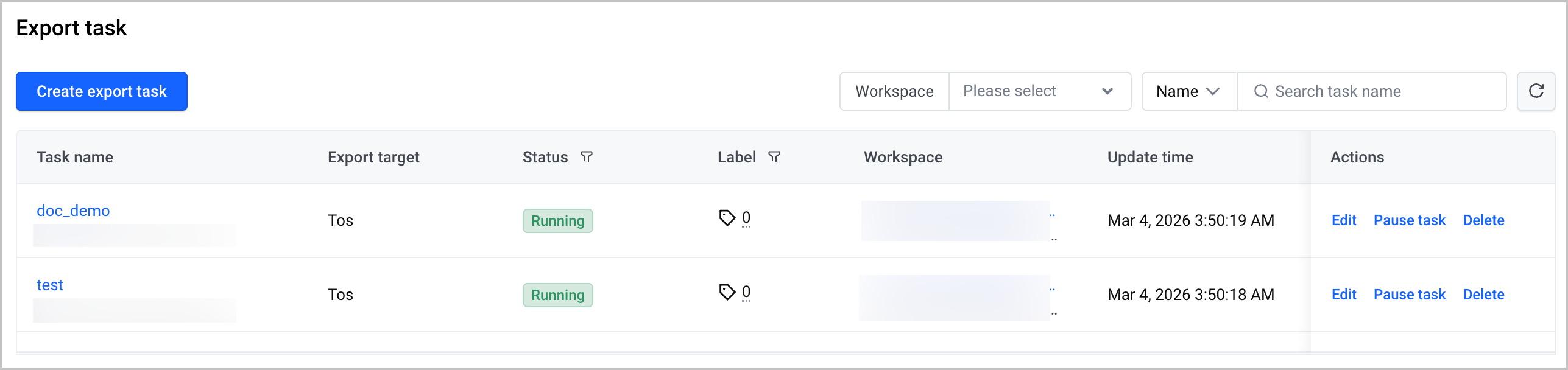
- After the export task is created, you can perform the following O&M operations:
- Click the name of the task to go to the task details page, where you can view the details of the task.
- Click Edit in the Actions column to edit the task.
- Click Suspend task in the Actions column to suspend the task.
- Click Delete in the Actions column to delete the task.
Check exported data
After data from your VMP workspace is delivered to a TOS bucket, you can access the TOS console to view the data in the destination bucket.
What to do next
On the export task details page, switch to the Monitoring dashboard tab and view the dashboards for both the raw metrics and exports to TOS. Here:
- The dashboard for raw metrics displays three metrics: the scrape QPS, the average number of raw metric samples pulled per second, and the average time consumed to pull raw metrics.
- The dashboard for exports to TOS displays three metrics: the number of successful export tasks, the number of failed export tasks, and the latency of export tasks.
Last updated: 2026.09.09 14:42:18
All rights reserved © Beijing Volcano Engine Technology Co., Ltd2024
