Volcengine Managed Service for Prometheus
Volcengine Managed Service for Prometheus


Document

- Documentation
 Volcengine Managed Service for PrometheusIntegration GuideCloud service integrationCustom ECS integration
 Copy page
 Download PDF
Cloud service integration
Custom ECS integration
Copy pageDownload PDFCustom ECS integration
Volcengine Managed Service for Prometheus supports ECS integration to meet users' unified monitoring needs for cloud basic resources and custom business services. This topic describes the procedure for integrating an ECS instance.
Background information
ECS serves as a cloud virtual server that is secure, stable, and scalable, and provides resources such as CPU, memory, disk, and network. You can use ECS to create a business environment that is elastic, available, secure, and reliable to effectively reduce IT maintenance costs.
You can monitor basic ECS instance resources or custom applications deployed on ECS instances by integrating them into VMP.
tip
Prerequisites
- VMP and ECS have been activated.
- A VMP workspace has been created. For details, see Creating workspaces.
- An ECS instance is created. For details, see Creating ECS instances.
- When monitoring basic ECS resources, please confirm that the monitoring add-ons (cloud-monitor-agent, node-exporter, etc.) are installed on the ECS instance. For details, see How do I handle the "Cloud-monitor-agent unable to collect monitoring data" issue on ECS instances?
- When monitoring custom business on ECS, please confirm the custom business is deployed, and the metric interface is exposed, or the corresponding exporter is deployed.
- Security groups are configured. For details, please refer to Creating Security Groups.
- Create the security group used by the managed collector, and allow the subnet and port of the ECS instance in the outbound rule.
- Configure the security group to which the ECS belongs, and allow the security group used by the managed collector to access the corresponding port in the inbound rule.
tip
The VMP workspace and the target ECS instance must be deployed in the same region.
Procedure
- Log in to the VMP console.
- In the top navigation bar, select the target region.
- In the left navigation bar, click Integration Center > Component. On the page that appears, click Elastic Computing Services custom scraping.
- (Optional) Service authorization.
- When you configure an ECS integration task for the first time, you need to grant permissions to allow VMP to access ECS and VPC. Click Authorize to configure service authorization.
- Click Authorize Now to authorize VMP to access other services.
- Configure integration task details.
-
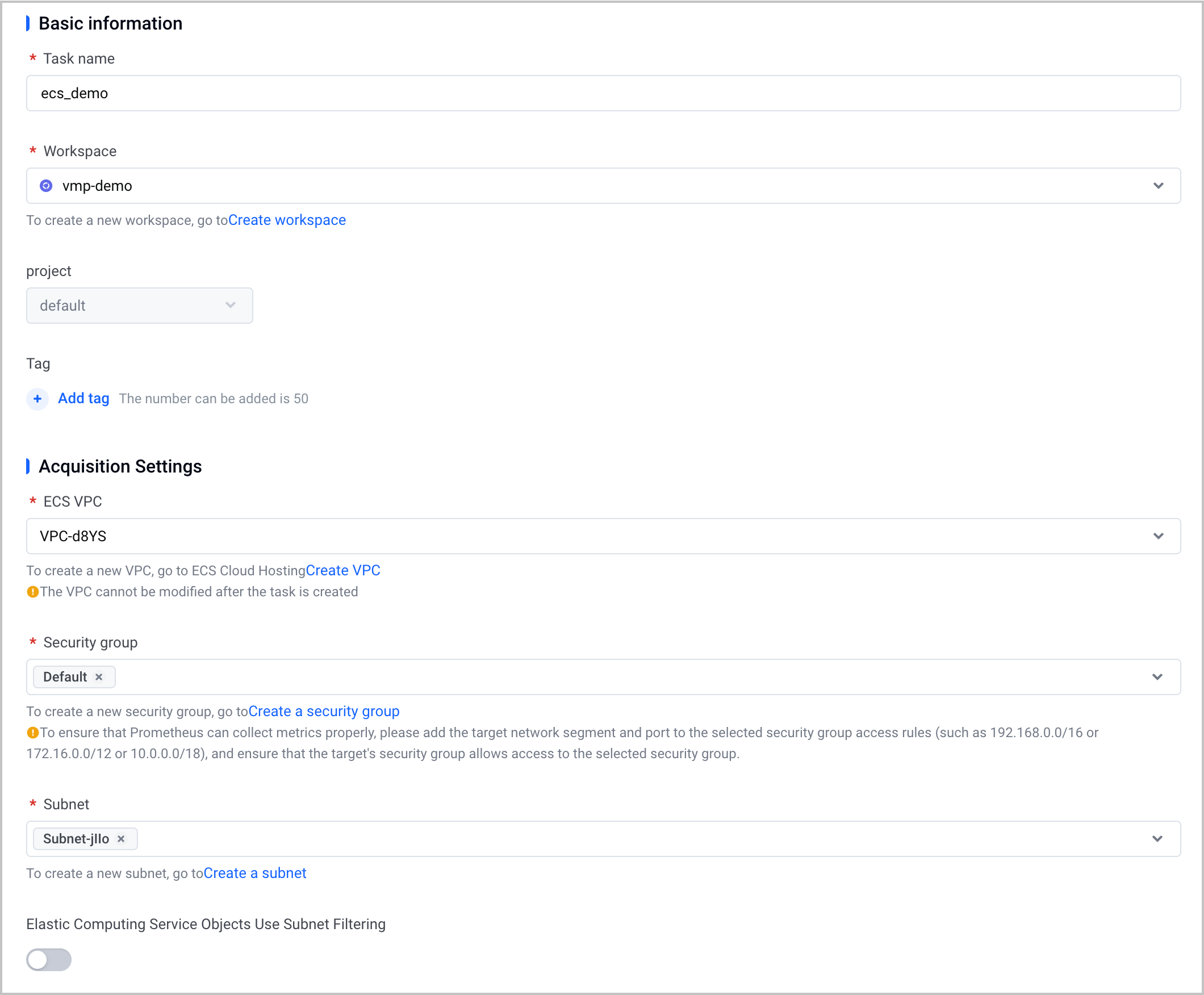
- ParameterDescriptionTask nameConfigure the name of the integration task.workspaceSelect a created VMP workspace.ECS VPCSelect the VPC where the ECS instance is located.Security groupSelect the security group for the hosted collector to use, which allows the hosted collector to access resources in the VPC of the user.warningTo ensure that the hosted collector can collect the metrics of the ECS instance as expected, add the target CIDR block and port of the ECS instance to the outbound access rules of the selected security groups.SubnetSelect one or more subnets. This setting is mainly for connecting networks. This setting can be used together with Filtering ECS objects by subnet to specify a granular ECS scope for metric collection.Filtering ECS objects by subnetSpecify the ECS scope for metric collection.
- Disable: (default) Do not use subnet filtering. The system will perform ECS service discovery within the selected VPC, and collect metrics from all ECS instances within all subnets in the VPC.
- Enable: Use subnet filtering. The system will perform ECS service discovery within the specified subnet of the VPC and collect metrics only from ECS instances within the specified subnet.
- The Job configuration includes items such as the collection time interval, collection timeout, collection protocol, and port number. You can configure multiple groups of jobs for a task.
Currently, three service discovery configurations are available:
Service discovery configuration | Configuration example |
volc_sd_configs | The default service discovery configuration. The following is an example: |
http_sd_configs | The service discovery configuration that is natively supported by Prometheus. With no ecosystem dependencies, the configuration applies to scenarios where a complex service discovery mechanism is not required and various backends are flexibly integrated, such as lightweight architectures without a service registry or integration with a custom registry. For more details, see the official documentation. Sample code: |
consul_sd_configs | The service discovery configuration that is natively supported by Prometheus. It natively integrates with Consul, offering a high degree of automation. It applies to scenarios where the Consul service mesh has been deployed, or large-scale dynamic monitoring is required, such as the scenario where Consul is deployed as a service registry, monitoring of large-scale microservices clusters, and multi-data center environments. For more details, see the official documentation. Sample code: |
The following content is a complete example of Job configuration in which the service discovery configuration volc_sd_configs is used.
tip
- For more configuration item descriptions, refer to the official documentation.
- The job configurations will take effect about 1 minute after modification and deployment. Please wait patiently.
- When you configure multiple filter conditions for ECS instances, the conditions are in an AND relationship. In this way, only ECS instances that meet all conditions will be identified and monitored.
- Click Confirm to complete the configuration.
Validate results
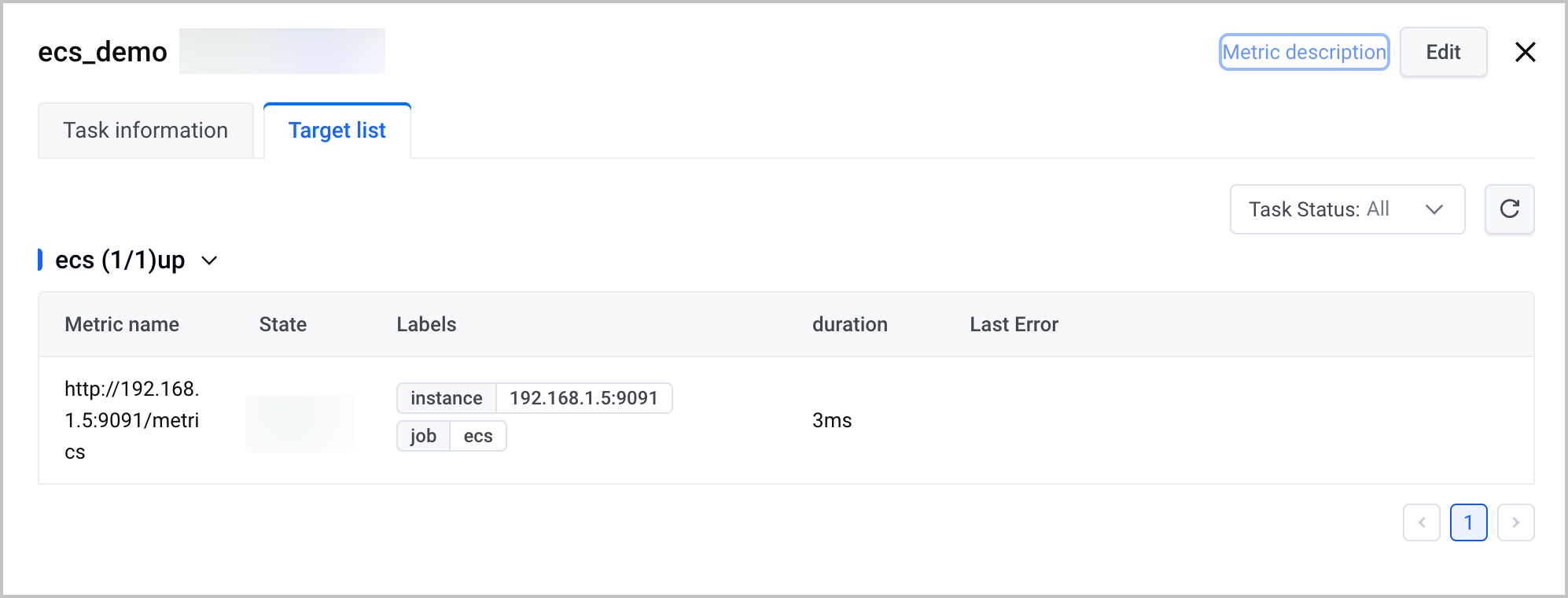
After the configuration is complete, you can view the status and details of the task. Check whether the target ECS instance is integrated with VMP properly.
- Select Access Center > Access Jobs in the left navigation bar and select the managed environment tab.
- Select the target job in the job list, click the job name, and enter the access job details. Select the Target List tab to view the ECS instances properly integrated with Volcengine Managed Service for Prometheus.
Related document
Last updated: 2026.10.14 10:15:12
All rights reserved © Beijing Volcano Engine Technology Co., Ltd2024
