Volcengine Managed Service for Prometheus
Volcengine Managed Service for Prometheus


Document

- Documentation
 Volcengine Managed Service for PrometheusIntegration GuideCloud service integrationCloud Monitor integration
 Copy page
 Download PDF
Cloud service integration
Cloud Monitor integration
Copy pageDownload PDFCloud Monitor integration
Volcengine Managed Service for Prometheus (VMP) can be integrated with Cloud Monitor to meet your business requirements for centralized monitoring of basic cloud resources, cloud services, and custom businesses. This topic describes how to integrate VMP with Cloud Monitor.
tip
[Beta - Apply for trial]: This feature can be used only after your account is added to the allowlist of Cloud Monitor. If you want to use it, contact your account manager to help you enable the Exporter feature of Cloud Monitor.
Background
Solution introduction
Cloud Monitor is a one-stop monitoring and alerting solution on the Volcano Engine cloud. It enables you to gather and visualize the resource status and monitoring metrics of various Volcano Engine cloud products, such as ECS, clusters, gateways, dedicated connections, and cloud storage. For more details, see What is Cloud Monitor?
You can integrate Cloud Monitor with VMP to export real-time cloud service monitoring data from Cloud Monitor to VMP and merge the data with business monitoring data in your clusters. This achieves centralized monitoring of business data and basic resource data. In addition, you can use Grafana, which is natively compatible with VMP, to build business-related dashboards.
Supported cloud products
The VMP Integration Center only allows you to export metrics from certain cloud services to Prometheus through Cloud Monitor. For details on supported cloud products, see Supported cloud products.
Metric structure
In the exported data of Cloud Monitor, the metric name consists of Namespace, SubNamespace, and MetricName. For the values of each parameter, see Cloud product metric queries.
- Namespace indicates the cloud service.
- SubNamespace indicates the sub-category of metrics for a cloud service.
- MetricName indicates the metric name.
tip
For example, when you export the metrics of ECS, Namespace is VCM_ECS, SubNamespace is GPU, and MetricName is GpuTemperature. The exported metric name is GpuTemperature_GPU_VCM_ECS.
Prerequisites
- Cloud Monitor has been activated, and the pay-as-you-go billing method has been specified for Cloud Monitor. For more details, see Product billing.
- Relevant cloud services have been integrated with Cloud Monitor.
- A VMP workspace has been created. For details, see Creating workspaces.
Procedure
Configure an integration task
- Log in to the VMP console.
- In the top navigation bar, select the target region.
- In the left navigation bar, click Integration Center > Component. On the page that appears, click the name of the service to be integrated. This topic takes Application Load Balancer (ALB) as an example.
tip
If you cannot find the service to be integrated in the integration center, you can click Cloud Monitoring (Batch Access) to try to integrate the target cloud service.
- Check service authorization. The system will check whether permissions related to Cloud Monitor are granted. If related permissions are not granted or related features are disabled, grant permissions to access the service or enable features as prompted.
-
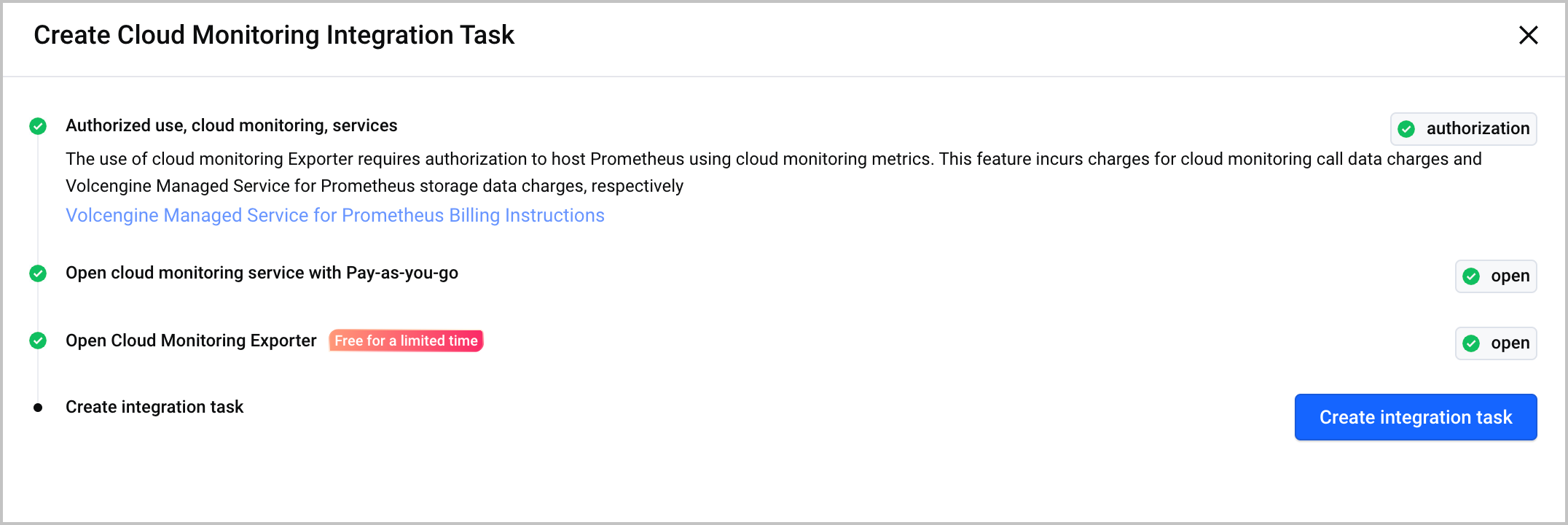
- Click Create integration task, and click the Start connecting tab to specify the details of the integration task.
-
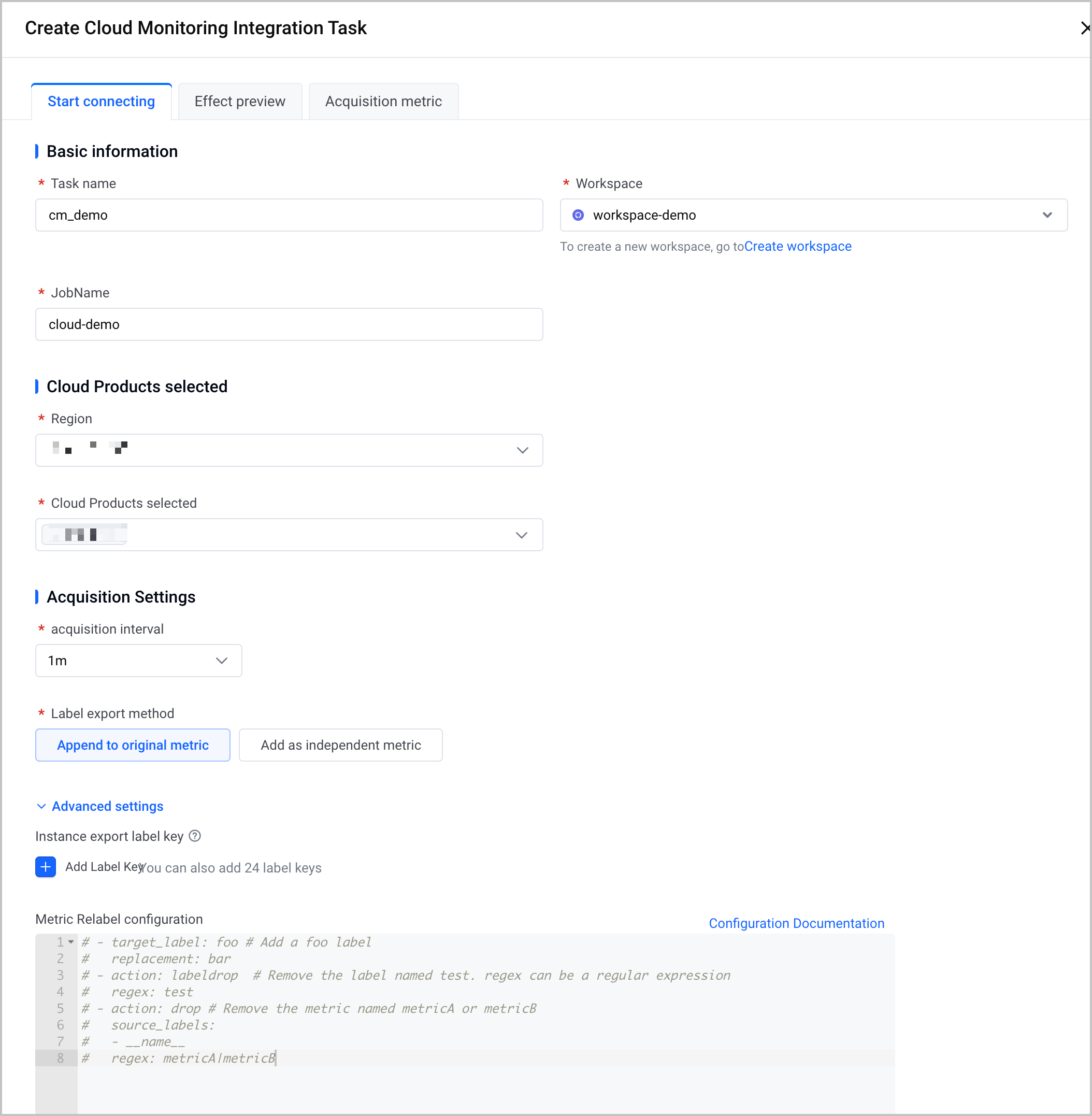
- ParameterDescriptionBasic informationTask nameConfigure the name of the integration task.workspaceSelect a created VMP workspace.JobNameSpecify the name of the Cloud Monitor collection task. It is used to distinguish the collection task from other collection tasks.After integration, you can use the name to view the number of collected metrics on the Resource consumption page.Cloud Products selectedRegionSelect the region of the cloud service for which you want to collect metrics by using Cloud Monitor.For some cloud services such as Cloud Enterprise Network (CEN) that are not deployed in regions, select No region displayed.Cloud Products selectedSelect the cloud service for which you want to pull metrics from Cloud Monitor.Acquisition SettingsAcquisition intervalConfigure the metric collection interval.Label export methodConfigure the export method for cloud service metadata. Metadata mainly includes labels such as ProjectName and Name of cloud service instances.
- Append to original metric: Metadata will be appended to the original metric as a label. You can query metadata by using the original metrics.
- Add as independent metric: Metadata will be used as an independent metric. You can query metadata by using the volc_resource_info metric.
tipYou can export the metadata of only some cloud services, and metadata fields that can be exported vary based on different cloud services. For more details, see the documentation of Cloud Monitor.Advanced SettingsInstance export label keyClick Add label key to configure the Volcano Engine resource label to be exported when pulling product metrics from Cloud Monitor. For more details, see Tag overview.tipIf the label key list fails to be retrieved, check the GetTagKeys permission or network environment based on the error message and try again.Metric Relabel configurationConfigure metric relabeling settings. You can add or replace labels in metrics during metric collection. For more details, see Metric relabeling.ProductConfig configurationConfigure metric filtering. You can filter collection objects by project, sub-namespace, metric, and instance ID. For details, see the ProductConfig configuration description section in this topic.
Obtain monitoring dashboards
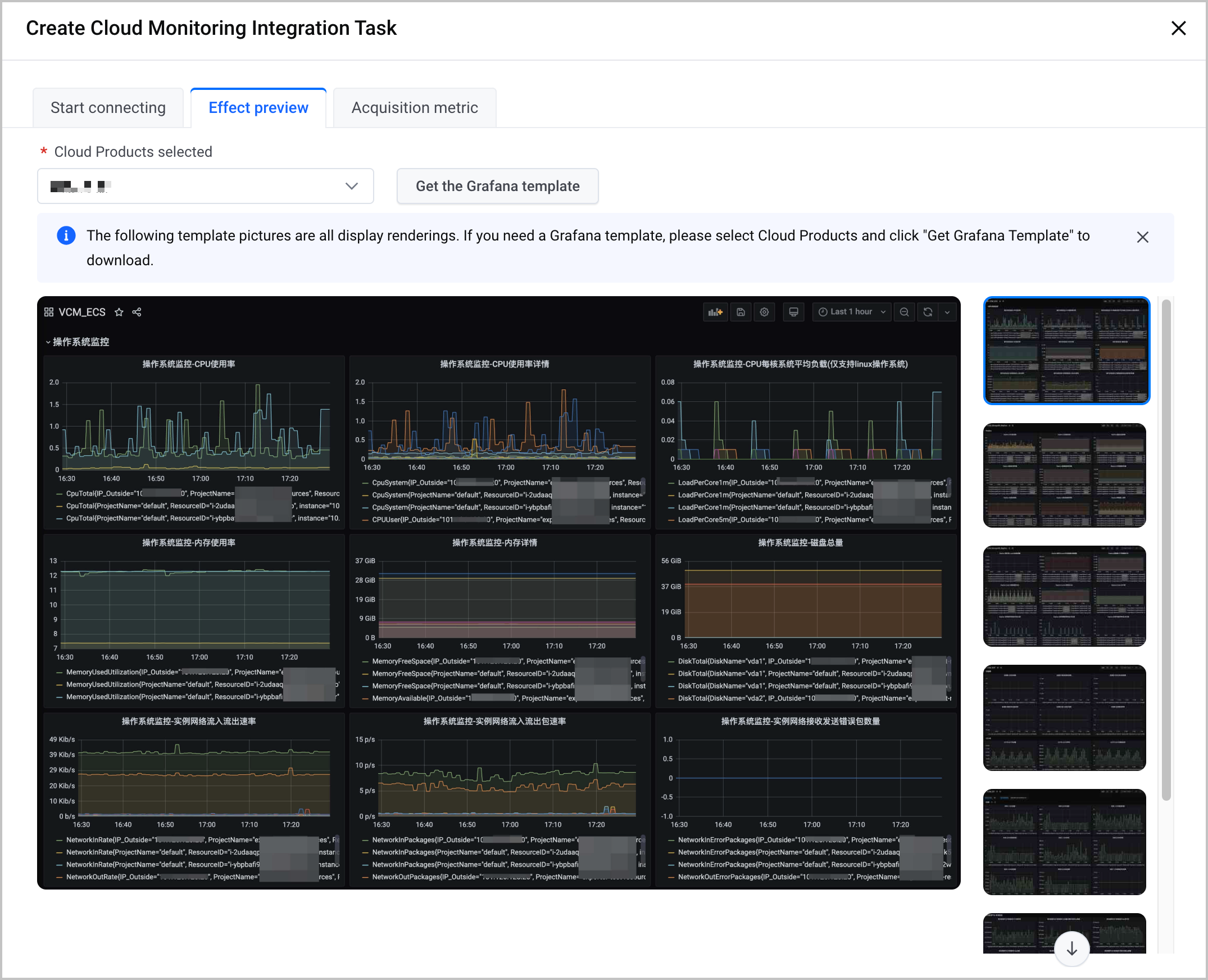
Click the Effect preview tab to view the examples of cloud service monitoring dashboards. Select the cloud service that you want to monitor from the Cloud Products selected list and click Get the Grafana template to download the Grafana monitoring dashboard template in JSON format.
Query metrics
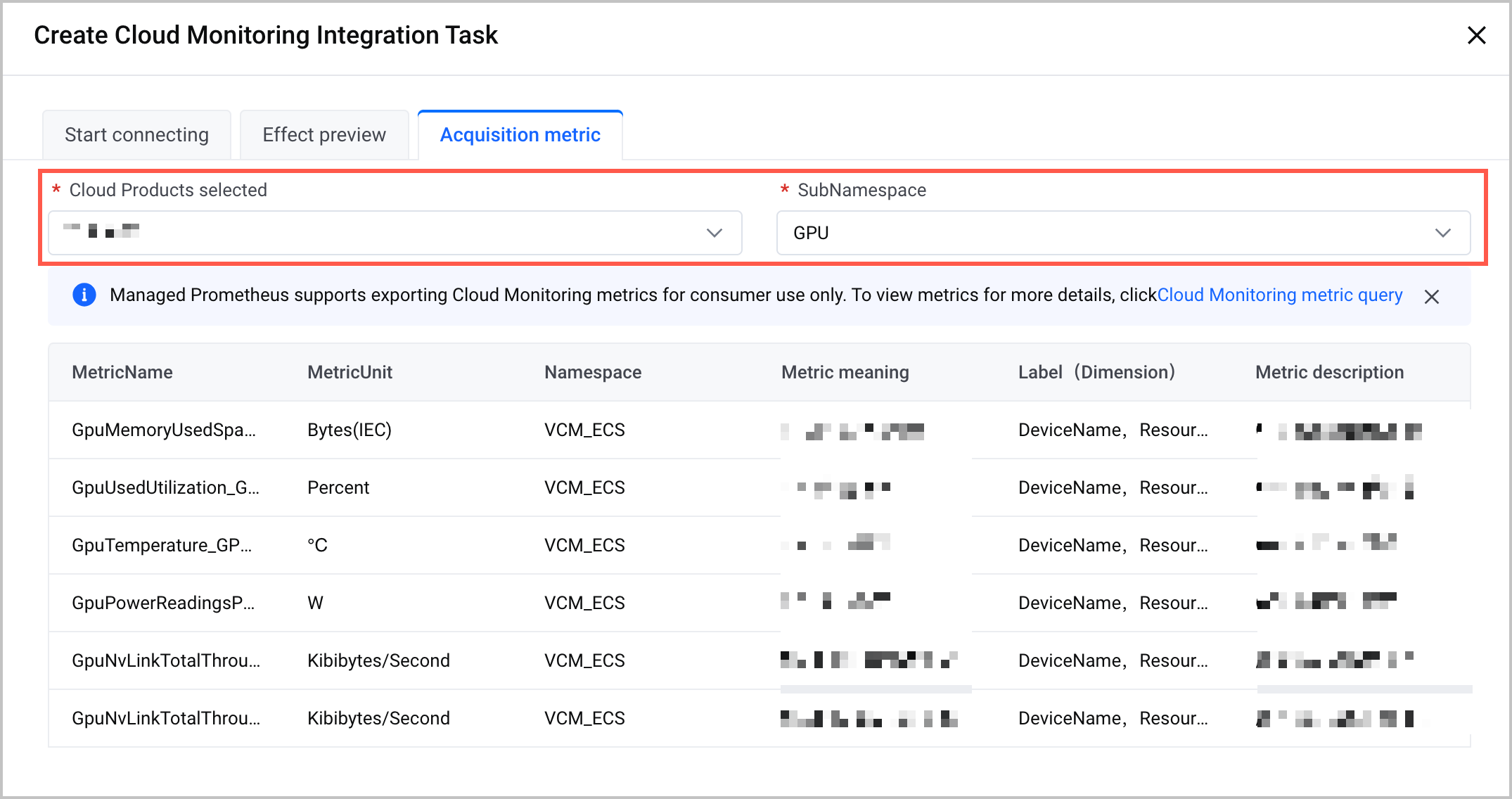
- Click the Acquisition metric tab.
- Select the cloud service that you want to monitor from the Cloud Products selected list and select a sub-category of metrics for the cloud service from the SubNamespace list. You can view the details of the metrics under that category.
tip
What to do next
After the configuration is complete, you can view the integration task status and details to confirm whether Cloud Monitor is integrated with Prometheus. In addition, you can configure alert rules based on templates to promptly trigger alerts in case of exceptions.
- In the left navigation bar, click Integration Center > Integration task. On the page that appears, click the Hosting environment tab.
- In the task list, find the target task and click the task name to go to the details page of the task. On the details page, you can view the details and monitoring dashboards of the integration task.
- Click the Task information tab and view the details of the integration task.
-
- Click the Dashboard tab and view the monitoring dashboards of the integration task. The dashboards include the number of cloud service instances, the number of cloud service metrics, total time taken for the last collection, and other dashboards.
-
- Click the Alert template tab to view the preset alert templates for the corresponding service. The tab displays information such as the template name, ID, version, type, description, number of associated alert rule groups, and time. Click Apply template in the Actions column that corresponds to the template to create an alerting rule group based on the template.
-
Advanced configuration
ProductConfig configuration description
tip
When you configure multiple filter conditions at the same time, the conditions are in an AND relationship. In this way, only objects or metrics that meet all conditions will be collected.
Parameter | Description |
ProjectName | Filter collection objects by project. For example, if you set the ProjectName parameter to ["default"], only objects in the default project are collected. |
OnlyIncludeSubNamespaces | Filter collection metrics by cloud service sub-namespace and only collect the metrics of the specified sub-namespace. For example, if you integrate VMP with ECS and set the OnlyIncludeSubNamespaces parameter to ["GPU"], only GPU-related metrics of ECS instances will be collected. To query the sub-namespaces of cloud services, see Cloud service metric query. |
ExcludeSubNamespaces | Filter collection metrics by cloud service sub-namespace and exclude the metrics of the specified sub-namespace. For example, if you integrate VMP with ECS and set the OnlyIncludeSubNamespaces parameter to ["GPU"], it indicates that all metrics except for GPU-related metrics for ECS instances will be collected. To query the sub-namespaces of cloud services, see Cloud service metric query. |
OnlyIncludeMetrics | Configure the metrics that only need to be collected. <sub-namespace> indicates the subnamespace of the cloud service. To query the metrics of cloud services, see Cloud service metric query. For example, if you integrate VMP with ECS and configure the following code, it indicates that only CPU metrics with the sub-namespace being instance and GPU metrics with the sub-namespace being GPU will be collected. |
ExcludeMetrics | Configure metrics to be excluded. <sub-namespace> indicates the sub-namespace of the cloud service. To query the metrics of cloud services, see Cloud service metric query. For example, if you integrate VMP with ECS and configure the following code, it indicates that CPU metrics with the sub-namespace being instance and GPU metrics with the sub-namespace being GPU will not be collected. All other metrics are collected. |
OnlyIncludeInstances | Filter collection objects by cloud service instance ID and collect only the metrics of the specified instances. For example, if you integrate VMP with ECS and set the OnlyIncludeInstances parameter to ["i-ye3dvuypkws6ip***"], only the metrics of the specified ECS instance will be collected. |
ExcludeInstances | Filter collection objects by cloud service instance ID and exclude the metrics of the specified instances. For example, if you integrate VMP with ECS and set the OnlyIncludeInstances parameter to ["i-ye3dvuypkws6ip***"], the metrics of the specified ECS instance will not be collected. |
Monitoring information
Query cloud service metrics
- Log in to the VMP console. the
- In the top navigation bar, select the target region.
- Click Explore in the left navigation bar to go to the Explore page.
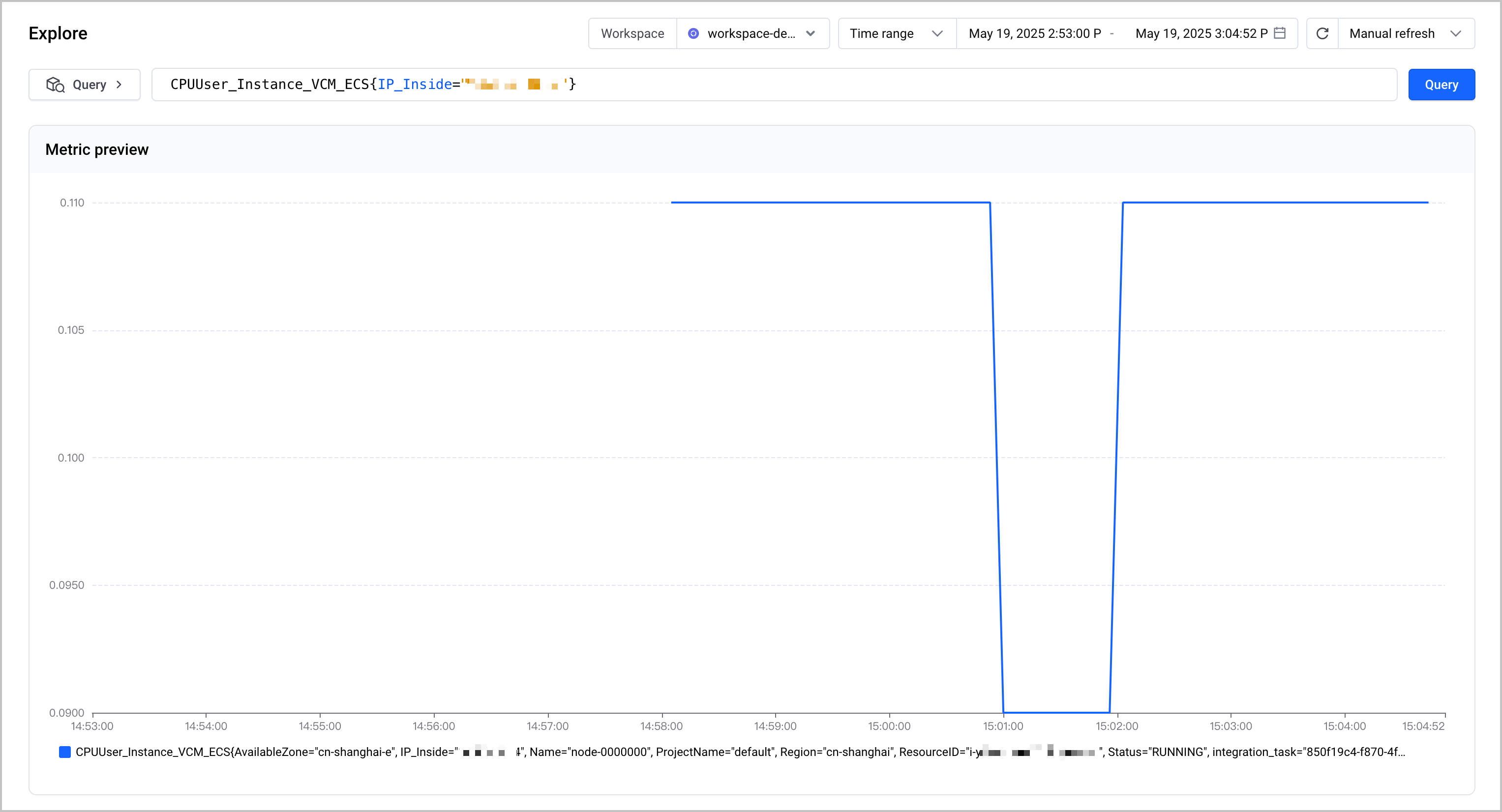
- Specify the Workspace parameter for which you want to query metrics in the upper-right corner of the page, and enter a metric name, such as CPUUser_Instance_VCM_ECS of Cloud Monitor, in the Query field to check whether the corresponding metric can be queried as expected.
-
tip
- The metric names exported from Cloud Monitor are in the format of MetricName_SubNamespace_Namespace, such as CPUUser_Instance_VCM_ECS. For more details on the metrics of different cloud services, see Cloud service metrics.
- You can use the ResourceID parameter for fine-grained resource filtering and view the monitoring data of specific resources.
- If you need to use Grafana to build monitoring dashboards, you can integrate data from VMP into your own Grafana. For more details, see Deploying Grafana in a VKE cluster and integrating Grafana with a workspace.
Query the metadata of cloud service instances
tip
You can export the metadata of some cloud services, and the metadata fields vary based on different cloud services. For more details, see the documentation of Cloud Monitor.
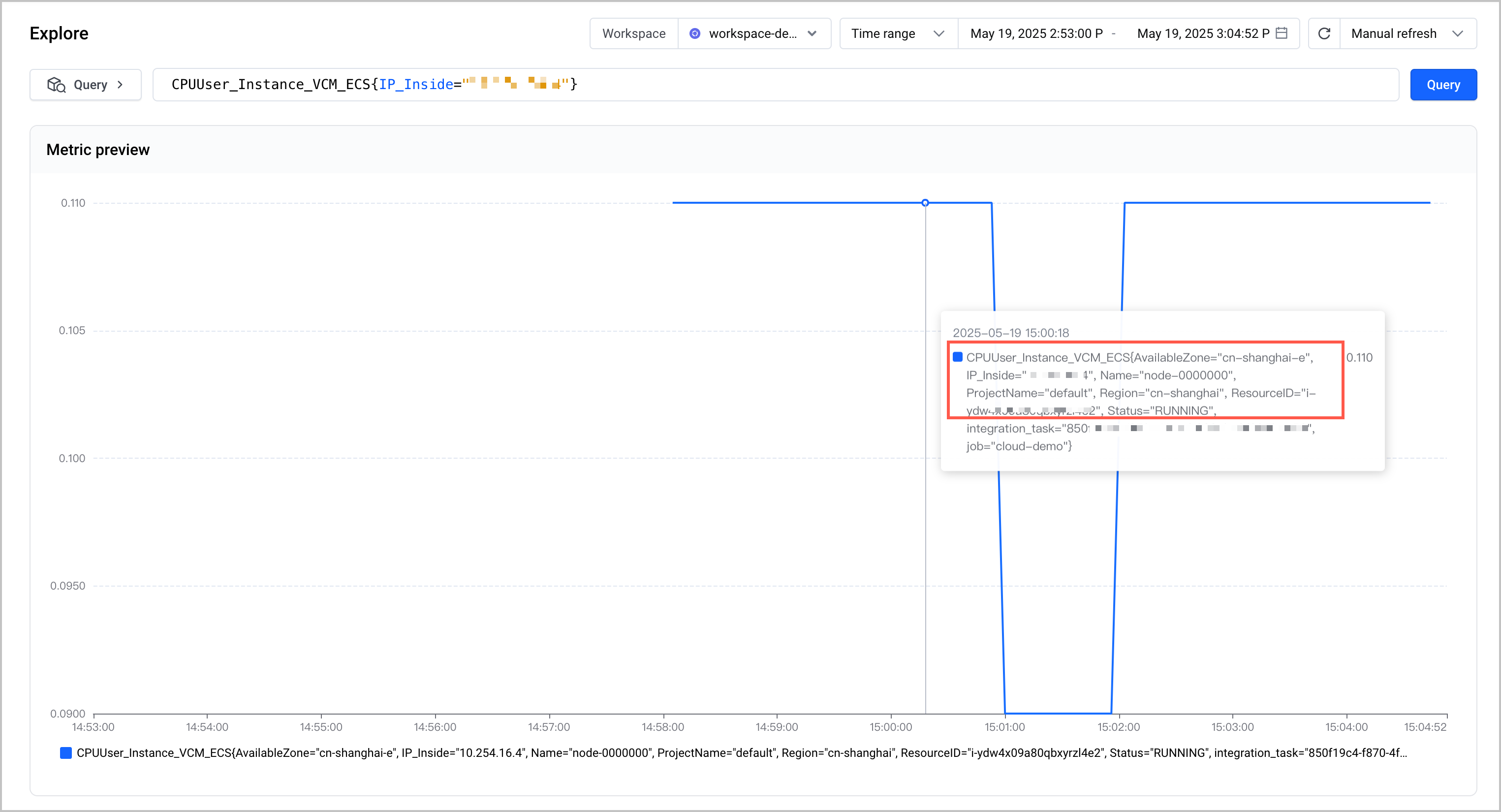
- When you set the Label export method parameter to Append to original metric, you can view the original metrics of the cloud service on the Explorer page. The query result includes the metadata labels of the cloud service. In the following figure, you can view the metadata labels such as ProjectName, Name, Status, and AvailableZone in the original metric of ECS CPUUser_Instance_VCM_ECS.
-
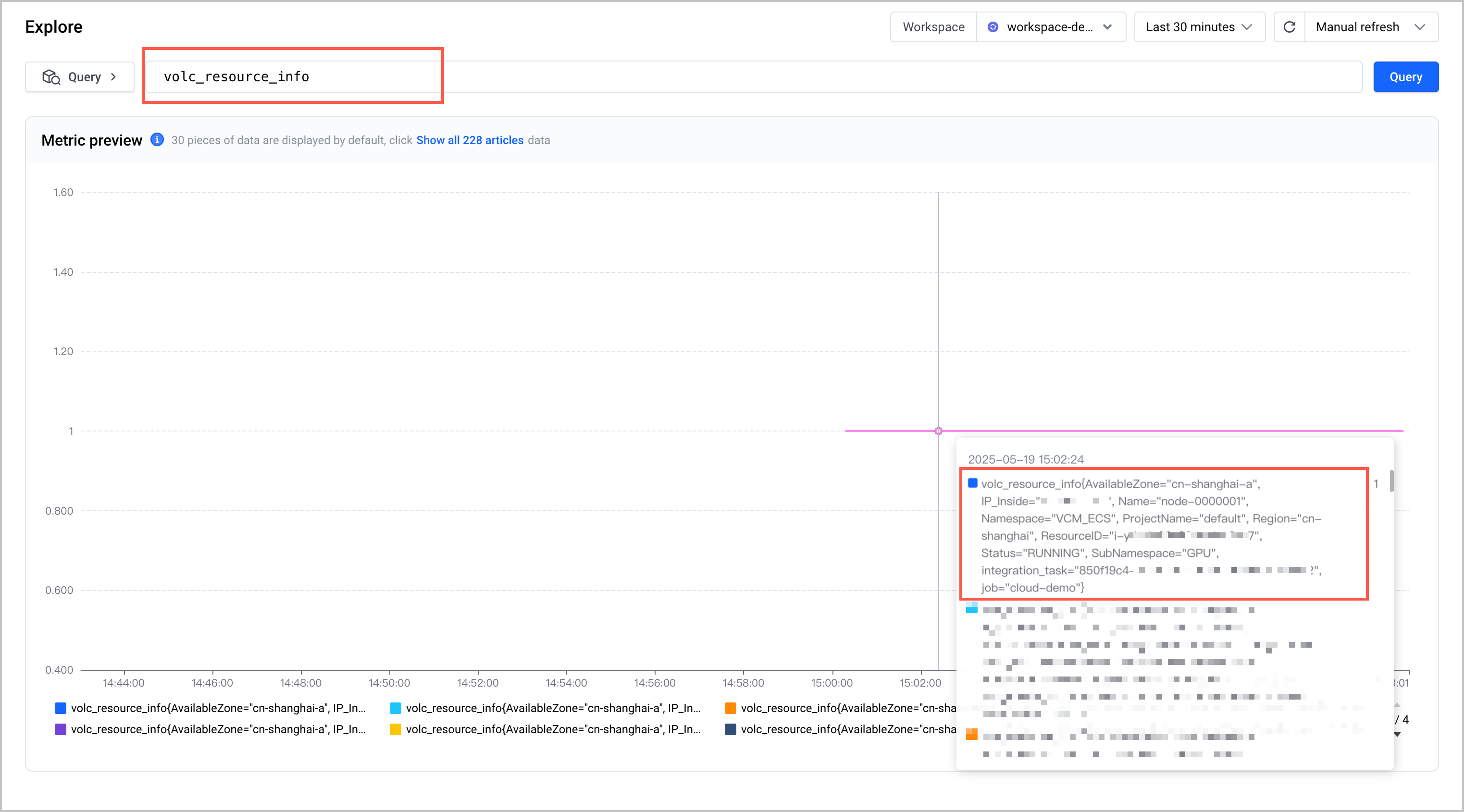
- When you set the Label export method parameter to Add as independent metric, you can view the metadata of cloud service instances by using the volc_resource_info metric.
-
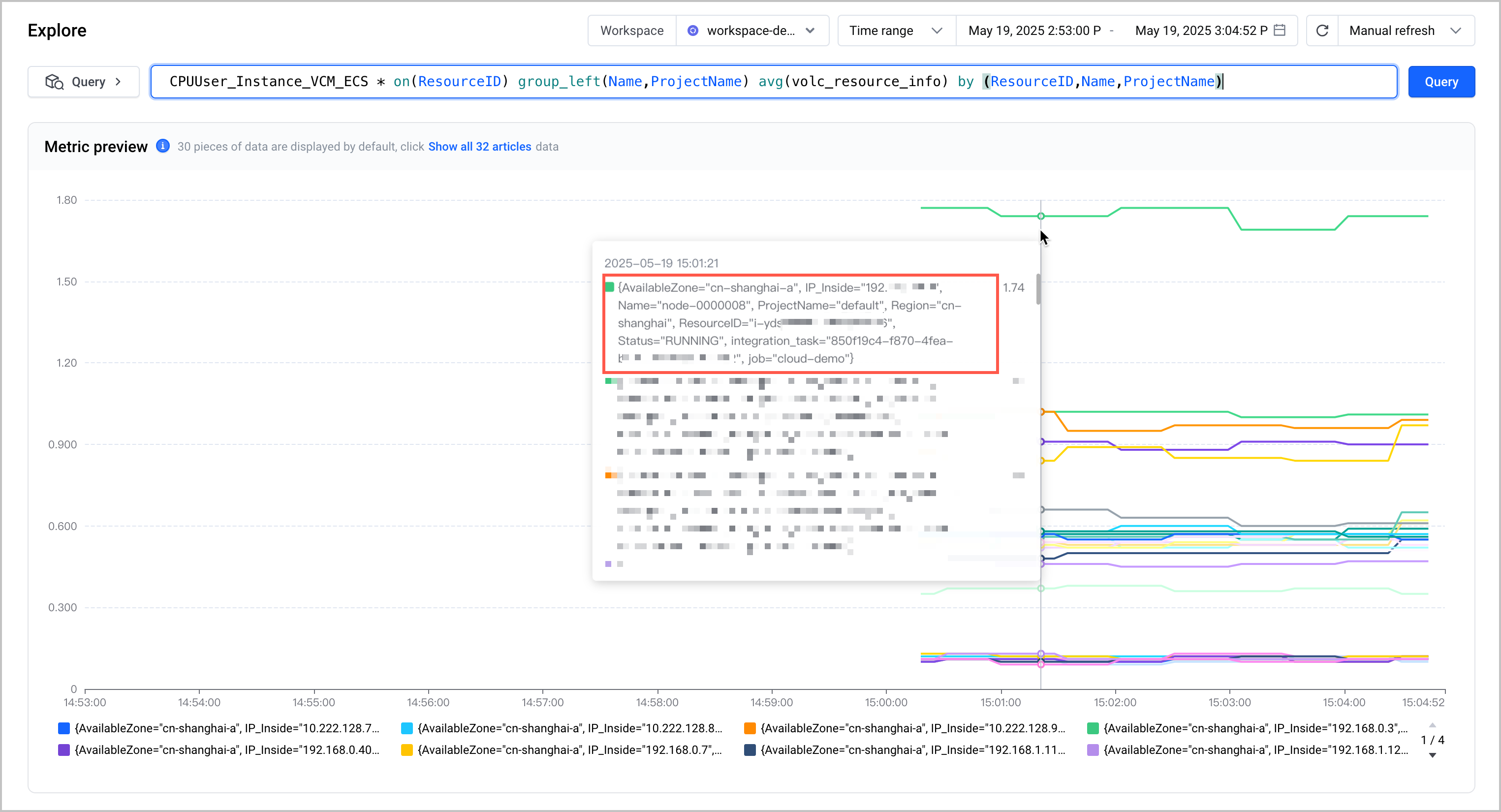
- The following example shows how to use join operations to query the returned metadata of specific cloud service instances.
-
- The following section shows an example.
-
- The following figure shows the expected result, in which you can view the metadata details returned by different cloud service instances.
-
- When you use the instance export label key feature to export the resource labels of cloud service instances, the system will automatically add the tag_ prefix before the labels. For example, if the resource label is ecs-label, the exported metric label will be tag_ecs_label.
Build a cloud service monitoring dashboard
You can build Grafana in a VKE cluster or an ECS instance, import the monitoring dashboard template that is obtained when you configure the integration task, and then use Grafana to view metrics and create dashboards.
Configure cloud service alerts
You can configure alerts in the alerting center of VMP. For more details, see Creating alert rules.
Last updated: 2026.10.10 10:16:49
All rights reserved © Beijing Volcano Engine Technology Co., Ltd2024
