Torch Log Service
Torch Log Service


Document

- Documentation
 Torch Log ServiceUser GuideLog applicationLog applications for product observabilityCloudLens for TOSCloudLens for TOS
 Copy page
 Download PDF
CloudLens for TOS
CloudLens for TOS
Copy pageDownload PDFCloudLens for TOS
This topic introduces the CloudLens for TOS features provided by the TLS app store for log observation of cloud products.
Feature description
The CloudLens for TOS log application provides log observability for cloud products built on TOS buckets, supporting log analysis and data pivot.
Both log analysis and data pivot serve to monitor and analyze TOS data, offering visual statistics on bucket operations and asset data. The comparison of their capabilities is described in the following chart. You can choose the appropriate method to view bucket usage as needed, helping with operational monitoring and maintenance decisions. For billing details, see Billing notes.
- Comparison: log analysis vs. pivot dashboards
-
- Use cases
-
Log analysis
The CloudLens for TOS log analysis dashboard presents essential telemetry data for object storage buckets, including resource usage, access trends, traffic analysis, and security analysis. For details on log fields, see Log analysis fields.
The log analysis dashboard displays key monitoring data such as bucket usage and traffic, and supports running query and analysis statements to analyze access logs generated during TOS usage.
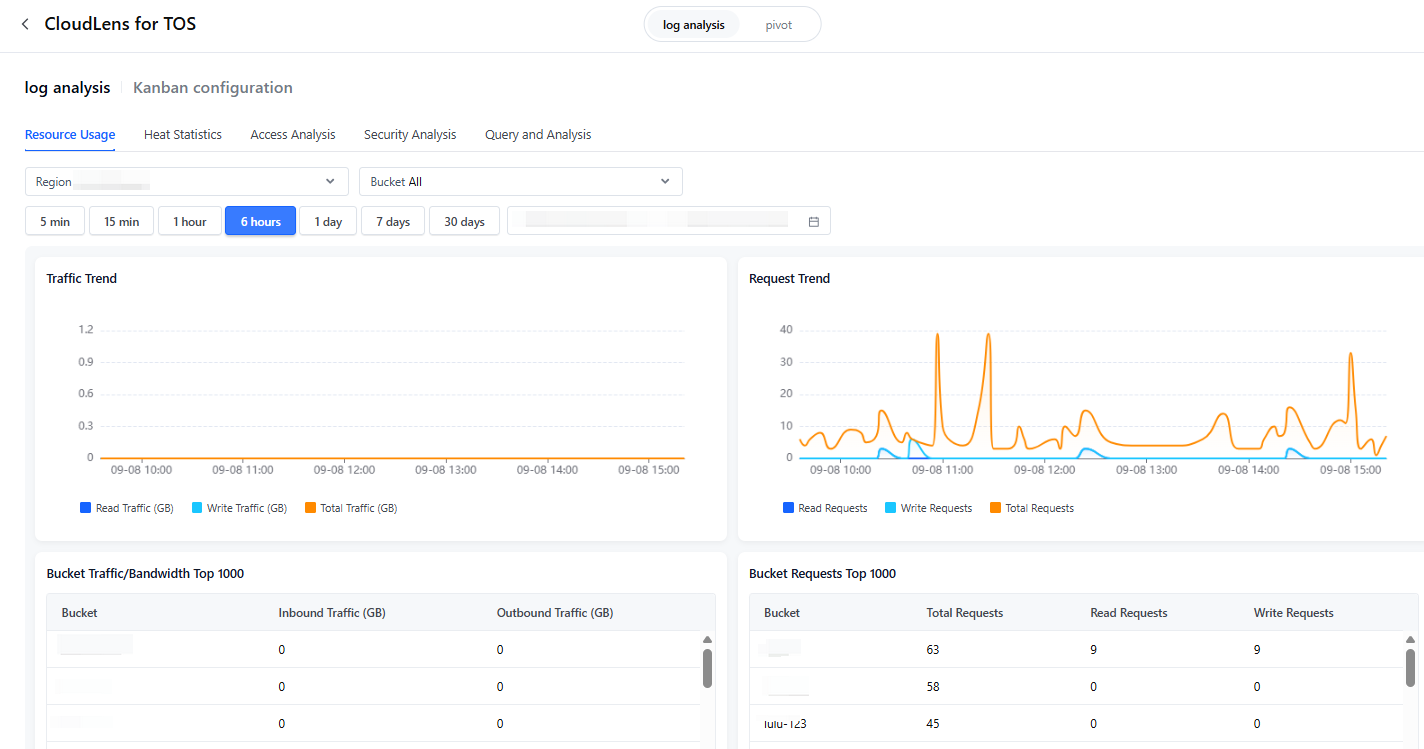
Log analysis dashboard features:
Data pivot
The pivot dashboard for CloudLens for TOS aggregates data daily by account, region, and bucket, and provides insights into activity metrics, summary metrics, cost optimization, and data protection to help you quickly understand how object storage resources are used. For details on log fields, see Data pivot fields.
With the pivot dashboard, you can track storage capacity growth trends and identify the fastest-growing buckets and prefixes. This helps you to determine whether storage growth aligns with expectations and optimize storage costs.
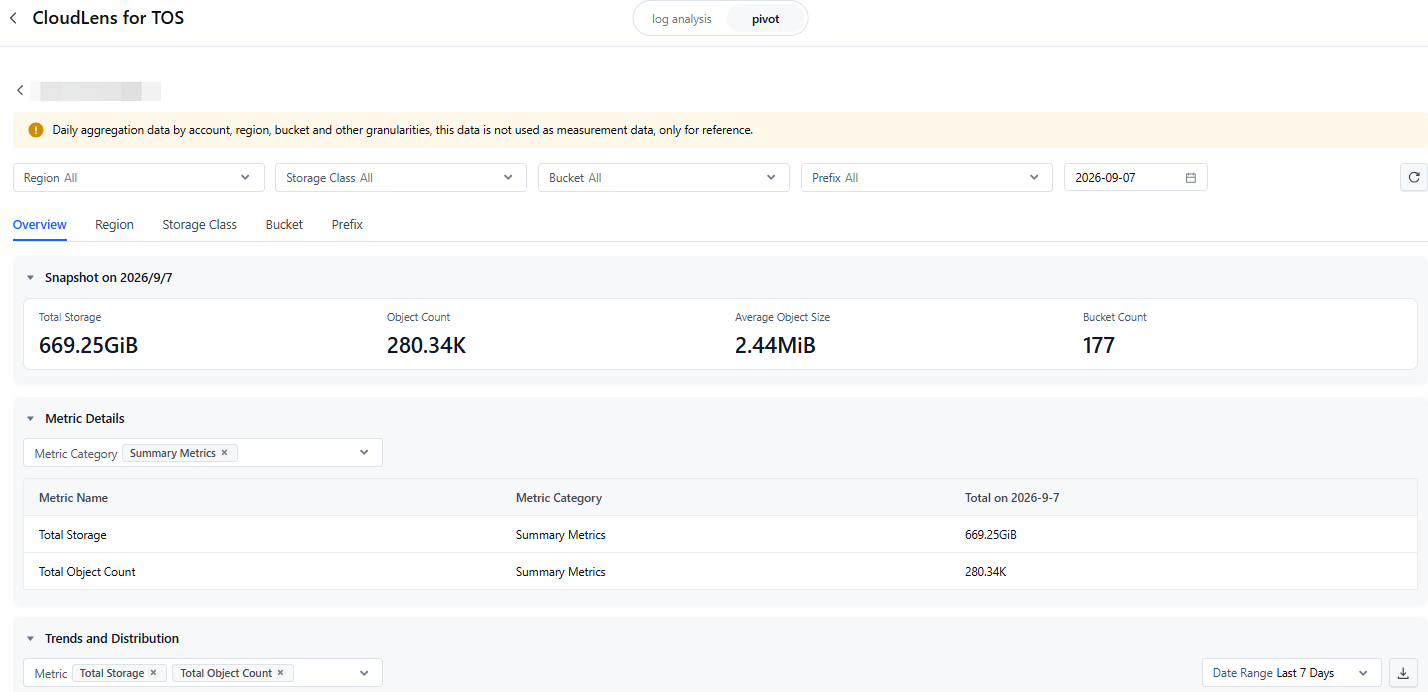
How pivot dashboard metrics are collected:
Collect free metrics. This feature is available for all regions and buckets. The metric details are as follows:
- Summary metrics: total storage and total number of objects.
- Cost optimization metrics: historical version bytes, number of historical version object, number of unmerged multipart upload bytes, and number of unmerged multipart upload object.
- Data protection metrics: current version bytes and current version object count.
Building on basic metrics, supports activity metrics and prefix aggregation, available only for specific regions and buckets.
- Activity metrics:
- Offers advanced metrics such as uploaded bytes and deleted bytes to help you manage resources more precisely.
- Prefix aggregation:
- In addition to statistics based on region, storage type, and bucket dimensions, prefix-level statistics are also supported. This means that metrics supported include the following: total storage, object count, current version bytes, current version object count, historical version bytes, historical version object count, incomplete multipart upload bytes, and incomplete multipart upload object count.
Dashboard detail overview:
The metrics are presented from perspectives such as overview, region, storage type, bucket, and prefix, including charts for trends, distribution, snapshots, bubble diagrams, and detailed data.
- Trend and distribution charts: used to identify key metric targets.
- Bubble diagram: A data-visualization diagram that maps data using bubble size to represent a third variable, showing relationships among three numerical variables.
Permissions
- When you first access the CloudLens for TOS log application, follow the prompts to complete cross-service access authorization.
- By default, the main account has full permissions and IAM sub-accounts have no permissions. If you need to perform this operation using a sub-account, the main account must grant the following permissions to the sub-account. For details, see IAM overview.
-
Resource management
After integrating the CloudLens for TOS log application, the following dedicated log projects and related resources will be generated:
Notice
All data pivot dashboard tasks generate data and share the same set of log topics/table topics:
- Basic summary statistics and prefix statistic task metrics are stored in a single log topic: tos-lens-topic.
- Process data for prefix statistics tasks: stored in table topics named after bucket names. If multiple tasks involve the same bucket, they use the same table topic. Data is stored only once and not duplicated.
Billing notes
The log application itself does not incur charges, but log topics and related data storage, read traffic, data transformation, and log shipping generated through the log application will incur fees.
If you need to view detailed billing information for a specific project, refer to split bills. After enabling the split billing service, you can view detailed split bill data on the split bills page.
Notice
- Once CloudLens for TOS log application is integrated, it can not be canceled.
- Deleting the tos-lens-topic log topic from the pivot dashboard and modifying index configuration are not supported.
- Deleting the tos-log-topic log topic in log analysis may cause the TLS feature for cloud products to stop working. If a topic needs to be deleted, ensure related resources under this topic are deleted or disabled before deleting the log topic.
- Do not integrate other data to exclusive log topics.
Last updated: 2026.09.08 17:53:41
All rights reserved © Beijing Volcano Engine Technology Co., Ltd2024
