Torch Log Service
Torch Log Service


Document

- Documentation
 Torch Log ServiceBest practicesLog-based JuiceFS observability best practices
 Copy page
 Download PDF
Best practices
Log-based JuiceFS observability best practices
Copy pageDownload PDFLog-based JuiceFS observability best practices
Solution overview
JuiceFS is a high-performance distributed file system designed for cloud-native environments and based on the Apache 2.0 open-source license. Provides full POSIX compatibility, allowing almost any object storage to be connected locally and used as extensive local disk storage, while also supporting simultaneous read and write access across different hosts, platforms, and regions.
Each JuiceFS client maintains an access log that records all operations performed on the file system in detail, including the operation type, user ID, user group ID, file inode, and the time spent.
JuiceFS access logs have a wide range of uses, such as performance analysis, auditing, and fault diagnosis. However, because logs are distributed across multiple clients and servers, both collection and analysis are relatively difficult, making it hard to establish a complete monitoring and alerting mechanism.
Volcengine TLS is a one-stop log management platform that provides log collection, storage, query, analysis, visualization, alerting, and other capabilities. TLS can provide the following support for JuiceFS access log analysis:
TLS (Log Service) functionality | Description |
Resolve the log dispersion problem | Centralized collection and management of JuiceFS access logs distributed across various clients and servers. |
Solve the problem of inconsistent log structure | During log collection, parsing is performed to standardize logs of different formats into a log structure that is easy to analyze. |
Support complex query analysis | Leverage the SQL analysis capabilities of TLS to perform in-depth log mining. |
Provide a ready-to-use analytics dashboard | We provide preset analysis templates for common JuiceFS log analysis scenarios, as well as ready-to-use analysis dashboards. |
Provide real-time monitoring and alerting capabilities | Configure monitoring rules, monitor logs in real time, and promptly detect and respond to anomalies. |
This article describes how to collect JuiceFS access logs from TLS and implement various analytics dashboards and real-time monitoring and alerting.
Analysis process
The log analysis process consists of log collection, log analysis dashboard, and real-time monitoring and alerting. The process is as follows:
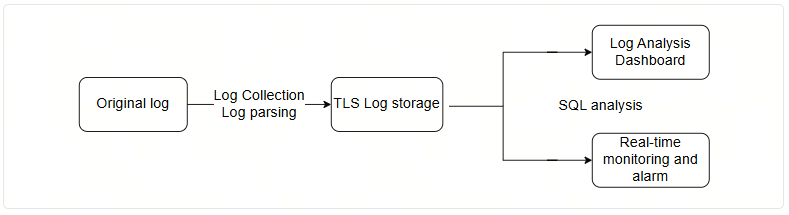
Collect JuiceFS logs
JuiceFS access log format
JuiceFS access logs are stored within the JuiceFS client, and the log fields are output on the same line, making direct statistical analysis impossible; extraction and parsing are required.
- Log format
-
- Field description
- Log fieldsDescription2021.01.15 08:26:11.003330Record the operation time.[uid:0,gid:0,pid:4403]Record the user ID, user group ID, and process ID of the operation.write (17669,8666,4993160)Types of operations recorded and their corresponding input parameters (the input parameters vary depending on the operation).write input parameters: the inode of the file to be written, the size of the data to be written, and the offset in the file where the data is to be written.OK <0.000010>Record whether the operation was successful and the corresponding duration (in seconds).If the operation is unsuccessful, specific failure information will be output.
Log collection
The self-developed log collector Logcollector from TLS offers multiple collection modes and a wide range of log processing plugins. It features excellent compatibility and high performance, can be adapted to various cloud vendors and IDC environments, and achieves single-core performance of up to 100 MB/s. With the same performance requirements, it consumes fewer resources and can save more on resource costs.
After installing LogCollector (host machine) on the server, you can issue collection rules and quickly access TLS through the console. You can also set different initial parameters to adjust CPU and memory thresholds according to different performance requirements by referring to LogCollector startup parameter settings.
By sequentially creating host groups, projects, log topics, collection rules, and other resources in the TLS console, you can report server log data to TLS.
Log parsing
Because the JuiceFS client access logs record all file system operations in detail, and the access log structure varies for each file system operation, it is necessary to use the fullregex plugin to perform chained structuring.
fullregex plugin configuration
The fullregex plugin workflow
- General parsing methods.
- Use regular expressions to extract basic fields from the original content field__content__ in JuiceFS client access logs.
- FieldDescriptiontimeOperation time, in the format 2024.06.30 12:34:56.789.uidUser ID.gidGroup ID.pidProcess ID.opOperation types, such as write, read, open, and so on.resultDetailed analysis of operation results by operation type
- Operation result analysis
- For different operation typesop, select the corresponding regular expression, parse the operation resultresult in detail, and extract the specific operation parameters and status.
- Operation typeRegular expressionFields for extracting operation resultswrite(\d+),(\d+),(\d+),(\d+)\): (\w+) <(.*)>inode、length、offset、filehandle、status、delayread(\d+),(\d+),(\d+)\): (\w+) \((\d+)\) <(.*)>inode、length、offset、status、unknown、delayunlink(\d+),(.*)\): (\w+) <(.*)>inode、filename、status、delaycreate(\d+),(.*),(.*)\): (\w+) \((\d+),(.*)\) \[fh:(\d+)\] <(.*)>parent_inode、filename、mode、status、inode、others、filehandle、delayopen(.*): (\w+) \[fh:(\d+)\] <(.*)>inode、status、filehandle、delaylookup(\w+),(\w+)\): (\w+) \((\d+),(.*)\) <(.*)>parent_inode、filename、status、inode、mode、delayflush(\w+),(\w+)\): (\w+) <(.*)>inode、filehandle、status、delay
Log index designs
You can perform log query and analysis only after configuring indexes for the collected logs.
In the TLS console, go to Common features > Query and analysis, select project > log topic, and click Index configuration to configure specific index types and their detailed fields. For details, refer to configuration index.
The following explains the Key-value index fields configured for JuiceFS access logs:
Field name | Data type | Field description |
uid | long | User ID, the identifier of the user performing this operation. |
gid | long | Group ID, the identifier of the user group to which the user performing this operation belongs. |
pid | long | Process ID (Process ID), the identifier of the process performing this operation, which facilitates tracking specific processes. |
op | text | Operation type (Operation): the file system operations recorded in logs. such as write, read, open, create, unlink, and so on. |
delay | double | Operation latency typically refers to the time consumed by the operation, which may be measured in milliseconds or microseconds. |
inode | long | The inode number of a file (inode) uniquely identifies a file in the file system. |
length | long | The length of the data written (in bytes) indicates how many bytes were written during this write operation. |
offset | long | The write offset specifies the position in the file where data writing begins. |
filename | text | File name to search for. |
filehandle | long | File handle, used internally by the system to identify an open file instance. |
status | text | Operation status, for example, OK indicates a successful write operation, while other values may indicate error types. |
mode | text | File permissions and type information. |
parent_inode | long | Find the inode number of the parent directory for the operation. |
time | text | Log time. |
others | text | Other information, which may include additional metadata or flags. |
unknown | text | Unknown field; may be an internal status code or additional information. Confirmation requires checking the specific log format. |
Create a JuiceFS log dashboard
In JuiceFS usage scenarios, there are many key metrics that require close attention, such as the counts and data volumes of read, write, and delete operations, the distribution of I/O sizes and execution times, the proportion of sequential reads, the occurrence of overwrite operations, and more.
TLS supports custom dashboards. In addition, for core analysis scenarios, TLS has refined these into dashboard templates, enabling users to quickly create a comprehensive analytical dashboard with a single click based on the templates. For details, refer to Create a dashboard.
By presenting examples such as write I/O size distribution, sequential read ratio distribution, overwrite analysis, and file lifecycle distribution, these examples demonstrate that everything from simple operation statistics to complex analyses—including sequential read detection, overwrite detection, and lifecycle analysis—can be easily achieved through SQL and TLS visual dashboards, providing JuiceFS users with flexible and in-depth access log insights.
Use a dashboard filter
In practical log analysis, it is often necessary to filter specific files or paths. The TLS dashboard provides a filter feature, allowing users to add filters in the console and configure filter criteria.
For example, when accessing logs, the log storage paths differ for different tasks. You can create a filter named task based on the __path__ field, with values derived from the actual SQL execution results of the logs.
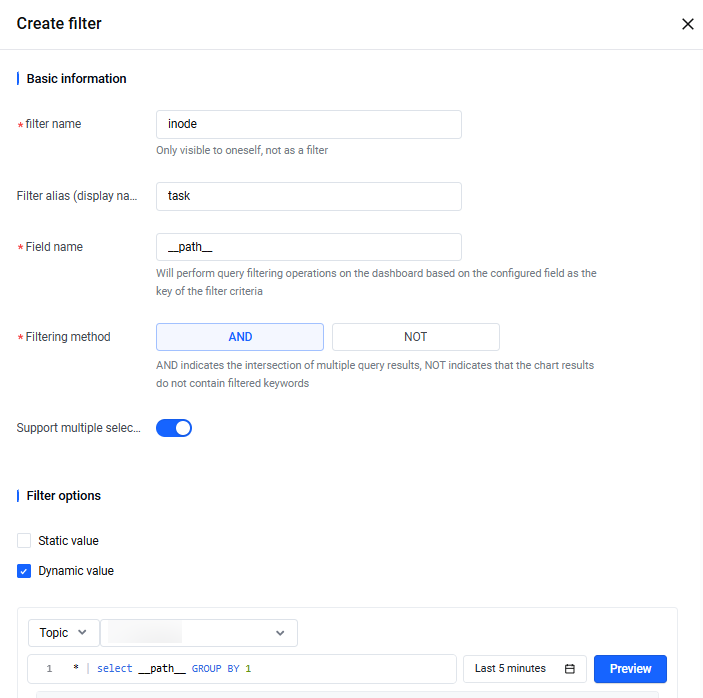
After completing the configuration, you can select the log files to be analyzed in the console to perform targeted analysis.
- An example of original SQL (analyzing all write operations):
-
- After applying the filter, the system automatically added the __path__ filter condition to SQL:
-
By configuring filters, you can quickly filter out the log range of interest and generate statistical results.
From the above sample SQL, you can obtain the total count, average size of written data, average execution time, maximum execution time, and minimum execution time for the write operation where __path__ is extract.log, bev_cpu.log.
Write IO size distributions
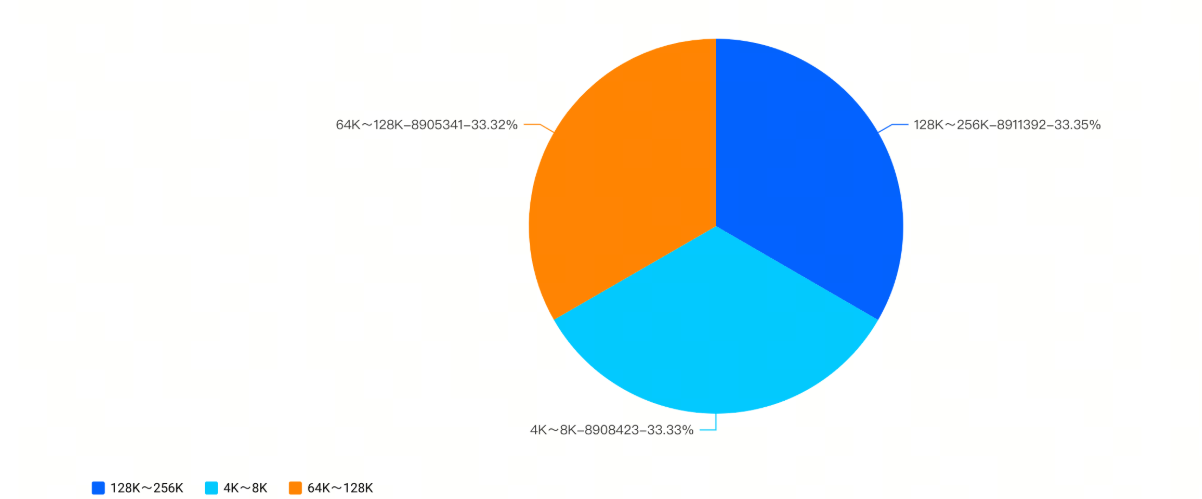
The IO size distribution of write operations can reflect business workload characteristics.
Write an example SQL query for IO size distribution:
Use CASE WHEN to divide write operation lengths into different ranges and count the number of occurrences in each range.
In the TLS dashboard, results can be displayed as a pie chart, providing a more intuitive representation of the proportion of different write IO sizes. For example, the 128K~256K range has the highest number of write operations, accounting for 33.35%.
Distribution of sequential read proportion
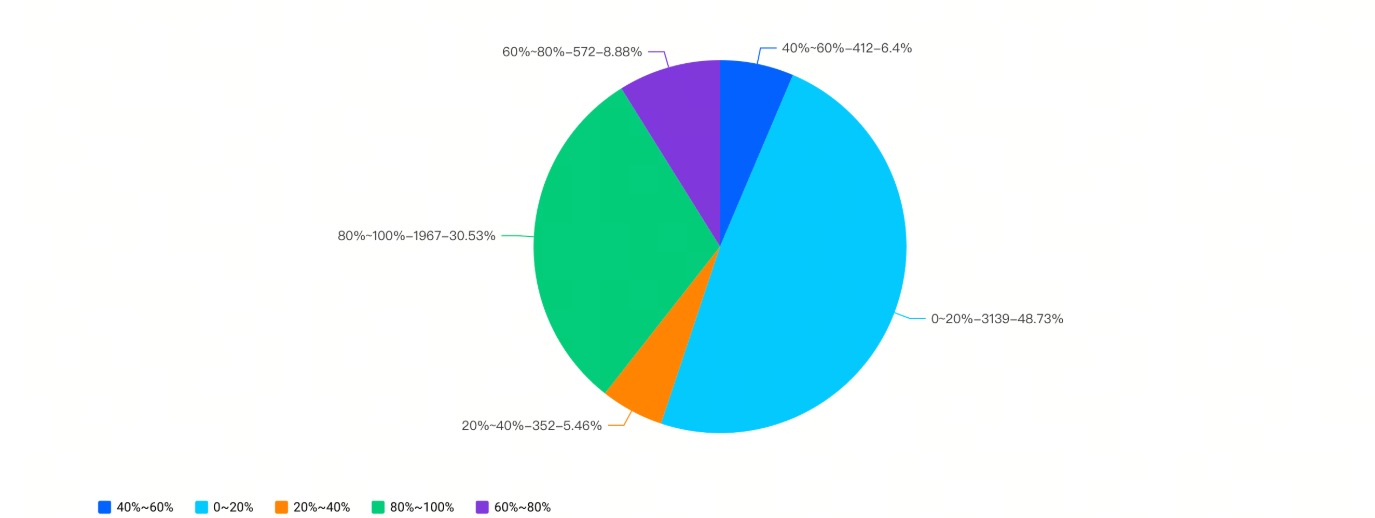
Sequential read refers to a read operation in which the offset range is contiguous with that of the previous read operation (that is, the end position of the previous read equals the start position of the current read).
Example SQL for the distribution of sequential read proportions:
Using WITH ... AS ... The clause defines a temporary table flagged, which can be reused in other SQL statements to simplify writing SQL statements.
- Sentence structure analysis of flagged temporary table:
- The temporary table contains the syntax: LAG(...) OVER(PARTITION BY ... ORDER BY ...)
- Temporary table SQL syntax example: LAG(offset) OVER (PARTITION BY __path__, inode ORDER BY time )
- __path__, inode: Sharded by these two fields.
- time: Sort by this field within each shard.
- LAG(offset): Retrieves the offset value from the row immediately preceding the current row after sorting.
- Example results of temporary table sentence patterns:
-
- Rows in the table with the same __path__ and inode belong to the same shard, and within each shard, they are sorted in ascending order by time.
- There are 3 shards in total: rows 1 to 5 constitute the first shard; rows 6 to 7 constitute the second shard; row 8 constitutes the third shard.
- For the first row, there is no previous row, so the result offset is NULL.
- For line 2, the previous line is line 1, so the result offset uses the offset from line 1, which is 32.
- For row 5, since its shard contains only one row and there is no previous row, the result offset is also NULL.
- Analysis of the CASE WHEN clause in temporary tables:
- If the starting offset of the current read operation is equal to the offset plus length of the immediately preceding read operation (that is, the end position of the previous read), then the current read operation is a sequential read. In this case, return the length of the current read operation; otherwise, return 0. This is the IO size for a sequential read operation, that is, sequentialReadSize.
-
- Then group by __path__ and inode, and for each file, calculate the ratio ratio of its sequential read total size sum(sequentialReadSize) to its read total size sum(length). Next, group by ratio and count the number of files.
-
tip
Here, GROUP BY 1 is an SQL abbreviation,1Represents the first field in the SELECT clause, which is the renamed scope.
- A pie chart similar to the following is obtained, showing that there are 3,139 files in which sequential read IO accounts for 0–20%, representing 48.73%.
-
Overwrite write analyses
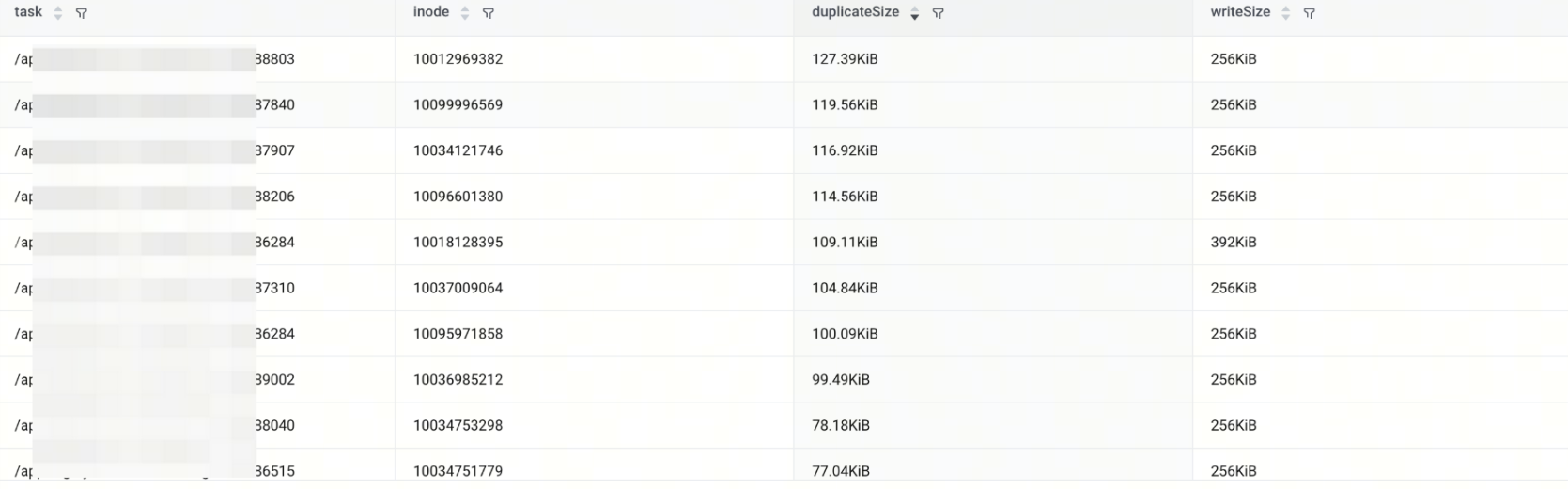
Overwrite refers to a situation where the offset range of the current write operation overlaps with that of the previous write operation.
For example, the current write range [32, 1024) and the previous write range [512, 2048) overlap.
Overwriting analysis example SQL:
The first and second CASE WHEN clauses calculate, respectively, for the same log file (path) and the same operation object (inode), the offset and length of each write operation and its immediately preceding write operation.
Then, in each row of write operation data, the offset and length corresponding to the immediately preceding write are added, and they are renamed as lastOffset and lastLength.
That is, for each row of data, there are two numerical ranges **[offset, offset + length), [lastOffset, lastOffset + lastLength),** and the intersection of these two left-closed, right-open intervals is:
Thus, the approach for the above overwrite SQL is:
- Use LAG(...) OVER(PARTITION BY ... ORDER BY...) to obtain the offset and length of the write operation immediately preceding each write operation.
- Using CASE ... WHEN ... THEN ... ELSE ... ENDSet lastOffset and lastLength to -1 when there is no previous write operation.
- Remove write operations where lastOffset and lastLength are -1, then calculate the overlap size with the previous write operation, which is the size of the overwrite.
Document lifecycle distribution
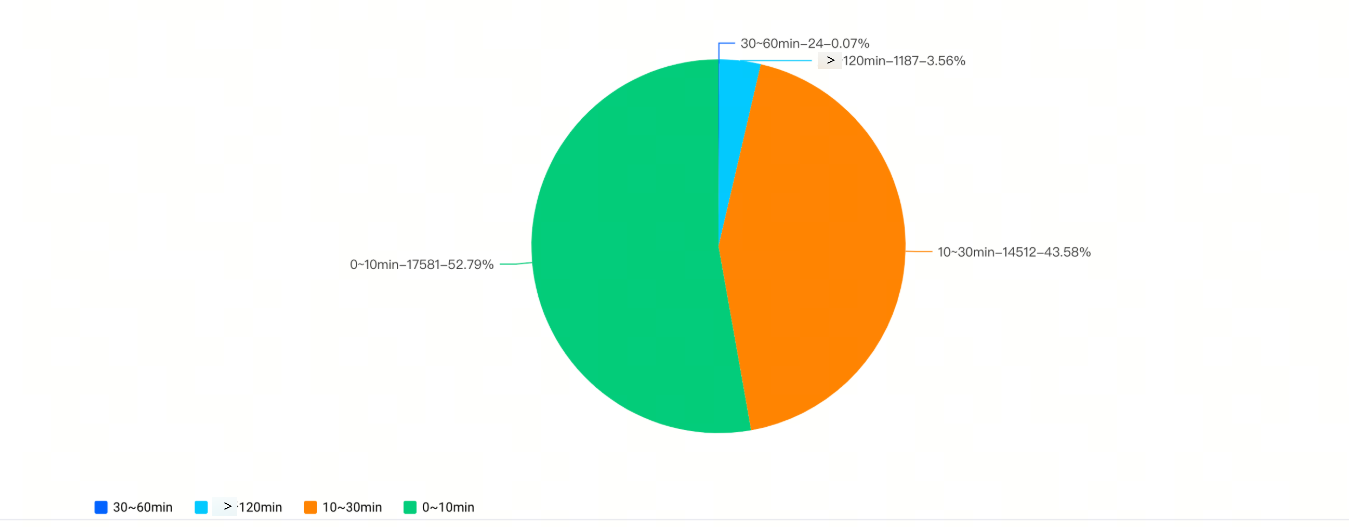
The document lifecycle is defined as the length of time from creation to deletion.
File lifecycle distribution example SQL:
- Join analysis in SQL:
- By associating the create and delete operations, you can obtain the creation time and deletion time of the same file.
- unlinkTable LEFT JOIN createTable: Associates the inode recorded when creating a file with the inode recorded when deleting a file.
- filename and __path__: used to uniquely identify a file.
- DATE_PARSE: Converts a millisecond timestamp to a formatted date type.
- Analysis of CASE WHEN in SQL:
-
- DATE_DIFF calculates the number of minutes by subtracting the creation time (createTime) from the deletion time (unlinkTime) of a file, and then categorizes the result into four ranges: '010min', '1030min', '30~60min', and 'greater than 60min'.
- Finally, by counting the number of files within the four ranges above, you can generate the following pie chart:
-
Create a real-time monitoring
TLS provides robust alerting capabilities, allowing you to configure monitoring rules, monitor logs in real time, and promptly detect and respond to anomalies.
This typical scenario—monitoring whether the write duration for each file is abnormally long—illustrates how to use the log alarm feature of Volcano Engine Log Service (TLS) to implement monitoring and alerting capabilities. For operation details, refer to Quick log alarm setup.
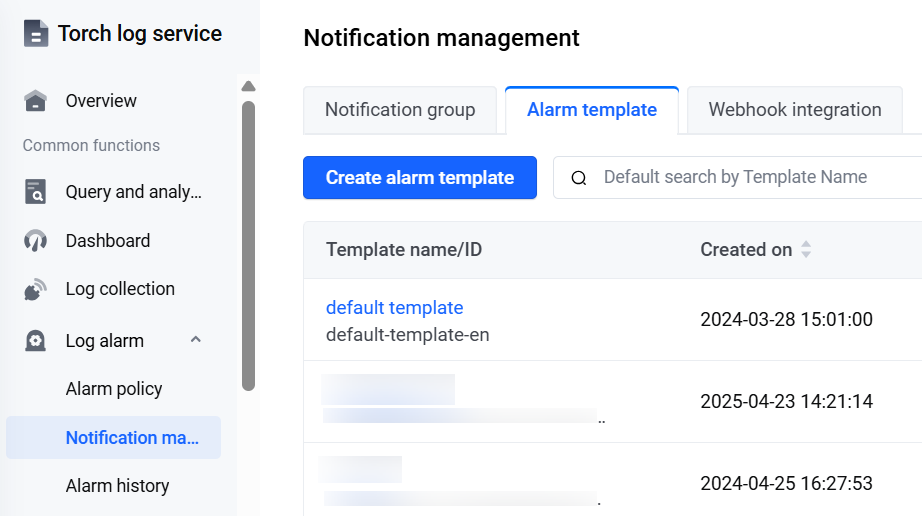
- Create a content template
- A content template is a predefined text template. TLS sends alert notifications to specified notification channels according to the content defined in the content template.
- This example creates a custom content template based on the default template, default-template, provided by TLS.
-
-
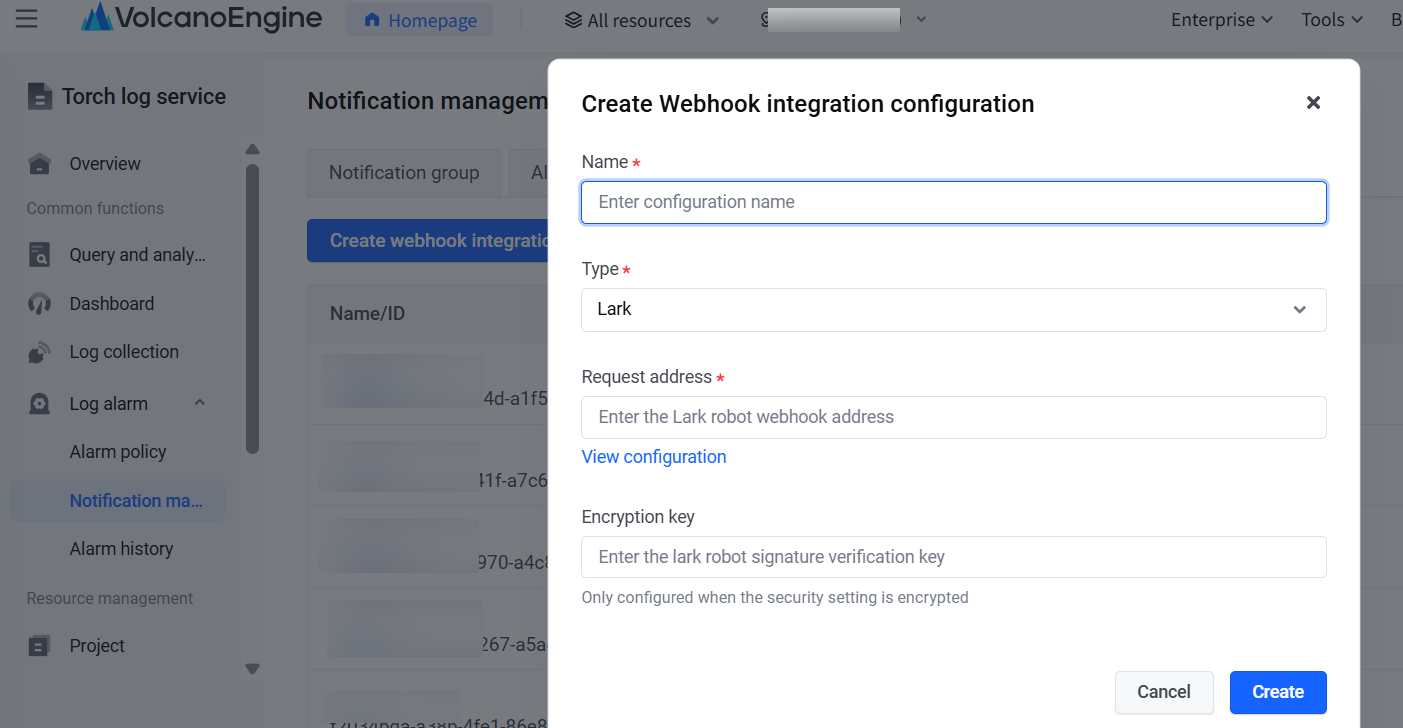
- Create a webhook integration configuration.
- Webhook integration configuration is used to manage your Feishu bot Webhook address.
-
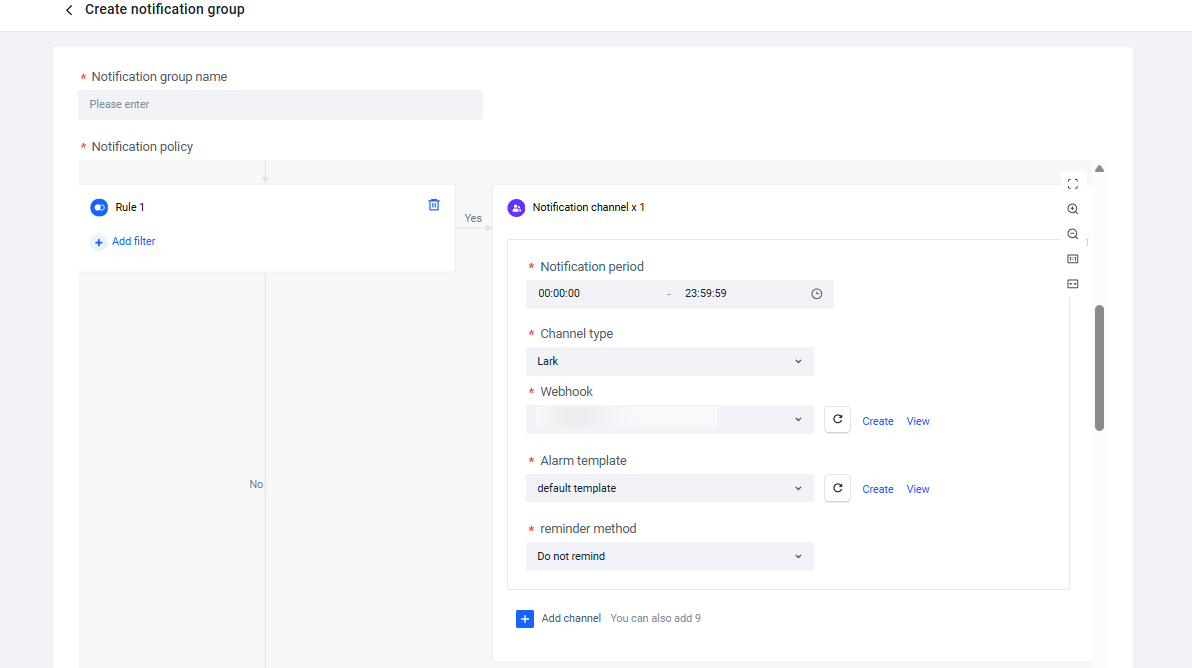
- Create notification groups.
- Notification groups are used to manage action policies and notification recipients for alert notifications. When creating a notification group, you need to select the webhook and content template created in the previous two steps.
-
- Create alarm policies
- In an alarm policy, you need to configure basic information, monitoring tasks, alarm notifications, and other settings. TLS regularly analyzes logs based on alarm policies and regularly sends alarms that meet trigger conditions to specified notification recipients.
- Execute a task: Select the corresponding log topic for the monitoring object and enter the analysis statement. Each task will periodically perform query and analysis using this statement.
-
- Trigger condition: When data in the query and analysis results meets the condition expression, an alert is triggered.
- The case shown in the diagram indicates that if consumedTime is greater than 2, an alert is triggered with the level set to Warning. A check is performed every 10 minutes.
- Notification group: Select the notification group created in the previous step.
- Additional notification content: Add the content variable FireResults to notify the data that triggered the alert.
- View alerts.
- Monitoring tasks are executed periodically, and when an alarm is triggered, notifications are sent via the configured notification group.
- In this case, alert information will be sent to the specified Feishu via a configured Webhook Feishu bot.
Conclusion
With the one-stop capabilities of Volcengine Log Service TLS for log collection, storage, query, analysis, visualization, monitoring, and alerting, JuiceFS users can efficiently address issues such as dispersed logs and complex log structures, achieving end-to-end observability from log collection and parsing to multidimensional analysis and real-time monitoring.
Whether for basic operational statistics or complex sequential read detection and overwrite analysis, TLS's SQL query and visualization features can easily handle these tasks. By using preset dashboard templates, you can create dashboards with one click.
The log collection configuration and log analysis dashboard mentioned above have been released in the TLS Demo Experience Center. You are welcome to try them out (click to visit).
Last updated: 2025.10.11 17:07:57
All rights reserved © Beijing Volcano Engine Technology Co., Ltd2024
