Torch Log Service
Torch Log Service
Torch Log Service


Document
Product News
Product Overview
Product Billing
User Guide
TLS Agent
AgentLoop
Resource management
Host group
Data collection
LogCollector collection
Introduction to LogCollector
Installation and upgrade
Collect host logs
Collect container logs
LogCollector plugins
Manage LogCollector
general reference
Data import
Cloud product log collection
TOS log collection
DBW log collection
VPN Log collection
VKE log collection
CLB log collection
CloudTrail log collection
CFW log collection
NTA log collection
ALB log collection
APMPlus log collection
veFaaS log collection
VPC log collection
veImageX log collection
TrafficRoute DNS log collection
DDoS log collection
WAF log collection
DCDN log collection
Multi-cloud security platform log collection
APIG log collection
Machine learning task log collection
CR log collection
Volcano Ark application lab log collection
FileNAS log collection
LLM Application Firewall Service log collection
vePFS log collection
Cloud security center log collection
EFS log collection
Data storage
Query and analysis
Configure log indexes
Query log
Analyze logs
Query and analyze logs using third-party tools
Associate external data source for log query
SQL function
SQL syntax
Visualization
Query and analysis charts
Summaries of query and analysis charts
Create dashboard
Use dashboard
Add dashboard filters and variables
Use other systems to analyze logs
Log application
Log applications for product observability
Log applications for large models observability
Coding Agent log app
ModelProvider log app
No-coding Agent log app
Log applications for basic service monitoring
Data processing
Data transformation
Syntax and functions
Global operation function
expression function
Data processing best practices
general reference
Data write processor
Data consumer processor
Data consumption and shipping
Ship logs to TOS
Ship logs to Kafka
Ship logs to Splunk
Alarm
Alarm policy
Alarm notification content
Alarm notification content template
alarm notification channel
Tracing service
Monitor Log Service
API reference
Project management API
Topic management API
Shard management API
Index management API
Log management API
Host group management API
Collection configuration management API
Data import API
Data processor API
Data transformation API
Data backflow API
SQL analysis API
Alarm management API
Consumer group management API
Kafka protocol consumption API
Tag management API
Trace storage API
Account management API
SDK reference
Go SDK
Java SDK
Python SDK
iOS SDK
C++ SDK
CLI reference
Best practices
Data collection
Query and analysis
permission management
Consumption and delivery
Visualization
Alarm
FAQs
Billing and cost FAQ
Data collection FAQ
Data storage FAQ
Index configuration FAQ
Query and analysis FAQ
Scheduled SQL tasks FAQ
Alarm FAQ
- Documentation
 Torch Log ServiceUser GuideQuery and analysisQuery logQuery logs via phrase query (Index edition)
 Copy page
 Download PDF
Query log
Query logs via phrase query (Index edition)
Copy pageDownload PDFQuery logs via phrase query (Index edition)
This topic describes the basic features, syntax, usage limitations, and examples of phrase query (index edition).
Notice
This feature is in closed beta. If you have relevant business needs, you can contact your account manager to enable the allowlist.
Query types
TLS supports non-phrase query, phrase query, and phrase query (index edition). Among them, phrase query is used to precisely match specified phrases. Phrase query (index edition) returns exact results and outperforms regular phrase query in performance. The details are as follows:
Query types | Keyword query (non-phrase query) | Phrase query | Phrase query (index edition) |
Query types | Keyword query (non-phrase query) | Phrase query | Phrase query (index edition) |
Description | Keyword matching is performed using delimiter, which means the phrase is split into individual keywords based on the index delimiter for querying. | Use the #"specified phrase" format to precisely match logs containing the specified phrase. For information about restrictions and principles, see Query logs via phrase query. | Use the "specified phrase" format to precisely match logs containing the specified phrase.
|
Example |
|
|
|
Result | Query logs that contain both the keywords connection, after and connection after. | Only query logs that contain the complete phrase connection after. | Only query logs that contain the complete phrase connection after. |
Basic syntax
In TLS, when using double quotes (" "), there are distinctions depending on whether the phrase query (index edition) feature is enabled:
- Enabled: The string inside the double quotes is not split and is treated as a complete phrase for phrase query.
- Disenabled:
- Strings inside double quotes are split by preset delimiters, and the resulting keywords are linked with an AND relationship. For details, see Query syntax.
- When using #"", the string inside double quotes is identified as a complete phrase and will be queried as a phrase without splitting.
For example, when the separator is a space, the syntax is explained as follows:
Query methods | Full-text query | Key-value query |
Query methods | Full-text query | Key-value query |
Syntax for keyword query (not phrase query) | "abc def" is equivalent to abc AND def. | key: 'abc def' is equivalent to key: abc AND key: def. |
Phrase query syntax | #"abc def" | key:#"abc def" |
Phrase query (index edition) syntax | "abc def" | key:"abc def" |
Basic principles
After enabling phrase query (index edition), TLS will record the locations of the term split in the original log when building the inverted index, and construct a sparse index for these locations to accelerate location scanning.
During queries, the inverted index and location index are combined to determine whether the query phrase meets the phrase condition. Query results meeting phrase conditions are quickly returned based on the index information scan.
Billing notes
Phrase query (index edition) is currently in invite-only testing and is free of charge. We will release billing notes in the upcoming announcements.
Query example
For logs with full-text index enabled and a delimiter that includes spaces, consider the query for logs containing connection after as an example.
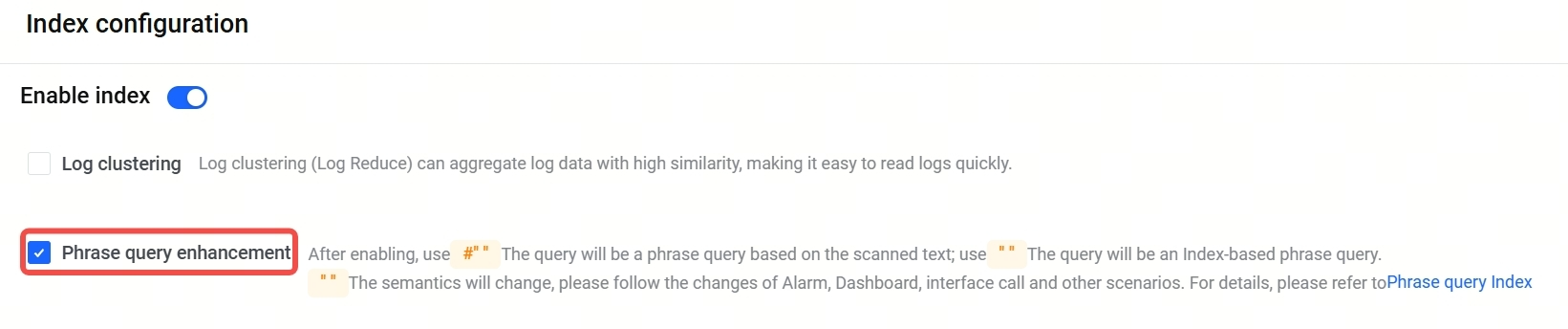
Enable phrase query enhancement: In the Index configuration of the log topic, enable index and enable Phrase query enhancement.
Query statement examples | Results when phrase query enhancement is disabled | Results when phrase query enhancement is enabled |
Query statement examples | Results when phrase query enhancement is disabled | Results when phrase query enhancement is enabled |
connection after | Match logs containing the following keywords (keyword match):
Notice Enabling the enhanced phrase query feature does not affect the query results for this statement. | |
#"connection after" | Match logs that contain only the keyword connection after (phrase query - standard version). | |
"connection after" | Match logs containing the following keywords (keyword match):
| Match logs containing only the keyword connection after (phrase query - index edition). |
Query result analysis:
- A: Matches logs containing both keywords connection and after, or matches data containing only connection after.
- B: Matches data that contains only the keyword connection after.
Query statements | Results when phrase query enhancement is disabled | Results when phrase query enhancement is enabled |
Query statements | Results when phrase query enhancement is disabled | Results when phrase query enhancement is enabled |
connection after | A | A |
#"connection after" | B | B |
"connection after" | A | B |
Last updated: 2026.09.11 10:28:03
All rights reserved © Beijing Volcano Engine Technology Co., Ltd2024
