Torch Log Service
Torch Log Service


Document

- Documentation
 Torch Log ServiceBest practicesQuery and analysisQuery and analyze JSON logs
 Copy page
 Download PDF
Query and analysis
Query and analyze JSON logs
Copy pageDownload PDFQuery and analyze JSON logs
This topic introduces typical query and analysis scenarios and examples for JSON format logs, using order system logs from an e-commerce platform as an example.
Background information
An e-commerce company's order system processes thousands of transaction requests daily and generates massive JSON format logs. These JSON logs record detailed information about each order, including user details (user ID, user address, user nickname), purchase details (item ID, item name, item price, item quantity), and order information (order ID, order total, order status, payment method, delivery time, etc.).
When dealing with the complex JSON logs generated by the order system, TLS is not just a storage repository but also a powerful analysis platform. TLS provides index configuration for JSON types, which significantly improves structured management of JSON logs and enables precise indexing of field contents within complex structures. TLS also includes a variety of built-in JSON functions to support efficient log parsing and content extraction
Prerequisites
- The log project and log topic are created. For details, see Create resources.
- An index has been created based on the log fields. For details, see Configure indexes.
Log example
The following are sample JSON logs from the order system.
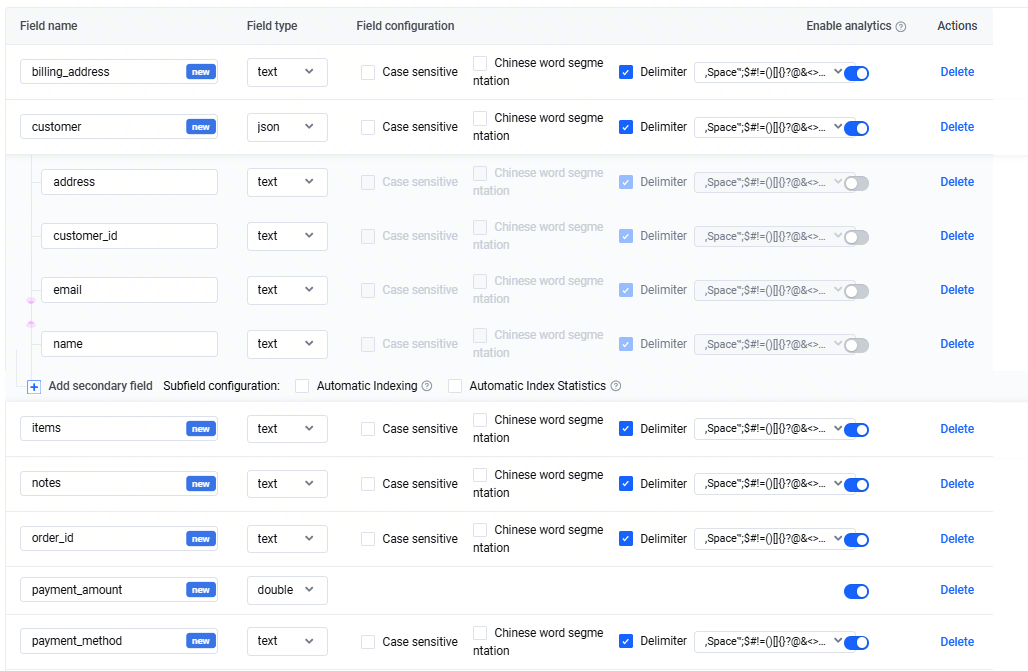
Index example
This case creates the following index configuration based on the log example above. For specific operations and precautions regarding index configuration, see Configure indexes.
The customer field is a JSON object. TLS supports setting indexes for subfields within the customer field and enables query and analysis of these fields. For detailed instructions and precautions on JSON data type indexing, see json type.
Typical query and analysis scenarios
This section introduces sample queries and analyses for JSON fields and shows how to use JSON functions with JSON logs.
Scenario 1 Precisely query relevant orders by user ID
- Scenario: Retrieve detailed information for all orders placed by user CUST987654321.
- Query statements
-
- Query result
-
Scenario 2 Use user ID to perform fuzzy queries for relevant orders
- Scenario: Query all order details with user IDs starting with CUST98
- Query statements
-
- When using fuzzy queries, add a wildcard asterisk (*) or question mark (?) to keywords. For more details, see Query overview.
- Query result
-
Scenario 3 Query related orders with a specific keyword
- Scenario: Query all request information for users whose address is Guangzhou.
- Query and analysis statement
-
- The customer.address field has a Key-value index with the Delimiter feature enabled, so TLS splits field values into multiple keywords and supports the above key-value queries.
- Query and analysis results
-
Scenario 4 Query orders based on multiple keywords
- Scenario: Query all request information where the user's address contains the 123 Main St street.
- Query and analysis statement
-
- Here, 123 Main St consists of three keywords separated by spaces. When querying with 123 Main St, you need to use double quotation marks ("") to enclose it.
- Query and analysis results
-
Scenario 5 Extract JSON field values using JSON functions
- Scenario: View the first item purchased by a user in a specified order.
- Query and analysis statement
Notice
In SQL statements, use single quotation marks ('') to enclose characters that represent strings. Characters with no quotes or with double quotation marks ("") represent field names or column names. For JSON fields, such as customer.customer_id, you must use double quotation marks ("") to enclose the fields.
-
- Note:
- The JSON_PARSE function converts a string in JSON format (the value of the items field) into JSON type. For details, see JSON_PARSE function.
- The JSON_ARRAY_GET function extracts the first element from the items field value (for example, "product_id":"PROD001"). For detailed instructions, see JSON_ARRAY_GET function.
- The JSON_EXTRACT_SCALAR function extracts the value of the product_id field from the element retrieved above (for example, "product_id":"PROD001"). For detailed instructions, see JSON_EXTRACT_SCALAR function.
- Query and analysis results
-
Scenario 6 Group orders by quantity
- Scenario: Count the number of orders for each user in the past month.
- Query and analysis statement
Notice
In SQL statements, use single quotation marks ('') to enclose characters that represent strings. Characters with no quotes or with double quotation marks ("") represent field names or column names. For JSON fields, such as customer.customer_id, you must use double quotation marks ("") to enclose the fields.
-
- Query and analysis results
-
Scenario 7 Group payment fees
- Scenario: Identify the top 10 cities by payment fees.
- Query and analysis statement
Notice
In SQL statements, use single quotation marks ('') to enclose characters that represent strings. Characters with no quotes or with double quotation marks ("") represent field names or column names. For JSON fields, such as customer.customer_id, you must use double quotation marks ("") to enclose the fields.
-
- Note:
- The JSON_EXTRACT_SCALAR function extracts the value of the city field from a JSON-formatted string. For more details, see JSON_EXTRACT_SCALAR function.
- The GROUP BY "City" clause groups the results by city to calculate payment fees for each city.
- Query and analysis results
-
Related documentation
Last updated: 2026.09.07 18:19:57
All rights reserved © Beijing Volcano Engine Technology Co., Ltd2024
