Torch Log Service
Torch Log Service
Torch Log Service


Document
Product News
Product Overview
Product Billing
User Guide
TLS Agent
AgentLoop
Resource management
Host group
Data collection
LogCollector collection
Introduction to LogCollector
Installation and upgrade
Collect host logs
Collect container logs
LogCollector plugins
Manage LogCollector
general reference
Data import
Cloud product log collection
TOS log collection
DBW log collection
VPN Log collection
VKE log collection
CLB log collection
CloudTrail log collection
CFW log collection
NTA log collection
ALB log collection
APMPlus log collection
veFaaS log collection
VPC log collection
veImageX log collection
TrafficRoute DNS log collection
DDoS log collection
WAF log collection
DCDN log collection
Multi-cloud security platform log collection
APIG log collection
Machine learning task log collection
CR log collection
Volcano Ark application lab log collection
FileNAS log collection
LLM Application Firewall Service log collection
vePFS log collection
Cloud security center log collection
EFS log collection
Data storage
Query and analysis
Configure log indexes
Query log
Analyze logs
Query and analyze logs using third-party tools
Associate external data source for log query
SQL function
SQL syntax
Visualization
Query and analysis charts
Summaries of query and analysis charts
Create dashboard
Use dashboard
Add dashboard filters and variables
Use other systems to analyze logs
Log application
Log applications for product observability
Log applications for large models observability
Coding Agent log app
ModelProvider log app
No-coding Agent log app
Log applications for basic service monitoring
Data processing
Data transformation
Syntax and functions
Global operation function
expression function
Data processing best practices
general reference
Data write processor
Data consumer processor
Data consumption and shipping
Ship logs to TOS
Ship logs to Kafka
Ship logs to Splunk
Alarm
Alarm policy
Alarm notification content
Alarm notification content template
alarm notification channel
Tracing service
Monitor Log Service
API reference
Project management API
Topic management API
Shard management API
Index management API
Log management API
Host group management API
Collection configuration management API
Data import API
Data processor API
Data transformation API
Data backflow API
SQL analysis API
Alarm management API
Consumer group management API
Kafka protocol consumption API
Tag management API
Trace storage API
Account management API
SDK reference
Go SDK
Java SDK
Python SDK
iOS SDK
C++ SDK
CLI reference
Best practices
Data collection
Query and analysis
permission management
Consumption and delivery
Visualization
Alarm
FAQs
Billing and cost FAQ
Data collection FAQ
Data storage FAQ
Index configuration FAQ
Query and analysis FAQ
Scheduled SQL tasks FAQ
Alarm FAQ
- Documentation
 Torch Log ServiceUser GuideVisualizationSummaries of query and analysis chartsMeasurement chart
 Copy page
 Download PDF
Summaries of query and analysis charts
Measurement chart
Copy pageDownload PDFMeasurement chart
The log service provides a measurement chart to display the results of log query and analysis. This paper introduces the configuration of various chart parameters of the measurement chart.
diagram description
A metering chart consists of one or more bar charts that simplify the data by reducing each query field to a single value, allowing you to visually see the proportion of the data in a specific range of individual values. The metrology chart supports a variety of display styles such as basic monochrome, layer discoloration, segmented bar charts and dashboards, and can present a variety of effects with color schemes.
For the operation steps of adding a metering chart to the dashboard, please refer to Add charts to dashboard.
Tip
common configuration
Configures a statistical chart of the specified type globally, with effect for the entire chart range. The general configuration supported by the meter chart is as follows.
configuration item | | explain |
configuration item | | explain |
panel configuration | title | Sets the title of the meter chart. |
| Show chart title bar | After checking the Show chart title bar , the title will be displayed in the upper left corner of the meter chart. |
search analysis field | main field | Select the field shown in the metering chart to support setting multiple fields. |
| maximum value | Sets the maximum value shown in the meter chart.
|
| minimum value | Sets the minimum value shown in the meter chart.
|
data configuration | display content | The display mode of the measurement chart.
|
| calculation function | When setting the display mode to calculate values , you should also set the calculation function to calculate the search analysis results. For example, if the calculation function is set to the first value , the first value in each search analysis result will be displayed in the measurement chart. |
| label | When the display mode is set to calculated values , label information for the measurement chart can be added. |
| number limit | When setting the display mode to All values , this parameter controls the number of bars displayed in the meter chart. |
| Tag source column | When Show Mode is set to All Values , this parameter is used to set the label of the meter chart. |
Standard configuration | format | Format numeric fields according to different unit conversion methods. |
| Preserve decimal point | Sets the number of digits after the decimal point. |
| custom unit | Set the unit of value. |
Measurement chart style | Chart Type | Set the style of the meter chart. Supports basic, continuous gradual change, segmented gradual change and dashboards. |
| layout | Sets the display mode of each bar chart in the meter chart, and supports setting to landscape, portrait, or adaptive. |
| rounded corners | Sets the shape fillet size. |
| thickness | When you set the chart type to Basic, Continuous Gradual Change, Segmented Gradual Change, this parameter is used to set the thickness of the bar. |
| Main field font size | Sets the font size of the main field. |
| Label size | Sets the font size of the label. |
| Display base color | When Show base color is checked, the base color is displayed. This parameter needs to be set when setting the chart type to basic, continuous gradual change, and segmented gradual change. |
| title | When the title is checked, the title of each bar is displayed. |
| Display percentage | When Show Percentages is checked, the percentage value for each bar will be displayed. |
Color Configuration | | Sets the color scheme of the meter chart.
|
value mapping | value mapping | When you click Add Mapping Value and set the mapping method, the Log Service automatically maps the matched content to the specified text. |
link | | Support for adding additional links to enrich chart information. After setting, the link icon will be displayed in the upper left corner of the chart, and you can click the link icon to view the link content. |
field configuration
After selecting a field name in the field configuration area, you can add a custom style configuration for this field. This configuration only takes effect for the specified field, and other fields still use the general configuration. The configuration items of the field configuration have the same meaning as the general configuration. Please refer to the description of each configuration item common configuration.
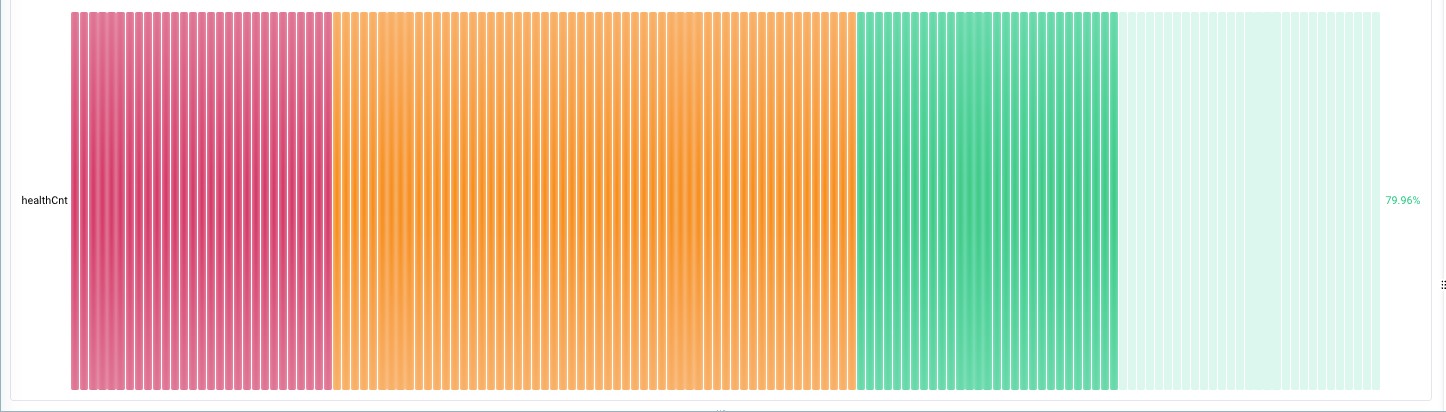
For example, the following example shows adding a field configuration to a healthCnt column.
example
The metric chart shows the number and proportion of health requests for each cluster.
- search analysis statement
- * | SELECT __source__, SUM(cnt) as allCnt, SUM(if(status='health', cnt, 0)) as healthCnt FROM( SELECT __source__, status, COUNT(status) as cnt FROM ( SELECT __source__ , if(httpStatusCode>=200,'health','error') as status ) GROUP BY status, __source__) GROUP BY __source__
- chart settings
- Main field : Specify as healthCnt . Where healthCnt represents Status equal to the number of health logs.
- Maximum value : specified as allCnt . The total value of SUM (cnt) statistics is used as the maximum index of the measurement chart.
- Display content : Select all values .
- Tag Source Column : Set to __source__ .
- statistical chart
-
Last updated: 2026.09.07 16:34:33
All rights reserved © Beijing Volcano Engine Technology Co., Ltd2024
