Torch Log Service
Torch Log Service
Torch Log Service


Document
Product News
Product Overview
Product Billing
User Guide
TLS Agent
AgentLoop
Resource management
Host group
Data collection
LogCollector collection
Introduction to LogCollector
Installation and upgrade
Collect host logs
Collect container logs
LogCollector plugins
Manage LogCollector
general reference
Data import
Cloud product log collection
TOS log collection
DBW log collection
VPN Log collection
VKE log collection
CLB log collection
CloudTrail log collection
CFW log collection
NTA log collection
ALB log collection
APMPlus log collection
veFaaS log collection
VPC log collection
veImageX log collection
TrafficRoute DNS log collection
DDoS log collection
WAF log collection
DCDN log collection
Multi-cloud security platform log collection
APIG log collection
Machine learning task log collection
CR log collection
Volcano Ark application lab log collection
FileNAS log collection
LLM Application Firewall Service log collection
vePFS log collection
Cloud security center log collection
EFS log collection
Data storage
Query and analysis
Configure log indexes
Query log
Analyze logs
Query and analyze logs using third-party tools
Associate external data source for log query
SQL function
SQL syntax
Visualization
Query and analysis charts
Summaries of query and analysis charts
Create dashboard
Use dashboard
Add dashboard filters and variables
Use other systems to analyze logs
Log application
Log applications for product observability
Log applications for large models observability
Coding Agent log app
ModelProvider log app
No-coding Agent log app
Log applications for basic service monitoring
Data processing
Data transformation
Syntax and functions
Global operation function
expression function
Data processing best practices
general reference
Data write processor
Data consumer processor
Data consumption and shipping
Ship logs to TOS
Ship logs to Kafka
Ship logs to Splunk
Alarm
Alarm policy
Alarm notification content
Alarm notification content template
alarm notification channel
Tracing service
Monitor Log Service
API reference
Project management API
Topic management API
Shard management API
Index management API
Log management API
Host group management API
Collection configuration management API
Data import API
Data processor API
Data transformation API
Data backflow API
SQL analysis API
Alarm management API
Consumer group management API
Kafka protocol consumption API
Tag management API
Trace storage API
Account management API
SDK reference
Go SDK
Java SDK
Python SDK
iOS SDK
C++ SDK
CLI reference
Best practices
Data collection
Query and analysis
permission management
Consumption and delivery
Visualization
Alarm
FAQs
Billing and cost FAQ
Data collection FAQ
Data storage FAQ
Index configuration FAQ
Query and analysis FAQ
Scheduled SQL tasks FAQ
Alarm FAQ
- Documentation
 Torch Log ServiceUser GuideLog applicationLog applications for large models observabilityNo-coding Agent log appHermesAgent observability
 Copy page
 Download PDF
No-coding Agent log app
HermesAgent observability
Copy pageDownload PDFHermesAgent observability
This section introduces the HermesAgent observability application for large model observability, available in the TLS application marketplace.
Overview
By integrating the HermesAgent observability application, you can monitor data and access services such as the HermesAgent observability dashboard and Trace call chain.
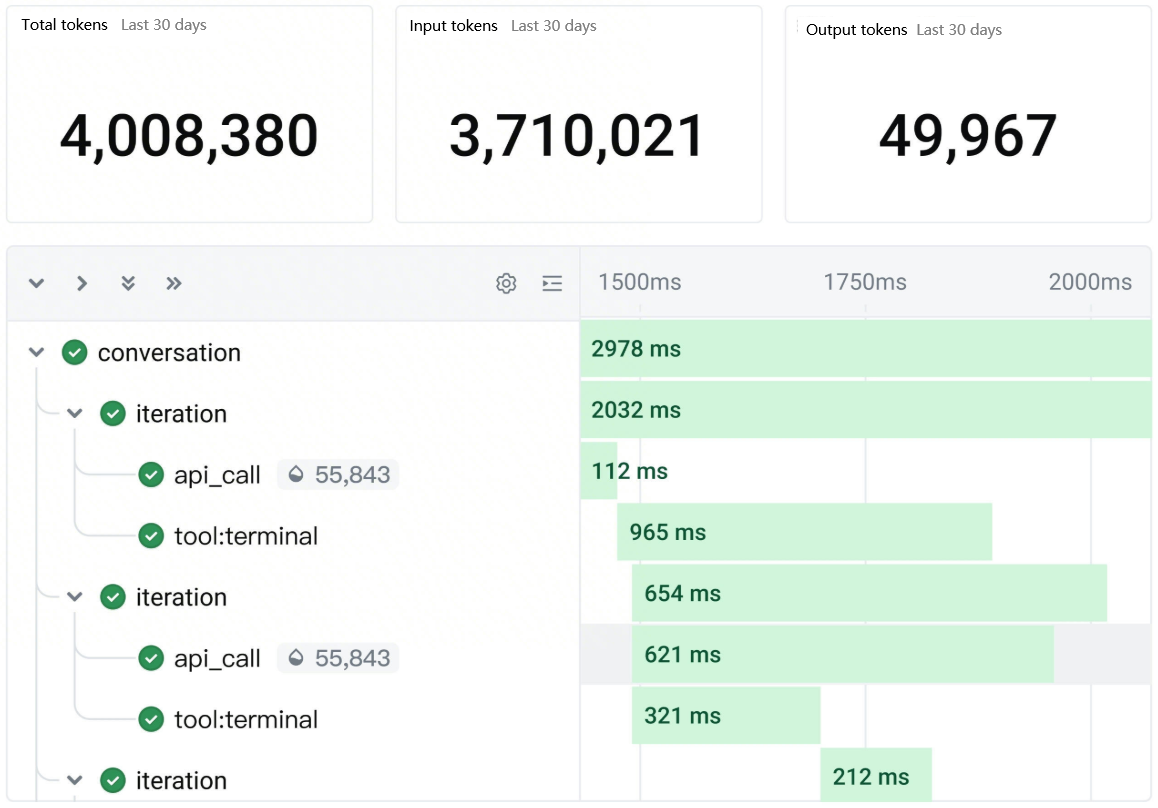
Monitoring chart details
The monitoring chart details for the TLS HermesAgent observability application are as follows:
- HermesAgent observability dashboard
- TypeChartTypeChartModel invocation
- Total tokens, daily tokens, input tokens, output tokens
- Cache Read Tokens, Cache Write Tokens, Reasoning Tokens, Prompt Tokens
- Model token consumption distribution, provider token consumption distribution, platform token consumption distribution
- Number of requests, daily model invocation count, model invocation latency P90
Session analysis- Number of new sessions, daily new session count, daily conversation count
- New session platform distribution, new session model distribution
- Conversation platform distribution, conversation model distribution, conversation count, conversation P90 latency
Tool invocation- Total tool invocations, daily tool invocations, tool invocation P90 latency, tool invocation P90 latency distribution
- Tool invocation distribution, tool invocation failure distribution
- Successful tool invocation count, failed tool invocation count
O&M analysis- Error log distribution
- Daily error logs
- Trace Call Chain
- TypeChartTypeChartTrace analysisTrace analysis (data retrieval limit: 50,000 records)
- Topic list
- Displays the corresponding projects and log topics for HermesAgent logs and Trace logs.
Integrate log applications
Limitations
Category | Description |
Category | Description |
Region restriction | The server where HermesAgent is deployed and TLS must be in the same region to ensure network connectivity. |
Authentication method | HermesAgent access to TLS supports the following authentication methods:
Notice API Key is a closed beta feature. If needed, contact your account manager for access to the allowlist. |
Integration steps
- Integrate the HermesAgent log application.
- Log in to TLS console.
- Select the region where log service is located from the top navigation bar.
- In the left navigation bar, click Common functions > Log application.
- On the App store tab, on the HermesAgent card, click Integrated application.
- Configure the following integration parameters, and then click Integration template.
- ParametersDescriptionParametersDescriptionNameName of the application integration.
- Only Chinese characters, letters, numbers, underscores _, and hyphens - are allowed.
- Can not start or end with a hyphen -
- Length must be between 3 and 64 characters.
DescriptionDescription of the application integration.- Length limit: 0–64 characters.
- Angle brackets <>, apostrophes ', backslashes \, double quotes ", and emojis are not supported.
Log projectSelect the project where data will be stored.
- After a successful integration, the dashboard page of the TLS application is displayed by default.
- Install the HermesAgent plugin.
- Log in to the server where HermesAgent is deployed.
- Depending on the installation method, execute the following commands.
- AK/SK modeAPI Key modeOne-click installation script, suitable for development and testing environments. You must obtain the AccessKey ID and AccessKey Secret of the Volcano Engine account in advance.curl -fsSL https://tls-hermes-cn-beijing.tos-cn-beijing.volces.com/install.sh | bash -s -- \--region cn-beijing \--ak {YourAK} \--sk {YourSK} \--endpoint tls-cn-beijing.volces.com \--non-interactiveOne-click installation script, suitable for production and similar environments. You must obtain the API Key of the Volcano Engine account in advance.curl -fsSL https://tls-hermes-cn-beijing.tos-cn-beijing.volces.com/install.sh | bash -s -- \--region cn-beijing \--api-key {YourAPI_Key} \--endpoint tls-cn-beijing.volces.com \--non-interactive
- After installation is complete, execute the following command to restart the Gateway.
- hermes gateway restart
- After the restart is complete, execute the following command to check the plugin status.
- If the plugin status is running, the installation is successful. At this point, you can view the log application observability dashboard in the TLS Console.
- hermes plugins list
Manage my applications
After successful integration of the log application, you can perform the following management operations on the integrated log applications:
- Log in to TLS console.
- Select the region where log service is located from the top navigation bar.
- In the left navigation bar, click Common functions > Log application.
- Go to the My app tab. In the Actions column of the corresponding log application, the following management operations are supported:
- ActionsDescriptionActionsDescriptionAccess managementClick Access management to enter the Access management tab, where you can modify the name and description of the log application.Cancel accessClick Cancel access, confirm the information in the cancel access pop-up window, and then click Cancel access again.
Last updated: 2026.07.08 14:57:27
All rights reserved © Beijing Volcano Engine Technology Co., Ltd2024
