Torch Log Service
Torch Log Service
Torch Log Service


Document
Product News
Product Overview
Product Billing
User Guide
TLS Agent
AgentLoop
Resource management
Host group
Data collection
LogCollector collection
Introduction to LogCollector
Installation and upgrade
Collect host logs
Collect container logs
LogCollector plugins
Manage LogCollector
general reference
Data import
Cloud product log collection
TOS log collection
DBW log collection
VPN Log collection
VKE log collection
CLB log collection
CloudTrail log collection
CFW log collection
NTA log collection
ALB log collection
APMPlus log collection
veFaaS log collection
VPC log collection
veImageX log collection
TrafficRoute DNS log collection
DDoS log collection
WAF log collection
DCDN log collection
Multi-cloud security platform log collection
APIG log collection
Machine learning task log collection
CR log collection
Volcano Ark application lab log collection
FileNAS log collection
LLM Application Firewall Service log collection
vePFS log collection
Cloud security center log collection
EFS log collection
Data storage
Query and analysis
Configure log indexes
Query log
Analyze logs
Query and analyze logs using third-party tools
Associate external data source for log query
SQL function
SQL syntax
Visualization
Query and analysis charts
Summaries of query and analysis charts
Create dashboard
Use dashboard
Add dashboard filters and variables
Use other systems to analyze logs
Log application
Log applications for product observability
Log applications for large models observability
Coding Agent log app
ModelProvider log app
No-coding Agent log app
Log applications for basic service monitoring
Data processing
Data transformation
Syntax and functions
Global operation function
expression function
Data processing best practices
general reference
Data write processor
Data consumer processor
Data consumption and shipping
Ship logs to TOS
Ship logs to Kafka
Ship logs to Splunk
Alarm
Alarm policy
Alarm notification content
Alarm notification content template
alarm notification channel
Tracing service
Monitor Log Service
API reference
Project management API
Topic management API
Shard management API
Index management API
Log management API
Host group management API
Collection configuration management API
Data import API
Data processor API
Data transformation API
Data backflow API
SQL analysis API
Alarm management API
Consumer group management API
Kafka protocol consumption API
Tag management API
Trace storage API
Account management API
SDK reference
Go SDK
Java SDK
Python SDK
iOS SDK
C++ SDK
CLI reference
Best practices
Data collection
Query and analysis
permission management
Consumption and delivery
Visualization
Alarm
FAQs
Billing and cost FAQ
Data collection FAQ
Data storage FAQ
Index configuration FAQ
Query and analysis FAQ
Scheduled SQL tasks FAQ
Alarm FAQ
- Documentation
 Torch Log ServiceUser GuideQuery and analysisQuery logQuery syntax
 Copy page
 Download PDF
Query log
Query syntax
Copy pageDownload PDFQuery syntax
This topic lists the query syntax supported by TLS query features.
Notice
- Syntax operators are case-insensitive. For example, both AND and and can be identified as query logical operators.
- For logical operations (AND, OR, &&, !, etc.), half-width parentheses (()) is required to define their logical precedence. Otherwise, search results may differ from expectations. For example, to search for logs on a specific machine under the log directory that does not contain error, set the query condition as ((__source__:192.168.10.10 AND __path__:/var/log/*) NOT error).
- If space is used to separate multiple query statements, it indicates the logical "AND". That is to say, the space is equivalent to AND. For example, warning error is equivalent to warning AND error. This syntax means retrieving logs containing both keywords warning and error.
- Operators in the query syntax are reserved characters in TLS. If any of these reserved characters are included in the query keywords, escape characters are required.
Query methods
TLS supports full-text and key-value queries. The details are shown in the table below.
Query methods | Description |
Query methods | Description |
Full-text query | When entering query statements, simply type the keywords without specifying log field names. TLS automatically splits the raw log by the specified delimiter. If the segmented log contains a word that matches the query criteria, it is a match. The query statement format is as follows: keywords1 [ [ and | or | not ] keywords2 ] ... In this case, keywords can be replaced with words that need to be queried. Logical operators can be included. For example, 404 AND 500 queries all logs containing both the 404 and 500 keywords. Notice
|
Key-value query (Key:Value) | When entering query statements, you need to specify both the field name and field value. The query matches if the value of the specified field in the log meets the specified conditions. Query statement format: key1 [ : | > | >= | < | <= | = ] value1 [ [ and | or | not ] key2 [ : | > | >= | < | <= | = ] value2 ]... In this case, key refers to the index field. For example, status:500 queries access logs where status is 500. Notice
|
Query accuracy
TLS supports exact query and fuzzy query. The details are shown in the table below.
Query accuracy | Description | Example |
Query accuracy | Description | Example |
Precise query | If complete keyword is specified during query, query results will match based on complete keyword.
|
|
Fuzzy query | If you specify only part of a keyword in query statement (add wildcard asterisk * or question mark ?), TLS matches up to 100 words and returns logs that contain these 100 words and meet the query conditions. For example, the search criteria erro* queries the first 100 words starting with "erro" in all logs, and then returns logs that contain these 100 words and meet the query conditions. For details, see Instructions for use.
|
|
Operators
The table below lists the query operators supported by TLS.
Operator | Description | Example |
Operator | Description | Example |
AND | Logical operator "AND". It is used to acquire the intersection of multiple search results. If multiple logical operations are specified, use half-width parentheses () to define the priority. | __path__:\/var\/log\/* AND error |
OR | Logical operator "OR" returns the union of multiple query results. If multiple logical operations are specified, use half-width parentheses () to define the priority. | error OR warning |
NOT | Logical operator NOT. Using it means that query results do not include keywords following NOT. If multiple logical operations are specified, use half-width parentheses () to define the priority. | ERROR AND NOT __path__:\/var\/log\/* |
TO | Range logical operator TO. Note: a space should be added before and after TO. If the starting value is greater than the ending value, it will be automatically replaced. age:[20 TO 1] is equivalent to age:[1 TO 20]. | age:[1 TO 20] |
'' | Single quotes: When a string inside single quotes contains preset delimiters, the keywords split by the delimiters are connected by an AND relationship. The asterisk * and question mark ? wrapped in single quotes ' represent wildcards. | 'today is friday' |
"" | Double quotes: When a string inside double quotes contains preset delimiters, the keywords split by the delimiters are connected by an AND relationship. The asterisk * and question mark ? enclosed in double quotes " are not wildcards but literal characters. | __hostname__:"Jone Doe" |
: | Colon: refers to key-value query; returns logs containing the specified key and value. | level:info |
| Wildcard, used for fuzzy queries. The wildcard * can match zero, single, or multiple characters. If asterisk (*) or question mark (?) are enclosed in double quotes (" "), asterisk (*) or question mark (?) represents only literal characters and can not be used for fuzzy match. For example:
| level:erro* |
? | Wildcard, used for fuzzy queries. The wildcard ? can match a single character If asterisk (*) or question mark (?) are enclosed in double quotes (" "), asterisk (*) or question mark (?) represents only literal characters and can not be used for fuzzy match. For example:
| level:erro? |
() | Grouping operators. It is used to control the priority among multiple logical operations. | ((__source__:192.168.10.10 AND __path__:\/var\/log\/*) NOT error) |
= | Equal sign: query logs with the specified value | age=18 |
!= | Inequality sign: query logs that do not contain the specified value | age!=18 |
> | Range operator: query logs where the value in a numeric field is greater than a specific number. | age>18 |
>= | Range operator. Used to query logs where the value in a numeric field is greater than or equal to a specific number | age>=18 |
< | Range operator. Used to query logs where the value in a numeric field is less than a specified value. | age<18 |
<= | Range operator. Used to query logs where the value in a numeric field is less than or equal to a specified value. | age<=18 |
[] | Range operator. The boundary values are included in the range. | age:[20 TO 30] |
{} | Range operator. Boundary values are not included within range. | age:{20 TO 30} |
\ | Escape character. If the query keywords contain reserved characters, you need use the escape character to process them before querying. An escaped character represents itself, not a keyword. Characters that need to be escaped include + - = & | > < !. ( ) { } [ ] ^ " ~ * ? : \ /. Notice
| __path__:\/images\/log |
Reference for query statements
Notice
Different index configurations produce different query results.
Common query statements
Scenarios | Statement |
Scenarios | Statement |
Query logs containing the keyword ERROR. | ERROR |
Query logs containing the level field. | level:* |
Query logs that do not contain the level field. | NOT level:* |
Query logs where the level field is not empty | NOT level:"" |
Query logs where the level field is empty | level:"" |
Query logs where the level field is not null. | NOT level:"null" |
Query logs from a specified IP address or multiple machines. | __source__:192.168.10.10 or __source__:192.168.10.* |
Query logs from files with a specific name in the log collection path. | __path__:"/var/log/access.log" or __path__:/var/log/*.log |
Query access logs whose status code is 4xx. | status:[400 TO 500} |
Query logs with status codes greater than 400, i.e., logs that failed to access. | status:>400 |
In access logs that GET requests, query logs of failed requests. | method:GET AND status:>400 |
Query exception logs, i.e., logs not at INFO level. | NOT level:INFO |
Query logs at ERROR level or WARNING level. | level:ERROR OR level:WARNING |
Query exception logs from the specified machine, i.e., logs from the specified IP address with a level other than INFO. | __source__:192.168.10.10 NOT level:INFO |
Logs from the specified IP address with a level of ERROR or WARNING. | __source__:192.168.10.10 AND (level:ERROR OR level:WARNING) |
Query exception logs in the specified file on the designated machine, i.e., logs from the specified IP address and specified file path with a level other than INFO. | (__source__:192.168.10.10 AND __path__:\/var\/log\/access.log) NOT level:INFO |
Query logs for the specified pod name using the reserved field __pod_name__. | __pod_name__:nginx |
Query logs where the Pod name is application and the request latency exceeds 3 seconds. | __pod_name__:application AND request_time:>3 |
Query logs that meet two conditions: contain a field named ProjectID; filed value starts with 6d and ends with 67. | ProjectID:6d*67 |
Query logs containing the keyword not. | "not" Notice not is used as a default TLS query operator. If not is just a regular query string, use double quotation marks ("") to enclose it. |
Query based on delimiter
If you enable the delimiter feature when creating an index, TLS splits the log content into multiple keywords based on the delimiter. You can query logs by each keyword. TLS supports delimiters including !@#%^&*"()-_=', <>/?|;:\n\t\r[]{}\.
For example, provides that the region field value is cn-guilin, and you have configured a Key-value index for this field.
- If the delimiter feature is not enabled, cn-guilin is identified as a whole. Using guilin query statement, the log can not be queried.
- If you set the delimiter to !@#%^&*"()-_=', <>/?|;:\n\t\r[]{}\, cn-guilin will be split into cn and guilin. You can refer to example statements below for log queries.
- ScenariosQuery statementsScenariosQuery statementsQuery logs where the value of the region field contains guilin.region:guilinQuery logs where the value of the region field contains cn and guilin.region:"cn guilin"Query logs containing words that start with gu.gu*
Phrase query
Phrase queries allow you to precisely match specified phrases. For details, see Query logs via phrase query.
Scenarios | Query statements |
Scenarios | Query statements |
Query logs where the value of the URL field contains ShardId=7. | URL:#"ShardId=7" |
Reserved field query
Reserved field | Description | Example |
Reserved field | Description | Example |
__source__ | Filter logs from the specified IP address. Supports fuzzy query using wildcards. | __source__:127.0.0.* |
__path__ | Filter logs from files in the specified path. Supports fuzzy query using wildcards. | __path__:\/var\/log\/messages |
__time__ | Filter logs using the __time__ field in the log. Range queries are supported. | __time__:[1524952304123 TO 1724958207123] |
Example queries
The following is an example that shows how to use query syntax from various perspectives, including full-text query, key-value query, exact query, fuzzy query, phrase query, and SQL LIKE query.
raw logs
Action:ConsumeLogs
Host:t.ivolces.com
UID:210006
ReqID:f118a5b781
ReqSize:51
ReqTime:16
RespSize:1
Method:GET
status:200
URL:/ConsumeKafkaLogs?ShardId=5&TopicId=d6cb02b5-1cd1-4265-9b8b-83b7
level:error
error:Too many requests in a short period of time, please slow down.
Configure indexes
Different index configurations result in different query and analysis outcomes. When both full-text and query indexes are created, the key-value index configuration applies.
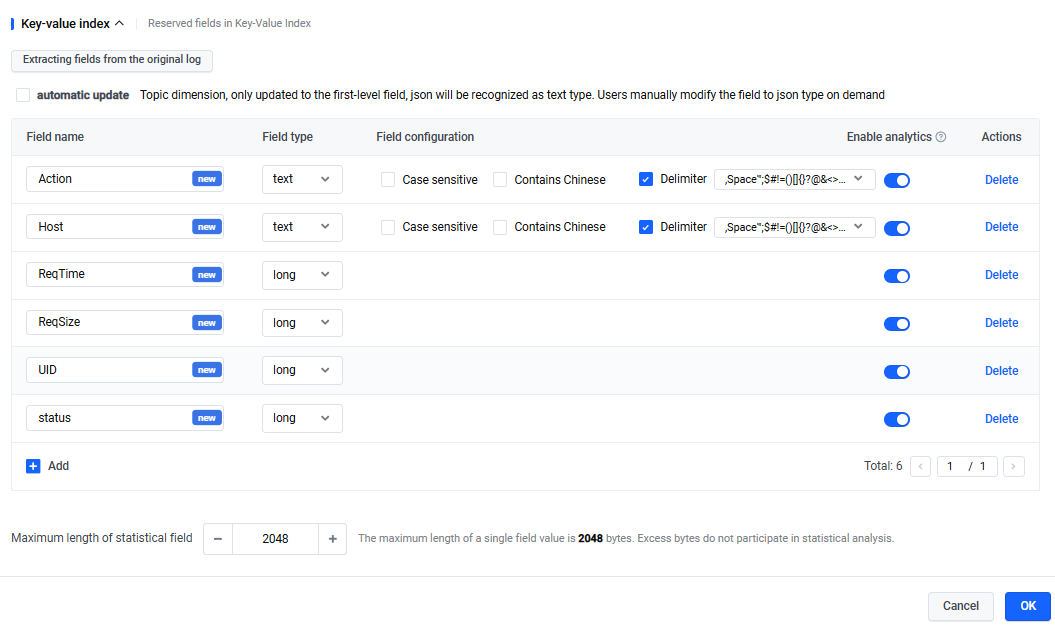
Query statements
Fuzzy query
Category | Scenarios | Query statements and results |
Category | Scenarios | Query statements and results |
Basic fuzzy query | Query logs containing keywords that start with Consume. |
|
Fuzzy query using SQL LIKE syntax | Query logs where the host field contains the string ivolces. |
|
Precise query
Category | Scenarios | Query statements and results |
Category | Scenarios | Query statements and results |
Basic exact query | Query logs containing the keyword ConsumeLogs. |
|
| Query logs in the URL field that contain ConsumeLogs. |
|
| Query logs related to ConsumeLogs?ShardId=5. | In this example, the question mark (?) and equals sign (=) are delimiters. Thus, TLS splits ConsumeLogs?ShardId=5 into ConsumeLogs, ShardId, and 5 for querying. If you need an exact match for the phrase ConsumeLogs?ShardId=5, refer to the following phrase search and SQL LIKE query.
|
Phrase query | Precisely query logs related to ConsumeLogs?ShardId=5. | To match ConsumeLogs?ShardId=5 exactly, you can use phrase queries or precise queries based on SQL LIKE syntax.
|
Precise query based on SQL LIKE syntax | Precisely query logs where the URL field contains ConsumeLogs?ShardId=5. |
|
-
Last updated: 2026.03.25 18:52:29
All rights reserved © Beijing Volcano Engine Technology Co., Ltd2024
