Torch Log Service
Torch Log Service


Document

- Documentation
 Torch Log ServiceBest practicesData collectionEnable LogCollector high precision time
 Copy page
 Download PDF
Data collection
Enable LogCollector high precision time
Copy pageDownload PDFEnable LogCollector high precision time
LogCollector supports enabling high precision time, allowing extraction of the nanosecond part from the raw log timestamp. This topic explains how to enable LogCollector high precision time.
Use cases
By default, TLS collects and stores logs with millisecond-level time precision, covering a wide range of log management and analysis scenarios. However, in fields such as real-time monitoring of financial transactions and ultra-low latency system performance analysis, nanosecond-level monitoring precision is essential for transaction analysis, service response, and troubleshooting.
To address these high precision time management needs, TLS allows you to easily enable nanosecond time precision through LogCollector when collecting logs, ensuring every minor time change is captured and analyzed to support timely decision-making.
Limits
Logs collected by LogCollector 1.0.50 and later versions, as well as logs collected via Go SDK 1.0.172 and later versions using the PutLogs API, support enabling LogCollector high precision time. For detailed steps, see Single-line full text mode and Write logs using the Go SDK.
Log example
Prerequisites
A log project and log topic are created. For detailed instructions, see Create log project and Create a log topic.
- A host group is created and the server heartbeat status is in normal state. For detailed instructions, see Create host group (IP address) or Create host group (Host identification).
- The server where LogCollector is installed must be able to access port 80 and port 443 on the remote server.
- The latest version of LogCollector is installed on the server where the original logs are stored. For detailed steps, see Install LogCollector (host machine).
Steps
You can extract the time from logs and parse it to nanoseconds using LogCollector or LogCollector components.
LogCollector
This example emplyes the separator mode. You need to complete the necessary configurations in the collection settings. Important parameter configuration is as follows. For other details and related operations, see Separator mode.
- Complete the related configuration for separator mode.
- According to the log example, set the separator as a comma. Set the Key for each Value in the provided results.
-
- Complete the configuration for log time.
- Disable the Acquisition point in time feature.
- Set the time key name to starttime.
- The starttime is the key you specified for the time value in the previous step.
- Select Enable nanosecond time accuracy.
- After enabling nanosecond time accuracy, log times will support nanosecond-level precision.
- Based on the time information in the log sample, set the time conversion format to %Y-%m-%d %H:%M:%S.%f.
-
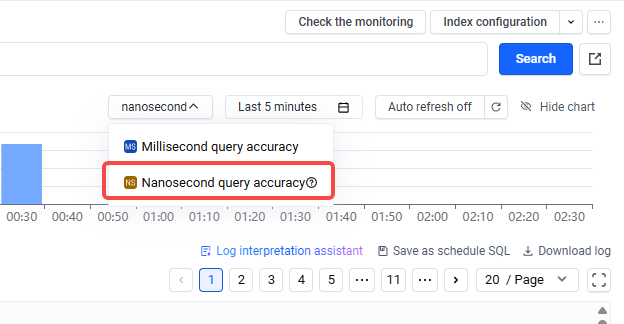
After collecting logs and enabling indexing, you can go to the query and analysis page, select Nanosecond query accuracy, and view collected logs with timestamp precision down to the nanosecond.
LogCollector plugin
When collecting text logs with LogCollector, you can use the LogCollector plugin to parse specific fields from collected log data. You can also use the LogCollector time parsing plugin to enable high-precision timestamp features.
This topic uses single-line full text mode as an example. You need to complete the relevant settings in the collection configuration. Key parameter configuration is shown below. For additional details and related operations, see Single-line full text mode.
- Select collection mode as single-line full text.
- In the Time field section, select Custom time.
- In the Configure plugin section, select Enable and enter the following script.
- When using the single-line full text mode for collection, each raw log line is stored in the __content__ field. You can use a time parsing plugin to extract time information from raw logs. For details, see Time parsing plugin.
-
-
After collecting logs and enabling the index for the reserved field __content__, you can enable nanosecond query accuracy on the query and analysis page to view collected logs, where the log time has nanosecond precision.
Last updated: 2026.05.26 11:31:26
All rights reserved © Beijing Volcano Engine Technology Co., Ltd2024
