Torch Log Service
Torch Log Service


Document

- Documentation
 Torch Log ServiceUser GuideData collectionLogCollector collectionLogCollector pluginsProcess logs using LogCollector plugins
 Copy page
 Download PDF
LogCollector plugins
Process logs using LogCollector plugins
Copy pageDownload PDFProcess logs using LogCollector plugins
When collecting text logs with LogCollector, you can use the LogCollector plugin to post-process specified fields of the collected log data, such as parsing a field with a regex pattern. This topic describes how to use the LogCollector plugin to process logs.
Background information
For complicated scenarios where logs have complex structures or inconsistent formats, you can enable the plugin feature when configuring LogCollector rules for text log collection. After enabling, fill in the plugin configuration. When TLS processes collect log data, it runs the corresponding logic sequentially according to the plugin configuration. That is to say, TLS processes the specified fields of the collected data, such as parsing a field with a regex pattern.
When creating a collection configuration in such scenarios, you can use different collection modes to initially split and parse the outer structure of raw logs, and then further split and parse specified fields via the LogCollector plugin. You can add one or more plugins, and LogCollector will execute them one by one in the order specified in the plugin configuration.
Prerequisites
- The log project and log topic are created. For detailed instructions, see Log project and Log topic.
- A host group is created and the server heartbeat status is in normal state. For detailed instructions, see Create host group (IP address) or Create host group (Host identification).
- The latest official version of LogCollector is installed on the data source server. For detailed installation steps, see Install LogCollector (host machine).
Steps
1. Fill in collection configuration
- Log in to Torch log service console.
- Select the region where torch log service is located from the top navigation bar.
- On the left navigation bar, select Common functions > Log Collection.
- Then, on the log collection page, under the LogCollector log collection tab, select collection mode and fill in relevant collection rules based on your business needs as well as the type and structure of logs.
- Based on the collection mode, set the initial configuration, enter the rule name, collection path, and collection mode, and then confirm the advanced settings. For the configuration of plugins, refer to the next step. For basic settings of different collection modes, refer to the following documentation.
2. Fill in the plugin configuration
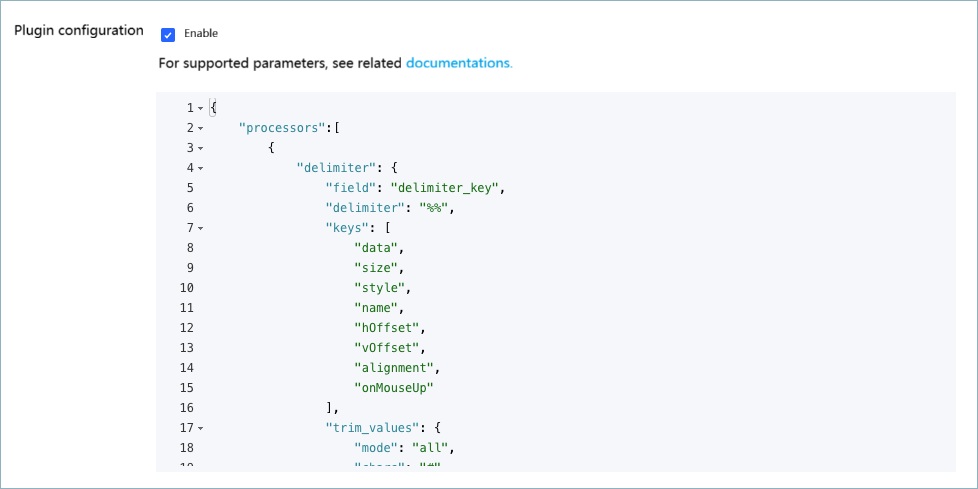
When creating log collection configurations and specifying collection rules, enable the Plugin configuration and complete the plugin configuration.
The plugin configuration follows the JSON format. You need to enter a complete JSON object. The key is set to "processors". The basis of value is a JSON object array. Each object in the array represents a LogCollector plugin configuration. For the list of supported LogCollector plugins and their configuration methods, see Plugin list.
Log example
For example, the original log of an application is as follows:
When collecting the above single-line log using single-line full text mode, TLS encapsulates the log content into fields. The final log data stored on the server is as follows:
The __content__ field can be further split using a separator. That is to say, you can activate plugin processing and specify the separator plugin to extract content from the __content__ field using separator mode.
The plugin configuration is shown below:
The processing result of the __content__ field is as follows:
Last updated: 2025.12.05 15:26:14
All rights reserved © Beijing Volcano Engine Technology Co., Ltd2024
