Torch Log Service
Torch Log Service


Document

- Documentation
 Torch Log ServiceBest practicesQuery and analysisQuery and analyze O&M logs
 Copy page
 Download PDF
Query and analysis
Query and analyze O&M logs
Copy pageDownload PDFQuery and analyze O&M logs
You can use system O&M logs to monitor operational indicators and quickly identify exceptions in system operation. This topic describes common scenarios and examples for system O&M analysis.
Background information
A game company uploads all client-to-server requests as logs to TLS, and then uses real-time log query and analysis features to explore user experience and identify system exceptions. For example:
- Analyze response status codes for user login interfaces to check whether there are exceptions in login activity.
- Analyze the load duration of user clients to evaluate user gaming experience.
- Identify the root cause of launch lag by investigating user-reported startup lag feedback.
- Analyze the response times of requests from one or more users over a period to analyze the specific reasons for lags.
- Query interfaces with high latency
Prerequisites
- The log project and log topic are created. For details, see Create resources.
- An index has been created based on the log fields. For details, see Configure indexes.
Log example
The table below lists sample fields of system operation logs.
Index example
This case creates the following index configuration based on the log example above. For specific operations and precautions related to index configuration, see Configure indexes.
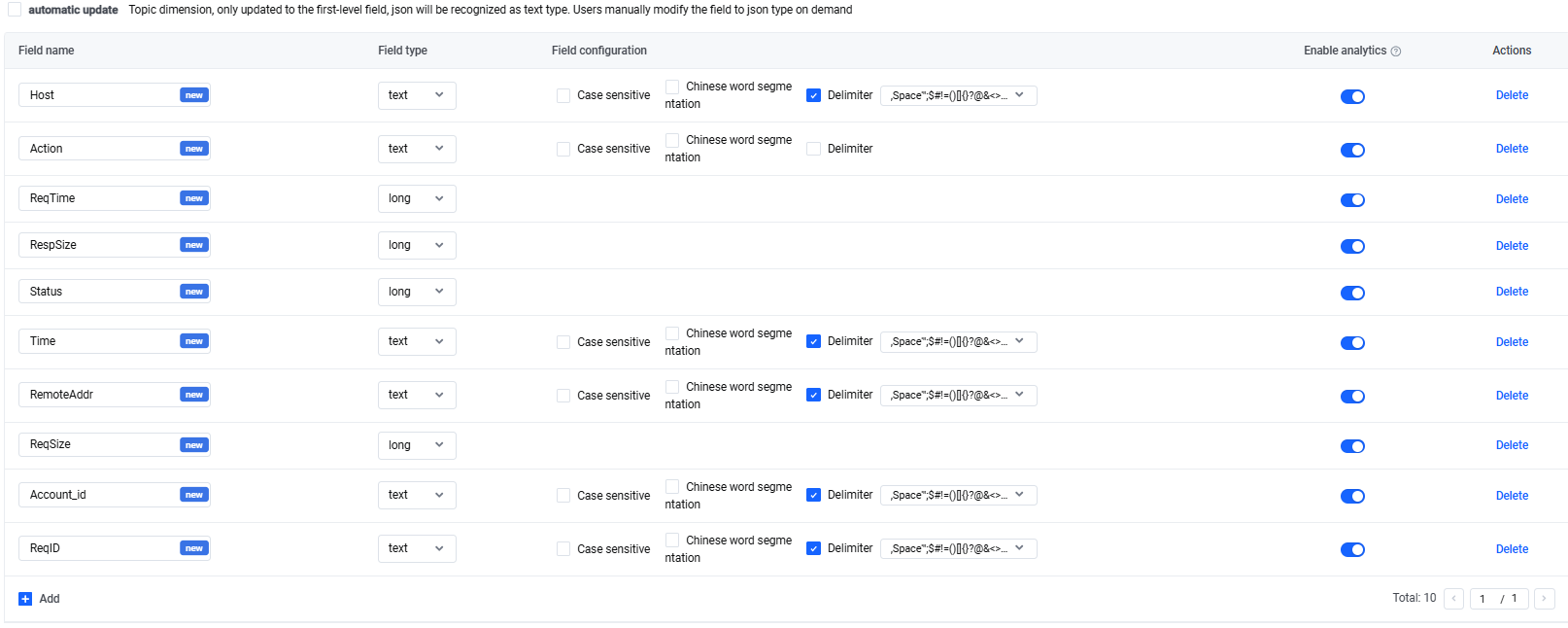
Typical query and analysis scenarios
Typical system O&M log analysis covers business monitoring, troubleshooting, and performance optimization.
Business monitoring
Scenario 1 Analyze regional distribution
- Scenario: Analyze the regional distribution of the top 10 clients from the past day.
- Query and analysis statement:
-
- Note:
- The IP_TO_CITY function retrieves the city name associated with a client IP address. For details, see IP_TO_CITY function.
- The GROUP BY clause groups access counts by cities. For details, see GROUP BY syntax.
- The HAVING IP_TO_CITY(RemoteAddr) != '' clause is used to exclude requests where the RemoteAddr field value is empty.
- The LIMIT 10 clause returns the first 10 rows. For detailed information, see LIMIT syntax.
- Query and analysis results
-
Scenario 2 Group requests by average duration
- Scenario: Calculate the average request duration for different clients in the past day.
- Query and analysis statement:
-
- Query and analysis results
-
Scenario 3 Count requests by time
- Scenario: Track changes in hourly request volume over the past day.
- Query and analysis statement:
-
- Note:
- Set the query time to the last day.
- The DATE_TRUNC function aligns timestamps to the hour level. For details, see DATE_TRUNC function.
- Query and analysis results
-
Troubleshooting
By analyzing system O&M logs, you can know the probability of errors, affected interfaces, and the number of errors. Therefore, you can quickly locate issues.
Scenario 1 Count errors by time
- Scenario: Analyze the frequency of various error types and their trends over time to identify patterns.
- Query and analysis statement:
-
- Note:
- The DATE_TRUNC function aligns timestamps to the specified time level. For details, see DATE_TRUNC function.
- The WHERE Status != 200 clause filters out successful requests.
- Query and analysis results
- Use a flow chart to show trends of different error types. For more information, see Flow graph.
-
Scenario 2 Calculate error ratios
- Scenario: Analyze the ratio of errors caused by excessive resource loading times to all errors within each minute.
- Query and analysis statement:
-
- Note:
- The DATE_TRUNC function aligns timestamps to the specified time level. For details, see DATE_TRUNC function.
- The expression CAST(SUM(CASE WHEN Status = 400 THEN 1 ELSE 0 END) * 100.00/COUNT(*) AS double) calculates the proportion of 400 errors among all errors, shown as a percentage.
- Query and analysis results
-
Scenario 3 Group error count statistics
- Scenario: Group users and count the errors each user encountered to analyze which users are mostly affected based on groups.
- Query and analysis statement:
-
- Query and analysis results
-
Performance optimization
Analyze system O&M logs to track request latency, slow requests, and interface response speed. Identify system bottlenecks in time to optimize performance.
Scenario 1 Group statistics of average and maximum latency
- Scenario: Calculate the average and maximum request latency for each interface per hour to know latency overall.
- Query and analysis statement:
-
- Query and analysis results
-
Scenario 2 Filter slow requests
- Scenario: Filter slow requests and their sources within the past hour.
- Query and analysis statement:
-
- Note:
- WHERE Status = 200 AND ReqTime > 30000 filters successful requests whose request time exceed 30,000 microseconds.
- Query and analysis results
-
Scenario 3 Analyze error trends
- Scenario: Analyze the response status codes of the user query interface to check if there are exceptions in user queries.
- Query and analysis statement:
-
- Note:
- The DATE_TRUNC function aligns the timestamp to the specified time level. For more details, see DATE_TRUNC function.
- The clause WHERE Action = 'SearchPlayerProfile' AND Status != 200 identifies error requests related to the user query API.
- Query and analysis results
- Use a flow chart to show the trend of each error type. For more information, see Flow graph.
-
Scenario 4 Calculate the average response time of a specified API
- Scenario: Calculate the average response time of the data query API to help identify potential exceptions in this API.
- Query and analysis statement:
-
- Note:
- The DATE_TRUNC function aligns the timestamp to the specified time level. For more details, see DATE_TRUNC function.
- WHERE Status = 200 AND Action = 'SearchDate' clause is used to query successful requests related to the data query API.
- Query and analysis results
- Use a line chart to show how the average response time for the data query API changes over time. For detailed line chart configuration, see Line chart.
-
Related documentation
Last updated: 2026.09.07 18:19:57
All rights reserved © Beijing Volcano Engine Technology Co., Ltd2024
