Torch Log Service
Torch Log Service


Document

- Documentation
 Torch Log ServiceUser GuideData collectionLogCollector collectionCollect container logsCollect container logs (DaemonSet - CRD method)
 Copy page
 Download PDF
Collect container logs
Collect container logs (DaemonSet - CRD method)
Copy pageDownload PDFCollect container logs (DaemonSet - CRD method)
When collecting container text logs or container standard output using DaemonSet, you can create collection configurations using LogCollector CRD method. This topic demonstrates how to create log collection configurations using the DaemonSet - CRD method.
Background information
TLS supports collecting container logs via DaemonSet, and creating collection configurations using the LogCollector CRD method.
- When collecting container logs using DaemonSet, you can collect both container standard output and text logs. This method offers lower resource usage and flexible configuration.
- Creating collection configurations via LogCollector CRD is simple and convenient, but requires certain tool proficiency. Therefore, it is suitable for advanced users familiar with Kubernetes and CRD. For details about the collection principles of the CRD method, see LogCollector CRD collection mechanism.
In addition, when collecting container logs, LogCollector supports various collection configurations, such as single-line and multi-line. Aside from the reserved fields that are added by default in various configurations, TLS also adds the following reserved fields to logs collected from containers by LogCollector and automatically creates indexes for these fields.
Reserved fields for container text logs:
Reserved field | Description |
__image_name__ | Image name. |
__container_name__ | Container name. |
__container_ip__ | IP address of the container or Pod. |
__pod_name__ | Pod name. |
__pod_uid__ | Unique identifier of the Pod. |
__namespace__ | The Namespace to which the Pod belongs. |
Reserved field for container standard output:
Reserved field | Description |
__container_source__ | Data source type: either stdout or stderr. |
__image_name__ | Image name. |
__container_name__ | Container name. |
__container_ip__ | IP address of the container or Pod. |
__pod_name__ | Pod name. |
__pod_uid__ | Unique identifier of the Pod. |
__namespace__ | The Namespace to which the Pod belongs. |
Prerequisites
- LogCollector has been installed in the Kubernetes cluster. For detailed steps, see Install LogCollector (DaemonSet deployment).
- LogCollector CRD is installed in the Kubernetes cluster. For detailed steps, see Install LogCollector CRD.
Limits
- When collecting container standard output:
- Docker container engine only supports JSON type log drivers.
- If a container matches multiple collection configurations, only the latest configuration takes effect on that container.
- When collecting log files inside containers:
- Currently, log file collection paths inside containers support only three methods: No mount, emptyDir mount, and hostPath mount.
- LogCollector does not support setting the collection path to a symbolic link, as LogCollector cannot access symbolic links to log files inside containers. Therefore, configure the collection path using the actual path of the log files in the container.
- After the container stops, LogCollector receives the stop event for that container and immediately stops collecting its logs. If delay exists when LogCollector collects logs from the container, some logs generated before the container stops may not be collected.
- LogCollector supports container engines including Docker and Containerd. Restrictions for accessing different types of container engines are as follows:
- Docker: LogCollector accesses the Docker container engine on the host via /run/docker.sock. Ensure that this path exists and LogCollector has access permissions.
- Containerd: LogCollector accesses the Containerd container engine on the host via /run/containerd/containerd.sock. Ensure that this path exists and LogCollector has access permissions.
Create LogCollector collection configuration
LogCollector CRD defines and delivers LogCollector collection configurations using yaml files. After you create and apply the file, TLS automatically creates a new LogCollector CR based on the configuration. This CR corresponds to a LogCollector collection configuration and shows in the TLS console.
Notice
Multiple LogCollector CRs with the same projectName, topicName, and RuleName are considered the same collection configuration. Only the collection rule specified in the most recently applied CR takes effect. Ensure there are no CRs with identical projectName, topicName, and RuleName. Otherwise, the final effective collection rules may not meet your expectations.
Follow these steps to create a LogCollector collection configuration:
- Log in to a Kubernetes cluster where LogCollector CRD is installed.
- Create a YAML file to specify the collection configuration.
- You can define the YAML file name based on your business needs. In this topic, access.yaml is used as an example.
-
- Edit the YAML file and enter the following content.
-
- You need to set the parameters in the metadata and spec sections based on your business requirements. Parameter descriptions are as follows:
-
- Run the following command to apply the access.yaml file configuration.
- In the configuration, access.yaml refers to the file name. You can replace it based on your actual needs.
-
Related operations
Modify collection configuration
If you need to adjust the collection configuration, we recommend that you modify it by updating the LogCollector CR. After successful modification, TLS will automatically update the corresponding LogCollector CR and refresh the collection configuration that is displayed in the console.
Notice
- If you directly adjust the collection configuration through the console, LogCollector CR and collection configuration information in console may be out of sync.
- Modifying projectName, topicName, or RuleName in the collection configuration is not supported yet. Once changed, TLS creates a new collection configuration and assigns a new configuration name, project, or log topic to it.
The recommended modify method is as follows. Here, YAML file name access.yaml is used as an example.
- Log in to a Kubernetes cluster where LogCollector CRD is installed.
- Run the following command to edit the specified YAML file and modify the collection configuration.
-
- Run the following command to apply the file so the new configuration can apply.
-
Delete collection configuration
To delete a LogCollector collection configuration, run the command below to remove the corresponding LogCollector CR resource. Here, logcollector_cr_name refers to the name of the LogCollector CR, such as collectrule-sample. You can replace it based on your actual situation.
View collection configuration information
After you successfully create and apply the LogCollector collection configuration, you can view its details using the console or CRD method.
- Console method: In the TLS console, check the corresponding collection configuration by project and configuration name. For the operating procedure, see View Acquisition Configuration Information .
- CRD method: View the LogCollector CR list in the Kubernetes cluster and check information for the specified CR by its name. How to do:
- Log in to the Kubernetes cluster.
- Run the following command to view the list of LogCollector CRs in your Kubernetes cluster. From the list, obtain the name of the CR you want to review.
-
- The following is an example of echo message:
-
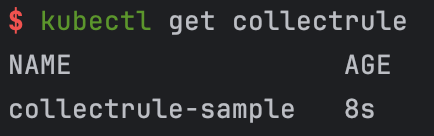
- Run the following command to view the detailed definition of the specified LogCollector CR in the spec field of the echo message. Here, logcollector_cr_name refers to the name of the LogCollector CR, such as collectrule-sample. You can replace it based on your actual situation.
-
View LogCollector CR status
After you create a LogCollector collection configuration using CRD, if the console does not display the corresponding configuration, or if changes to a CR are not synchronized, the configuration creation or update has failed. You can check the status and description of the LogCollector CR in the Kubernetes cluster to figure out the cause of the failure.
Run the following command to check the status of the specified LogCollector CR. In this case, logcollector_cr_name is the name of the LogCollector CR, such as collectrule1. You can replace it as needed.
The status field in the output indicates the status of the LogCollector CR. Note:
Example of echo message:
- LogCollector collection configuration is created or updated successfully.
-
- Failed to create or update LogCollector collection configuration:
-
Configuration examples
The following are sample collection configurations for common scenarios. For parameter descriptions of the metadata and spec sections, see Create LogCollector collection configuration.
Collect container standard output for specified workload
Collect the standard output and standard error of all containers that match the following configuration: workload type is Deployment; the name is test-nginx; the Pod Label has key label-test-key1 with value label-test-key1 or key label-test-key2 with value label-test-key2.
Here is a LogCollector collection configuration example:
Collect container standard output for specified namespace
Collect the standard output and standard error from all containers that match the following configuration: Namespace is name namespace-test-name; Pod name is pod-test-name; container name is container-test-name.
Here is a LogCollector collection configuration example:
Collect container text logs using separator mode
Collect logs from access.log file under /var/logs/app directory in all containers that match the following configuration: Namespace name is namespace-test-name; Pod name is pod-test-name; container name is container-test-name. The collection mode is separator mode.
Here is a LogCollector collection configuration example:
Collect container text logs in JSON mode
Collect logs from access.log file under /var/logs/app directory in all containers that match the following configuration: Namespace name is namespace-test-name; Pod name is pod-test-name; container name is container-test-name. The collection mode is JSON mode.
Here is a LogCollector collection configuration example:
Next steps
After creating the collection configuration, LogCollector will monitor and collect container log files or container standard output according to the specified rules. The log data will be stored in the specified log topic.
Log indexing is disabled by default. To query and analyze collected log data in the console, you need to enable the index feature and configure indexing for the log topic.
Last updated: 2025.12.05 15:12:18
All rights reserved © Beijing Volcano Engine Technology Co., Ltd2024
