Torch Object Storage
Torch Object Storage
Torch Object Storage


Document
What's New
Announcements
Billing
Billable items
Billing method
Getting Started
User Guide
Working with buckets
Basic configurations
Managing lifecycle
Back-to-origin rules
Event notification
Intelligent Tiering
Permissions
Domain management
Fault tolerance and disaster recovery
Cross-region replication
Same-region replication
Data redundancy
Image processing
ObjectSet
Working with objects
Managing folders
Monitoring and alerting
Metric monitoring
Access control
Bucket policies
Common configuration scenarios
Authorizing IAM users of the current account
Authorizing other accounts
Managing access via tools and SDKs
Managing public read access
Data security
Access points
Multi-region access points (MRAP)
Single-region access points (SRAP)
Converged access points (CAP)
DevMind
TOS accelerator
SenseFlow
TOS Agent
Data processing
Basic concepts
Image processing
Media processing
Document preview
Task processing
Data subscription
Flow control management
Quality of Service (QoS) policies
Hierarchical namespace (HNS)
User guide
Tool reference
Best practices
TOS Vectors
User guide
API reference
Vector bucket
Vector index
SDK reference
Python-Vectors
Vector bucket
Vector index
Java-Vectors
Vector bucket
Vector index
Node.js-Vectors
Vector bucket
Vector index
Tool Guide
tosutil
Common commands
Upload, download, and copy objects
Share objects
Auxiliary commands
Common examples
TOS Browser
FSX
FSX best practices
TOS PyTorch Connector
tosfsspec
API Reference
Signature Mechanism
The header contains a signature
Bucket
Basic Bucket Operations
Bucket Lifecycle
Access Monitor
Bucket ACL
Bucket CORS
Bucket Policy
Back-to-origin Rules
Bucket Replication
Versioning
Static Website
Event Notification
Custom Domain
Server-side encryption
Transfer Acceleration
Data Processing
Image processing
Media processing
Video transcoding
Audio transcoding
video to GIF
Document preview
File decompression
Log Storage
Retention Policy
Requester pays
TLS version
Object
Basic Object Operations
Object ACL
Fetch Object
Symbolic Link
WORM object
Multipart Upload
SDK Reference
Java
Pre-signing Mechanism
Bucket Interface
Basic Bucket Interface
Manage Bucket Configuration
Object Interface
Upload Object
Download Object
Upload and Download Speed Limit
Copy Object
List Object
Data Processing
Image Processing
Video Processing
Audio Processing
Log Configuration
Hierarchical Namespace
Bucket base interface
Introduction to Typical Scenes
Python
Data processing
Pre-signature mechanism
Bucket interface
Basic bucket interface
Manage bucket configuration
Object interface
Upload object
Download object
Copy object
List objects
Introduction to typical scenes
C
Object Interface
Upload object
C++
Pre-signature Mechanism
Bucket Interface
Basic Bucket Interface
Manage Bucket Configuration
Object Interface
Upload Object
Download Object
Copy Object
List Objects
Data Processing
Go
Object Interface
Upload Object
Download Object
Copy Object
List Objects
Manage Objects
Bucket Interface
Manage Bucket Configuration
Data Processing
Log Configuration
Introduction to Typical Scenes
Pre-signature Mechanism
Node.js
Pre-signature Mechanism
Bucket Interface
Basic Bucket Interface
Manage Bucket Configuration
Object Interface
Upload object
Download object
Copy object
List objects
Data Processing
Image Processing
Introduction to Typical Scenes
Browser.js
Pre-signature Mechanism
Upload Object
Download Object
Copy Object
List Objects
Manage Objects
Data Processing
.NET
Bucket Interface
Object Interface
Upload Object
Download Object
List Objects
Introduction to Typical Scenes
PHP
Bucket Interface
Object Interface
Download Object
Data Processing
Exception Handling
Android
Bucket Interface
Object Interface
Upload Object
Download Object
Exception Handling
iOS
Bucket Interface
Object Interface
Upload Object
Download Object
Harmony
Pre-signature Mechanism
Bucket Interface
Object Interface
Upload Object
Download Object
List Objects v2
Introduction to Typical Scenarios
Rust
Pre-signing mechanism
Bucket interface
Basic bucket operations
Lifecycle rules
Bucket ACLs
Cross-origin resource sharing
Bucket inventory
Back-to-origin rules
Bucket replication
Static website hosting
Event notification
Custom domain
Server-side encryption
Object interface
Basic operation
Access control
Error Codes
01-SERVICE_ERROR
02-AUTH
03-ACCESS_CONTROL
04-QOS
05-REQUEST
06-BUCKET
07-LIFECYCLE
08-ACL
09-CORS
10-POLICY
11-MIRROR
12-REPLICATION
13-WEBSITE
14-NOTIFICATION
15-ENCRYPT
16-CUSTOMDOMAIN
17-OBJECT
18-TAG
19-MULTIPART
20-STORAGE_CLASS
21-CALLBACK
22-DATA_PROCESS
23-BATCH
24-STORAGE_LENS
25-INVENTORY
26-DIRECTORY_BUCKET
FAQ
Best Practices
AIGC-Doubao LLMs
Accessing TOS with third-party tools
Granting temporary access
Data migration
Data processing
Checking data integrity
Performance optimization
- Documentation
 Torch Object StorageUser GuideData securityConfiguring the TLS version
 Copy page
 Download PDF
Data security
Configuring the TLS version
Copy pageDownload PDFConfiguring the TLS version
Transport Layer Security (TLS) is an encryption protocol that ensures the security of communications over the Internet. TOS allows you to use specific TLS versions for secure communication. This topic provides background information and instructions for configuring TLS versions.
Background information
When a TOS server and client connect, they negotiate and select a TLS version that they both support. If they both support multiple versions, the server prioritizes the highest version it can offer. Once a TLS version is agreed upon, the server and client use it to securely transmit data.
By default, TOS supports TLS versions 1.0, 1.1, and 1.2 when the TLS version setting is disabled. After enabling this feature, you can choose to enable the following protocols: TLS 1.0, 1.1, 1.2, and 1.3. To enhance security, you can specify the minimum and maximum TLS versions in the TOS console. Once configured, clients can only establish secure connections with the TOS server using TLS versions within the specified range.
Understanding TLS versions
There have been several versions of TLS, each offering different features and levels of security. Although higher versions offer better security, they may be incompatible with browsers that use earlier versions.
TOS supports TLS 1.0, 1.1, 1.2, and 1.3. The security levels and mainstream browser support for each version are described below.
Version | Security notes | Supported browsers |
Version | Security notes | Supported browsers |
TLS 1.0 | TLS 1.0 has known security vulnerabilities that attackers can exploit. For this reason, TLS 1.0 is no longer recommended for general secure communications. |
|
TLS 1.1 | Although TLS 1.1 improves the security of the encryption algorithm and protects the integrity of messages, it has issues such as insufficient key length and weak attack resistance. While TLS 1.1 is more secure than TLS 1.0, it is still vulnerable. For this reason, it has been replaced by later versions, such as TLS 1.2. |
|
TLS 1.2 | TLS 1.2 restricts the use of insecure cryptographic algorithms and introduces stronger cipher suites, such as AES-GCM. It offers high security, good performance, and compatibility, while effectively resisting various attacks. TLS 1.2 is suitable for most scenarios requiring secure network communication. |
|
TLS 1.3 | TLS 1.3 streamlines the handshake process, eliminates insecure cryptographic algorithms, and introduces stronger key exchange mechanisms and ciphers. These changes improve user privacy and offer greater security and communication efficiency. It is ideal for industries with strict security requirements, such as finance and healthcare. |
|
Notes
- Before disabling a specific TLS version, make sure that none of your clients rely exclusively on it. Otherwise, those clients will be unable to access TOS.
- Switching to a lower TLS version or disabling TLS version settings could pose security risks, so proceed with caution.
- Since TLS 1.2 is the most widely adopted version, excluding it may prevent many clients from accessing the bucket. Be sure to include TLS 1.2 version at a minimum.
Steps
- Log in to the TOS console.
- In the left navigation pane, click Buckets. In the Buckets list, click the bucket you want to manage.
- In the left navigation pane, select Security > TLS version settings.
- On the TLS version settings page, click Edit and set the following parameters:
- ParameterDescriptionParameterDescriptionTLS version settingsSelect whether to enable the TLS version settings feature.Minimum TLS versionSet the minimum TLS version allowed for client connections. Connection requests using a lower version will be rejected. Options are TLS 1.0, TLS 1.1, TLS 1.2, and TLS 1.3.Maximum TLS versionSet the maximum TLS version allowed for client connections. Connection requests using a higher version will be rejected. Options are TLS 1.0, TLS 1.1, TLS 1.2, and TLS 1.3.tipThe maximum TLS version cannot be lower than the minimum TLS version.
- Once you have finished configuring, click Select.
- In the box that appears, click OK.
Related operations
Check the current TLS version
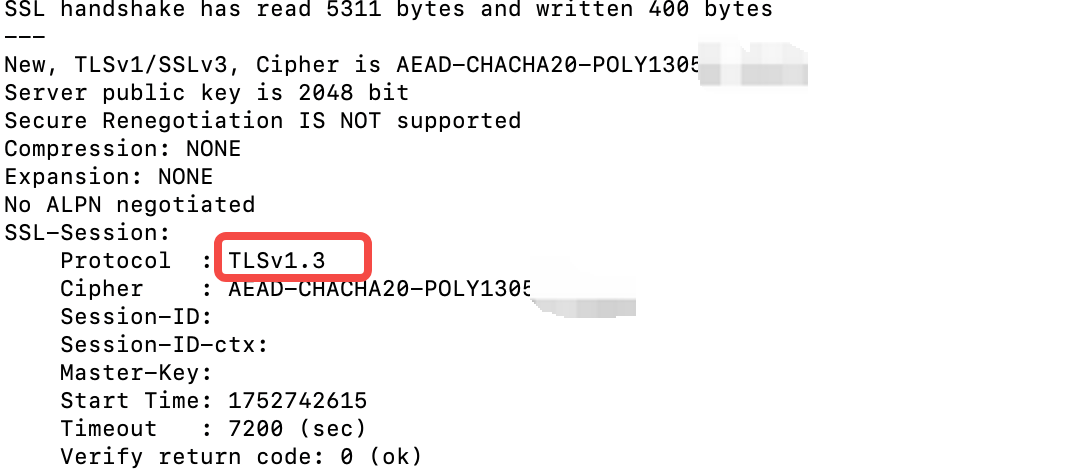
Run this command to retrieve the TLS version used by the client and server.
openssl s_client -connect <bucket name>.<TOS endpoint>:443 -servername <bucket name>.<TOS endpoint>
The command returns output containing text similar to the following:
Last updated: 2026.01.21 16:38:31
All rights reserved © Beijing Volcano Engine Technology Co., Ltd2024
