Torch Object Storage
Torch Object Storage
Torch Object Storage


Document
What's New
Announcements
Billing
Billable items
Billing method
Getting Started
User Guide
Working with buckets
Basic configurations
Managing lifecycle
Back-to-origin rules
Event notification
Intelligent Tiering
Permissions
Domain management
Fault tolerance and disaster recovery
Cross-region replication
Same-region replication
Data redundancy
Image processing
ObjectSet
Working with objects
Managing folders
Monitoring and alerting
Metric monitoring
Access control
Bucket policies
Common configuration scenarios
Authorizing IAM users of the current account
Authorizing other accounts
Managing access via tools and SDKs
Managing public read access
Data security
Access points
Multi-region access points (MRAP)
Single-region access points (SRAP)
Converged access points (CAP)
DevMind
TOS accelerator
SenseFlow
TOS Agent
Data processing
Basic concepts
Image processing
Media processing
Document preview
Task processing
Data subscription
Flow control management
Quality of Service (QoS) policies
Hierarchical namespace (HNS)
User guide
Tool reference
Best practices
TOS Vectors
User guide
API reference
Vector bucket
Vector index
SDK reference
Python-Vectors
Vector bucket
Vector index
Java-Vectors
Vector bucket
Vector index
Node.js-Vectors
Vector bucket
Vector index
Tool Guide
tosutil
Common commands
Upload, download, and copy objects
Share objects
Auxiliary commands
Common examples
TOS Browser
FSX
FSX best practices
TOS PyTorch Connector
tosfsspec
API Reference
Signature Mechanism
The header contains a signature
Bucket
Basic Bucket Operations
Bucket Lifecycle
Access Monitor
Bucket ACL
Bucket CORS
Bucket Policy
Back-to-origin Rules
Bucket Replication
Versioning
Static Website
Event Notification
Custom Domain
Server-side encryption
Transfer Acceleration
Data Processing
Image processing
Media processing
Video transcoding
Audio transcoding
video to GIF
Document preview
File decompression
Log Storage
Retention Policy
Requester pays
TLS version
Object
Basic Object Operations
Object ACL
Fetch Object
Symbolic Link
WORM object
Multipart Upload
SDK Reference
Java
Pre-signing Mechanism
Bucket Interface
Basic Bucket Interface
Manage Bucket Configuration
Object Interface
Upload Object
Download Object
Upload and Download Speed Limit
Copy Object
List Object
Data Processing
Image Processing
Video Processing
Audio Processing
Log Configuration
Hierarchical Namespace
Bucket base interface
Introduction to Typical Scenes
Python
Data processing
Pre-signature mechanism
Bucket interface
Basic bucket interface
Manage bucket configuration
Object interface
Upload object
Download object
Copy object
List objects
Introduction to typical scenes
C
Object Interface
Upload object
C++
Pre-signature Mechanism
Bucket Interface
Basic Bucket Interface
Manage Bucket Configuration
Object Interface
Upload Object
Download Object
Copy Object
List Objects
Data Processing
Go
Object Interface
Upload Object
Download Object
Copy Object
List Objects
Manage Objects
Bucket Interface
Manage Bucket Configuration
Data Processing
Log Configuration
Introduction to Typical Scenes
Pre-signature Mechanism
Node.js
Pre-signature Mechanism
Bucket Interface
Basic Bucket Interface
Manage Bucket Configuration
Object Interface
Upload object
Download object
Copy object
List objects
Data Processing
Image Processing
Introduction to Typical Scenes
Browser.js
Pre-signature Mechanism
Upload Object
Download Object
Copy Object
List Objects
Manage Objects
Data Processing
.NET
Bucket Interface
Object Interface
Upload Object
Download Object
List Objects
Introduction to Typical Scenes
PHP
Bucket Interface
Object Interface
Download Object
Data Processing
Exception Handling
Android
Bucket Interface
Object Interface
Upload Object
Download Object
Exception Handling
iOS
Bucket Interface
Object Interface
Upload Object
Download Object
Harmony
Pre-signature Mechanism
Bucket Interface
Object Interface
Upload Object
Download Object
List Objects v2
Introduction to Typical Scenarios
Rust
Pre-signing mechanism
Bucket interface
Basic bucket operations
Lifecycle rules
Bucket ACLs
Cross-origin resource sharing
Bucket inventory
Back-to-origin rules
Bucket replication
Static website hosting
Event notification
Custom domain
Server-side encryption
Object interface
Basic operation
Access control
Error Codes
01-SERVICE_ERROR
02-AUTH
03-ACCESS_CONTROL
04-QOS
05-REQUEST
06-BUCKET
07-LIFECYCLE
08-ACL
09-CORS
10-POLICY
11-MIRROR
12-REPLICATION
13-WEBSITE
14-NOTIFICATION
15-ENCRYPT
16-CUSTOMDOMAIN
17-OBJECT
18-TAG
19-MULTIPART
20-STORAGE_CLASS
21-CALLBACK
22-DATA_PROCESS
23-BATCH
24-STORAGE_LENS
25-INVENTORY
26-DIRECTORY_BUCKET
FAQ
Best Practices
AIGC-Doubao LLMs
Accessing TOS with third-party tools
Granting temporary access
Data migration
Data processing
Checking data integrity
Performance optimization
- Documentation
 Torch Object StorageUser GuideWorking with bucketsObjectSetOverview
 Copy page
 Download PDF
ObjectSet
Overview
Copy pageDownload PDFOverview
In business scenarios involving AI agents and multi-tenant SaaS services, developers often need to provide logically isolated data management units for a large number of end users within a single storage space. TOS addresses this need with the ObjectSet feature.
An ObjectSet is a virtual resource management unit created within a bucket. It expands the TOS data model from two layers (bucket-object) to three layers (bucket-objectset-object), providing a scalable, native, multi-tenant isolation solution for upper-layer applications. Each ObjectSet has its own permissions, traffic throttling, and usage metering. This enables you to build robust applications that can support billions of tenants on TOS in a convenient and cost-effective manner.
Introduction
An ObjectSet provides a lightweight isolation layer within a bucket, offering management capabilities similar to those of a native bucket. It eliminates the need for complex middleware services to manage multi-tenant data.
Core features | Description |
Core features | Description |
Independent resource unit | An ObjectSet is an independent resource entity that enables you to manage objects throughout their lifecycle, including their creation, modification, and deletion. You can create an ObjectSet for each end user or business unit to achieve fine-grained resource management. |
Performance isolation | Each ObjectSet offers comprehensive isolation capabilities to ensure that the data and access behaviors of different users do not interfere with each other. You can set independent QPS (queries per second) and bandwidth limits for each ObjectSet. This prevents burst traffic from a single user from affecting others and helps maintain overall service stability. |
Protocol compatibility | Accessing an ObjectSet is identical to accessing a standard TOS object. ObjectSet is also compatible with the S3 protocol. |
Advanced features | An ObjectSet can be used with various advanced TOS features. For example, you can add tags to an ObjectSet and configure lifecycle rules to migrate or archive objects in bulk within all ObjectSets with a specific tag. |
Benefits
Benefit | Description |
Benefit | Description |
Hundreds of millions of ObjectSets | You can create hundreds of millions of ObjectSets within a single bucket. This solves the problem of the limited number of buckets found in traditional solutions and provides a solid foundation for building large-scale, multi-tenant applications. |
Simplified architecture | The ObjectSet feature extends multi-tenant isolation to the storage layer. It natively isolates permissions, performance, and metering. By eliminating the need for complex middleware gateways or proxies, it greatly reduces architectural complexity and development costs. |
Refined management | With per-ObjectSet metering and billing, you can accurately track the resource consumption of each tenant. |
Flexible performance | To achieve differentiated quality of service (QoS), you can assign different QPS and bandwidth quotas to tenants based on their business tier or payment model. This prevents unpaid or low-value tenants from abusing resources while ensuring service quality for core tenants. |
Use cases
Use case | Description |
Use case | Description |
AI agents and sandbox environments | In applications such as AI agents, MaaS platforms, and Coze, each end user or session may require independent, secure file storage (a sandbox). Creating an ObjectSet for each user allows you to easily achieve file isolation, manage resource quotas, and track usage statistics, thereby ensuring data privacy and service fairness. |
Multi-tenant SaaS applications | Enterprise SaaS services, such as online collaboration platforms, project management tools, and cloud storage services, require logically isolated storage space for each customer. With ObjectSet, you can assign a dedicated ObjectSet to each customer, enabling data isolation, per-customer metering, and customized feature configurations. |
Content creation and sharing platforms | On video, image, or document-sharing platforms, each content creator can have their own ObjectSet to store and manage their work. These platforms can use ObjectSet metrics to track each creator's storage usage and outbound traffic for cost accounting or revenue sharing purposes. |
IoT device data management | In IoT scenarios, massive numbers of devices continuously upload data. To achieve logical data isolation, access control, and traffic monitoring, as well as to simplify subsequent data analysis and management, you can create an ObjectSet for each device or group of devices. |
How it works
The introduction of ObjectSet changes the TOS data model from a two-layer structure (Bucket-Object) to a three-layer structure (Bucket-ObjectSet-Object). The following explains how data is accessed and managed under this new architecture.
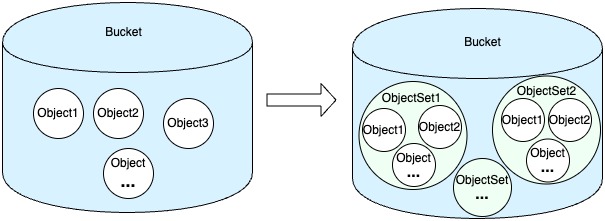
- Enabling and configuring ObjectSet: When enabling the ObjectSet feature, you can define the directory hierarchy and delimiter of the ObjectSet path prefix, establishing a unified standard for subsequent ObjectSet creation and management.
- Creating an ObjectSet: You can create a dedicated ObjectSet for a tenant (e.g., an end user) and assign a unique path prefix. This prefix serves as the unified namespace entry for all objects in that ObjectSet.
- Policy execution for object reads and writes: When an end user reads or writes an object, the TOS gateway matches the object's full path (i.e., key) against its ObjectSet. Once a match is found, the system automatically enforces the configured policies of that ObjectSet. These policies include:
- Quality of Service (QoS) check: Determines whether the request exceeds the ObjectSet's QPS or bandwidth quota. If so, throttling is applied.
- Permission check: Verifies that the requester has permission to access the ObjectSet and its objects.
- Metering and monitoring: Attributes metrics, such as traffic and request count, to the corresponding ObjectSet for statistical purposes.
- Data flow: If all policy checks are passed, the data I/O process is the same as standard TOS object access. Ultimately, it writes to or reads from the underlying storage medium. This process is transparent to upper-layer applications.
Constraints and limitations
To ensure the stability, performance, and future scalability of the ObjectSet feature, observe the following constraints.
Category | Description |
Category | Description |
Number of buckets with ObjectSet enabled | You can create up to 100 buckets with ObjectSet enabled for each account and its sub-account(s). |
Number of ObjectSets per bucket | By default, you can create up to 10 million ObjectSets for each bucket. To request a higher limit, submit a ticket. |
Lifecycle | Deleting an ObjectSet only removes its metadata. The data belonging to that ObjectSet is not deleted. Whether or not to clean up that data is based on your business requirements. |
Hierarchy |
|
Naming conventions | The path prefix of an ObjectSet must be between 3 and 256 characters long. |
Usage statistics | Usage statistics obtained through APIs such as GetObjectSetStorage are not precise, real-time values. There is usually a 10-minute calculation and synchronization delay. |
Enablement and compatibility |
|
Billing notes
The ObjectSet feature is currently free.
FAQ
Q1: Can I enable the ObjectSet feature on a bucket that already contains a large number of objects?
A1: Yes. Once enabled, all objects whose path prefix does not match any newly created ObjectSet become orphaned objects. These objects continue to follow the bucket-level management policies.
Q2: After I delete an ObjectSet, are the data inside it deleted immediately?
A2: No. Deleting an ObjectSet only removes the logical resource unit and its associated configurations, such as QoS and tags. The objects stored under that ObjectSet are not deleted. Instead, they become orphaned objects. Based on your business needs, you need to decide whether to clean up these data through batch deletion or other methods.
Q3: Are the QPS and bandwidth quotas of ObjectSet hard or soft limits?
A3: They are hard limits. When an ObjectSet's access traffic or request rate reaches its configured quota limit, TOS throttles subsequent requests and returns a 429 (Too Many Requests) error code. This ensures that the service quality of other ObjectSets is not affected.
Related documentation
Last updated: 2026.08.07 17:17:20
All rights reserved © Beijing Volcano Engine Technology Co., Ltd2024
